
Latest Version
September 12, 2026
RoadRocks
Word
iOS
0
Report a Problem
More About :game
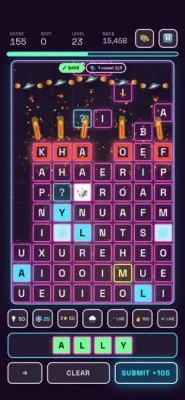
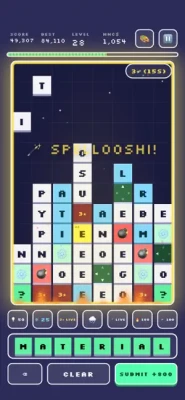
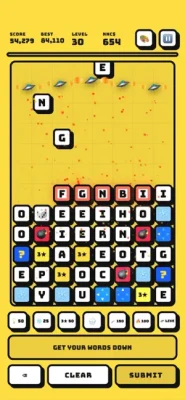
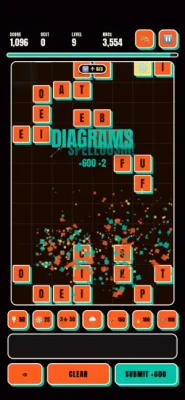
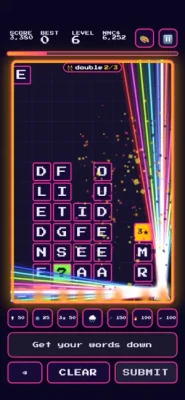
The basic idea is easy to understand: letters fall, you spell words, words disappear, and the game gets faster.
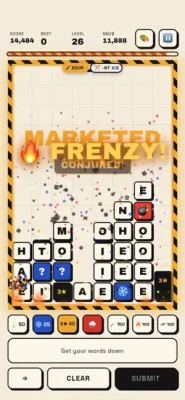
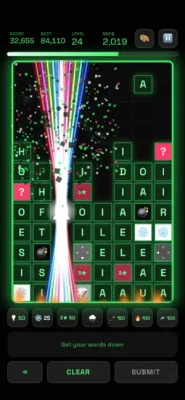
Words must contain at least four letters to clear in the standard rules, while longer words are worth more points. Creating words quickly can also build combos and eventually trigger FRENZY, a scoring state where everything scores double while the board is burning.
Developed by RoadRocks, WordsDown combines traditional word-game vocabulary with the pressure of a falling-block puzzle. It offers several ways to play, including Classic, Daily, Word Trip and Relax.
What Is WordsDown?
WordsDown is a falling word puzzle game designed around speed, vocabulary and board management.
Rather than receiving a fixed crossword-style grid, you're constantly dealing with incoming letters.
Your challenge changes from moment to moment.
A group of letters may give you an obvious four-letter word, but waiting a few seconds could allow you to create a much longer word worth more points.
The problem is that the board keeps filling.
That creates the central tension of WordsDown:
Do you clear a safe word now, or wait for a better combination?
How to Play WordsDown
The core gameplay is straightforward.
- Watch the falling letters.
- Look for possible words.
- Form a word containing four or more letters.
- Clear the word.
- Keep the board under control.
- Build combos.
- Trigger FRENZY whenever possible.
- Use power-ups when the board becomes dangerous.
- Try to beat your previous score.
Longer words are rewarded with higher scores, so vocabulary knowledge is valuable. However, survival and timing are just as important as knowing obscure words.
WordsDown Game Modes
WordsDown currently offers four main ways to play.
Classic
Classic is the primary score-chasing mode.
It provides three speed choices:
- Chill
- Fast
- Faster
The faster settings increase the pressure and demand quicker decisions.
Classic Strategy
Start with Chill if you're learning the mechanics.
Once you become comfortable identifying words quickly, move to Fast.
Faster should be treated as a completely different challenge rather than simply a harder version of the same game.
At higher speeds, hesitation becomes much more expensive.
Daily Mode
Daily gives everyone the same board once per day.
This creates a different kind of challenge from Classic.
Instead of simply playing endless rounds, you're trying to perform well on a shared daily puzzle and maintain your streak.
Daily Strategy
Don't immediately chase the highest possible word.
First understand the board.
Look for:
- Easy clears
- Potential long words
- Dangerous letter clusters
- Opportunities for combos
- Places where the board could become blocked
Once you understand the available letters, start looking for the higher-value plays.
Daily mode is particularly good for players who enjoy comparing their performance over time.
Word Trip
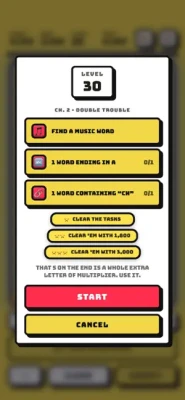
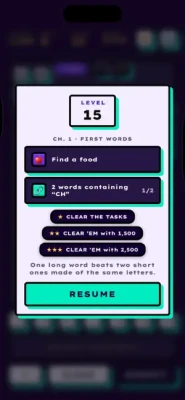
Word Trip contains 1,500 handcrafted levels, with individual rules for different stages.
Each chapter ends with a boss, and levels can award up to three stars depending on performance.
This mode changes the experience from endless survival into structured progression.
Instead of asking:
"How long can I survive?"
you're asking:
"How efficiently can I solve this level?"
Word Trip Strategy
Don't play every level as quickly as possible.
First identify the rule or objective of the stage.
Then determine which letters are most valuable.
If the level is becoming difficult, think about whether a power-up can create a better opportunity rather than using it immediately.
Relax Mode
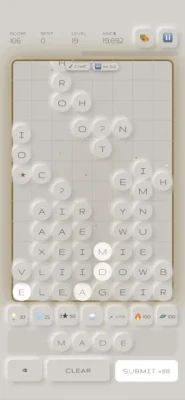
Relax is designed for players who want to enjoy word building without the pressure of a traditional game-over condition.
There is no game over and no pressure in this mode.
It's particularly useful for:
- Learning vocabulary
- Testing word combinations
- Practicing longer words
- Understanding the board
- Experimenting with power-ups
- Playing without worrying about survival
If you're struggling with Classic, Relax is a useful practice environment.
Understanding the Four-Letter Rule
In the standard gameplay described by the App Store listing, words need to contain at least four letters to clear.
That makes four-letter words your basic emergency tool.
You don't always need to search for an impressive word.
Sometimes the best move is simply to clear a four-letter word before the board becomes crowded.
Think of four-letter words as your safety net.
Longer words are your scoring opportunity.
Four-Letter Words vs Long Words
There are two competing goals in WordsDown.
Short word
Advantages:
- Quick to recognize
- Easy to use
- Helps control the board
- Reduces immediate danger
Long word
Advantages:
- Higher score
- Better scoring potential
- Can contribute to stronger combinations
The best strategy
Don't automatically choose the longest possible word.
Choose the longest word you can identify without allowing the board to become dangerous.
Survival comes first.
Score optimization comes second.
How Combos Work
WordsDown rewards you for chaining words quickly.
The faster you create successful clears, the more opportunities you have to build a combo and eventually activate FRENZY.
This creates an important distinction between:
clearing words
and
clearing words efficiently.
A player who clears ten words slowly may score worse than someone who creates a strong chain of slightly shorter words.
FRENZY Strategy
FRENZY is one of the most important scoring mechanics in WordsDown.
When the board catches fire, scoring is doubled while FRENZY is active.
This means the period immediately around FRENZY is extremely valuable.
Don't waste FRENZY
If you have the opportunity to create a valuable longer word while FRENZY is active, take advantage of the double scoring.
However, don't sacrifice board control simply because the multiplier is active.
A huge score isn't useful if the board becomes impossible to manage afterward.
Ideal FRENZY approach
Build → trigger → exploit → stabilize.
High-Score Strategy
If your main goal is to climb the Game Center leaderboard, you need to think beyond individual words.
Your score comes from combining:
- Word length
- Speed
- Combos
- FRENZY
- Board management
- Power-up usage
A good high-score run should therefore look something like:
Safe opening → build rhythm → create combos → activate FRENZY → maximize valuable clears → recover → repeat.
How to Build a Good Word Quickly
When letters begin falling, don't read them individually.
Instead, look for common word structures.
For example, when you see combinations involving:
- S
- T
- R
- E
- A
- I
- N
- O
try to recognize possible word patterns rather than processing each letter independently.
Common prefixes and suffixes become extremely valuable when the board is moving quickly.
Vocabulary Strategy
You don't need to know thousands of obscure words to perform well.
A stronger strategy is to become extremely fast with common words.
Build automatic recognition for:
- Common four-letter words
- Plurals
- Common verb endings
- Common prefixes
- Common suffixes
- Words using difficult letters
Speed of recognition is often more important than vocabulary size.
Difficult Letters
Some letters can be difficult to use because they appear in fewer common words.
Instead of waiting for the perfect combination, try to connect difficult letters to familiar word patterns.
For example, if you see a difficult consonant, think about common endings or combinations that can absorb it.
The goal isn't necessarily to use the letter immediately.
The goal is to prevent it from becoming a long-term problem on the board.
Board Management
Board control is arguably more important than raw vocabulary.
A player who knows many words can still lose if they allow the board to fill with awkward combinations.
Keep asking:
"What is the board going to look like after my next move?"
This changes your strategy from reactive to proactive.
Don't Always Chase the Highest Score
Suppose you see a possible eight-letter word but it requires several seconds of searching.
Meanwhile, a simple four-letter word is immediately available.
The four-letter word may be the better decision.
Why?
Because clearing the board keeps your options open.
A player who constantly waits for perfect words eventually loses flexibility.
Power-Ups
WordsDown contains a substantial collection of tools for difficult situations.
The App Store specifically lists:
- PAUSEICLE!
- THREEDOM!
- SPELLOOSHI!
- UFOh!
- Wildcards
- Bombs
- Lasers
- Firewall
- Letter Storm
These aren't merely cosmetic features.
They give you ways to recover when the normal word-building system isn't enough.
PAUSEICLE! Strategy
PAUSEICLE! freezes everything.
This is particularly useful when the board is becoming difficult to read or you need additional time to identify a strong word.
Don't necessarily wait until you're about to lose.
A freeze can be more valuable when used early enough to let you reorganize your thinking.
THREEDOM! Strategy
THREEDOM! makes three-letter words legal.
This can be extremely useful when the board doesn't provide enough letters for a normal four-letter clear.
Use it as a rescue tool when:
- The board is crowded
- You can't find four-letter words
- You need a quick clear
- You're trying to maintain control
It effectively changes the rules temporarily in your favor.
SPELLOOSHI! Strategy
SPELLOOSHI! finds a word for you.
This makes it particularly useful when you're stuck.
But don't rely on it constantly.
The strongest use is when the board is dangerous and you genuinely cannot see a viable word.
Think of it as an emergency vocabulary assistant.
UFOh! Strategy
UFOh! calls in a squadron to help clear the board.
It's another example of WordsDown's deliberately playful approach to solving difficult board situations.
Save dramatic tools like this for moments when conventional word-building isn't keeping up with the board.
Wildcards
Wildcards are among the most flexible tools available.
Their biggest advantage is that they can help complete words that would otherwise be impossible.
Instead of immediately using a wildcard on an easy word, look for a situation where one wildcard creates a significantly better clear.
Bombs
Bombs are designed for clearing problematic areas.
If a cluster of awkward letters is creating a serious board-management problem, a bomb can be more valuable than spending several turns searching for words.
Lasers
Lasers provide another way of attacking troublesome board positions.
Use them strategically rather than simply whenever they become available.
Firewall
The Firewall is particularly useful when you need to control the board and prevent a dangerous situation from escalating.
Think of defensive power-ups as tools for maintaining your run, not merely as emergency buttons.
Letter Storm
Letter Storm adds even more letters to the action.
Because WordsDown is already built around falling letters, this creates an intentionally chaotic situation.
Use it when you're prepared to capitalize on the additional possibilities rather than when you're already struggling to process the board.
Best Power-Up Strategy
Don't use every power-up as soon as it appears.
Instead, divide them into three categories:
Emergency
Use when you're close to losing control.
Scoring
Use when you can convert the effect into a strong scoring opportunity.
Utility
Use when the board is manageable but you can improve your position.
This simple classification makes your power-ups much more valuable.
42 Themes
WordsDown currently offers 42 themes.
These aren't simply static wallpapers.
The themes can change the tiles, sounds and colors of the game.
For players who spend a lot of time with the game, this provides plenty of customization.
The themes are also a fun way to change the atmosphere between longer sessions.
Daily Streak Strategy
The Daily mode gives you one shared board per day.
That makes streak preservation important.
If maintaining a streak is your priority, don't treat every Daily attempt as a high-score challenge.
Your priorities should be:
- Stay calm.
- Understand the board.
- Make safe clears.
- Avoid unnecessary risks.
- Finish the challenge.
- Chase a higher score only after establishing control.
A consistent player will often outperform a reckless player over a long streak.
Game Center and Achievements
WordsDown supports Game Center leaderboards and achievements.
This gives competitive players several goals beyond simply finishing a game.
You can work toward:
- Higher scores
- Better leaderboard positions
- Achievements
- Longer Daily streaks
- Better Word Trip results
Best Strategy for Beginners
If you're playing WordsDown for the first time, follow this progression.
Step 1
Start with Relax to become comfortable with the interface.
Step 2
Practice recognizing four-letter words quickly.
Step 3
Move into Classic on Chill speed.
Step 4
Learn to chain words rather than making isolated clears.
Step 5
Experiment with power-ups.
Step 6
Try Fast speed.
Step 7
Start playing Daily.
Step 8
Use Word Trip to practice under different rules.
This gives you a natural learning curve without immediately throwing you into the fastest gameplay.
Advanced Strategy
Once you're comfortable with the basic mechanics, change your mindset.
Don't ask:
"What word can I make?"
Ask:
"What is the best word I can make while preserving the board?"
That difference is enormous.
Advanced play is about balancing:
Vocabulary + speed + positioning + risk + scoring.
How to Improve Your Reaction Speed
Reaction speed in a word game isn't only about moving faster.
It's about recognizing patterns faster.
Practice:
- Common prefixes
- Common suffixes
- Short common words
- Plural forms
- Verb endings
- Familiar letter combinations
The goal is to turn word recognition into an automatic process.
How to Play Faster Without Making Mistakes
Speed should increase gradually.
If you're making many spelling mistakes because you're rushing, slow down.
A good rhythm is:
Scan → identify → form → clear → scan again.
Don't constantly stare at a single group of letters.
Keep scanning the entire board.
When to Take a Risk
Take a risk when:
- You're already in a strong position.
- The potential score is substantially higher.
- FRENZY is active.
- The board has enough space.
- You have a power-up available as backup.
Avoid risky plays when:
- The board is almost full.
- Your options are limited.
- You have no recovery tool.
- A safe clear is immediately available.
How to Recover From a Bad Board
If the board starts getting messy, don't panic.
Use this order:
Find any valid word → create space → reassess → search for a longer word → rebuild your combo.
If normal play isn't enough, use a power-up.
The biggest mistake is staring at an impossible board while continuing to wait for the perfect word.
Word Trip Boss Strategy
Word Trip chapters end with bosses, making these stages natural checkpoints.
Treat a boss level differently from a normal level.
Before starting:
- Understand the objective.
- Look at the available letters.
- Identify useful word patterns.
- Consider which power-up would be most helpful.
- Don't waste your best tool early.
The goal isn't just survival.
You may also want to improve your star rating.
Three-Star Strategy
If you're trying to earn three stars in Word Trip, efficiency becomes more important.
Start by looking for the highest-value opportunities.
Then ask:
Can I create a long word without compromising the board?
If yes, take it.
If no, clear safely and wait for the next opportunity.
Three-star performance is usually about consistency rather than one lucky word.
WordsDown vs Traditional Word Games
WordsDown stands apart from crossword-style or static word puzzles because the board is constantly changing.
Traditional word games often give you time to analyze the board.
WordsDown adds pressure.
The falling-letter mechanic means vocabulary and reaction speed work together.
That makes it appealing to players who want a word game that feels more active.
WordsDown Pros and Cons
Pros
- Simple core mechanics
- Fast and satisfying gameplay
- Four distinct game modes
- 1,500 handcrafted Word Trip levels
- Multiple speed settings
- Daily shared board
- Relax mode without game-over pressure
- FRENZY double-scoring mechanic
- Large selection of power-ups
- 42 customizable themes
- Game Center leaderboards
- Achievements
- Easy to learn but increasingly demanding
Cons
- Fast modes can become stressful
- Players who prefer quiet crossword puzzles may not enjoy the pressure
- Power-ups can make the game feel more chaotic
- The strongest scoring strategies take practice
- The current U.S. App Store listing has only one displayed rating, so there isn't yet a large review sample to judge long-term player sentiment.
WordsDown In-App Purchases
The game is free to download and contains advertising and optional in-app purchases.
The U.S. App Store currently lists purchases including:
- Remove Ads — $4.99
- Unlock All Themes — $4.99
- Various NONCENT$ bundles
The game does not require these purchases to understand or play its core word mechanics.
WordsDown System Requirements
The current iOS listing requires:
- iOS 17.0 or later on iPhone
- iPadOS 17.0 or later on iPad
- macOS 14.0 or later with an Apple M1 chip or later for Mac
- visionOS 1.0 or later on Apple Vision
The listed download size is approximately 20.8 MB, and English is the listed language.
WordsDown Beginner Tips
1. Learn four-letter words first.
They are your foundation.
2. Don't chase long words when the board is dangerous.
Survival matters.
3. Build combos deliberately.
Fast consecutive clears are valuable.
4. Take advantage of FRENZY.
Double scoring creates your biggest opportunities.
5. Save emergency power-ups.
You never know when the board will suddenly become difficult.
6. Use Relax to practice.
There is no game-over pressure.
7. Start Classic on Chill.
Build speed gradually.
8. Don't ignore Daily.
It's a good way to test your skills against a consistent board.
9. Use Word Trip to learn different situations.
The handcrafted levels force you to adapt.
10. Keep scanning the whole board.
Don't become obsessed with one possible word.
Common Mistakes in WordsDown
Waiting Too Long for a Perfect Word
A safe four-letter word can be better than a theoretical ten-letter word.
Ignoring the Board
Vocabulary alone won't save a badly managed board.
Using Power-Ups Too Early
Save them for situations where they have meaningful impact.
Chasing FRENZY Recklessly
Double scoring isn't worth losing control.
Playing Faster Than You Can Think
Increase your speed gradually.
Ignoring Relax Mode
It's an excellent place to experiment.
Is WordsDown Worth Playing?
If you enjoy word puzzles but want something faster and more dynamic than a traditional crossword, WordsDown is an interesting choice.
Its biggest strength is the combination of vocabulary and pressure.
You aren't simply searching for words.
You're searching for words while the board changes underneath you.
The addition of Classic speed settings, Daily challenges, 1,500 Word Trip levels and a relaxed mode also gives the game several different ways to play.
Final Verdict
WordsDown: Falling Word Puzzle takes a familiar idea—making words from letters—and gives it the urgency of a falling-block puzzle.
The most important skills are not simply knowing difficult words.
You need to:
Recognize words quickly, control the board, maintain combos, use FRENZY effectively and know when to deploy your power-ups.
For beginners, the best path is to start slowly, learn the four-letter foundation, and gradually increase the speed.
For experienced players, the real challenge is maximizing score while keeping the board under control.
Whether you're chasing a Game Center leaderboard, protecting a Daily streak, working through Word Trip's 1,500 levels or simply relaxing with an endless word board, WordsDown offers a flexible word-game experience with plenty of room to improve.
WordsDown FAQ
What is WordsDown?
WordsDown is a falling word puzzle where letters fall onto the board and players create words to clear them.
How many letters do you need to make a word?
The standard game requires words of four letters or more to clear, although the THREEDOM! power-up temporarily makes three-letter words legal.
What is FRENZY in WordsDown?
FRENZY is a special scoring state triggered by chaining words quickly. While the board is in FRENZY, scoring is doubled.
How many Word Trip levels are there?
WordsDown currently lists 1,500 handcrafted Word Trip levels, with different rules across the levels and a boss at the end of each chapter.
What game modes does WordsDown have?
The game offers Classic, Daily, Word Trip and Relax.
What is Classic mode?
Classic is an endless mode with Chill, Fast and Faster speed settings.
What is Daily mode?
Daily gives players one shared board each day and allows them to build a streak.
What is Word Trip?
Word Trip is a structured collection of 1,500 handcrafted levels with individual rules and chapter-ending bosses.
What is Relax mode?
Relax removes the traditional game-over pressure, making it useful for casual play and practicing word combinations.
What does PAUSEICLE! do?
PAUSEICLE! freezes the action, giving you time to think.
What does THREEDOM! do?
THREEDOM! allows three-letter words to be used temporarily.
What does SPELLOOSHI! do?
SPELLOOSHI! finds a word for you when you're stuck.
Does WordsDown have leaderboards?
Yes. The game supports Game Center leaderboards and achievements.
How many themes are available?
The App Store listing currently advertises 42 themes, including changes to tiles, sounds and colors.
Is WordsDown free?
Yes. WordsDown is free to download, with advertising and optional in-app purchases.
Does WordsDown have ads?
Yes. The current App Store listing says the game contains advertising, with a paid Remove Ads option.
Is WordsDown difficult?
The difficulty depends heavily on the mode and speed. Classic Faster is much more demanding than Chill, while Relax removes game-over pressure.
What is the best WordsDown strategy?
The best general strategy is to prioritize board control, create words quickly, maintain combos, take advantage of FRENZY and save powerful tools for difficult situations.
Can beginners play WordsDown?
Yes. The rules are easy to understand, while the faster speeds and score-chasing provide a deeper challenge as your word recognition improves.
Final Strategy
The key to WordsDown is not simply finding the biggest word.
It's finding the right word at the right time.
Clear safely when the board is dangerous. Build longer words when you have room. Maintain fast chains whenever possible. Exploit FRENZY for double points. And when the board starts fighting back, don't be afraid to use the tools available to you.
Master those habits and WordsDown becomes much more than a simple word puzzle—it becomes a fast test of vocabulary, timing and decision-making.
Rate the Game
User Reviews



Popular Games



















 Android
 iOS
iOS Windows
 Xbox
Xbox