
Latest Version
August 19, 2025
G Soft Team SRL
Word
iOS
0
Report a Problem
More About :game
Word Wizard: Spoken Words is designed around the idea that understanding a word involves more than simply recognizing its spelling.
The game encourages players to see, hear, recall and understand words through several different activities. Words can be spoken aloud using the device's text-to-speech engine, while interactive challenges require players to recognize or construct vocabulary.
This makes the game particularly interesting for people who enjoy word puzzles, vocabulary games, language practice and educational-style brain games.
Rather than presenting one repetitive challenge, Word Wizard offers several ways to interact with words, allowing players to switch between active testing and relaxed practice.
Game Theme & Atmosphere
Word Wizard has a calm, educational and brain-training atmosphere.
The experience revolves around:
- Vocabulary discovery
- Word recognition
- Listening
- Spelling
- Memory
- Word recall
- Language practice
- General knowledge
The game is intentionally less frantic than many traditional word games. Its Word Practice mode, in particular, is designed for relaxed review rather than competitive play.
Gameplay Overview
The central idea is simple: learn and remember words through repeated interaction.
Depending on the selected mode, you may need to identify a word, answer a vocabulary question, construct a word piece by piece or simply review words while listening to their pronunciation.
Every interaction provides feedback, allowing players to immediately see the correct word and learn from mistakes. The game also keeps track of words played to help optimize the practice experience.
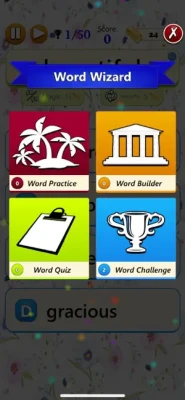
Main Game Modes
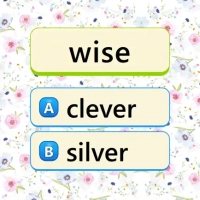
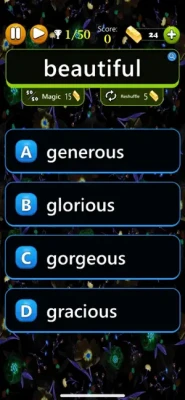
Word Challenge
Word Challenge is the competitive side of the game.
It is designed to test your natural vocabulary ability and reveal areas where you may need more practice.
This mode is ideal when you want to test yourself rather than simply study.
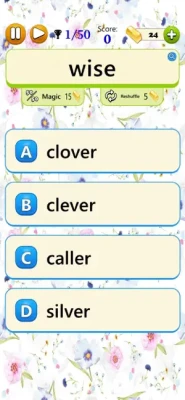
Word Quiz
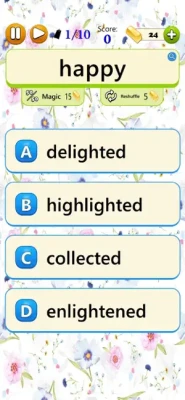
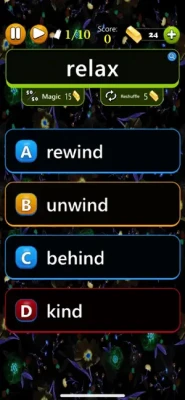
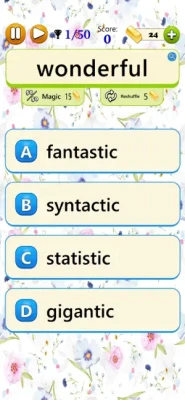
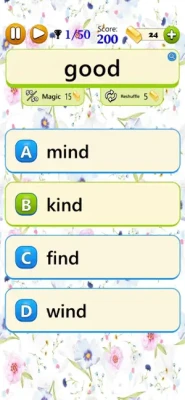
Word Quiz provides a more balanced practice experience.
The word difficulty can be adjusted using a slider in the Settings section, allowing players to select vocabulary that matches their current ability.
Word Builder
Word Builder changes the way you interact with vocabulary.
Instead of merely recognizing a word, you enter it part by part. This places greater emphasis on recalling the word from memory.
This can make Word Builder especially useful for players who want to strengthen spelling and active vocabulary recall.
Word Practice
Word Practice is the most relaxed mode.
Instead of competing for a high score, you can simply review words and listen to them. The developer describes it as an effortless way to enjoy and review vocabulary when you want something less demanding.
Spoken Words & Text-to-Speech
One of the defining features of Word Wizard is its use of text-to-speech technology.
Words are read aloud by the device, adding an auditory component to the vocabulary experience.
This means the game can involve multiple forms of learning:
See the word → Hear the word → Understand the word → Recall the word
That combination gives Word Wizard a different feel from conventional word-search or crossword games.
Vocabulary Practice
Word Wizard is built around repeated exposure to vocabulary.
Every word you play is counted and remembered, according to the developer, with the aim of improving the practice experience.
This can encourage players to identify words they already know while gradually becoming more comfortable with unfamiliar vocabulary.
Adjustable Word Difficulty
Not every player has the same vocabulary level.
Word Wizard addresses this through an adjustable difficulty setting. If the words feel too advanced, players can move the difficulty slider down; if the challenge feels too easy, they can increase it.
This makes the game suitable for a wider range of players than a fixed-difficulty word puzzle.
How to Play Word Wizard
Step 1: Choose a Mode
Start with Word Challenge, Word Quiz, Word Builder or Word Practice.
Step 2: Select a Comfortable Difficulty
Use the difficulty control to find vocabulary that provides an appropriate challenge.
Step 3: Listen Carefully
When a word is spoken, pay attention to its pronunciation as well as its meaning.
Step 4: Read the Word
Look at the spelling and identify familiar prefixes, suffixes or letter patterns.
Step 5: Complete the Challenge
Depending on the mode, identify, answer or construct the word.
Step 6: Learn From Feedback
The game provides immediate feedback so you can see the correct answer and understand your mistake.
Step 7: Review Difficult Words
Return to Word Practice when you want a more relaxed opportunity to revisit vocabulary.
Controls & Interface Guide
The controls are designed around simple touchscreen interaction.
| Action | Control |
|---|---|
| Select an answer | Tap |
| Enter word parts | Tap letters/options |
| Change difficulty | Adjust the slider |
| Hear pronunciation | Use the spoken-word feature |
| Review vocabulary | Open Word Practice |
| View progress | Open statistics |
| Check rankings | Open leaderboards |
| Change appearance | Select Light or Dark Mode |
The game supports both portrait and landscape orientations.
Beginner's Guide
Start With Word Practice
If you are unfamiliar with the game, Word Practice provides the least stressful introduction.
Choose Moderate Difficulty
Don't immediately select the hardest vocabulary. A level that challenges you without overwhelming you is more useful for building confidence.
Listen to Pronunciation
Don't focus exclusively on spelling. The spoken-word feature adds an auditory dimension to the experience.
Pay Attention to Meaning
When you encounter an unfamiliar word, try to remember its meaning rather than only its spelling.
Use Word Builder
Word Builder encourages active recall instead of simple recognition, making it a useful mode for reinforcing vocabulary.
Advanced Vocabulary Strategy
1. Focus on Recall
Recognizing a word is easier than producing it from memory. Word Builder can help strengthen the second skill.
2. Increase Difficulty Gradually
Once a vocabulary level becomes comfortable, increase the difficulty rather than repeatedly solving familiar words.
3. Use Multiple Senses
Look at the spelling while listening to the pronunciation. Connecting visual and auditory information can make words easier to remember.
4. Review Difficult Words
Don't avoid unfamiliar vocabulary. Difficult words provide some of the most valuable opportunities for learning.
5. Track Your Statistics
Use the statistics system to monitor how your performance changes over time.
6. Challenge Yourself
Once you're comfortable with regular practice, Word Challenge and the global leaderboards can add a competitive element.
Progression System
Word Wizard doesn't use traditional character levels, weapons or an adventure map.
Instead, progression is based on personal vocabulary development.
Your progress can be measured through:
- Words practiced
- Quiz performance
- Word-building ability
- Difficulty level
- Statistics
- Achievements
- Leaderboard position
The game also remembers words you play to support its practice system.
Statistics & Performance Tracking
Local statistics allow players to monitor their performance over time.
Global leaderboards provide another goal for competitive players, with rankings available for each game mode.
This combination works well because the game can appeal to both types of users:
Casual learners: Focus on vocabulary practice.
Competitive players: Chase stronger scores and higher rankings.
Achievements & Game Center
Word Wizard supports local and global achievements and Game Center features, including leaderboards and achievements.
These features add long-term goals without changing the fundamental vocabulary-focused gameplay.
Cloud Save
Cloud Save allows game data to synchronize across multiple supported devices.
This is particularly useful for players who switch between an iPhone and iPad.
Light Mode & Dark Mode
The game supports both Light Mode and Dark Mode.
Dark Mode can provide a more comfortable appearance in low-light environments, while Light Mode offers a traditional bright interface.
Portrait & Landscape Support
Word Wizard supports both portrait and landscape orientations, giving users flexibility when playing on different Apple devices.
Languages
The current App Store listing supports 12 languages:
- English
- Czech
- Dutch
- French
- German
- Italian
- Polish
- Portuguese
- Romanian
- Slovak
- Spanish
- Swedish
This multilingual support makes the game accessible to a broader international audience.
Difficulty
Overall Difficulty: Easy to Challenging
| Area | Difficulty |
|---|---|
| Learning controls | Very Easy |
| Word Practice | Easy |
| Word Quiz | Easy–Moderate |
| Word Challenge | Moderate |
| Word Builder | Moderate |
| Advanced vocabulary | Hard |
Because word difficulty can be adjusted, the experience can be adapted to different skill levels.
Educational Value
Word Wizard is best understood as a vocabulary practice game, rather than a formal educational course.
Its strongest learning-oriented features include:
- Word recognition
- Vocabulary review
- Spelling practice
- Auditory pronunciation
- Word recall
- Adjustable difficulty
- Immediate feedback
- Repeated exposure
The combination of spoken and written words can make it more engaging than simply reading a vocabulary list.
Who Should Play Word Wizard?
Word Wizard is a good fit for:
- Word-game fans
- Vocabulary enthusiasts
- Puzzle players
- Language learners
- Students
- Casual brain-game players
- Spelling enthusiasts
- People who enjoy trivia
- Players interested in word challenges
- Anyone looking for a relaxing vocabulary game
It can also appeal to users who prefer short mental exercises rather than traditional action games.
Player Experience
The US App Store currently lists Word Wizard: Spoken Words with a 5.0/5 rating from 3 ratings. The relatively small number of ratings means this score should be treated cautiously rather than as a broad measure of player sentiment.
The game's four modes provide different levels of intensity, from relaxed word review to competitive challenges.
Pros & Cons
Pros
- Four distinct word-game modes
- Spoken-word text-to-speech feature
- Adjustable vocabulary difficulty
- Word Builder for active recall
- Relaxed Word Practice mode
- Immediate feedback
- Multiple languages
- Cloud Save
- Global leaderboards
- Achievements
- Game Center support
- Light Mode
- Dark Mode
- Portrait and landscape support
- Statistics tracking
Cons
- Relatively small number of App Store ratings
- Primarily focused on vocabulary rather than conventional word puzzles
- Advanced vocabulary may be challenging
- Some features use optional in-app purchases
- The developer has not listed specific Apple accessibility features for the app.
Technical Details
Game: Word Wizard: Spoken Words
Developer: G Soft Team
Seller: G Soft Team SRL
Category: Word
Age Rating: 4+
Size: 117.4 MB
Current listed version: 1.0.9
Latest listed update: March 6, 2024
iPhone: iOS 12.0 or later
iPad: iPadOS 12.0 or later
Mac: macOS 11.0 or later with Apple M1 chip or later
Apple Vision: visionOS 1.0 or later
Languages: 12
In-App Purchases: Yes
Latest Update
The App Store currently lists version 1.0.9, released on March 6, 2024. The version history describes the update as containing performance improvements and bug fixes.
In-App Purchases
The current App Store listing includes optional purchases such as:
- 30 Gold — $0.99
- 160 Gold — $4.99
- 330 Gold — $8.99
- 700 Gold — $15.99
- 1,500 Gold — $27.99
- Remove Ads — $2.99
Privacy Information
Apple's current listing states that identifiers may be used to track users across apps and websites owned by other companies. It also indicates that identifiers, usage data and diagnostics may be collected without being linked to the user's identity.
These disclosures can change, so users should consult the current App Store privacy section before installing.
Word Wizard vs Traditional Word Games
| Feature | Word Wizard |
|---|---|
| Vocabulary practice | Yes |
| Spoken words | Yes |
| Word quiz | Yes |
| Word construction | Yes |
| Relaxed practice | Yes |
| Difficulty adjustment | Yes |
| Multiple languages | Yes |
| Statistics | Yes |
| Global rankings | Yes |
| Achievements | Yes |
| Cloud Save | Yes |
Its biggest distinction is the combination of spoken vocabulary and active word recall rather than relying exclusively on crossword, word-search or anagram mechanics.
What Makes Word Wizard Different?
Many word games focus on finding words as quickly as possible.
Word Wizard takes a different approach.
The emphasis is on becoming more familiar with words by:
Reading → Listening → Recognizing → Recalling → Practicing
The inclusion of Word Practice also means that not every session has to be competitive.
Expert Rating
Overall Rating: 8.4/10
| Category | Rating |
|---|---|
| Vocabulary Gameplay | 9/10 |
| Variety | 8.5/10 |
| Learning Potential | 9/10 |
| Controls | 8.5/10 |
| Difficulty Options | 9/10 |
| Replay Value | 8/10 |
| Competition | 8/10 |
| Overall | 8.4/10 |
This is an editorial rating based on the documented features and available App Store information, not an official Apple rating.
Final Verdict
Word Wizard: Spoken Words is a thoughtful vocabulary game that goes beyond simple word recognition.
Its strongest feature is the combination of spoken pronunciation, word quizzes, active word construction and relaxed vocabulary practice. The adjustable difficulty also makes it possible to tailor the challenge instead of forcing every player into the same vocabulary level.
The game is particularly appealing if you want something that sits between a casual word game and a lightweight vocabulary practice tool. Its statistics, achievements, Game Center support and global leaderboards provide additional motivation for players who enjoy measurable progress.
For anyone searching for a vocabulary game for iPhone or iPad, a spoken word game, or a relaxed way to practice word recognition and recall, Word Wizard is worth considering.
Frequently Asked Questions
What is Word Wizard: Spoken Words?
Word Wizard: Spoken Words is a word and vocabulary game for iPhone and iPad featuring quizzes, challenges, word construction and spoken-word practice.
Is Word Wizard free?
Yes. The App Store lists the game as free with optional in-app purchases.
What game modes are available?
There are four main modes: Word Challenge, Word Quiz, Word Builder and Word Practice.
Can Word Wizard read words aloud?
Yes. The game uses the device's text-to-speech engine to read words aloud.
Can I change the difficulty?
Yes. The difficulty of the words can be adjusted through the Settings slider.
Does Word Wizard help with vocabulary?
The game is specifically designed around learning, practicing and recalling word meanings and vocabulary.
Does Word Wizard have a practice mode?
Yes. Word Practice provides a relaxed way to review words without the same emphasis on competitive challenge.
Does Word Wizard have leaderboards?
Yes. It includes local statistics and global leaderboards for each game mode.
Does Word Wizard support achievements?
Yes. It includes local and global achievements and supports Game Center.
Does Word Wizard support multiple languages?
Yes. The current listing supports 12 languages, including English, French, German, Spanish, Italian and Portuguese.
Can I play Word Wizard offline?
The App Store description does not explicitly state that every feature works offline, so it is better not to claim full offline functionality. Cloud Save and global leaderboard features require connectivity when synchronizing or accessing online services.
Does Word Wizard work on iPad?
Yes. The current listing supports iPhone and iPad.
What iOS version does Word Wizard require?
The current App Store listing requires iOS 12.0 or later. iPadOS 12.0 or later is required for iPad.
Rate the Game
User Reviews






Popular Games



















 Android
 iOS
iOS Windows
 Xbox
Xbox