

Latest Version
August 19, 2025
G Soft Team SRL
Word
iOS
0
Report a Problem
More About :game
Game Overview
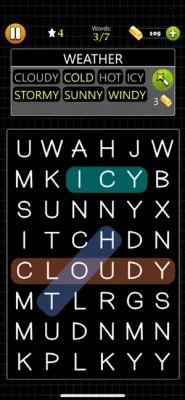
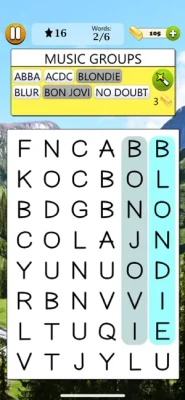
Looking for a simple puzzle that can challenge your attention without overwhelming you? Word Search - Word Game delivers a classic word-finding experience built around one straightforward goal: locate every hidden word in a grid of letters.
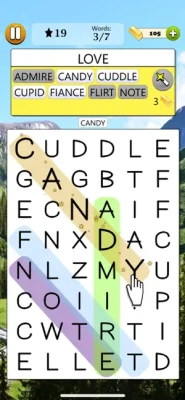
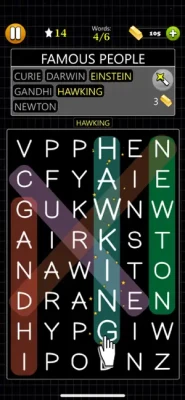
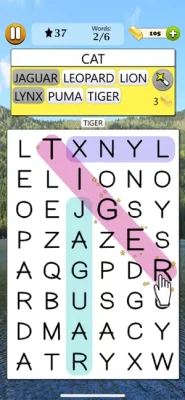
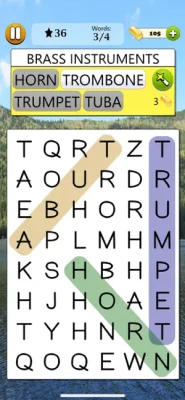
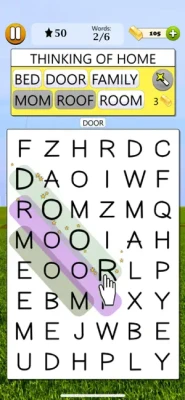
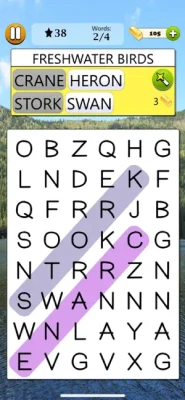
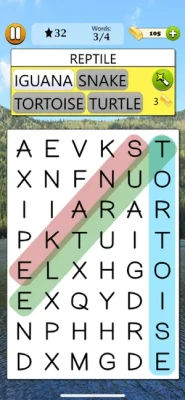
Each puzzle gives you a list of words to discover. The challenge comes from spotting them among letters arranged in different directions. Words can appear horizontally, vertically, or diagonally, encouraging you to scan the board carefully and develop your own search strategy.
With 25,000 levels, three difficulty settings, multiple languages, statistics, achievements, and global leaderboards, the game offers a large collection of puzzles for both casual players and dedicated word-game fans.
How Word Search - Word Game Works
The concept is easy to understand:
- Start a word-search puzzle.
- Look at the list of hidden words.
- Search through the letter grid.
- Find each word.
- Trace the letters in the correct direction.
- Complete the puzzle and move forward.
The simplicity makes it easy to pick up for a few minutes, while harder puzzles require considerably more concentration.
Gameplay
The main gameplay revolves around visual scanning and word recognition.
A word may be hidden from left to right, right to left, from top to bottom, from bottom to top, or diagonally. This means you cannot rely on a single scanning pattern. As the difficulty increases, finding the correct word becomes more about recognizing letter combinations and less about simply spotting obvious sequences.
The game also provides Magic Wands that can help when you become stuck.
25,000 Word Search Levels
One of the biggest attractions is the game's extensive puzzle collection.
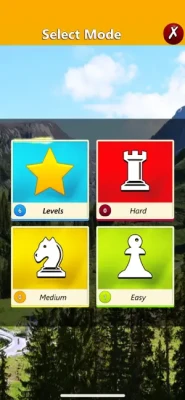
With 25,000 levels, players have a substantial number of word-search challenges to work through. The puzzles are divided into:
- Easy
- Medium
- Hard
This structure makes the game suitable for beginners who want a relaxed introduction to word searches as well as experienced puzzle players looking for more demanding challenges.
Difficulty Levels
Easy
The Easy difficulty is a comfortable starting point for new players. It allows you to become familiar with the letter-grid format and develop a reliable search technique.
Medium
Medium puzzles require more concentration. Words become less immediately obvious, encouraging players to scan carefully and recognize unusual letter combinations.
Hard
Hard puzzles put your observation skills to the test. Finding every word can require patience, systematic searching, and clever use of the available hints.
Word Search Puzzle Features
Classic Hidden Word Gameplay
The game stays true to the traditional word-search format. You receive a collection of words and must locate them within a grid filled with letters.
Horizontal, Vertical and Diagonal Words
Hidden words can appear in multiple directions, keeping the puzzles from becoming repetitive.
Magic Wands
When a puzzle becomes difficult, Magic Wands can help you continue instead of getting completely stuck.
Light and Dark Modes
Players can choose between Light Mode and Dark Mode, allowing the visual presentation to better suit different preferences and playing environments.
Portrait and Landscape Orientation
The game works in both portrait and landscape orientations, giving players flexibility when playing on compatible devices.
Multiple Languages
Word Search - Word Game supports English plus 11 additional languages, including Czech, Dutch, French, German, Italian, Polish, Portuguese, Romanian, Slovak, Spanish, and Swedish.
Cloud Save
Cloud Save allows game data to synchronize across multiple supported devices, making it easier to continue your progress when switching devices.
Statistics
Local statistics provide a way to keep track of your puzzle activity and progress.
Global Leaderboards
Players can compare their performance through global leaderboards and see how they rank against other players around the world.
Achievements
The game includes both local and global achievements, adding extra goals beyond simply completing individual puzzles.
Game Theme & Atmosphere
Word Search - Word Game focuses on a clean and relaxing puzzle atmosphere rather than action or competition-driven gameplay.
The experience is designed around concentration, observation, and word recognition. Its straightforward mechanics make it suitable for short sessions, while the large number of puzzles gives players plenty of reasons to return.
Game Progression
Progression comes primarily through completing word-search puzzles and tackling increasingly challenging levels.
Players can begin with Easy puzzles, improve their scanning technique, and eventually take on Medium and Hard challenges. Achievements, statistics, and leaderboards add additional long-term objectives for players who enjoy tracking their performance.
Controls & Interface
The controls are simple and intuitive.
Players interact directly with the letter grid to identify and select hidden words. Because the game focuses on touch-based word finding rather than complicated controls, almost all of the challenge comes from recognizing words quickly and accurately.
Portrait and landscape orientations are supported, giving players additional flexibility.
How to Find Words Faster
There are several effective ways to approach a word-search puzzle.
Start With the First Letter
Choose a word from the list and search the grid for its first letter. Once you locate it, inspect the surrounding letters for the rest of the word.
Search From Left to Right
A systematic approach can prevent you from repeatedly checking the same areas. Scan the grid from one side to the other and look for potential word beginnings.
Look for Uncommon Letters
Rare letters such as X, Z, Q, and J can make a word easier to locate because there are fewer occurrences of those letters in the grid.
Watch for Double Letters
Words containing repeated letters can sometimes be easier to recognize. If you find two identical letters next to each other, check whether they form part of a word on your list.
Beginner's Guide
If you're new to word-search games, don't try to scan the entire grid randomly.
Instead:
- Pick one word from the list.
- Identify an unusual letter in that word.
- Search the grid for that letter.
- Check the surrounding eight directions.
- Follow the letter sequence.
- Mark the word once you confirm it.
- Move to the next word.
This approach makes larger puzzles feel much more manageable.
Advanced Player Strategy
Experienced players can improve their speed by combining several techniques.
Focus on distinctive letters first, then examine possible word paths in every direction. Instead of checking individual letters randomly, divide the grid into sections and systematically clear each area.
When two words share similar letter combinations, compare their possible starting points rather than repeatedly scanning the entire grid.
For difficult puzzles, Magic Wands can provide useful assistance when normal searching stops producing results.
Is Word Search - Word Game Difficult?
The game has a flexible difficulty curve because players can choose between Easy, Medium, and Hard puzzles.
Easy levels are accessible to casual players, while Medium introduces more challenging searches. Hard puzzles demand greater concentration and stronger visual word-recognition skills.
This makes the game appropriate for players with different levels of word-puzzle experience.
Who Should Play?
Word Search - Word Game is a good choice for:
- Fans of classic word search puzzles
- Casual puzzle players
- People who enjoy vocabulary games
- Players who prefer relaxing games
- Fans of brain-training style puzzles
- Players looking for short gaming sessions
- People who enjoy completing large collections of levels
- Competitive players interested in leaderboards and achievements
Game Modes & Features at a Glance
| Feature | Details |
|---|---|
| Game Type | Word Puzzle |
| Main Gameplay | Find hidden words |
| Levels | 25,000 |
| Difficulty | Easy, Medium, Hard |
| Word Directions | Horizontal, Vertical, Diagonal |
| Hints | Magic Wands |
| Visual Modes | Light and Dark |
| Orientation | Portrait and Landscape |
| Languages | English + 11 more |
| Cloud Save | Yes |
| Statistics | Yes |
| Global Leaderboards | Yes |
| Achievements | Yes |
| Age Rating | 4+ |
| Category | Word |
| Developer | G Soft Team |
The core specifications above are based on the current App Store listing.
iPhone and iPad Compatibility
The game requires iOS 16.0 or later on iPhone and iPadOS 16.0 or later on iPad. It also supports Mac computers with macOS 13.0 or later when equipped with an Apple M1 chip or later, as well as Apple Vision with visionOS 1.0 or later.
Technical Details
Developer: G Soft Team
Category: Word
Age Rating: 4+
Current listed version: 1.1.6
Latest listed version date: February 18, 2025
App Size: 140.6 MB
iPhone Requirement: iOS 16.0 or later
iPad Requirement: iPadOS 16.0 or later
Languages: English, Czech, Dutch, French, German, Italian, Polish, Portuguese, Romanian, Slovak, Spanish and Swedish.
Achievements and Leaderboards
For players who enjoy competition, the game goes beyond individual puzzle completion.
Global leaderboards allow players to compare their performance with people around the world, while achievements provide additional milestones to pursue. Game Center support also includes leaderboards and achievements.
Cloud Save and Multi-Device Progress
Cloud Save is particularly useful for players who use more than one supported device. The game can synchronize progress, allowing players to continue where they left off instead of restarting their puzzle journey.
Word Search - Word Game Rating
The App Store listing currently shows a 4.8 out of 5 rating based on 195 ratings.
This strong user rating reflects the appeal of a straightforward word-search format combined with a very large puzzle collection and additional progression features.
Pros and Cons
Pros
- 25,000 word-search levels
- Three difficulty settings
- Simple and accessible gameplay
- Horizontal, vertical and diagonal word placement
- Magic Wand hints
- Light and Dark modes
- Portrait and landscape support
- Multiple language support
- Cloud Save
- Global leaderboards
- Achievements
- Game Center support
Cons
- Some players may find the easiest puzzles too simple.
- Harder puzzles can become repetitive for players who prefer more varied puzzle mechanics.
- The game contains optional in-app purchases.
- Some features are primarily aimed at players who enjoy long-term puzzle progression.
In-App Purchases
The App Store listing identifies the game as free with optional in-app purchases. Available purchases include a Remove Ads option and several Gold packages.
Updates and Version History
The listed version history includes performance improvements and bug fixes. Version 1.1.6 was released on February 18, 2025, with previous updates also focused on performance and stability improvements.
Similar Games
Players who enjoy Word Search - Word Game may also be interested in other word puzzle experiences such as:
- Classic word search games
- Hidden word puzzles
- Word-find games
- Vocabulary puzzles
- Crossword-style games
- Daily word puzzles
- Brain-training word games
The main difference is that Word Search - Word Game focuses heavily on a traditional hidden-word grid while expanding the experience with thousands of levels, multiple difficulty settings, achievements, statistics, and worldwide leaderboards.
Word Search - Word Game vs Classic Word Puzzles
Traditional word searches can be enjoyable but often provide a relatively limited number of puzzles. Word Search - Word Game expands the classic formula with a much larger collection of 25,000 levels.
The three difficulty levels also make it easier to choose an appropriate challenge, while cloud saving and leaderboards give the experience more long-term appeal.
Player Experience
The biggest strength of Word Search - Word Game is its simplicity. There is very little to learn before starting a puzzle. Players can open the game, choose a challenge, and immediately begin searching for words.
That simplicity also makes it suitable for short sessions. At the same time, the huge level count gives dedicated players a long-term puzzle collection to work through.
Expert Verdict
Word Search - Word Game is a straightforward but substantial word puzzle experience. Its traditional hidden-word gameplay is easy to understand, while the enormous collection of 25,000 levels gives the game considerable longevity.
The combination of Easy, Medium, and Hard puzzles works well for different skill levels. Magic Wands provide assistance when needed, while achievements, statistics, cloud saving, and global leaderboards add extra reasons to keep playing.
For anyone who enjoys classic word search puzzles and wants a large collection of challenges on iPhone or iPad, this is a solid choice.
Recommended for: Casual puzzle fans, word-game enthusiasts, vocabulary lovers, and players who enjoy relaxing brain games.
Final Summary
Word Search - Word Game brings the familiar pleasure of finding hidden words into a large mobile puzzle collection. With 25,000 levels, three difficulty settings, multiple word directions, Magic Wand assistance, Light and Dark modes, cloud synchronization, achievements, statistics, and global leaderboards, it offers considerably more than a basic word-search puzzle.
Whether you want a quick mental challenge or a long-running collection of puzzles to complete, the game provides an accessible and flexible experience for word-game fans.
Frequently Asked Questions
What is Word Search - Word Game?
Word Search - Word Game is a word puzzle game where players find hidden words inside grids of letters.
How many levels does Word Search - Word Game have?
The game features 25,000 levels divided across Easy, Medium, and Hard difficulty settings.
Can words appear diagonally?
Yes. Hidden words can appear horizontally, vertically, or diagonally.
Does the game have hints?
Yes. Players can use Magic Wands when they need help finding words.
Does Word Search - Word Game support multiple languages?
Yes. The App Store listing currently shows English plus 11 additional languages.
Does the game support cloud saving?
Yes. Cloud Save can synchronize game data across multiple supported devices.
Does it have leaderboards?
Yes. The game includes local statistics and global leaderboards where players can compare their standing with other players.
Does Word Search - Word Game have achievements?
Yes. The game includes local and global achievements and supports Game Center leaderboards and achievements.
What devices can run the game?
The game supports iPhone and iPad, with iOS 16.0 or later and iPadOS 16.0 or later. It also supports compatible Apple Silicon Macs and Apple Vision devices.
Is Word Search - Word Game free?
The App Store lists the game as free with optional in-app purchases, including an option to remove advertisements and several Gold packages.
Rate the Game
User Reviews





Popular Games



















 Android
 iOS
iOS Windows
 Xbox
Xbox