


Latest Version
April 03, 2026
Mobility Ware
Word
iOS
0
Report a Problem
More About :game
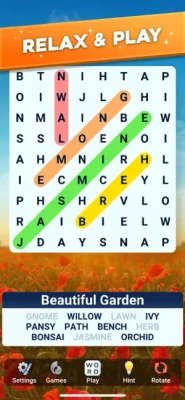
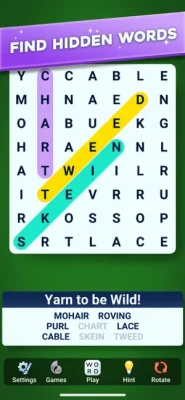
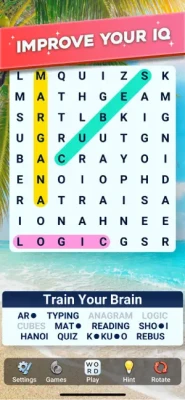
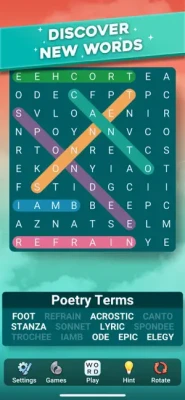
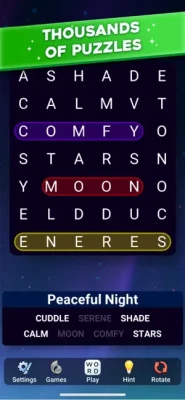
Word Search Legend takes the familiar word-search format and gives it a polished, relaxing presentation. Instead of rushing against a clock, players can explore themed letter grids at their own pace, searching for words hidden horizontally, vertically, diagonally, forwards, or backwards.
The game features thousands of puzzles covering a wide range of subjects, including categories such as nature, food, travel, and other entertaining word lists. The relaxed structure makes it suitable for short sessions as well as longer puzzle-solving sessions.
A major part of its appeal is the atmosphere. Beautiful backgrounds, soothing music, animations, haptics, customizable visual themes, and generous hints are designed to make finding words feel satisfying rather than stressful.
What Is Word Search Legend?
Word Search Legend is a casual word puzzle game centered around finding hidden words in letter grids. Each puzzle has a particular theme, and players must locate all of the words associated with that theme.
The basic concept is simple: examine the board, identify a hidden word, and swipe across its letters. Words can appear in several directions, creating enough variety to keep familiar word-search gameplay interesting.
The game is particularly focused on relaxed puzzle solving. There are no traditional time limits forcing players to race through a level, allowing the experience to remain accessible to casual players and people who simply enjoy word puzzles.
Gameplay
The main gameplay loop is straightforward but satisfying.
Players receive a themed word list and a grid filled with letters. The objective is to locate every word hidden within the grid.
Words may be placed:
- Horizontally
- Vertically
- Diagonally
- From left to right
- From right to left
- From top to bottom
- From bottom to top
Once a word is spotted, players swipe across its letters to select it. Successfully identifying words gradually clears the puzzle until the complete list has been found.
Different puzzle sizes, word counts, patterns, and themes help prevent every level from feeling identical.
Relaxing Word Puzzle Experience
One of Word Search Legend's strongest qualities is its calm approach to the genre.
Rather than emphasizing fast reactions or complicated controls, the game encourages players to slow down and examine the board carefully. This makes it a natural choice for anyone looking for a casual word game to play during a break, before bed, while traveling, or whenever they want a quieter puzzle experience.
The App Store description specifically emphasizes relaxing gameplay, beautiful backgrounds, soothing music, and a low-pressure approach to solving puzzles.
Thousands of Word Search Puzzles
Word Search Legend provides a large collection of themed word puzzles rather than relying on a small number of repeating boards.
The themes can cover subjects such as:
- Nature
- Food
- Travel
- Everyday subjects
- Vocabulary
- Synonyms
- Antonyms
- Other creative word categories
The variety gives players a reason to continue beyond the first few puzzles and provides opportunities to encounter unfamiliar words along the way.
Puzzle Creator Mode
One of the newer additions is Puzzle Creator Mode.
This feature allows players to create personalized Word Search puzzles based on categories they choose and share those custom puzzles with friends and family. It adds a creative element that goes beyond simply completing pre-made puzzles.
For players who enjoy making their own challenges, this can provide another reason to return after completing the standard puzzle content.
Weekly Jigsaw Event
Word Search Legend has also introduced a weekly Jigsaw event.
Players solve Word Search puzzles to make progress toward completing a jigsaw puzzle and can earn unique badges during the weekly event. This provides an additional activity alongside the traditional word-search levels.
Antonym and Synonym Puzzles
Classic puzzles have also been expanded with Antonym and Synonym categories.
These puzzles add a vocabulary-focused twist to the normal hidden-word format and encourage players to think about relationships between words rather than simply recognizing familiar subjects.
Themes and Visual Customization
Word Search Legend lets players customize the presentation of their puzzle experience with different backgrounds and visual themes.
The available style options are designed to match different moods, including calmer nature-inspired visuals as well as newspaper and night-style themes.
This customization helps the game feel more personal instead of presenting every puzzle with exactly the same appearance.
Hints and Helpful Assistance
Getting stuck on a word does not necessarily mean the puzzle has to stop.
Word Search Legend includes hints that can help players when a hidden word becomes difficult to locate. This is particularly useful on larger boards or when several words have similar letter patterns.
A good strategy is to use hints selectively rather than immediately. Searching the board yourself first keeps the solving process more rewarding.
Offline Word Search Gameplay
Another useful feature is offline play.
Word Search Legend can be played without an internet connection, making it suitable for situations such as flights, commuting, travel, or places with limited connectivity.
This also makes it convenient as a quick puzzle game that does not always depend on being online.
Daily Brain Training
Word Search Legend can also work as a short daily vocabulary and word-recognition activity.
The Google Play description highlights daily challenges, level progression, vocabulary development, and bonus words.
Instead of requiring a long gaming session, players can complete a few puzzles in a short period and return later.
Controls and Interface Guide
The controls are intentionally simple.
How to Select a Word
- Read the word list.
- Scan the letter grid.
- Locate the first letter.
- Trace the word with your finger.
- Swipe across the letters in the correct direction.
- Release when the complete word has been selected.
The game supports horizontal, vertical, diagonal, forward, and backward word placement.
There is no complicated movement system or extensive control scheme to learn, which allows new players to start solving puzzles almost immediately.
How to Play Word Search Legend
Step 1: Check the Theme
Look at the puzzle category before searching. The theme provides an important clue about the types of words you should expect.
Step 2: Read the Word List
Review all of the target words before starting. Familiarize yourself with their length and unusual letter combinations.
Step 3: Search Strategically
Instead of randomly scanning every letter, look for uncommon letters and distinctive combinations.
Step 4: Check Multiple Directions
Remember that words can run diagonally, vertically, horizontally, forwards, or backwards.
Step 5: Use Hints When Necessary
If a word remains hidden after a careful search, use a hint rather than spending too much time searching the same area.
Step 6: Complete the Puzzle
Continue until every word on the list has been found.
Beginner's Guide
New players should avoid trying to inspect the entire grid simultaneously.
Start by searching for the longest words. Longer words are often easier to recognize because their letter sequences are more distinctive.
Next, look for unusual letters. A word containing uncommon letter combinations can sometimes be identified faster than a short word made from common letters.
Pay particular attention to diagonal lines because they can be easier to overlook.
Most importantly, do not rush. Word Search Legend is designed around a relaxed experience rather than a race against the clock.
Advanced Word Search Strategies
Experienced players can improve their solving speed by developing a consistent scanning pattern.
Look for uncommon letters
Rare or distinctive letters can act as anchors for longer words.
Search both directions
Don't assume every word begins at the left or top of the board.
Scan diagonals carefully
Diagonal words can blend into surrounding letters and are easy to miss.
Use the theme
The category can help you predict what types of words are likely to appear.
Check short words last
Short words can be difficult to distinguish because their letter combinations appear frequently throughout the board.
Rotate the board
The game supports board rotation, which can provide a different perspective when a word is difficult to see.
Game Progression
Progression revolves around completing increasingly varied word-search puzzles and exploring new themes and puzzle configurations.
The game uses different combinations of puzzle size, word count, and word patterns to create variety.
As players continue, they can encounter new categories, different visual themes, additional puzzle types, and special activities such as weekly events.
Difficulty
Word Search Legend generally favors a relaxed difficulty curve rather than an aggressively challenging one.
The App Store describes the puzzles as beginning simply and maintaining a gentle challenge, although individual players may find certain larger grids or unusual word categories more demanding.
The absence of traditional time pressure means difficulty comes primarily from observation and word recognition.
Game Modes and Activities
Classic Word Search
The main experience revolves around themed hidden-word puzzles.
Synonym Puzzles
Players encounter word relationships based around synonyms.
Antonym Puzzles
These introduce vocabulary challenges involving opposite meanings.
Weekly Jigsaw Event
Solve word-search puzzles to progress through a weekly jigsaw activity and earn badges.
Puzzle Creator Mode
Create personalized word-search puzzles and share them with others.
Characters, Weapons and Items
Word Search Legend does not use traditional playable characters, weapons, vehicles, or combat equipment.
Its progression and interaction systems are centered on words, letter grids, themes, hints, backgrounds, puzzles, events, and badges.
This keeps the experience focused on vocabulary and observation rather than action-oriented mechanics.
Sound, Music and Atmosphere
The game's presentation is deliberately peaceful.
Soothing music, visual backgrounds, animations, and haptic feedback contribute to a relaxing atmosphere.
The overall presentation makes Word Search Legend feel more like a quiet puzzle session than a conventional fast-paced mobile game.
Player Experience
The current App Store listing shows a 4.7 out of 5 rating from approximately 2.6K ratings, indicating a generally positive reception among its iOS audience.
Player feedback also reveals an interesting range of experiences. Some reviewers praise the relaxing nature, backgrounds, and enjoyable word-search format, while others would like greater difficulty or improved readability on some puzzles.
That makes the game particularly appealing to players who value calm, accessible puzzle solving rather than intense difficulty.
Pros and Cons
Pros
- Thousands of word puzzles
- Relaxing, low-pressure gameplay
- No traditional time limit
- Many themed word lists
- Offline gameplay
- Helpful hints
- Customizable backgrounds and themes
- Weekly Jigsaw events
- Synonym and Antonym puzzles
- Puzzle Creator Mode
- Simple swipe controls
- Suitable for short gaming sessions
Cons
- Players looking for intense difficulty may find some puzzles too easy
- Larger letter grids can become harder to read for some players
- Some puzzle categories may be more challenging than others
- The game contains advertising according to its App Store listing
Technical Information
| Information | Details |
|---|---|
| Game | Word Search Legend |
| Developer | MobilityWare |
| Genre | Word / Puzzle |
| Platform | iPhone, iPad |
| Price | Free |
| Age Rating | 4+ |
| Language | English |
| iPhone Requirement | iOS 15.0 or later |
| iPad Requirement | iPadOS 15.0 or later |
| Mac | macOS 12.0+ with Apple M1 or later |
| Size | Approximately 333.4 MB on the current US App Store listing |
| Offline Play | Yes |
| Advertising | Yes |
The technical information above is based primarily on the current US App Store listing.
Recent Updates and New Features
Word Search Legend has continued to receive feature updates.
The recent version history includes:
Version 1.2.1: Added Puzzle Creator Mode for making and sharing personalized word-search puzzles.
Version 1.2.0: Added a weekly Jigsaw event and introduced Antonym and Synonym puzzles to Classic mode.
Version 1.1.0: Included performance and stability improvements.
Version 1.0.2: Included additional performance optimizations.
Word Search Legend vs Traditional Word Search Games
Traditional word-search games usually focus on finding words in static grids.
Word Search Legend keeps that familiar foundation but adds modern mobile features such as customizable themes, hints, offline play, events, vocabulary-oriented puzzle categories, and Puzzle Creator Mode.
That combination makes it suitable for players who enjoy classic word searches but want a more polished mobile presentation.
Who Should Play Word Search Legend?
Word Search Legend is a strong choice for:
- Word puzzle fans
- Casual gamers
- Vocabulary enthusiasts
- Players who enjoy brain teasers
- Adults looking for relaxing games
- People who like offline puzzle games
- Fans of traditional word searches
- Players who prefer short gaming sessions
- Anyone who enjoys discovering hidden words
It is less suited to players who primarily want fast action, competitive multiplayer, or highly demanding puzzle mechanics.
Tips for Finding Difficult Words
When a word seems impossible to find, try changing your approach.
Start with the first letter: Search for every occurrence of the word's first letter.
Look for unusual combinations: A rare letter pair can reveal the correct direction.
Search backwards: Hidden words are not limited to the normal reading direction.
Check diagonals: Scan diagonal lines separately instead of mixing them with horizontal and vertical searches.
Rotate the board: A different orientation can sometimes make a difficult pattern easier to recognize.
Use a hint: If repeated scanning fails, a hint can keep the puzzle moving.
Why Word Search Legend Is Different
The biggest difference is its emphasis on relaxation.
Rather than turning every puzzle into a timed competition, Word Search Legend gives players room to inspect the board and solve at their own pace. The combination of themed word lists, customizable visuals, music, hints, offline access, and new puzzle activities creates a broader experience than a basic word-search grid.
Ratings and Social Proof
The current US App Store listing reports:
4.7 / 5 stars
Approximately 2.6K ratings
The game is also listed on Google Play, where it has received thousands of downloads and positive player ratings.
Rather than relying only on the numerical rating, player feedback suggests that the game's strongest qualities are its relaxing presentation and straightforward word-search gameplay. Some players, however, have requested greater challenge or found certain visual layouts difficult to read.
Expert Rating
Overall: 8.7/10
| Category | Rating |
|---|---|
| Gameplay | 8.8/10 |
| Puzzle Variety | 9.0/10 |
| Controls | 9.2/10 |
| Presentation | 9.0/10 |
| Relaxation Factor | 9.4/10 |
| Difficulty | 8.0/10 |
| Replay Value | 8.8/10 |
| Overall | 8.7/10 |
Final Verdict
Word Search Legend is a polished mobile word puzzle game that focuses on relaxation, vocabulary, and satisfying discovery rather than speed or competition.
Its thousands of themed puzzles provide plenty of content, while hints, offline play, customizable backgrounds, weekly events, Synonym and Antonym puzzles, and Puzzle Creator Mode give the traditional word-search formula more variety.
For players who enjoy hidden-word puzzles and want something calm enough for a quick break or a longer evening session, Word Search Legend is an appealing choice.
Frequently Asked Questions
What is Word Search Legend?
Word Search Legend is a word puzzle game from MobilityWare focused on finding hidden words inside themed letter grids.
Is Word Search Legend free?
Yes. The iOS App Store lists Word Search Legend as a free game.
Can you play Word Search Legend offline?
Yes. Offline play is listed as one of the game's features.
Is there a time limit?
The game's basic rules describe Word Search Legend as having no pressure or time limits.
How do you find words?
Swipe your finger across the letters forming a hidden word. Words can appear horizontally, vertically, diagonally, forwards, or backwards.
Does Word Search Legend have hints?
Yes. Hints are available when players have trouble locating a word.
Does the game have different themes?
Yes. Players can explore different puzzle categories and customize backgrounds or visual themes.
Does Word Search Legend have daily challenges?
The Google Play description highlights daily challenges as part of the game's ongoing word-puzzle experience.
Can players create their own puzzles?
Yes. Puzzle Creator Mode allows players to create personalized Word Search puzzles and share them with friends and family.
Is Word Search Legend available on iPhone?
Yes. The App Store lists it for iPhone and iPad, with iOS 15.0 or later required for iPhone.
Is Word Search Legend good for casual players?
Yes. Its simple swipe controls, lack of time pressure, hints, and relaxing presentation make it particularly suitable for casual puzzle sessions.
Is Word Search Legend difficult?
The game generally aims for a gentle challenge, although larger grids and unusual word categories can make individual puzzles more demanding.
Who developed Word Search Legend?
Word Search Legend was developed by MobilityWare.
What makes Word Search Legend different?
Its combination of classic hidden-word puzzles with relaxing presentation, customizable themes, offline play, special events, vocabulary-based puzzles, and Puzzle Creator Mode gives it more variety than a basic word-search game.
Rate the Game
User Reviews









Popular Games



















 Android
 iOS
iOS Windows
 Xbox
Xbox