
Latest Version
September 07, 2026
Easybrain Ltd
Word
iOS
0
Report a Problem
More About :game
Looking for a simple word puzzle that you can play for a few minutes or spend hours mastering? Word Search - Crossword Game combines classic hidden-word gameplay with a clean mobile interface, daily challenges, progression, and plenty of vocabulary-based puzzles.
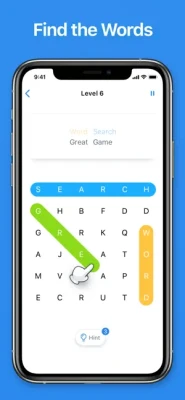
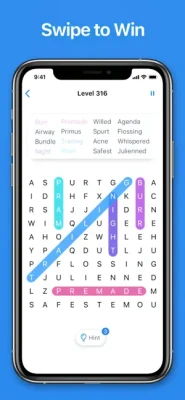
The objective is straightforward: find the words hidden among a grid of letters and swipe across them in the correct direction. Words can appear horizontally, vertically, or diagonally, so careful observation is just as important as vocabulary knowledge.
The current App Store listing describes thousands of words to explore and highlights daily challenges, unique trophies, clues, and a seamless puzzle experience.
How to Play Word Search - Crossword Game
Playing is simple, but finding every word can become increasingly challenging.
- Examine the letter grid.
- Look at the words you need to find.
- Search for recognizable letter combinations.
- Swipe across the letters when you spot a word.
- Find every required word to complete the puzzle.
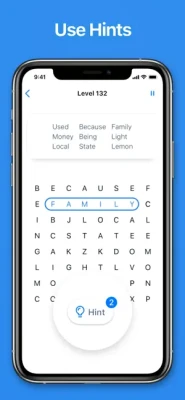
- Use a clue when you become stuck.
- Continue to the next puzzle and work toward your progression goals.
The game supports swiping up, down, left, right, and diagonally to mark hidden words.
Classic Word Search Gameplay
The core gameplay is based on the traditional word-search puzzle.
A grid is filled with letters, and your task is to identify specific words hidden within it. Words can be positioned in multiple directions, which means you need to scan the board carefully rather than simply reading from left to right.
The simplicity of the rules makes the game immediately accessible, while the growing collection of puzzles provides plenty of opportunities to improve your speed and word-recognition skills.
Thousands of Words to Discover
One of the game's biggest attractions is its large collection of words and puzzles.
Instead of repeating the same small set of vocabulary, the game gives players a broad selection of hidden-word challenges. This makes it suitable for players who enjoy expanding their vocabulary while solving casual puzzles.
The App Store specifically promotes thousands of words to explore.
Daily Challenges
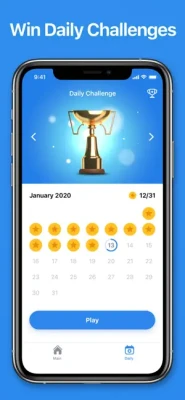
Daily Challenges give the game a regular reason to return.
Rather than simply completing standard puzzles, players can take on daily objectives and work toward unique trophies. This adds a light progression system to an otherwise straightforward word-search format.
For players who enjoy maintaining a daily puzzle routine, these challenges can turn a quick word search into a consistent habit.
Trophies & Progress
Completing challenges can contribute toward unique trophies.
This gives players additional goals beyond finding the words on the current board. Instead of treating each puzzle as an isolated activity, the game provides longer-term motivation through achievements and progression.
Clues & Assistance
Sometimes a hidden word is difficult to spot even when you know what you are looking for.
The game provides clues to help players progress when they get stuck. This makes the experience more approachable for beginners while allowing experienced players to decide how much assistance they want to use.
Word Search Strategy
Finding hidden words quickly is partly about vocabulary and partly about visual scanning.
Experienced players can improve their solving speed by learning to recognize common prefixes, suffixes, letter combinations, and unusual patterns.
Start With Unusual Letters
Words containing uncommon letters can sometimes be easier to locate because the combinations stand out from surrounding characters.
Search From Both Ends
Instead of always looking for the first letter of a word, look for its final letter too. You may notice the word more easily from the opposite direction.
Check Diagonals
Diagonal words are easy to overlook. Make diagonal scanning part of your normal search routine.
Look for Repeated Patterns
If a target word contains repeated letters or distinctive combinations, use those patterns as visual anchors.
Scan Methodically
Rather than moving your eyes randomly around the board, scan rows, columns, and diagonals systematically.
Beginner's Guide
If you are new to word search games, start slowly.
First, read the entire list of target words. Familiarize yourself with their length and spelling.
Then scan the board for the first and last letters of each word. Once you find a likely match, check the surrounding letters before swiping.
Do not worry about speed at the beginning. Accuracy and pattern recognition are more important. As you become familiar with the game's word patterns, your solving time should naturally improve.
Advanced Tips for Faster Solving
Look for Long Words First
Longer words often have more distinctive letter sequences, making them easier to recognize.
Identify Rare Letter Combinations
Pairs or groups of letters that do not commonly appear together can make a word easier to spot.
Scan in Multiple Directions
Remember that words can run horizontally, vertically, and diagonally. Train yourself to check all directions automatically.
Use the Word List Strategically
Do not treat the word list as something to check only after finding a word. Use it as a roadmap for your search.
Improve Your Visual Scanning
The faster you can compare patterns across the grid, the quicker you can identify potential matches.
Vocabulary Building
Word Search - Crossword Game is naturally suited to players who enjoy vocabulary-based activities.
The game exposes players to a wide range of words while requiring them to recognize spelling patterns inside a crowded letter grid.
It should primarily be viewed as an entertainment and puzzle experience rather than a formal language-learning tool, but vocabulary recognition is an important part of successful play.
Brain & Focus Gameplay
Word searches require players to maintain attention while comparing letters and patterns.
The game can provide a satisfying mental break because the rules are simple while individual puzzles require concentration.
Players who enjoy brain games, word puzzles, vocabulary games, and casual logic challenges may find the format particularly appealing.
Controls & Interface
The controls are deliberately simple.
Touch Controls
- Swipe horizontally to select words.
- Swipe vertically to select words.
- Swipe diagonally to mark diagonal words.
- Use the available clue system when necessary.
The App Store confirms the four basic directional patterns plus diagonal movement.
There are no complicated controls to learn, so players can focus almost entirely on searching the grid.
Game Progression
Progression is built around completing word-search puzzles, advancing through the game, participating in daily challenges, and earning trophies.
This approach gives the game a light sense of advancement without adding complicated character systems, equipment, or resource management.
The result is a straightforward puzzle progression loop:
Find words → Complete puzzle → Progress → Take on new challenges → Earn trophies.
Difficulty
Word searches can appear easy at first, but the challenge increases as players encounter more complicated letter arrangements and harder-to-spot words.
Difficulty can come from:
- Similar-looking letter combinations
- Longer word lists
- Diagonal words
- Words hidden among distracting letters
- Less familiar vocabulary
- Increased pressure to solve puzzles quickly
The game is therefore suitable for both relaxed players and people who enjoy improving their solving speed.
Casual & Relaxing Gameplay
One of the strongest qualities of Word Search - Crossword Game is its pick-up-and-play nature.
You do not need to learn complicated mechanics before starting. A player can open the game, solve a puzzle, and stop whenever they want.
That makes it suitable for:
- Short breaks
- Daily puzzle sessions
- Travel
- Relaxing at home
- Casual brain-game sessions
- Longer word-puzzle sessions
Word Search vs Crossword Puzzles
Although the title includes "Crossword Game," its core interaction is a traditional hidden-word search rather than a conventional clue-and-grid crossword.
| Feature | Word Search | Traditional Crossword |
|---|---|---|
| Hidden Words | Yes | No |
| Letter Grid | Yes | Yes |
| Clues | Optional assistance | Core mechanic |
| Swiping | Yes | Usually no |
| Diagonal Words | Yes | No |
| Vocabulary | Important | Important |
| Pattern Recognition | Very important | Important |
| Main Goal | Find listed words | Solve clues |
This makes the game particularly suitable for players who prefer visual word discovery over traditional crossword clues.
Word Search vs Other Word Games
Compared with anagram games, Word Search focuses less on creating words from a fixed group of letters and more on recognizing complete words hidden inside a larger grid.
Compared with crosswords, it removes the need to interpret traditional clues and instead emphasizes visual scanning.
Compared with word puzzles based on timed typing, the game provides a slower, more observational experience.
Daily Puzzle Routine
For regular players, Daily Challenges can become the centerpiece of a simple daily word-game routine.
A useful approach is to:
- Complete the daily puzzle.
- Record how quickly you solved it.
- Avoid clues when possible.
- Look for patterns that caused difficulty.
- Try to improve your solving speed over time.
Player Experience
The current US App Store listing shows a 4.7 out of 5 rating from approximately 420,000 ratings, demonstrating a very large and generally positive player response.
Reviews frequently praise the straightforward gameplay, challenge, and daily puzzles. Some players, however, criticize the frequency of advertising, including advertisements appearing after completing puzzles.
This makes the game a strong choice for people who enjoy word searches, although players who strongly dislike ads may want to consider the optional ad-removal purchase.
Pros & Cons
Pros
- Simple and easy-to-learn gameplay
- Thousands of words to discover
- Daily Challenges
- Unique trophies
- Helpful clues
- Horizontal, vertical, and diagonal word searches
- Strong vocabulary focus
- Suitable for short or long sessions
- Available on iPhone and iPad
- Large player base
- Highly rated on the App Store
Cons
- Advertising can interrupt the experience
- Some players may prefer larger or more complex word-search grids
- Players looking specifically for traditional crossword clues may find the gameplay different from a conventional crossword
- Advanced players may eventually want more customization options
The current App Store listing confirms advertising and offers a Remove Ads in-app purchase for $9.99.
Visual Style
The game uses a clean letter-grid presentation that keeps the puzzle itself at the center of the screen.
This minimalist approach works well for a word-search game because there are no unnecessary controls competing with the letter board.
The main visual task is simple: examine the grid, identify the target word, and swipe across it.
Accessibility & Ease of Use
From a gameplay perspective, the controls are highly accessible because they rely on a familiar smartphone gesture: swiping.
There are no complex combinations or difficult control schemes to master.
The current App Store listing does not provide a specific set of officially declared accessibility features, so the game should not be described as having specialized accessibility support without further confirmation.
Game Modes
Standard Word Search
The main gameplay mode challenges players to find listed words inside letter grids.
Daily Challenges
Special daily puzzles provide recurring objectives and trophy opportunities.
Clue-Assisted Play
Players can use clues when a particular word is difficult to locate.
Updates & Current Version
The current App Store listing shows version 1.31.0, released on July 30, 2026, with performance and stability improvements. The previous listed version, 1.30.0, was released on September 28, 2025.
The continued version history indicates that Easybrain has continued maintaining the application with performance and stability updates.
Technical Details
| Detail | Information |
|---|---|
| Game | Word Search - Crossword Game |
| Developer | Easybrain Ltd |
| Genre | Word |
| Platform | iPhone, iPad |
| Price | Free with in-app purchases |
| Current Version | 1.31.0 |
| App Size | 224 MB |
| Minimum iOS | iOS 15.0 or later |
| Age Rating | 4+ |
| Languages | English + 19 more |
| Main Gameplay | Hidden word search |
| Advertising | Yes |
| Remove Ads | $9.99 |
| Daily Challenges | Yes |
| Trophies | Yes |
| Clues | Yes |
These details are based on the current US App Store listing.
Supported Languages
The current listing states that the game supports English plus 19 additional languages, including Arabic, Danish, French, German, Hindi, Italian, Japanese, Korean, Norwegian Bokmål, Polish, Portuguese, Russian, Simplified Chinese, Spanish, Swedish, Thai, Traditional Chinese, Turkish, and Vietnamese.
This multilingual support makes the game accessible to a broad international audience.
Who Should Play Word Search - Crossword Game?
This game is a good fit for players who enjoy:
- Word search puzzles
- Vocabulary games
- Brain games
- Hidden-word games
- Casual puzzle apps
- Daily challenges
- Relaxing mobile games
- Spelling-based games
- Observation puzzles
- Word games for iPhone
- Word games for iPad
It is especially suitable for players who want straightforward gameplay without complicated rules.
Expert Rating
Gameplay: 9/10
Word Puzzle Design: 9/10
Controls: 9.5/10
Replay Value: 9/10
Difficulty Balance: 8.5/10
Daily Content: 8.5/10
Overall: 9/10
Final Verdict
Word Search - Crossword Game takes one of the most recognizable word-puzzle formats and turns it into a polished mobile experience.
Its greatest strength is simplicity. You see the letters, identify the hidden words, swipe across them, and move forward. Daily Challenges, trophies, clues, and thousands of words give the straightforward formula enough depth to remain engaging over many sessions.
The game is an excellent choice for fans of word search puzzles, vocabulary games, brain teasers, spelling challenges, and relaxing mobile games.
If you enjoy finding hidden words and want a simple puzzle you can play almost anywhere, Word Search - Crossword Game is an easy recommendation.
Frequently Asked Questions
What is Word Search - Crossword Game?
Word Search - Crossword Game is a word puzzle from Easybrain where players search a letter grid for hidden words and swipe across them to mark each solution.
Is Word Search - Crossword Game free?
Yes. The game is free to download and includes optional in-app purchases.
Who developed Word Search - Crossword Game?
The game was developed by Easybrain Ltd.
How do you play Word Search?
Look for the requested words in the letter grid and swipe across each word. Words can appear horizontally, vertically, or diagonally.
Can words be diagonal?
Yes. Diagonal word searches are part of the core gameplay.
Does the game have daily challenges?
Yes. Word Search - Crossword Game includes Daily Challenges and unique trophies.
Does Word Search have hints?
Yes. The game provides clues that can help players progress when they are stuck.
Is Word Search available for iPad?
Yes. The current App Store listing supports both iPhone and iPad.
What iOS version does Word Search require?
The current listing requires iOS 15.0 or later for iPhone and iPadOS 15.0 or later for iPad.
Does Word Search contain advertisements?
Yes. The App Store listing indicates that the game contains advertising. A $9.99 Remove Ads purchase is also listed.
What is the current version of Word Search - Crossword Game?
The current App Store listing shows version 1.31.0, released July 30, 2026.
How many ratings does Word Search have?
The US App Store currently displays approximately 420,000 ratings with an average score of 4.7 out of 5.
Official App Store
Rate the Game
User Reviews





Popular Games



















 Android
 iOS
iOS Windows
 Xbox
Xbox