
Latest Version
August 19, 2025
G Soft Team SRL
Word
iOS
0
Report a Problem
More About :game
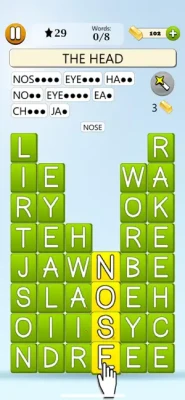
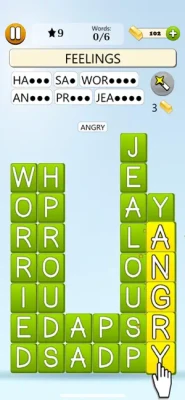
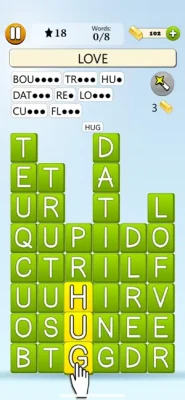
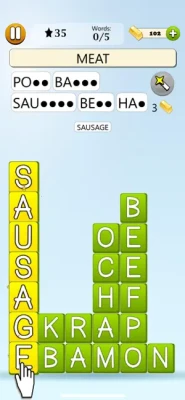
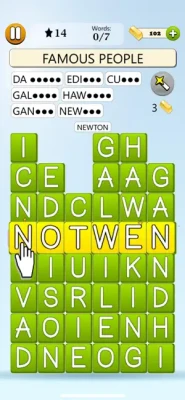
Word Blocks Word Game takes the familiar idea of finding hidden words and turns it into a simple, swipe-based puzzle experience. Instead of complicated controls or fast action, the game focuses on observation, vocabulary, attention, and relaxation.
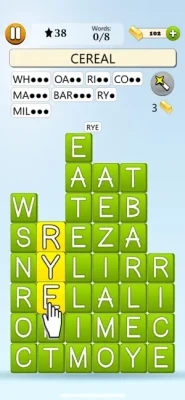
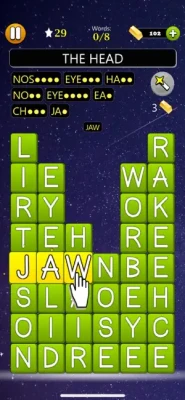
Words are arranged vertically or horizontally among blocks of letters. Your objective is to identify the correct words and pop them with a single swipe. As you discover more words, the remaining puzzle becomes easier to complete.
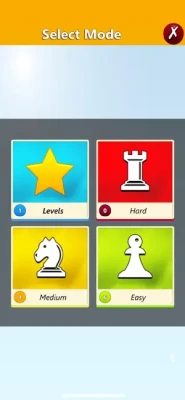
The game features 25,000 levels across Easy, Medium, and Hard difficulties, making it suitable for casual players as well as people who enjoy working through large collections of word puzzles.
How Word Blocks Word Game Works
The basic gameplay is straightforward:
- Start a word puzzle.
- Review the words you need to find.
- Search the letter blocks for a matching word.
- Swipe across the letters to select it.
- Pop the discovered word.
- Continue until all the required words have been found.
- Complete the level and move on to the next challenge.
The simplicity makes Word Blocks easy to pick up, while the higher difficulty levels provide more demanding word-finding challenges.
Core Gameplay
The heart of the game is word discovery.
Players scan a collection of letter blocks and search for the words required by the current puzzle. Words are positioned horizontally or vertically, so players can concentrate on two primary directions instead of searching diagonally.
Once a word is recognized, a swipe is enough to pop it. Finding additional words gradually makes the remaining puzzle easier.
25,000 Puzzle Levels
One of the strongest features of Word Blocks Word Game is its huge level collection.
The game offers 25,000 levels divided into:
- Easy
- Medium
- Hard
This large selection gives players a substantial progression path and makes the game suitable for both quick puzzle sessions and longer-term play.
Difficulty Levels
Easy
Easy levels provide a gentle introduction to the game's word-finding mechanics. They are a good starting point for casual players and anyone unfamiliar with the format.
Medium
Medium puzzles require greater attention and more deliberate searching. Players need to examine the available letters carefully before committing to a word.
Hard
Hard levels provide a stronger challenge for experienced word-puzzle fans. Finding the required words can take more time and concentration, especially when several possibilities look similar.
Magic Wands and Hints
Getting stuck does not necessarily mean the puzzle has to end.
Word Blocks Word Game includes Magic Wands that players can use whenever they need assistance. Hints can be especially useful when a remaining word is difficult to recognize or locate.
Word Blocks Gameplay Features
One-Swipe Word Popping
The main interaction is simple: find a word and swipe across it to pop it. This keeps the controls accessible and lets the puzzle itself remain the focus.
Horizontal and Vertical Words
Words are placed horizontally or vertically, giving players clear directions to investigate while searching the puzzle.
25,000 Levels
The enormous level count provides a long progression path for players who enjoy completing word puzzles.
Three Difficulty Settings
Easy, Medium, and Hard modes allow players to select a challenge appropriate for their experience.
Magic Wands
Use Magic Wands when a word becomes difficult to find.
Light and Dark Mode
Players can choose between Light Mode and Dark Mode, allowing the interface to better match their preferred visual environment.
Portrait and Landscape
The game supports both portrait and landscape orientations on compatible devices.
Cloud Save
Cloud Save synchronizes game data between supported devices, allowing players to continue their progress without starting over.
Global Leaderboards
Players can compare their performance with people around the world through online leaderboards.
Achievements
Local and global achievements provide additional goals for players who enjoy collecting milestones and improving their performance.
Game Theme and Atmosphere
Word Blocks Word Game is built around a calm and relaxing puzzle atmosphere.
There are no complicated combat systems, racing mechanics, or demanding reflex challenges. Instead, the experience encourages players to slow down, observe the letter arrangement, identify words, and solve puzzles at their own pace.
This makes it a natural fit for players looking for a relaxing word game, casual brain puzzle, or short mental challenge.
Game Progression
Progression is based around completing the game's extensive collection of word puzzles.
Players can work through the Easy, Medium, and Hard difficulty levels while tracking their statistics and achievements. Global leaderboards provide an additional competitive layer for players interested in comparing their results with others.
Cloud Save also allows progress to remain synchronized across supported devices.
Controls and Interface Guide
The control system is intentionally simple.
Primary action: Swipe across a discovered word.
There are no complicated button combinations or advanced controls to learn. The main challenge comes from locating the correct words rather than mastering the interface.
The game supports both portrait and landscape orientation, providing flexibility in how players hold and use their devices.
Beginner's Guide
If you're new to Word Blocks, start by taking your time rather than trying to find every word immediately.
Step 1: Read the Word List
Look at the words you need to discover before searching randomly.
Step 2: Search for Distinctive Letters
Look for unusual or recognizable letters in the target word. These can make possible locations easier to identify.
Step 3: Check Horizontal and Vertical Paths
Remember that the words are arranged horizontally or vertically.
Step 4: Swipe Carefully
Once you're confident that you've found the correct word, swipe across its letters.
Step 5: Use Hints When Necessary
If you cannot locate a remaining word, consider using a Magic Wand rather than repeatedly searching the entire puzzle.
Advanced Strategy
Experienced players can make their searches more efficient by using a systematic approach.
Instead of scanning the entire board randomly, concentrate on the first letter of a target word and check its surrounding horizontal and vertical possibilities.
You can also prioritize longer or more distinctive words first. Once several words have been removed, the remaining letter arrangement becomes easier to understand.
For especially difficult puzzles, save Magic Wands for situations where normal searching is no longer productive.
Attention and Word Recognition
The game is designed around attention and word recognition. Its App Store description specifically presents Word Blocks as an experience intended to improve attention and mental focus while providing a relaxing activity.
It is best described as an attention-focused word puzzle, rather than a formal educational or medical brain-training tool.
Game Modes Overview
| Mode | Experience |
|---|---|
| Easy | Relaxed introduction to word finding |
| Medium | More demanding word recognition |
| Hard | Greater concentration and searching |
| Light Mode | Bright visual presentation |
| Dark Mode | Darker interface for different environments |
The three core difficulty levels are officially listed as Easy, Medium, and Hard.
Languages
Word Blocks Word Game supports 12 languages:
- English
- Czech
- Dutch
- French
- German
- Italian
- Polish
- Portuguese
- Romanian
- Slovak
- Spanish
- Swedish
This multilingual support makes the game accessible to a broader international audience.
Achievements and Global Competition
Players who want more than casual puzzle solving can use the game's achievement and leaderboard systems.
The game supports local and global achievements, along with local statistics and global leaderboards. Players can check their worldwide standing after completing games and compare their performance with other players.
Cloud Save
Cloud Save is useful for players who move between compatible devices.
The feature synchronizes game data across supported devices, allowing players to pick up their progress where they left off.
Who Should Play Word Blocks?
Word Blocks Word Game is particularly suitable for:
- Word puzzle enthusiasts
- Fans of hidden word games
- Casual mobile gamers
- Players who enjoy relaxing puzzles
- Vocabulary game fans
- Players who like swipe-based games
- People looking for short puzzle sessions
- Players who enjoy large collections of levels
- Achievement hunters
- Competitive puzzle players
Pros and Cons
Pros
- 25,000 levels
- Easy, Medium, and Hard difficulties
- Simple swipe controls
- Horizontal and vertical word placement
- Magic Wand hints
- Light and Dark modes
- Portrait and landscape support
- 12 supported languages
- Cloud Save
- Global leaderboards
- Local and global achievements
- Game Center support
- Relaxing gameplay
Cons
- The basic gameplay may feel too simple for players seeking complex puzzle mechanics.
- Some players may prefer puzzles with more word-placement directions.
- Optional in-app purchases are available.
- The game contains advertisements unless the relevant purchase is made.
Technical Details
| Specification | Details |
| Game | Word Blocks Word Game |
| Developer | G Soft Team |
| Category | Word |
| Age Rating | 4+ |
| Size | 126.4 MB |
| Current Listed Version | 1.2.6 |
| Latest Listed Update | February 18, 2025 |
| iPhone | iOS 16.0 or later |
| iPad | iPadOS 16.0 or later |
| Mac | macOS 13.0 or later, Apple M1 or later |
| Apple Vision | visionOS 1.0 or later |
| Languages | English + 11 more |
| In-App Purchases | Yes |
| Game Center | Yes |
These specifications are based on the current App Store listing.
In-App Purchases
Word Blocks Word Game is free to download and includes optional purchases.
The current App Store listing includes several Gold packages ranging from $0.99 to $27.99, along with a Remove Ads purchase listed at $2.99.
Latest Updates
The current listed version is 1.2.6, released on February 18, 2025. The version history primarily mentions performance improvements and bug fixes, with earlier releases also including stability and performance improvements.
Player Rating
At the time of checking the App Store listing, Word Blocks Word Game has a 4.6 out of 5 rating from 18 ratings.
Because the number of ratings is relatively small, the score should be treated as an early indication of player reception rather than a broad statistical consensus.
Word Blocks Word Game vs Traditional Word Search
Traditional word-search games usually ask players to find words hidden inside a larger letter grid.
Word Blocks takes a slightly different approach by presenting the words as blocks that can be popped with a swipe. Words are positioned horizontally or vertically, and the puzzle becomes easier as players find more words.
The result is a more streamlined and relaxing interpretation of the classic word-finding formula.
Player Experience
The strongest part of Word Blocks is its accessibility.
You don't need to learn complicated rules before starting. The basic concept can be understood almost immediately: locate a word, swipe across it, and pop it.
The combination of a large number of levels, adjustable difficulty, hints, statistics, achievements, and leaderboards gives the straightforward concept more long-term depth.
Expert Verdict
Word Blocks Word Game is a clean and accessible word puzzle designed for players who enjoy finding hidden words without complicated gameplay.
Its biggest strength is scale: 25,000 levels provide an enormous amount of content, while Easy, Medium, and Hard settings let players choose how demanding they want the experience to be.
The swipe-to-pop mechanic is easy to understand, Magic Wands provide assistance when needed, and cloud saves, achievements, statistics, and global leaderboards give dedicated players additional reasons to keep progressing.
Recommended for: Fans of relaxing word games, hidden-word puzzles, casual brain games, and large mobile puzzle collections.
Final Summary
Word Blocks Word Game transforms classic word finding into a simple swipe-based experience. Players search for words hidden horizontally or vertically, then pop them with one swipe.
With 25,000 levels, three difficulty settings, Magic Wands, multiple languages, Light and Dark modes, cloud saving, achievements, statistics, and global leaderboards, the game provides a substantial collection of relaxing word puzzles.
Frequently Asked Questions
What is Word Blocks Word Game?
Word Blocks Word Game is a relaxing word puzzle in which players find hidden words and pop them by swiping across the letters.
How many levels are in Word Blocks?
The game contains 25,000 levels across Easy, Medium, and Hard difficulty settings.
How do you play Word Blocks?
Find a required word in the puzzle and swipe across its letters to pop it. Continue until all required words have been found.
Can words be placed diagonally?
According to the current App Store description, words are placed horizontally or vertically.
Does Word Blocks have hints?
Yes. Players can use Magic Wands when they become stuck.
Does Word Blocks support Dark Mode?
Yes. The game offers both Light Mode and Dark Mode.
Does Word Blocks support multiple languages?
Yes. It currently supports 12 languages, including English, French, German, Spanish, Italian, Portuguese, Dutch, Swedish, Polish, Czech, Slovak, and Romanian.
Does Word Blocks have leaderboards?
Yes. The game includes global leaderboards where players can compare their performance internationally.
Does Word Blocks have achievements?
Yes. It supports local and global achievements and Game Center features.
Does Word Blocks have Cloud Save?
Yes. Cloud Save synchronizes game data across supported devices.
Is Word Blocks Word Game free?
Yes. The App Store lists it as free with optional in-app purchases, including Gold packages and a Remove Ads option.
What devices support Word Blocks?
The game requires iOS 16.0 or later on iPhone and iPadOS 16.0 or later on iPad. It is also compatible with Macs running macOS 13.0 or later with an Apple M1 chip or later, as well as Apple Vision devices running visionOS 1.0 or later.
Rate the Game
User Reviews


Popular Games



















 Android
 iOS
iOS Windows
 Xbox
Xbox