



Latest Version
March 06, 2024
Unico Studio
Puzzle
1
com.unicostudio.sudoku
Report a Problem
More About :game
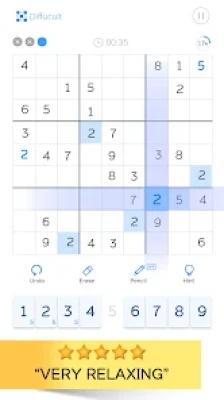
Sudoku: Classic Brain Puzzle brings the timeless logic game to Android with a modern interface and useful features that make solving puzzles enjoyable for players of every skill level.
Instead of relying on guessing, every puzzle can be solved using logical reasoning. The game encourages concentration, memory improvement, and critical thinking while remaining relaxing enough for daily play.
With thousands of unique puzzles and offline support, it's an excellent companion whether you're commuting, traveling, or simply exercising your brain.
Main Features
- More than 5,000 unique Sudoku puzzles
- Five balanced difficulty levels
- Beginner to Expert gameplay
- Offline play
- Automatic game saving
- Unlimited Undo
- Pencil Notes
- Hint system
- Error checking
- Duplicate number highlighting
- Progress statistics
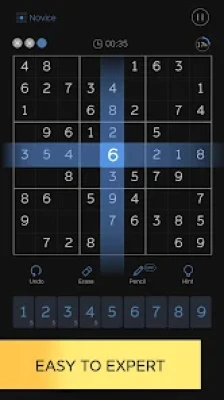
- Dark Mode
- Multiple color themes
- Optimized for phones and tablets
Difficulty Levels
The game offers carefully balanced puzzles for every player.
Novice
Perfect for first-time Sudoku players.
Easy
Ideal for learning solving techniques.
Medium
Requires logical planning and careful observation.
Hard
Designed for experienced puzzle solvers.
Expert
Complex puzzles that challenge advanced Sudoku fans.
How to Play
The objective is simple:
- Fill every row with numbers 1–9.
- Fill every column with numbers 1–9.
- Every 3×3 box must also contain numbers 1–9.
- No number may appear twice in the same row, column, or box.
Every puzzle has one correct solution that can be reached through logic rather than guessing.
Controls Guide
The interface is designed to be simple.
- Tap a square to select it.
- Choose a number from the bottom keypad.
- Enable Notes to write possible values.
- Use Undo if you make a mistake.
- Use Eraser to clear a cell.
- Tap Hint if you're stuck.
Helpful Gameplay Features
Notes
Record possible numbers inside empty cells.
Auto Save
Leave the game anytime and continue later.
Statistics
Track:
- Best completion time
- Games completed
- Progress by difficulty
Highlighting
The game highlights:
- Matching numbers
- Related rows
- Related columns
- Related boxes
- Duplicate entries
These features make solving puzzles much easier.
Beginner Tips
If you're new to Sudoku:
- Start with Easy mode.
- Fill obvious numbers first.
- Look for rows with only one missing value.
- Use Notes frequently.
- Avoid random guessing.
- Review every section before using hints.
Consistency is more important than speed.
Advanced Strategies
Experienced players often use advanced solving techniques.
Cross-Hatching
Compare rows and columns to eliminate possibilities.
Pencil Mark Reduction
Remove impossible candidates whenever new numbers appear.
Hidden Singles
Find numbers that only fit one location.
Naked Pairs
Identify matching candidate pairs to eliminate possibilities elsewhere.
Box-Line Reduction
Use interactions between rows, columns, and boxes to narrow options.
Mastering these strategies significantly improves solving speed.
Common Mistakes
Avoid these habits:
- Guessing too early
- Ignoring Notes
- Forgetting to update candidates
- Missing duplicate numbers
- Rushing difficult puzzles
Careful observation leads to faster improvement.
Brain Benefits
Regular Sudoku practice may help improve:
- Logical thinking
- Pattern recognition
- Memory
- Focus
- Problem-solving
- Concentration
- Mental relaxation
Many players enjoy Sudoku as part of a daily brain-training routine.
Why Players Enjoy This Game
Many players appreciate:
- Clean interface
- Thousands of puzzles
- Smooth controls
- Offline support
- Helpful hint system
- Well-balanced difficulty progression
- Automatic saving
These features make long play sessions comfortable and enjoyable.
Player Feedback
Based on recent user reviews, players commonly mention:
Positive
- Large collection of puzzles
- Beginner-friendly design
- Helpful note-taking tools
- Relaxing gameplay
- Good variety of difficulty levels
Criticisms
Some players report:
- Frequent advertisements in the free version
- Occasional bugs after updates, though some users noted that support later resolved their issues.
Pros
- Huge puzzle collection
- Suitable for beginners and experts
- Offline gameplay
- Excellent hint system
- Attractive themes
- Auto Save
- Progress tracking
- Smooth performance
Cons
- Ads can interrupt gameplay in the free version
- Some users have reported occasional technical issues after updates
Tips for Faster Solving
- Complete obvious rows first.
- Scan every 3×3 box before moving on.
- Keep Notes organized.
- Double-check duplicates.
- Save hints for difficult moments.
- Practice daily to improve pattern recognition.
Recommended For
This game is ideal for:
- Sudoku beginners
- Logic puzzle enthusiasts
- Students
- Adults
- Seniors
- Brain-training fans
- Offline gamers
- Casual puzzle players
Similar Games
Players who enjoy this game may also like:
- Sudoku by Brainium
- Killer Sudoku
- Sudoku Master
- Sudoku.com
- Nonogram puzzles
- Kakuro
- Number Match
- Crossword games
Frequently Asked Questions
Is Sudoku: Classic Brain Puzzle free?
Yes. The game is free to download and play, with optional in-app purchases and ads.
Can I play offline?
Yes. Most gameplay works without an internet connection.
How many puzzles are included?
The game offers more than 5,000 handcrafted Sudoku puzzles.
Is it suitable for beginners?
Absolutely. The Novice and Easy levels are designed for new players.
Does it include Dark Mode?
Yes. The game supports multiple themes, including a dark theme.
YouTube Gameplay
Final Verdict
Sudoku: Classic Brain Puzzle is an excellent choice for anyone who enjoys classic logic games. With thousands of puzzles, five difficulty levels, offline play, and practical features such as notes, hints, statistics, and auto-save, it offers long-lasting value for both beginners and experienced Sudoku enthusiasts. While the free version includes advertisements and some users have reported occasional technical issues, the overall gameplay experience remains engaging, polished, and rewarding for daily brain training.
Rate the Game
User Reviews









Popular Games



















 Android
 iOS
iOS Windows
 Xbox
Xbox