



Latest Version
October 25, 2026
MOBIRIX
Puzzle
iOS
0
Report a Problem
More About :game
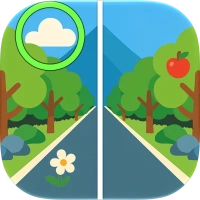
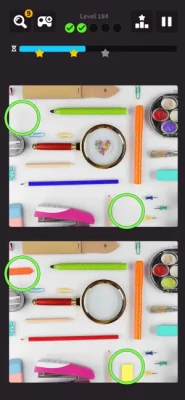
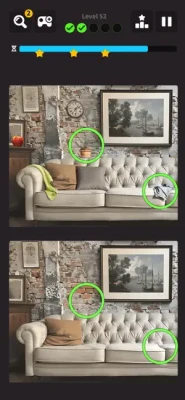
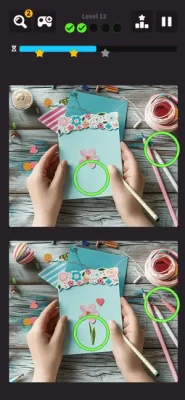
The game features familiar photographic scenes across several themes, including interiors, food, landscapes, and everyday objects. Its straightforward controls make it easy to start playing, while the time limit and penalties for incorrect taps add pressure that rewards observation, patience, and quick decision-making.
Players can progress through individual levels, use hints when a difference proves difficult to find, and try Challenge Mode, where they must tackle five pictures in one challenge. A leaderboard and star-based progression provide additional goals for players who enjoy improving their performance and competing with others.
Difference Find Quest also supports offline play, making it suitable for short puzzle sessions at home, during travel, or whenever an internet connection is unavailable.
What Is Difference Find Quest?
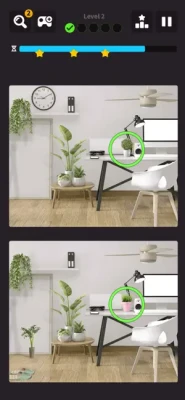
Difference Find Quest is a classic spot-the-difference puzzle game designed for players who enjoy visual challenges. Each level presents two pictures that appear almost identical. Your job is to inspect both images, recognize the details that do not match, and tap each difference to complete the puzzle.
Although the concept is simple, the time limit makes every decision important. A difference may be obvious at first glance, while another might be hidden in a small detail that requires closer inspection. Incorrect taps also result in a time penalty, so guessing randomly can make an otherwise manageable level much harder.
The game combines relaxed picture observation with a light competitive element. You can concentrate on completing ordinary levels, challenge yourself to find differences more quickly, or work toward collecting stars and improving your leaderboard performance.
Key features include:
Five hidden differences to discover in each standard picture puzzle.
A time limit that encourages efficient observation.
Time penalties for incorrect taps.
Photographic scenes featuring interiors, food, landscapes, and objects.
Challenge Mode with five pictures to solve in one challenge.
Hint items that help reveal difficult differences.
Star collection and leaderboard competition.
Offline gameplay without requiring Wi-Fi or a network connection for supported play.
Simple touch controls suitable for short gaming sessions.
The main skill you need is careful visual comparison. You do not need complicated controls or extensive gaming experience, but you will benefit from developing a consistent method for examining each picture.
How to Play Difference Find Quest
Getting started is easy, but learning how to search efficiently can make a significant difference in your results.
1. Examine Both Pictures
When a level begins, two similar images appear on the screen. Look at them as a pair rather than examining only one picture.
Your goal is to find five differences. These may involve an object that appears in one image but not the other, a change in color, a different shape, a missing detail, or a small alteration in the scene.
Avoid tapping as soon as something looks unusual. First, make sure you can identify the difference clearly.
2. Tap the Differences
When you locate a mismatch, touch the corresponding area on the screen. A correct selection should register the difference and allow you to continue searching.
Try to be accurate when tapping. If you select an incorrect area, the game applies a time penalty, reducing the time available to finish the puzzle.
3. Find All Five Differences
Continue comparing the images until you have identified all five differences.
Some levels may be easier than others. Familiar objects can be quick to recognize, while busy scenes with many small details may require a more systematic search.
Do not assume the remaining differences will be as obvious as the first ones. Slow down enough to inspect areas you may have overlooked.
4. Complete the Level Before Time Runs Out
Each puzzle has a time limit. If you fail to find all five differences before the timer expires, you fail the level and may need to try again.
The goal is to balance speed with accuracy. Rushing can lead to incorrect taps, but spending too long examining one small area can leave insufficient time for the rest of the picture.
5. Use Hints When Necessary
Hint items can help reveal a difference when you are struggling to locate it. They are especially useful when you have already found most of the differences but cannot identify the final one.
Use hints strategically instead of relying on them immediately. Learning to recognize common visual changes will make future puzzles easier.
6. Explore Challenge Mode
Once you understand the basic mechanics, try Challenge Mode. This mode lets you challenge yourself to find differences across five pictures in one challenge.
It requires stronger concentration and more consistent searching because you must manage your attention across multiple scenes.
7. Collect Stars and Improve Your Results
The game includes star collection and leaderboard features. These give you additional reasons to improve your speed and accuracy.
Rather than focusing only on finishing a puzzle, work on reducing mistakes and building a reliable search routine. Consistent performance is more useful than occasional success achieved through random tapping.
Complete Difference Find Quest Strategy Guide
The best way to improve in Difference Find Quest is to develop a repeatable method for comparing pictures. Instead of searching randomly, divide each image into sections, examine specific types of details, and use your time carefully.
The following strategies can help beginners learn the mechanics and help experienced players complete puzzles more efficiently.
Strategy 1: Divide Each Picture Into Sections
One of the most effective ways to find hidden differences is to examine the pictures in an organized pattern.
Start at the top and move gradually toward the bottom. You can divide each image into three horizontal sections or imagine a simple grid.
For example:
Top section: Examine the sky, walls, ceilings, signs, and objects near the upper edge.
Middle section: Compare furniture, people, food, decorations, and other prominent objects.
Bottom section: Check tables, floors, shadows, smaller items, and details near the lower edge.
The exact arrangement depends on the scene, but the principle remains the same: inspect every area instead of jumping between unrelated details.
A systematic search reduces the chance of overlooking a difference because you forgot to check part of the image.
Strategy 2: Look for Missing Objects First
Missing or added objects are often easier to recognize than subtle changes in color or shape.
Begin by scanning for items that appear in one picture but not the other. Check shelves, tables, windowsills, walls, and other places where objects may be positioned.
For example, a picture might contain an extra cup, a missing decoration, or an object that appears in only one version of the scene.
Once you have checked the larger objects, move on to smaller details.
This approach helps you secure obvious differences quickly while leaving enough time to investigate the more difficult ones.
Strategy 3: Compare Colors and Shapes
After checking for missing objects, examine the colors and shapes of the remaining items.
A small color change can be difficult to notice when you focus on the overall scene. Instead, compare individual objects between the two pictures.
Look for:
Different colors on clothing or decorations.
Changes in the shape of an object.
Altered patterns or markings.
Different numbers of visible items.
Small changes in an object's position.
Details that appear in one image but not the other.
Do not assume a difference must involve an entirely missing object. Sometimes the pictures look identical at first because the change affects only a small part of a familiar item.
Strategy 4: Pay Attention to Background Details
Players naturally focus on large objects near the center of a picture. This can make background differences easier to miss.
Once you have checked the main subjects, examine the surroundings carefully.
Look at wall decorations, windows, signs, plants, distant objects, and details near the edges of the scene. Background areas can contain subtle differences that become easier to recognize when you deliberately direct your attention toward them.
A useful habit is to finish each section by checking the background rather than assuming the main objects contain every answer.
Strategy 5: Avoid Random Tapping
Random tapping may occasionally reveal a difference by chance, but it is not a reliable strategy.
Incorrect selections cost time, and several mistakes can make it difficult to finish the level.
Before tapping, identify the exact feature that does not match. Confirm its position in both pictures and then select the corresponding area.
If you cannot explain what is different, continue examining the image instead of guessing.
Accuracy is especially important when the timer is low. A carefully chosen tap is more valuable than several rushed attempts that consume the remaining time.
Strategy 6: Use a Consistent Comparison Pattern
A consistent search pattern helps you recognize differences without wasting time deciding where to look next.
You might compare the pictures from left to right, top to bottom, or by following a clockwise route around the scene.
Choose one method and use it for the entire puzzle.
For example, begin in the upper-left corner, move across the top, inspect the center, and finish with the lower portion of the picture. If you find a difference, register it and continue from the next area rather than restarting your search.
Over time, this routine can make your observations more efficient and reduce repeated checks of areas you have already examined.
Strategy 7: Manage the Timer Carefully
The timer adds pressure, but speed alone is not the goal. You need to find all five differences while avoiding unnecessary penalties.
Divide your attention according to the difficulty of the scene. Spend less time on obvious objects and reserve additional attention for complicated areas.
If you have already identified four differences, resist the urge to tap randomly just to finish. The final difference may require a more careful comparison.
The best approach is to maintain a steady pace. A consistent search pattern helps prevent both excessive hesitation and careless mistakes.
Strategy 8: Use Hints at the Right Moment
Hints are valuable when a difference remains hidden despite a careful search.
Rather than using a hint as soon as the level begins, first inspect the main objects, colors, shapes, and background details. If you have exhausted your reasonable search options, a hint can help you continue.
Hints are particularly useful when:
Only one difference remains.
The picture contains many similar objects.
You have already spent considerable time searching.
The timer is getting low.
Repeated attempts have not revealed the missing detail.
The best moment to use a hint depends on the situation and the items available to you. The important point is to use it deliberately rather than automatically.
Strategy 9: Learn From Every Failed Attempt
Failing a level can help you improve if you review what happened.
Ask yourself whether you missed a background object, overlooked a color change, or lost too much time searching without a plan.
If you failed because of incorrect taps, focus on accuracy. If you spent too long examining one section, use a more structured scanning pattern next time. If the final difference remained hidden, pay closer attention to smaller details in future puzzles.
Do not repeat the same approach without making adjustments. Even a small change in your search method can make a difficult level more manageable.
Strategy 10: Prepare for Challenge Mode
Challenge Mode asks you to find differences across five pictures in a single challenge. This requires consistent performance rather than relying on one successful puzzle.
Before attempting it, practice the basic mode until you are comfortable scanning images and identifying common difference types.
During the challenge, keep your attention focused on the current picture. Avoid worrying about the remaining images before you finish the one in front of you.
A repeatable search method will help you maintain your pace and reduce unnecessary mistakes across multiple pictures.
Strategy 11: Improve Your Visual Attention Gradually
You do not need to identify every difference instantly to become a good player. Visual comparison is a skill that improves with practice.
Start by noticing larger differences and then train yourself to identify smaller ones. Over time, you may become faster at recognizing changes in shape, color, quantity, and position.
Avoid trying to memorize the exact layout of every picture. Instead, learn the types of details that commonly change and develop a reliable way to compare them.
This approach is more useful because it can be applied to unfamiliar scenes as well as pictures you have seen before.
Strategy 12: Balance Speed With Accuracy
Fast players are not necessarily the players who tap most frequently. Good performance comes from identifying differences efficiently and making accurate selections.
If you notice that your speed increases but your mistakes become more frequent, return to a slower and more deliberate approach.
Once your accuracy improves, gradually increase your pace.
This method helps you build reliable habits without allowing the timer to push you into unnecessary guesses.
Best Tips and Tricks for Difference Find Quest
These practical tips can make ordinary levels and Challenge Mode easier to manage.
Start With the Most Obvious Differences
Large color changes and missing objects are usually good places to begin. Finding them early helps you focus on the smaller details that remain.
Compare Similar Objects
When a picture contains several cups, plates, plants, or decorations, compare each item individually. Small differences can be difficult to notice when you look at the scene as a whole.
Check the Edges of the Picture
Do not focus exclusively on the center. Objects near the corners and edges can contain important details.
Look at the Background After the Main Subjects
Once the obvious objects have been checked, inspect walls, windows, signs, and other background elements.
Use Hints for Difficult Final Differences
If you have found four of the five differences and cannot locate the last one, a hint may be more useful than continuing to search aimlessly.
Keep Your Taps Precise
Touch the area where the difference appears and avoid tapping uncertain locations. Incorrect taps cause time penalties.
Practice in Short Sessions
Short, focused sessions can help you maintain concentration. If you become tired or start missing obvious differences, take a break and return later.
Avoid Rechecking the Same Areas
Remember which sections you have already examined. Move systematically so you do not waste time repeatedly inspecting the same objects.
Learn to Recognize Difference Types
Train yourself to look for missing objects, color changes, altered shapes, position changes, and small details. This makes your search more organized.
Focus on Consistency
Finishing several puzzles with few mistakes is a better foundation for improvement than rushing through one level and failing the next.
Difference Find Quest Challenge Mode Guide
Challenge Mode is designed for players who want to test their observation skills across five pictures in one challenge.
Because the mode requires you to handle multiple scenes, it is important to maintain a consistent approach from beginning to end.
Understand the Challenge
Before starting, make sure you understand the instructions and the objective. The central task remains identifying differences, but the multiple-picture format demands sustained attention.
Use the Same Search Pattern
Avoid changing your search method with every new picture. A familiar routine makes it easier to begin scanning immediately.
Start with prominent objects, check colors and shapes, and then examine background details.
Avoid Carrying Frustration Between Pictures
If one picture is difficult, do not let that experience distract you from the next. Treat each image as a separate puzzle and concentrate on the details in front of you.
Use Hints When They Offer Real Value
A hint can help you continue when you are stuck, but use it according to your needs. If you can identify the remaining differences through a quick systematic scan, save the hint for a more difficult situation.
Review Your Performance
After completing or failing a challenge, consider where you lost the most time. You may discover that you are good at spotting missing objects but struggle with small color changes.
Use that information to guide your practice.
How to Earn More Stars and Improve Your Leaderboard Performance
Difference Find Quest includes star collection and a leaderboard that allows players to compare their results with others.
Although exact scoring details may depend on the current game version, the most useful general strategy is to improve the speed and accuracy of your puzzle-solving routine.
Prioritize Accurate Selections
Incorrect taps create time penalties, so avoid guessing when you are uncertain. Better accuracy helps preserve the time you need to locate the remaining differences.
Learn Common Visual Patterns
The more familiar you become with common types of changes, the easier it may be to recognize them in new pictures.
Look for alterations in color, shape, quantity, position, and the presence or absence of objects.
Practice Before Competitive Attempts
Use ordinary levels to refine your technique before focusing on leaderboard results. Familiarity with the controls and a reliable scanning pattern can make competitive sessions less stressful.
Set Small Improvement Goals
Instead of trying to achieve your best possible result immediately, work on one skill at a time.
For example, aim to reduce incorrect taps, improve your speed when identifying obvious differences, or become more effective at checking backgrounds.
Gradual improvement is easier to maintain than constantly trying to beat your previous result.
Common Mistakes to Avoid in Difference Find Quest
Even simple picture puzzles can become difficult when you make avoidable mistakes.
1. Tapping Without Confirming a Difference
Random taps waste time and can lead to penalties. Identify the mismatch before selecting it.
2. Ignoring Background Details
The main subject is not always where the difference appears. Inspect the surrounding scene carefully.
3. Searching Without a Pattern
Jumping between unrelated areas makes it easy to overlook details. Use a consistent route across the image.
4. Spending Too Long on One Object
If an object appears identical after careful comparison, move to another section and return later if necessary.
5. Forgetting About Small Color Changes
Not every difference involves a missing object. Check colors, shapes, patterns, and small alterations.
6. Using Hints Too Early
Try a structured search first. Save hints for differences that remain difficult to locate.
7. Panicking When Time Runs Low
Rushing often leads to incorrect taps. Stay focused and examine the most promising areas instead of guessing.
8. Repeating Failed Strategies
If you repeatedly fail to find the final difference, change your search method. Pay more attention to background objects or inspect smaller details.
9. Attempting Challenge Mode Before Practicing
Challenge Mode requires consistency across multiple pictures. Learn the basic mechanics and develop a reliable routine before making it your main focus.
10. Focusing Only on Speed
Fast tapping is not the same as efficient puzzle-solving. Accuracy and a systematic search pattern are essential.
Is Difference Find Quest Free to Play?
Yes. Difference Find Quest is free to download and includes advertising.
The game offers hint items that can help you locate difficult differences. The exact availability of hints and any related options should be checked in the current game version.
You can enjoy the basic puzzle experience without purchasing a premium package. For players who prefer not to spend money, the best approach is to learn the picture-comparison mechanics, use hints carefully, and improve through regular practice.
Because the game supports offline play, it can also be a convenient choice for people who want to enjoy puzzles without relying on a continuous internet connection.
Graphics, Themes, and Gameplay Experience
Difference Find Quest uses photographic images to create familiar and recognizable puzzle scenes. The available themes include interiors, food, landscapes, and everyday objects, giving players a range of settings to explore.
The photographic approach makes the puzzles approachable because players can compare objects they recognize from daily life. At the same time, familiar scenes can contain subtle changes that require careful observation.
The interface centers on touch controls and side-by-side visual comparison. You do not need to master complex combinations or learn a large set of commands. Instead, the challenge comes from seeing small differences before the timer expires.
The time limit adds urgency, while the penalty for incorrect taps encourages accuracy. Players who prefer a relaxed experience can take their time learning the basic method, although the timed rules still apply during ordinary puzzles.
Challenge Mode adds another layer for those who want to test their concentration across multiple pictures. Star collection and leaderboard features provide further goals for players who enjoy improving their performance.
Overall, the game is best suited to people who enjoy visual puzzles, careful observation, and short sessions that test attention to detail.
Benefits of Playing Difference Find Quest
Spot-the-difference games offer several kinds of mental engagement, and Difference Find Quest provides a straightforward way to practice them.
Visual Observation
Comparing similar pictures encourages you to notice small changes in objects, colors, and shapes.
Attention to Detail
The requirement to find five differences encourages careful inspection rather than relying on a quick glance.
Concentration
The timer requires you to stay focused while moving through different sections of an image.
Pattern Recognition
Repeated play can help you become more familiar with common visual changes, making your search routine more efficient.
Decision-Making
You must decide when to keep searching, when to move to another section, and when a hint may be useful.
These are general benefits associated with visual puzzle activities, not a guarantee of specific cognitive improvements. The main purpose of the game is entertainment, and its value comes from the enjoyment of solving each challenge.
Difference Find Quest System Requirements and Compatibility
Difference Find Quest is available for iPhone and iPad. The App Store listing specifies iOS 12.0 or later for iPhone and iPadOS 12.0 or later for iPad.
The listed download size is approximately 119.1 MB, although the amount of storage used after installation may vary.
The game is categorized as a puzzle title, is free to download, and includes advertising. Its listed age rating is 13+.
Supported languages include English, French, German, Hindi, Indonesian, Italian, Japanese, Korean, Portuguese, Russian, Simplified Chinese, Spanish, Thai, Traditional Chinese, Turkish, and Vietnamese.
Before installing, check the current store listing on your device for the latest compatibility information and requirements.
Frequently Asked Questions About Difference Find Quest
What is Difference Find Quest?
Difference Find Quest is a spot-the-difference puzzle game developed by MOBIRIX. Players compare two similar pictures and identify five hidden differences in each standard puzzle.
How many differences do you need to find?
You must find five differences in each standard picture puzzle to complete the level.
How do you play Difference Find Quest?
Examine the two pictures, identify an area that does not match, and tap the corresponding location. Find all five differences before the timer expires to complete the level.
What happens if you tap the wrong area?
An incorrect tap results in a time penalty. Avoid guessing randomly and confirm each difference before selecting it.
Does Difference Find Quest have a time limit?
Yes. Standard puzzles have a time limit. If you fail to locate all five differences before time runs out, you fail the level.
What is Challenge Mode?
Challenge Mode allows you to challenge yourself by finding differences across five pictures in one challenge. It is suitable for players who want to test their observation skills and consistency.
Can I use hints?
Yes. Hint items can help reveal a difficult difference. They are particularly useful when you cannot find the final mismatch after a careful search.
How can I find differences faster?
Use a consistent scanning pattern, start with obvious missing objects, compare colors and shapes, and inspect the background. Avoid random tapping because incorrect selections cause time penalties.
Does Difference Find Quest work offline?
Yes. The game supports offline play, so you can enjoy supported puzzle gameplay without Wi-Fi or a network connection.
Does the game have a leaderboard?
Yes. Difference Find Quest includes a leaderboard and star collection, giving players additional goals beyond simply completing levels.
Is Difference Find Quest free?
Yes. It is free to download and includes advertising. Check the current in-game options for details about any available hint-related purchases or other offers.
Who developed Difference Find Quest?
The game was developed by MOBIRIX, a mobile game developer.
Is Difference Find Quest suitable for beginners?
Yes. Its touch controls and simple objective make it easy to learn. The main challenge is developing the observation skills needed to identify all five differences before time runs out.
What types of pictures are included?
The game features photographic scenes across themes such as interiors, food, landscapes, and everyday objects.
What should I do if I cannot find the final difference?
Return to the areas you have not examined carefully, compare small color and shape changes, and check the background and edges. If you are still stuck, consider using a hint.
Final Verdict: Is Difference Find Quest Worth Playing?
Difference Find Quest is a good option for players who enjoy visual puzzles and the satisfaction of spotting details others might overlook. Its familiar photographic scenes, five-difference objective, hint system, Challenge Mode, and leaderboard features create a straightforward but engaging puzzle experience.
The game is easy to start, but completing levels consistently requires a methodical approach. By dividing pictures into sections, checking for missing objects, comparing colors and shapes, and avoiding random taps, you can improve your efficiency and make better use of the available time.
Beginners should concentrate on learning the basic mechanics and developing a reliable search pattern. More experienced players can focus on Challenge Mode, improving accuracy, and earning better results.
With offline support and simple touch controls, Difference Find Quest is well suited to short puzzle sessions at home or on the go. If you enjoy testing your attention to detail and solving picture-based challenges, it is worth trying.
Rate the Game
User Reviews










Popular Games



















 Android
 iOS
iOS Windows
 Xbox
Xbox