


Latest Version
December 17, 2025
Fanatee, Inc.
Word
iOS
0
Report a Problem
More About :game
Stop is a competitive word game from Fanatee that transforms the classic paper-and-pencil category game into a mobile multiplayer experience.
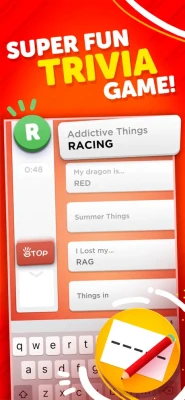
Each round gives you one letter and five categories. Your task is to enter a word for every category that begins with the selected letter before the 60-second timer expires. Once the round ends, your answers are compared and the player with the strongest collection of correct responses wins.
The simple rules make Stop easy to understand, but the limited time and unpredictable categories can make individual rounds surprisingly challenging.
How Does Stop Categories Word Game Work?
The basic gameplay is straightforward:
- A letter is randomly selected.
- Five categories appear.
- You have 60 seconds.
- Find one suitable word for each category.
- Submit your answers.
- Correct answers are evaluated.
- Compete against your opponent for the best result.
The challenge comes from finding answers quickly while avoiding obvious mistakes.
For example, if the selected letter is B, categories might ask for a food, animal, country, profession, and movie. You need to think of five appropriate answers beginning with B before the clock reaches zero.
200+ Categories to Explore
One of Stop's biggest strengths is its huge variety of categories.
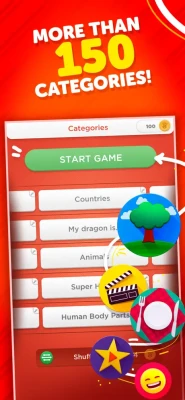
The App Store lists 200+ categories and counting, which means rounds can feel very different depending on the combination selected.
Categories can test knowledge across areas such as:
- Animals
- Food
- Places
- Movies
- Sports
- Professions
- Famous people
- Objects
- Entertainment
- Everyday life
- General trivia
This variety prevents the game from becoming simply a spelling exercise. You need both vocabulary and general knowledge to consistently perform well.
The 60-Second Challenge
Time is one of the most important mechanics in Stop.
You have 60 seconds to provide five answers.
That creates an interesting balance between speed and accuracy. Spending too much time searching for an unusual answer could leave another category incomplete, while entering the first word that comes to mind could result in an invalid answer.
The best players learn to quickly identify easy answers and move through the categories efficiently.
Multiplayer Word Battles
Stop is designed around competition.
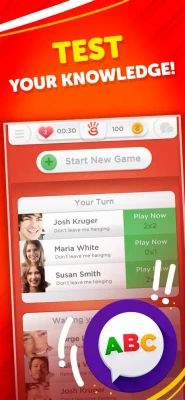
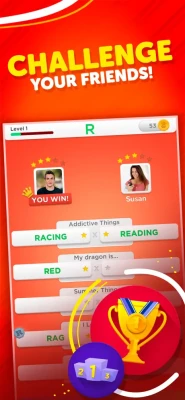
You can connect with friends using personalized nicknames, Facebook, or Game Center, or allow the game to match you with another opponent.
This makes Stop particularly appealing when you want a quick competitive game without committing to a long multiplayer session.
You can challenge someone you already know or test your vocabulary against a new opponent.
Play With Friends
Playing Stop with friends adds a social element to the traditional category game.
Instead of simply trying to beat your own score, you can compare answers and see who can produce the most creative and accurate words.
It's especially well suited to short breaks, casual competition, family gaming, or friendly vocabulary challenges.
Random Opponents
Don't have a friend available?
Stop can match you with a fresh opponent, allowing you to keep playing without needing to organize a multiplayer session first.
This keeps the competitive side of the game active even when your usual opponents aren't online.
Levels and Progression
Stop isn't only about winning individual rounds.
The game includes a progression system in which players can earn experience and advance through levels. Achievements also give players additional goals to pursue.
This creates a sense of long-term progression and gives frequent players reasons to continue improving their vocabulary and performance.
Achievements
Players can unlock achievements that recognize their progress and vocabulary skills.
Achievements provide another objective beyond simply winning a single round. For completion-focused players, they can become an additional reason to experiment with different strategies and continue playing.
The App Store confirms that Stop supports achievements through Game Center.
Multilingual Word Game
Stop is also useful for players who enjoy language-based challenges.
The game supports:
- English
- Dutch
- French
- German
- Italian
- Portuguese
- Russian
- Spanish
- Turkish
The App Store currently lists English plus eight additional languages.
This makes the game more accessible to an international audience and can also make it interesting for players practicing vocabulary in another supported language.
Gameplay Strategy
Winning Stop isn't necessarily about knowing the most words. It's about combining knowledge, speed, and decision-making.
A good strategy is to scan all five categories first. Identify the easiest categories and answer those immediately. Then spend the remaining time on categories that require more thought.
Don't become stuck on one difficult category while four easy answers remain unfinished.
Beginner Tips
Start With the Easiest Category
If you immediately recognize an answer, enter it rather than spending time searching for a better option.
Keep Moving
Getting stuck on one category can cost you valuable seconds. If an answer doesn't come quickly, move to another category.
Think Beyond the Obvious
Common answers may come to mind first, but unusual valid words can sometimes give you an advantage over an opponent.
Learn Difficult Letters
Letters such as Q, X, Y, and Z can be challenging. Building a mental collection of useful words beginning with these letters can make future rounds easier.
Improve Your Vocabulary
The more words you know, the faster you'll be able to respond under pressure.
Advanced Stop Strategy
Experienced players can improve their results by preparing mentally for difficult categories and letters.
Instead of trying to memorize thousands of random words, build groups of words around common categories.
For example, learn several:
- Animals beginning with difficult letters
- Countries and cities
- Foods
- Professions
- Famous people
- Sports terms
- Objects
- Movie titles
This allows you to retrieve an answer faster when the clock is running.
Handling Difficult Letters
A difficult letter can completely change the pace of a round.
If you receive a letter such as Q, X, Y, or Z, don't panic. Start with the category where you have the strongest knowledge.
Then work through the remaining categories.
The important thing is to keep thinking rather than wasting most of the timer on one answer.
Some App Store reviewers have specifically mentioned the challenge of difficult letters and the limited number of obvious words available for them.
Zen Mode
Stop also offers Zen Mode, which provides a less stressful alternative for players who don't want the same competitive pressure.
According to the App Store listing and player feedback, Zen Mode allows players to work with a more relaxed one-minute window rather than being forced into the same pressure of racing another player.
This can be particularly appealing if your main goal is vocabulary practice rather than winning every match.
Hints and Coins
The game includes coins and hint-related mechanics.
Hints can help players when they are struggling to find an appropriate answer. Other features can also use coins, providing additional strategic choices during gameplay.
This creates another layer of resource management for players who want help during particularly difficult rounds.
Game Modes and Features
Stop offers a combination of competitive and relaxed experiences.
Multiplayer Battles
Challenge friends or compete against randomly matched opponents.
Timed Word Rounds
Race against the 60-second clock to complete your categories.
Zen Mode
Play in a more relaxed format.
Achievements
Complete goals and demonstrate your word-game skills.
Level Progression
Earn experience as you continue playing.
Language Support
Play across nine supported languages.
Category Variety
Explore more than 200 categories.
Controls and Interface
Stop uses a simple text-entry interface designed to keep the focus on the words rather than complicated controls.
The basic interaction is:
Read → Think → Type → Submit
Because there are no complex controls to learn, almost anyone familiar with mobile keyboards can understand the gameplay quickly.
Graphics and Presentation
Stop doesn't need elaborate 3D graphics to make its gameplay engaging.
Its presentation focuses on colorful category screens, readable text, timers, player information, and quick access to answers. The clean interface helps keep attention on the actual word challenge.
The result is a game that feels closer to a modern digital version of a classic word-party game than a traditional action or puzzle title.
Sound and Game Feel
The game's presentation is built around quick rounds and immediate feedback.
The timer adds urgency while answer validation and scoring create a satisfying competitive rhythm.
The overall design makes Stop suitable for short sessions rather than requiring players to sit down for a lengthy gaming experience.
Stop Categories Word Game on iPhone and iPad
The U.S. App Store currently lists Stop for iPhone and iPad. It requires iOS 15.6 or later and has an app size of approximately 174.6 MB.
Developer: Fanatee
Genre: Word / Trivia
Price: Free with in-app purchases
Age Rating: 13+
Platforms: iPhone, iPad
Languages: English, Dutch, French, German, Italian, Portuguese, Russian, Spanish, Turkish
Game Center: Supported
Is Stop Categories Word Game Free?
Yes. Stop is listed as a free download on the App Store, although optional in-app purchases are available.
The U.S. listing includes purchases such as coin packs, ad removal, Infinite Lives, Full Recharge, and Zen Mode.
Does Stop Have Ads?
Yes. The App Store indicates that the game contains advertising, while an optional Remove Ads purchase is available.
Player Experience
Stop has a strong overall reception on the U.S. App Store, where it currently holds a 4.6 out of 5 rating from approximately 106,000 ratings.
Players commonly praise the fast rounds, vocabulary challenge, multiplayer competition, and ability to play with friends.
Some reviews also point out potential frustrations, including difficult letters, advertisements, and occasional disagreements over whether particular answers should be accepted.
Pros and Cons
Pros
- Simple rules
- Fast 60-second rounds
- 200+ categories
- Multiplayer gameplay
- Play with friends
- Random opponent matching
- Level progression
- Achievements
- Nine supported languages
- Zen Mode
- Easy to learn
- Strong player rating
Cons
- Difficult letters can make some rounds frustrating
- Advertising is included
- Some categories can be challenging depending on your knowledge
- Answer validation may occasionally feel restrictive
- Some optional features require in-app purchases
Who Should Play Stop?
Stop is a great choice for players who enjoy:
- Word games
- Trivia games
- Vocabulary challenges
- Multiplayer word games
- Games with friends
- Brain-training style games
- Quick mobile games
- Party games
- Category games
- Language games
- Competitive puzzles
It's especially suitable if you like games where knowledge and quick thinking matter more than complicated controls.
Stop vs Traditional Word Games
Traditional word games often focus on crossword clues, anagrams, spelling, or word searches.
Stop takes a different approach.
Instead of solving a predefined puzzle, you have to generate your own answers. The letter and category determine the challenge, but the actual solution comes from your vocabulary and general knowledge.
That makes every round unpredictable.
Expert Rating
| Category | Rating |
|---|---|
| Gameplay | 9.0/10 |
| Word Challenge | 9.2/10 |
| Multiplayer | 9.0/10 |
| Replay Value | 9.1/10 |
| Category Variety | 9.2/10 |
| Accessibility | 9.0/10 |
| Progression | 8.5/10 |
| Overall | 9.0/10 |
Final Verdict
Stop - Categories Word Game is one of those games that proves a simple idea can remain remarkably addictive.
Its formula is easy to understand: one letter, five categories, and 60 seconds to find the answers. But the combination of time pressure, vocabulary, general knowledge, multiplayer competition, and hundreds of categories gives the game plenty of replay value.
Whether you're challenging a friend, competing against a random opponent, working toward achievements, or simply trying to improve your vocabulary, Stop offers a quick and accessible word-game experience.
For fans of multiplayer word games, trivia games, category games, and fast brain challenges, Stop is an excellent choice for iPhone and iPad.
Frequently Asked Questions
What is Stop Categories Word Game?
Stop is a multiplayer word trivia game where you receive one letter and five categories and must find an appropriate word for each category within 60 seconds.
How long is a Stop round?
The standard round gives players 60 seconds to complete five categories.
How many categories does Stop have?
The App Store lists more than 200 categories, with additional categories continuing to be added.
Can I play Stop with friends?
Yes. You can connect with friends through personalized nicknames, Facebook, or Game Center.
Can I play against strangers?
Yes. Stop can match you with a fresh opponent when you don't want to play with someone you already know.
Does Stop have achievements?
Yes. The game includes achievements, and its App Store listing confirms Game Center support.
What languages does Stop support?
Stop supports English, Dutch, French, German, Italian, Portuguese, Russian, Spanish, and Turkish.
Is Stop available on iPad?
Yes. Stop is available for both iPhone and iPad.
Is Stop free to play?
Yes. The game is free to download, with optional in-app purchases.
Who developed Stop?
Stop was developed by Fanatee, Inc.
Rate the Game
User Reviews





Popular Games



















 Android
 iOS
iOS Windows
 Xbox
Xbox