

Latest Version
September 19, 2026
H2T GLOBAL PTE. LTD.
Puzzle
Android
0
com.My.Dream.Satis.Room
Report a Problem
More About :game
If you enjoy home decorating games, interior design puzzles, cozy games and relaxing room makeover challenges, My Dream Satis Room offers a simple way to experiment with different styles without the pressure of traditional competitive gameplay.
The basic idea is straightforward: start with a room, choose suitable furniture and decorations, arrange the space, and gradually turn it into a finished home.
The Google Play listing describes the experience as relaxed and easy to pick up, with rooms ranging from kitchens and bedrooms to living rooms and gaming setups. Completing rooms unlocks additional spaces throughout the house.
Game Information
| Feature | Details |
|---|---|
| Game Title | My Dream Satis Room |
| Developer | H2T GLOBAL PTE. LTD. |
| Genre | Puzzle |
| Gameplay | Home design, room decoration and customization |
| Main Theme | Dream home creation |
| Rooms | Bedrooms, kitchens, living rooms, gaming spaces and more |
| Decorations | Furniture, rugs, plants, lamps, wallpapers and other items |
| Customization | Colors, furniture, floors and wallpapers |
| Companion | Cat |
| Unlockable Areas | Walk-in closets, game rooms, poolside lounges and more |
| Visual Style | Colorful, cozy and decorative |
| Rating | Rated 3+ |
| Contains | Ads |
| Latest listed update | August 25, 2026 |
The information above is based on the current Google Play listing.
What Is My Dream Satis Room?
My Dream Satis Room is built around the satisfaction of taking an empty or unfinished room and gradually turning it into a comfortable living space.
Rather than concentrating on fast reactions or difficult combat, the game focuses on decoration, organization, color choices and room customization.
You can experiment with different combinations of:
- Sofas
- Beds
- Rugs
- Plants
- Lamps
- Wallpapers
- Flooring
- Decorative objects
- Gaming furniture
- Other home accessories
The game encourages you to create rooms according to your own preferred style.
Main Features
Design Every Room
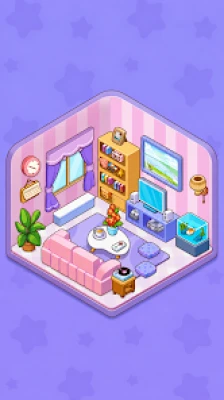
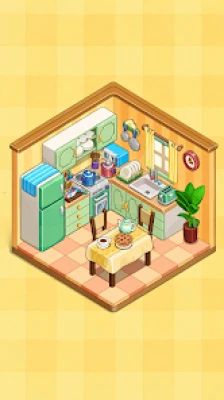
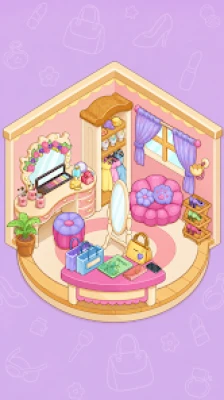
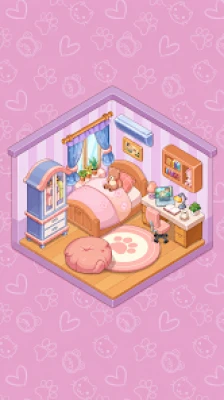
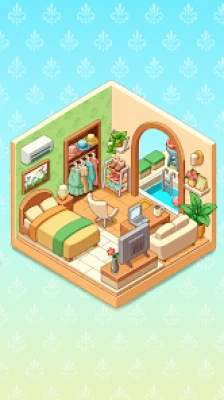
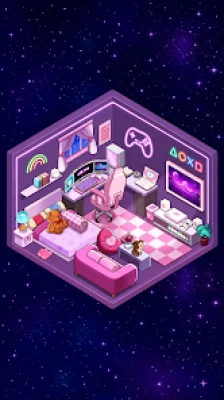
The game offers different types of rooms to decorate, including a sunny kitchen, dreamy bedroom, stylish living room and neon-inspired gaming setup.
Each room provides an opportunity to experiment with a different atmosphere.
A bedroom might benefit from warm colors and soft furniture, while a gaming room can use brighter colors and more energetic decorations.
Customize Your Home
One of the biggest attractions is the ability to change the appearance of your rooms.
You can experiment with:
Walls + floors + furniture + decorations = your personal room style
The listing specifically highlights the ability to swap wallpapers, floors and furniture to create different looks.
Hundreds of Decor Items
The Google Play description says that hundreds of decorative items are available, including furniture and accessories.
This provides plenty of room for experimentation when deciding how to fill an empty space.
Cute Cat Companion
A cheerful cat accompanies you as your dream home develops.
The cat adds a friendly character element to an otherwise design-focused experience.
Unlock New Spaces
Completing rooms isn't the end of the game.
The listing says that finishing rooms allows you to unlock additional areas such as:
- Walk-in closets
- Game rooms
- Poolside lounges
- Other parts of the house
This gives players a reason to continue decorating instead of treating each room as an isolated challenge.
Full My Dream Satis Room Strategy Guide
1. Start With the Room's Purpose
Before placing furniture, think about what the room is supposed to be.
For example:
Bedroom
Focus on comfort and relaxation.
Kitchen
Prioritize functional-looking arrangements and clear walking areas.
Living Room
Create a central seating area and balance larger furniture with smaller decorations.
Gaming Room
Use stronger colors and organize furniture around the gaming setup.
Understanding the room's purpose makes decoration decisions much easier.
2. Choose Your Main Style First
Don't randomly place every item you like.
Instead, choose a general style before decorating.
Some possible themes include:
- Cozy
- Pastel
- Modern
- Wooden
- Minimal
- Colorful
- Neon
- Playful
The Google Play listing specifically mentions pastel, cozy wood and glowing neon as examples of different visual directions.
Once you select your theme, choose furniture that supports it.
3. Pick the Wallpaper Before Small Decorations
The walls occupy a large part of the room, so the wallpaper can establish the entire mood.
If you're building a calm bedroom, a softer wall treatment can provide a comfortable background.
For a gaming room, a more energetic design may work better.
Once the wallpaper is chosen, select flooring that complements it.
4. Match the Floor With the Walls
A common decorating mistake is choosing a great wall design without considering the floor.
Think about the two together.
For example:
Warm walls + wooden floor = cozy atmosphere
Bright walls + modern floor = contemporary look
Neon walls + darker floor = gaming atmosphere
You don't need every element to match perfectly. A little contrast can make the room more interesting.
5. Place Large Furniture First
Start with the biggest objects.
Depending on the room, these could include:
- Bed
- Sofa
- Dining table
- Desk
- Gaming setup
- Cabinets
Large furniture establishes the room's structure.
Once those pieces are positioned, use smaller decorations to fill empty areas.
6. Don't Overcrowd the Room
More furniture doesn't necessarily mean a better room.
Leave enough visual space around major objects.
An overcrowded room can make individual decorations difficult to appreciate.
Try this approach:
Large furniture → medium furniture → small decorations
Stop adding items when the room begins to feel visually crowded.
7. Use Rugs to Connect Areas
Rugs can help visually separate different parts of a room.
For example, in a living room, a rug can define the seating area.
In a bedroom, it can make the area around the bed feel more complete.
Use rugs as visual anchors rather than placing them randomly.
8. Add Plants for Balance
Plants are useful for filling empty corners without making the room feel overly crowded.
Try placing them near:
- Windows
- Empty corners
- Shelves
- Seating areas
A few carefully positioned plants can make a room feel more finished.
9. Use Lighting to Establish Mood
Lamps can dramatically change the feeling of a room.
For a cozy space, use lighting as part of the relaxing atmosphere.
For a gaming room, brighter or more colorful lighting can complement the theme.
Don't place every lamp together. Spread lighting elements throughout the room.
10. Build Around a Focal Point
Every room benefits from having something that immediately attracts attention.
Examples include:
- A large bed
- A beautiful sofa
- A gaming setup
- A decorative wall
- A large plant arrangement
Once you choose your focal point, arrange the surrounding furniture so that it supports rather than competes with it.
Advanced Decorating Strategy
Use the Three-Level Decoration Method
A simple way to create a balanced room is to divide decorations into three sizes.
Large
Beds, sofas, tables and major furniture.
Medium
Chairs, cabinets, desks and larger decorative objects.
Small
Plants, lamps and small accessories.
Using all three levels creates visual depth.
Create Color Harmony
You don't need every object to use the same color.
Instead, choose a small group of complementary colors.
For example:
Main color: soft blue
Secondary color: white
Accent: warm yellow
Or:
Main color: beige
Secondary color: brown
Accent: green
This creates a more organized appearance without making the room boring.
Use Contrast Carefully
Contrast can make certain decorations stand out.
A darker floor can make lighter furniture more noticeable.
A bright lamp can become a focal point in a darker room.
The key is moderation.
Too much contrast can make the room feel chaotic.
Room-by-Room Decorating Guide
Bedroom Strategy
Start with the bed because it will normally be the room's dominant piece.
Then add:
- Bedside furniture
- Rug
- Lighting
- Plants
- Wall decoration
- Smaller accessories
Keep the design comfortable rather than filling every available space.
Living Room Strategy
Start with the sofa.
Then build a social area around it using appropriate furniture.
A good sequence is:
Sofa → rug → table → lamps → plants → small decorations
Try to create a visually connected seating area.
Kitchen Strategy
Keep the main furniture organized.
Avoid placing decorative objects where they make the room look difficult to use.
Use color coordination between cabinets, flooring and walls.
Gaming Room Strategy
This is where you can experiment with a more energetic style.
Consider:
- Stronger colors
- Gaming furniture
- Neon-inspired decoration
- A central gaming setup
- Decorative lighting
The Google Play listing specifically includes a neon gaming setup among the room themes.
How to Unlock New Rooms
Completing existing rooms is an important part of progression.
The current Google Play description states that finishing rooms unlocks new areas of the house, including walk-in closets, game rooms and poolside lounges.
Therefore, don't spend all your time endlessly modifying one room.
Once you're satisfied with a completed space, move forward and work toward unlocking the next area.
Best Progression Strategy
A useful progression loop is:
Complete room → unlock area → decorate new room → experiment with new style → complete → unlock another space
This keeps the experience fresh while gradually expanding your dream home.
Common Decorating Mistakes
Adding Too Much Furniture
A room needs breathing space.
Ignoring the Floor
The floor is part of the overall color scheme.
Mixing Too Many Styles
A room can contain different furniture types, but too many unrelated styles can make the design feel disconnected.
Using Only One Color
Matching everything perfectly can make the room feel flat.
Forgetting Empty Corners
Small plants, lamps or decorations can make unused spaces feel intentional.
Decorating Without a Focal Point
Choose one major visual element and build around it.
Relaxing Gameplay Experience
My Dream Satis Room is designed to be played casually.
The Google Play description emphasizes an easy, satisfying experience that can be enjoyed during short breaks or relaxed sessions.
There is no need to approach it like a competitive game.
Instead, the appeal comes from experimenting with different room layouts and gradually seeing the house become more complete.
Graphics and Atmosphere
The game focuses on a cozy, colorful home-design aesthetic.
Different room themes allow the atmosphere to change substantially, from warm bedrooms and comfortable living spaces to bright gaming rooms.
The cat companion also reinforces the friendly, relaxing character of the game.
Is My Dream Satis Room a Puzzle Game?
Yes. Google Play currently categorizes My Dream Satis Room under the Puzzle genre, although its gameplay is centered heavily around home decoration and room customization.
Is My Dream Satis Room Suitable for Kids?
The current Google Play listing gives the game a 3+ content rating.
Parents should still consider the presence of advertisements when deciding whether the game is appropriate for a particular child.
Does My Dream Satis Room Have Different Rooms?
Yes. The game features multiple room types and unlockable areas. The current description mentions kitchens, bedrooms, living rooms, gaming setups, walk-in closets and poolside lounges.
Does the Game Have a Cat?
Yes. A cheerful cat companion accompanies the player while the home is being developed.
My Dream Satis Room Tips at a Glance
| Goal | Recommended Approach |
|---|---|
| Start decorating | Choose the room's purpose |
| Pick a style | Select a main theme first |
| Build the room | Place large furniture before small items |
| Improve appearance | Coordinate walls and flooring |
| Avoid clutter | Leave open space |
| Add personality | Use plants, lamps and accessories |
| Create balance | Mix large, medium and small objects |
| Make rooms memorable | Choose a clear focal point |
| Progress | Complete rooms to unlock new spaces |
| Experiment | Try different color and furniture combinations |
Frequently Asked Questions
What is My Dream Satis Room?
My Dream Satis Room is a cozy room-design and home-decoration puzzle game where players furnish rooms, change colors and wallpapers, and gradually create their dream home.
What can you decorate?
You can decorate rooms using furniture, beds, sofas, rugs, plants, lamps, wallpapers, flooring and other decorative items.
Can you customize the room's colors?
Yes. The game allows players to experiment with wallpapers, floors and furniture to create different visual styles.
Does My Dream Satis Room have a cat companion?
Yes. A friendly cat accompanies the player as they develop their dream home.
What rooms can you create?
The current listing mentions a sunny kitchen, dreamy bedroom, stylish living room and neon gaming setup, along with additional unlockable spaces.
How do you unlock new spaces?
Complete rooms to unlock additional areas of the house, including spaces such as walk-in closets, game rooms and poolside lounges.
Is My Dream Satis Room relaxing?
The game is specifically presented as a relaxed decorating experience without pressure, with simple gameplay intended for short or casual sessions.
Does the game contain advertisements?
Yes. The current Google Play listing indicates that the game contains ads.
Rate the Game
User Reviews












Popular Games



















 Android
 iOS
iOS Windows
 Xbox
Xbox