
Latest Version
September 02, 2026
Grand Games A.Ş.
Puzzle
iOS
0
Report a Problem
More About :game
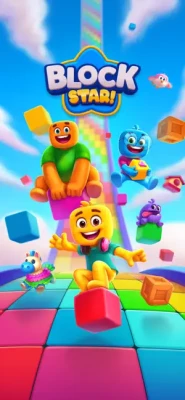
Block Star: Puzzle Adventure is a casual puzzle game from Grand Games A.Ş. that combines classic block placement with a more colorful adventure-style presentation.
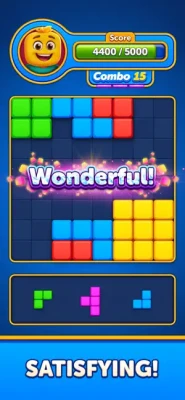
The main objective is straightforward: drag blocks onto available spaces, complete rows or columns, and clear them from the board. The real challenge comes from deciding where to place each shape so that you do not run out of useful space.
As you progress, new items and designs are introduced, giving players additional reasons to keep improving their scores and testing different strategies.
How Block Star: Puzzle Adventure Works
The gameplay loop is simple:
- Look at the available block shapes.
- Find an open position on the board.
- Drag and drop the block into place.
- Complete a horizontal row or vertical column.
- Clear the completed line.
- Use the newly available space to continue building the board.
- Create combos and aim for a higher score.
The game rewards players who think ahead instead of filling the board randomly.
Gameplay Overview
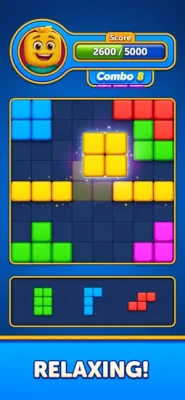
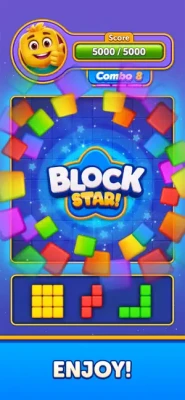
Block Star focuses on the satisfying rhythm of placing blocks, clearing lines, creating combos, and opening new space.
Every move affects the future shape of the board. A placement that looks useful immediately may leave an awkward gap later, while a carefully planned move can complete several lines or set up a powerful combination.
This makes the game easy enough for casual players while still offering room for strategic decision-making.
Block Placement Mechanics
The main control is drag and drop.
Players choose a block shape and move it into an available position. The goal is to fit shapes together efficiently while avoiding unnecessary gaps.
Good placement is particularly important when larger shapes appear. Leaving enough open space gives you more options on future turns and reduces the risk of becoming trapped by an awkward board configuration.
Clearing Rows and Columns
Completing rows and columns is the foundation of Block Star's gameplay.
When a line is completed, it clears from the board and creates additional room. This creates a natural cycle:
Place → Complete → Clear → Create Space → Plan Again
Learning to recognize opportunities to clear both rows and columns is one of the most important skills for improving your score.
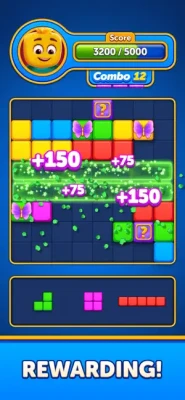
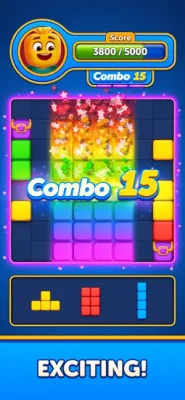
Combos and Chain Reactions
Combos add another layer of satisfaction to the basic block puzzle formula.
Instead of simply clearing one line at a time, players can plan placements that create multiple clearing opportunities. A well-designed board can therefore turn a single move into a much more rewarding sequence.
The official App Store description highlights powerful combos as a central part of the experience.
Endless Score Challenge
Block Star encourages players to beat their previous scores.
Rather than simply completing a fixed objective, the scoring system gives you a reason to improve your board-management skills and experiment with more efficient placements.
For players who enjoy replayable puzzle games, chasing a personal high score can become one of the most appealing parts of the experience.
New Items and Designs
Progression introduces new items and unique designs as you continue playing.
This helps keep the basic block-placement mechanic from feeling completely static. The developer specifically describes new items being unlocked as players progress.
Game Features
Satisfying Block Puzzles
Place colorful shapes and clear completed rows and columns.
Simple Drag-and-Drop Controls
The controls are easy to understand and require no complicated combinations.
Strategic Placement
Think ahead and leave enough room for future blocks.
Powerful Combos
Create efficient clearing sequences for more satisfying gameplay.
High-Score Challenge
Keep improving your score and see how far you can go.
New Items
Unlock additional items as you progress.
Unique Designs
The game introduces different visual designs as you continue playing.
Smooth Animations
Fluid movement and satisfying clearing effects make individual moves feel rewarding.
Offline Play
Block Star can be played without Wi-Fi, making it convenient for offline puzzle sessions.
Ad-Free Claim
The current App Store description promotes the game as ad-free.
Controls and Interface Guide
Block Star keeps its controls deliberately simple.
Drag: Pick up a block and move it across the board.
Drop: Release the block in an available position.
Board: Use the open spaces to build complete rows and columns.
Score: Track your progress and try to beat your previous best.
The simple interface allows players to focus on board management rather than learning complicated controls.
How to Play Block Star: Puzzle Adventure
Start by examining the available shapes before placing anything.
Rather than immediately choosing the first available space, consider how the block will affect the remaining board. Try to maintain several open areas so that different shapes can still fit later.
When possible, position blocks so that one placement can help complete multiple lines.
The key is to think about future space, not just the current move.
Beginner's Guide
1. Keep the Board Open
Avoid filling large areas without a clear reason. Open space gives you flexibility.
2. Plan Around Large Shapes
Large or unusual pieces can become difficult to place if the board is too crowded.
3. Clear Lines Regularly
Do not allow completed lines to remain unnecessarily blocked.
4. Look for Multiple Clears
Try to place blocks where they can contribute to both a row and a column.
5. Think One Move Ahead
Before dropping a block, ask where your next piece could realistically go.
Advanced Strategy
Experienced players should focus on space management and combo preparation.
Instead of maximizing every immediate line clear, sometimes it is better to leave a particular space open because it can accommodate a difficult block later.
Try to maintain several different-sized open areas. This reduces the chances that one awkward piece will suddenly make the board impossible to manage.
Another useful technique is to build toward multiple simultaneous clears. If one placement can complete more than one line, it can produce a much better result than several isolated clears.
Tips for Getting Higher Scores
- Keep the center and important open spaces available.
- Avoid creating narrow gaps that only one specific shape can use.
- Plan for large blocks before the board becomes crowded.
- Look for opportunities to clear rows and columns together.
- Use combos whenever they can be created naturally.
- Don't sacrifice the entire board for one immediate line clear.
- Think about the next two or three placements.
- Try to beat your previous score rather than playing only for completion.
Game Progression
Block Star uses progression to introduce new items and designs while encouraging players to continue improving their scores.
The App Store description specifically states that new items unlock as you progress.
This creates two complementary goals: continue advancing through the experience and improve your personal performance.
Difficulty
The basic controls are extremely accessible, but the strategic difficulty comes from limited board space.
Early gameplay can feel relaxing because players have plenty of room to experiment. As the board becomes more complicated, however, careless placement can quickly reduce your options.
Player reviews on the App Store generally praise the game's visuals and smooth gameplay, although some players have reported that level layouts can become repetitive later in progression.
Game Experience
Block Star works particularly well as a casual puzzle game because a single move can be completed quickly, while longer sessions can become focused on achieving a high score.
The absence of complicated controls also makes it easy to return to the game after a break.
Its combination of block placement, line clearing, combos, and score chasing gives it a familiar puzzle foundation while the colorful presentation adds its own identity.
Graphics and Visual Style
The game uses a bright, colorful presentation with smooth motion and clean board layouts.
The visual feedback is particularly important when rows and columns disappear. Seeing the board open up after a successful placement gives each good move a satisfying sense of progress.
The App Store listing describes the design as clean and unique, with smooth motion throughout the puzzle experience.
Sound and Feedback
The game is designed around satisfying feedback when blocks are placed and lines are cleared.
Rather than relying on complicated gameplay systems, much of the enjoyment comes from seeing the board respond to your decisions and watching successful combinations clear multiple pieces of space.
Offline Gameplay
One of Block Star's useful features is offline support.
The App Store description states that no Wi-Fi is required, allowing players to enjoy the puzzle experience when an internet connection is unavailable.
This makes it suitable for travel, commuting, waiting rooms, or short breaks.
Technical Information
- Game: Block Star: Puzzle Adventure
- Developer: Grand Games A.Ş.
- Genre: Puzzle / Casual
- Platforms: iPhone and iPad
- Minimum Requirement: iOS 13.0 or later
- iPad Requirement: iPadOS 13.0 or later
- Age Rating: 4+
- Languages: English, Portuguese, Spanish
- App Size: Approximately 775.6 MB
- Business Model: Free with in-app purchases
- Category: Puzzle
- Current App Store Version: 1405
- Latest listed update: April 8, 2026
In-App Purchases
Block Star is free to download but includes optional in-app purchases.
The current US App Store listing includes several packages, including Star Bundle, Mini Bundle, Adventure Bundle, coin packages, Mega Bundle, and Legendary Bundle.
Player Ratings and Reviews
At the time of checking, the US App Store listing shows 4.7 out of 5 stars from 620 ratings.
Player feedback highlights the game's colorful visuals, smooth gameplay, and satisfying puzzle mechanics.
There are also requests for additional level variety and obstacles. One reviewer praised the game but felt that some layouts became repetitive after progressing substantially.
Another recent review criticized the presence of intrusive advertising despite the App Store's current description promoting the game as ad-free. This is worth presenting carefully on an independent game page because it reflects individual user feedback rather than an official feature description.
Pros and Cons
Pros
- Easy-to-learn drag-and-drop controls
- Colorful and polished presentation
- Satisfying row and column clearing
- Strategic block placement
- Combo opportunities
- High-score replayability
- New items unlock through progression
- Offline gameplay
- Available for iPhone and iPad
- Strong App Store rating
Cons
- Large app size for a casual puzzle game
- Some players report repetition in later layouts
- Players have requested more varied obstacles and challenges
- Optional in-app purchases are available
- Some user feedback has raised concerns about advertising
Who Should Play Block Star?
Block Star is a good fit for players who enjoy:
- Block puzzle games
- Classic line-clearing puzzles
- Casual brain games
- Relaxing mobile games
- High-score challenges
- Offline puzzle games
- Drag-and-drop games
- Colorful casual games
- Strategic placement games
- Satisfying puzzle experiences
It is particularly suitable for players who prefer games that are easy to start but reward better planning over time.
Similar Games
Players who enjoy Block Star may also like other block puzzle games, line-clearing puzzles, and brain-training games.
The App Store's recommendation section currently includes titles such as Block Rush, Block Dash, Block Match, Block Flower, Block Puzzle Fun, Puzzle Blocks Classic, Cube Busters, Block Puzzle Gem Blast, Block Kingdom, and Block Master.
Block Star: Puzzle Adventure Review
Block Star: Puzzle Adventure succeeds because its core idea is instantly understandable.
You pick up a block, find a place for it, and try to complete rows and columns. Yet underneath that simplicity is a familiar strategic challenge: every piece changes the space available for everything that comes next.
The strongest part of the experience is the combination of simple controls and meaningful placement decisions. Clearing several lines through one carefully planned move feels much more rewarding than simply filling the board.
The colorful presentation and smooth animations reinforce that satisfying feeling, while offline play makes the game convenient for casual sessions.
The main area for improvement is long-term variety. Some player reviews praise the experience while also asking for more obstacles, challenges, and varied layouts as progression continues.
Overall, Block Star is an accessible and polished choice for anyone who enjoys classic block puzzles with a colorful modern presentation.
Expert Rating
Gameplay: 8.5/10
Puzzle Design: 8.5/10
Controls: 9/10
Visuals: 8.5/10
Replay Value: 8/10
Accessibility: 9/10
Overall: 8.5/10
Final Verdict
Block Star: Puzzle Adventure delivers a simple but satisfying block puzzle experience centered on smart placement, row and column clearing, combos, and high-score chasing.
Its drag-and-drop controls make it approachable from the first move, while limited board space gives experienced players plenty of opportunities to improve their strategy. Offline support and a colorful presentation make it especially convenient for casual mobile gaming.
If you enjoy block puzzle games, relaxing brain games, line-clearing challenges, and satisfying mobile puzzles, Block Star: Puzzle Adventure is a strong game to try.
Frequently Asked Questions
What is Block Star: Puzzle Adventure?
Block Star: Puzzle Adventure is a casual block puzzle game where players drag and drop shapes onto a board, complete rows and columns, create combos, and try to achieve high scores.
Is Block Star: Puzzle Adventure free?
Yes. The game is free to download and includes optional in-app purchases.
How do you play Block Star?
Drag available blocks onto open spaces on the board. Complete horizontal rows or vertical columns to clear them and create more space for future blocks.
Can Block Star be played offline?
Yes. The App Store description states that the game does not require Wi-Fi.
Does Block Star have combos?
Yes. Combos are an important part of the game's satisfying scoring and clearing system.
Does Block Star have different levels?
The game includes progression with new items and designs being unlocked as players continue.
Is Block Star available on iPhone?
Yes. The App Store lists Block Star for iPhone and iPad and requires iOS/iPadOS 13.0 or later.
What is the age rating for Block Star?
The App Store currently lists the game with a 4+ age rating.
Does Block Star receive updates?
Yes. The version history shows repeated bug-fix and improvement updates, with version 1405 listed on April 8, 2026.
Rate the Game
User Reviews






Popular Games



















 Android
 iOS
iOS Windows
 Xbox
Xbox