

Latest Version
September 28, 2026
UNICO STUDIO
Puzzle
iOS
0
Report a Problem
More About :game
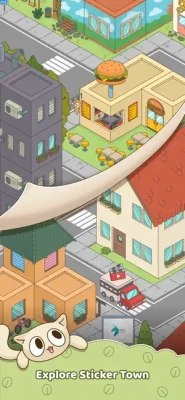
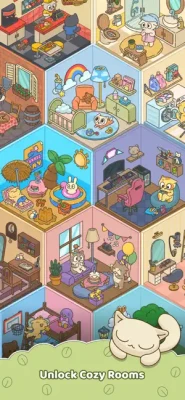
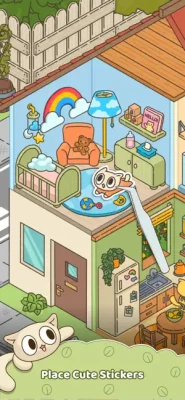
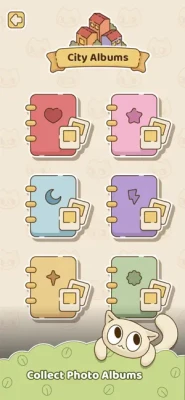
The gameplay is intentionally relaxed. You open sticker packs, place the stickers on the board, merge matching items, and gradually work toward completing collections. Finished sticker packs unlock new areas of your Sticker Town, including cozy bedrooms, art studios, and sunny gardens.
The game also includes an energy system, gems, undo boosters, daily rewards, events, special coconut rewards, and offline-friendly play. Three sticker packs remain open at a time, giving you several collection goals to work toward without making the experience feel rushed.
Game Information
- Game: My Sticker Town: Merge & Stick
- Developer: UNICO STUDIO
- Genre: Puzzle
- Game Style: Merge Puzzle / Sticker Collection / Decoration
- Players: Single-player
- Platforms: iPhone and iPad
- Age Rating: 4+
- Requires: iOS 15.0 or later
- Languages: English plus 18 additional languages
- Offline Friendly: Yes
- In-App Purchases: Yes
- Contains Advertising: Yes
- App Store Rating: 4.8/5 at the time of checking, based on 35 ratings
What Is My Sticker Town: Merge & Stick?
My Sticker Town is a relaxing merge and collection game built around the idea of creating your own colorful sticker-filled town.
The basic gameplay loop is easy to understand:
Open sticker packs → collect stickers → merge matching stickers → complete packs → unlock rooms → decorate your town.
Each merge can transform two identical stickers into a more advanced design. As you continue collecting and merging, you gradually complete sticker sets and unlock additional decorating opportunities.
The result is a game that mixes the satisfaction of a merge puzzle with the creativity of a room-decorating game.
How to Play My Sticker Town
1. Open a Sticker Pack
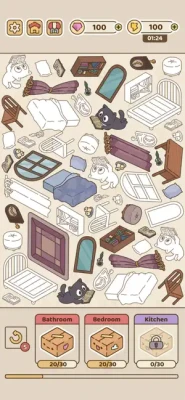
Tap an available sticker pack to generate a random sticker.
The game keeps three sticker packs open, giving you multiple collection objectives to work toward.
2. Place Stickers on the Board
New stickers appear on your board and become part of your growing collection.
Pay attention to where you place them because keeping the board organized makes future merges easier.
3. Find Matching Stickers
Look for two stickers with the same design.
When you have a matching pair, bring them together.
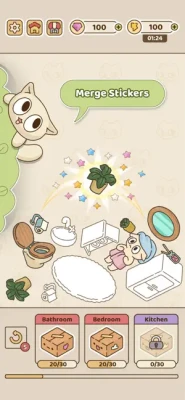
4. Merge Identical Stickers
Merge two identical stickers to evolve them into a new design.
This is the central puzzle mechanic.
5. Complete Sticker Packs
Continue collecting and merging until the required sticker collection is complete.
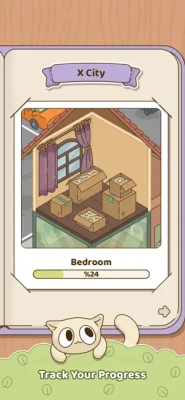
Completing packs moves your overall town progression forward.
6. Unlock New Rooms
Finished sticker collections can unlock themed Sticker Rooms.
The App Store specifically highlights settings such as bedrooms, art studios, and sunny gardens.
7. Decorate Your Town
Use your completed collections to bring new rooms to life.
The decoration system gives your progress a visual reward rather than simply increasing a numerical score.
My Sticker Town Main Features
Sticker Collection
Collecting stickers is the foundation of the game.
Each sticker becomes part of a larger collection, encouraging you to keep opening packs and searching for matching pieces.
Merge Evolution
Two identical stickers can be merged into a new design.
This creates a simple progression chain where basic stickers can eventually become more developed designs.
Sticker Packs
Sticker packs provide the main collection objectives.
Rather than playing an endless board with no clear destination, you have specific collections to complete.
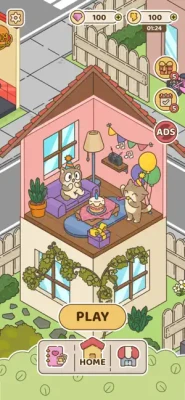
Room Decoration
Completing collections contributes to your Sticker Town.
New themed rooms provide a visual sense of progression and give your sticker collection a purpose.
Cozy Themes
The game features colorful and relaxed environments, including bedrooms, art studios, and gardens.
This gives the game a softer atmosphere than many competitive puzzle games.
Energy System
Opening stickers uses energy.
Energy gradually refills over time, while gems can also be used within the game's energy system.
Undo Booster
An undo booster lets you reverse your last move or help free up space when your board becomes crowded.
This is especially useful when you accidentally merge or place something in an inconvenient position.
Gems and Special Rewards
Gems form part of the game's progression economy, while special items such as energy and coconut rewards can be collected during play.
Daily Rewards and Events
Daily rewards provide free energy, gems, and undo boosters, while events add additional reasons to return to the game.
Offline-Friendly Gameplay
My Sticker Town is designed to be playable without an internet connection, making it suitable for casual sessions while traveling or when a connection is unavailable.
Full My Sticker Town Strategy Guide
Although My Sticker Town is designed to be relaxing rather than highly competitive, smart board management can make collecting stickers much easier.
1. Keep Your Board Organized
The most important habit is to avoid filling the board with random stickers.
When possible, group identical stickers together.
A tidy board makes matching pairs much easier to identify.
2. Merge Matching Stickers Quickly
When you have two identical stickers, consider merging them instead of allowing them to occupy separate spaces.
Merging reduces clutter and advances the sticker's evolution.
3. Do Not Merge Blindly
While merging is usually useful, pay attention to your current sticker packs.
You may want to keep track of which stickers are still required to finish an active collection.
4. Watch Your Three Open Packs
Because the game keeps three sticker packs open, you have several progression paths available at once.
Use this to your advantage.
If one collection is difficult because you are not getting the stickers you need, continue working on another available pack.
5. Prioritize Nearly Completed Packs
If one sticker pack is missing only a few items, focus your attention there when possible.
Completing an almost-finished collection can unlock the next room sooner than spreading your progress evenly across every pack.
6. Save Board Space
Board space becomes increasingly valuable as stickers accumulate.
Avoid keeping unnecessary duplicate pieces scattered around the board.
Look for opportunities to merge and consolidate your collection.
7. Use Undo Carefully
The undo booster is particularly useful when a move creates a space problem or when you realize that your previous action was not ideal.
Do not spend it automatically.
Save it for situations where reversing the move gives you a meaningful advantage.
8. Think Before Opening More Stickers
New stickers are exciting, but generating additional pieces can make a crowded board harder to manage.
Before opening another pack, check how much free space you have.
9. Use Energy Wisely
Energy refills over time, so you do not always need to spend gems immediately when your energy is low.
If you are not in a hurry, waiting for natural regeneration can help conserve premium resources.
10. Check Daily Rewards
Daily rewards can provide useful resources such as energy, gems, and undo boosters.
Make checking your daily rewards part of your normal routine.
Advanced My Sticker Town Tips
Build Around Available Space
Do not think only about which stickers you need.
Think about where future stickers will go.
A board with several open areas gives you more flexibility than one packed with isolated pieces.
Merge From the Outside In
When your board becomes crowded, try to consolidate stickers toward fewer areas.
This can leave larger open sections for new stickers.
Complete Collections Efficiently
When a pack is close to completion, concentrate on the missing stickers instead of making random merges.
The objective is not simply to create the highest-level sticker. It is to complete the collection.
Keep Rare Progress Visible
If you have an unusual or advanced sticker that you need for a collection, avoid accidentally obscuring it among unrelated pieces.
Organizing the board by collection can make this easier.
Do Not Waste Premium Resources
Gems are more valuable when used to solve an actual problem.
Before spending gems, ask whether waiting for energy regeneration or reorganizing the board can solve the issue without spending anything.
My Sticker Town Energy Strategy
Energy controls how quickly you can generate additional stickers.
Because energy refills over time, the most efficient approach depends on how actively you want to play.
Short Session
Use available energy to make a few merges, then leave the game and return later.
Long Session
Use your available energy while working toward a specific sticker pack, but avoid spending gems unnecessarily just to continue playing immediately.
Resource-Focused Play
Allow energy to regenerate naturally and collect daily rewards before using premium currency.
This gives you more resources without requiring constant spending.
How to Manage a Full Board
A crowded board can quickly make the game harder.
When space becomes limited:
- Look for identical pairs.
- Merge obvious matches.
- Consolidate related stickers.
- Remove unnecessary clutter.
- Use an undo booster if a recent move caused the problem.
- Only then generate additional stickers.
The goal is to create space before the board becomes completely blocked.
How to Complete Sticker Packs Faster
Focus on collections that are already close to completion.
For example, if a pack is missing only a few stickers while another pack still needs many, finishing the nearly complete collection can provide a quicker progression milestone.
At the same time, do not completely ignore your other two active packs. The three-pack system gives you flexibility when one collection temporarily stops progressing.
Room Decoration Guide
The decoration side of My Sticker Town gives your merging a larger purpose.
Instead of collecting stickers only for their own sake, completed sticker sets help unlock themed rooms.
The game currently highlights:
- Cozy bedrooms
- Art studios
- Sunny gardens
- Other colorful themed spaces as the town expands
The best way to approach the decoration system is to treat every completed sticker pack as a step toward expanding your town.
My Sticker Town Beginner Tips
If you are just starting, keep these rules in mind:
- Keep matching stickers close together.
- Merge duplicates to save board space.
- Watch your three active sticker packs.
- Prioritize collections that are nearly finished.
- Do not fill the board unnecessarily.
- Check your energy before opening new stickers.
- Save undo boosters for genuine mistakes.
- Collect daily rewards.
- Do not spend gems when waiting will solve the problem.
- Keep your board organized by sticker type or collection.
Common Mistakes in My Sticker Town
Opening Too Many Stickers at Once
Generating more stickers when the board is already crowded can create unnecessary problems.
Ignoring Duplicate Stickers
Two identical stickers occupying separate spaces are using valuable board capacity.
Spending Gems Too Quickly
Premium resources are useful, but not every shortage requires an immediate purchase.
Forgetting About Active Packs
You may spend time making merges without realizing that another collection is much closer to completion.
Using Undo Without a Clear Purpose
Undo boosters are limited resources. Use them when reversing a move genuinely improves your board.
My Sticker Town: Merge & Stick Pros and Cons
Pros
- Simple merge gameplay
- Cute and colorful sticker designs
- Collectible sticker packs
- Room decoration
- Cozy visual style
- Daily rewards
- Events
- Energy and gem systems
- Undo boosters
- Three active sticker packs
- Offline-friendly gameplay
- Relaxed, no-rush approach
Cons
- The gameplay is intentionally simple, so players looking for demanding strategic puzzles may find it fairly casual.
- Progress depends partly on random sticker drops.
- Energy limits how quickly you can generate stickers.
- The game contains advertising and optional in-app purchases.
- Current player feedback indicates that some players would like more rooms and areas as the game expands.
Who Should Play My Sticker Town?
My Sticker Town is particularly suited to players who enjoy:
- Merge puzzle games
- Sticker collecting games
- Casual puzzle games
- Relaxing mobile games
- Room decoration games
- Collection games
- Cozy games
- Matching games
- Offline-friendly games
- Creative casual games
- Cute puzzle games
- Merge and match games
It is especially appealing if you prefer a slower, more relaxed experience rather than timed challenges or competitive gameplay.
My Sticker Town vs Traditional Merge Games
Many merge games focus primarily on combining objects to create increasingly advanced items.
My Sticker Town adds a collection and decoration layer.
The progression can be viewed as:
Merge → Collect → Complete Pack → Unlock Room → Decorate Town
This gives each merge a longer-term purpose.
You are not simply trying to create a better sticker. You are working toward completing a collection and expanding your personal Sticker Town.
My Sticker Town FAQ
What is My Sticker Town: Merge & Stick?
My Sticker Town: Merge & Stick is a casual puzzle game where players collect stickers, merge identical designs, complete sticker packs, unlock themed rooms, and decorate a colorful town.
Who developed My Sticker Town?
The game was developed by UNICO STUDIO.
How do you merge stickers?
Tap an available sticker pack to generate stickers, then bring two identical stickers together to merge them into a new design.
What happens when you complete a sticker pack?
Completed sticker packs help unlock new Sticker Rooms that you can use to expand and decorate your town.
How many sticker packs can be open?
The game states that it keeps three open sticker packs available at a time.
Does My Sticker Town have an energy system?
Yes. Opening stickers uses energy, which refills over time. Gems can also be used as part of the energy system.
What is the undo booster?
The undo booster allows you to reverse your last move or help free up board space after an unwanted move.
Can you play My Sticker Town offline?
The App Store describes the game as offline friendly, allowing you to play without an internet connection.
Does My Sticker Town have daily rewards?
Yes. Daily rewards can include free energy, gems, and undo boosters.
Is My Sticker Town free?
The game is listed as free to download, with advertising and optional in-app purchases.
Is My Sticker Town suitable for children?
The App Store currently gives the game an 4+ age rating.
Does My Sticker Town have room decoration?
Yes. Completing sticker packs helps unlock themed rooms that can be decorated as you expand your Sticker Town.
Final Thoughts
My Sticker Town: Merge & Stick takes the familiar merge-puzzle formula and combines it with sticker collecting and room decoration.
The most effective approach is to keep the board organized, merge duplicate stickers regularly, focus on nearly completed packs, conserve energy and gems, and use undo boosters when they can genuinely solve a board-space problem.
The real progression is simple:
Collect stickers → merge matching designs → complete packs → unlock rooms → decorate your Sticker Town.
For players looking for a relaxing merge puzzle, sticker collection game, cozy decoration game, or casual offline-friendly experience, My Sticker Town offers a gentle progression system centered on collecting and creativity.
Rate the Game
User Reviews






Popular Games



















 Android
 iOS
iOS Windows
 Xbox
Xbox