

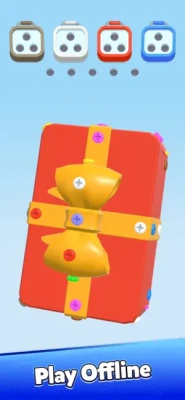
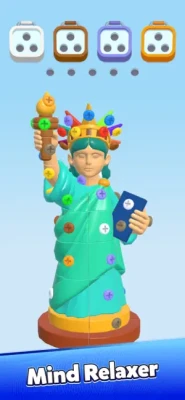
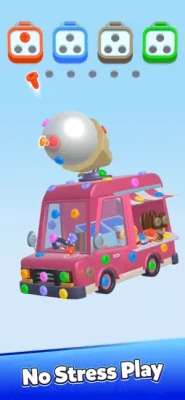
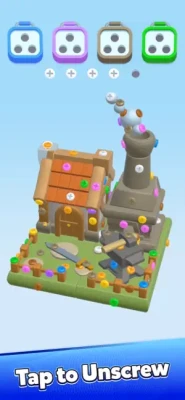
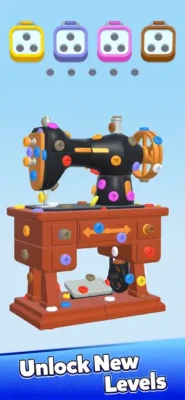
Latest Version
September 29, 2026
UNICO STUDIO
Puzzle
iOS
0
Report a Problem
More About :game
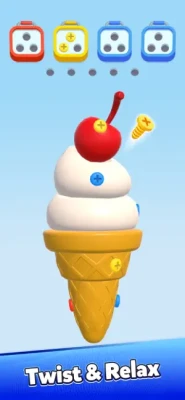
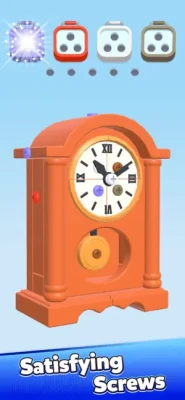
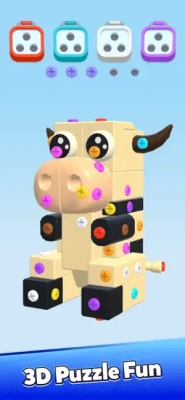
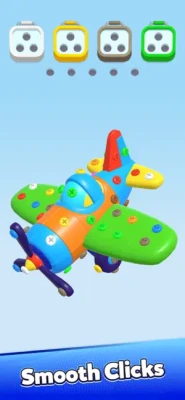
The basic controls are easy to understand, but later puzzles require considerably more planning. Removing one screw can change the position of an entire section, expose another screw or block an important route.
The current App Store listing describes hundreds of levels, daily challenges, level packs, no-timer gameplay, 3D visuals, ASMR-style sound effects and offline play.
What Is Screw Out 3D?
Screw Out 3D is a 3D screw puzzle and sorting game built around the satisfying process of taking objects apart.
Instead of simply matching identical pieces, you have to understand how the structure is assembled.
A typical puzzle may contain:
- Screws
- Nuts
- Bolts
- Bars
- Plates
- Colored pieces
- Different shapes
- Hidden components
- Limited tray space
The challenge is deciding which screw to remove first.
That makes the game part logic puzzle, part spatial puzzle and part sorting challenge.
Screw Out 3D Gameplay
The gameplay follows a simple concept:
Inspect → Unscrew → Move → Sort → Dismantle → Clear
You begin by examining the 3D structure.
Some screws will be immediately accessible, while others are hidden underneath or blocked by other components.
Removing the wrong screw at the wrong time can make the puzzle much more difficult.
The goal is therefore not simply to remove screws quickly.
The goal is to remove them in a useful order.
Main Features
3D Screw Puzzles
Each level presents a three-dimensional structure that must be dismantled piece by piece.
Unscrew Mechanics
The central interaction is twisting and removing screws with carefully chosen movements.
Color and Shape Sorting
The game goes beyond basic screw removal by incorporating color and shape organization.
Hundreds of Levels
The App Store listing describes a large collection of levels ranging from beginner-friendly puzzles to more difficult challenges.
Daily Challenges
Daily challenges provide additional puzzles beyond the regular level progression.
Level Packs
Additional level packs give players more structures and sorting challenges to work through.
No Timers
The game is designed around solving puzzles at your own pace rather than racing against a countdown.
Relaxing 3D Presentation
Smooth animations, tactile interactions and ASMR-style sounds are a major part of the experience.
Offline Play
The App Store describes Screw Out 3D as playable without an internet connection, making it suitable for travel and short offline sessions.
How to Play Screw Out 3D
The first step is to inspect the entire structure.
Don't immediately remove the first screw you see.
Instead, identify:
- Which screws are exposed
- Which pieces are covering others
- Which screws appear to hold larger components
- Where removed screws can be placed
- Which colors need to be sorted
- Which parts may fall or move after a screw is removed
Then begin dismantling the structure in a controlled order.
A useful rule is:
Remove the screw that creates the most useful new option.
Screw Out 3D Strategy Guide
1. Study the Structure Before Unscrewing
The 3D design can make it tempting to start twisting immediately.
Resist that temptation.
Rotate the structure and examine it from different angles.
Look for:
- Hidden screws
- Overlapping plates
- Screws holding multiple pieces
- Blocked components
- Possible removal paths
Understanding the structure before making your first move can prevent a lot of unnecessary mistakes.
2. Rotate the Object Frequently
A screw that looks impossible to reach from the front may be easy to access from the side.
Use the 3D view to inspect:
- Front
- Back
- Left
- Right
- Top
- Bottom
Don't assume that what you see from the starting angle represents the entire puzzle.
3. Remove Blocking Screws First
Some screws are important because they prevent an entire component from moving.
These are your blocking screws.
If removing one screw allows a plate or bar to move freely, that screw may be more important than another screw that is easier to remove.
Think about what each screw controls.
4. Don't Always Choose the Easiest Screw
The easiest screw to reach is not necessarily the correct first move.
A simple screw may lead nowhere.
Another screw may unlock several components.
Before removing a screw, ask:
What will become possible after this screw is gone?
This is one of the most important habits for harder levels.
5. Watch for Falling or Moving Pieces
When a screw is removed, the structure can change.
A plate may become loose.
A bar may move.
A previously hidden screw may become visible.
A piece can also occupy a new position.
After every major removal, pause and inspect the structure again.
Don't continue with the original plan automatically.
6. Think About Screw Order
Screw Out 3D is fundamentally an order-based puzzle.
Imagine three screws:
A → B → C
Removing A might make B accessible.
Removing B might expose C.
But removing C first may do nothing useful.
Therefore, the challenge isn't simply identifying the screws.
It is identifying their correct sequence.
7. Use Tray Space Carefully
Sorting introduces another strategic consideration.
When you remove pieces, you may need to place them into appropriate trays or spaces.
Avoid creating unnecessary clutter.
If you have several possible pieces to remove, consider which one gives you the most useful space afterward.
8. Pay Attention to Colors
Color becomes especially important on sorting-focused puzzles.
Don't simply remove pieces because they are accessible.
Look at the overall color arrangement.
If several pieces of one color can be grouped together, organizing them efficiently can reduce future clutter.
9. Pay Attention to Shapes
Color is not always enough.
The game also includes shape-based sorting challenges.
Two pieces can look similar in color but behave differently because of their shape.
Before placing a component, check both:
Color + Shape
This is particularly important on more complicated levels.
10. Keep Important Space Available
Don't fill every available tray position immediately.
Leave enough flexibility to handle the pieces you still need to remove.
A good puzzle-solving mindset is:
Space is a resource.
Once your available space becomes limited, your choices become limited too.
11. Look for the Key Piece
Many 3D structures contain one component that effectively controls the rest of the puzzle.
It may be:
- A central plate
- A long bar
- A large panel
- A hidden screw
- A piece covering several others
Find the component that is preventing the most progress.
Then work backward to determine what must be removed first.
12. Work Backward From the Goal
If you know which component needs to be removed last, ask:
What needs to happen immediately before that?
Then:
What needs to happen before that?
Working backward can reveal the correct sequence when several screws appear equally important.
13. Don't Rush
The App Store specifically presents the game as a no-timer experience.
Use that to your advantage.
Take your time.
Rotate the object.
Look at the structure.
Think about the next two or three moves.
There is little benefit in making fast mistakes when careful observation can solve the same puzzle more efficiently.
14. Recheck the Puzzle After Every Major Move
The board can change significantly after removing one important screw.
After a major change:
- Stop.
- Rotate the structure.
- Look for newly exposed screws.
- Check whether pieces have shifted.
- Reconsider your next move.
This prevents you from following an outdated plan.
15. Learn From Failed Attempts
If you reach a dead end, don't simply restart without thinking.
Ask:
Which move caused the problem?
Maybe you:
- Removed a screw too early
- Filled an important tray
- Blocked another component
- Missed a hidden screw
- Used the wrong sorting order
Understanding the mistake makes the next attempt much easier.
Screw Out 3D Walkthrough Strategy
If you're stuck on a specific level, use this systematic method.
Step 1: Rotate the entire structure
Look at it from multiple angles.
Step 2: Identify all visible screws
Don't remove anything yet.
Step 3: Find blocked components
Determine which parts cannot move because of specific screws.
Step 4: Find the key screw
Look for the screw whose removal creates the most new possibilities.
Step 5: Check available space
Make sure removing the component won't create a sorting problem.
Step 6: Remove one screw
Then stop and reassess.
Step 7: Search for newly exposed pieces
A new screw or component may now be accessible.
Step 8: Continue in sequence
Repeat until the structure is completely dismantled.
How to Solve Difficult Screw Out 3D Levels
When a puzzle becomes difficult, divide it into smaller problems.
Instead of trying to solve the entire structure at once, identify:
Phase 1: Access
Which screws can currently be reached?
Phase 2: Unlock
Which screw will release an important component?
Phase 3: Remove
Which component can now be safely dismantled?
Phase 4: Sort
Where should the removed pieces go?
Phase 5: Repeat
Which new screw has become available?
This makes complicated structures much easier to understand.
Advanced Screw Out 3D Strategy
For harder puzzles, classify each screw mentally.
Access Screw
A screw that is easy to remove and provides access to another area.
Blocking Screw
A screw preventing a component from moving.
Key Screw
A screw whose removal unlocks multiple possibilities.
Low-Priority Screw
A screw that can be removed later without affecting your main route.
Final Screw
A screw that becomes useful only after surrounding components have been removed.
Thinking in these categories can turn a confusing 3D structure into a logical sequence.
Common Mistakes
Removing Screws Randomly
Random removal can make the structure harder to manage.
Ignoring the Back of the Structure
Important screws may be hidden from the initial viewpoint.
Focusing Only on Color
Shape and position can also matter.
Filling Storage Too Early
Limited space can turn a solvable puzzle into a difficult one.
Forgetting That the Structure Changes
Removing one component can expose an entirely new part of the puzzle.
Moving Too Fast
The game has no timer, so there is little reason to rush.
Screw Out 3D Tips for Beginners
Rotate before removing
Always inspect the object from multiple angles.
Start with structure, not speed
Understand what each screw appears to control.
Find the bottleneck
Look for the component blocking the greatest number of possibilities.
Preserve space
Don't fill every available sorting position.
Reassess after every major removal
The puzzle can change after a component comes loose.
Use color and shape together
Sorting isn't always based on one characteristic.
Think two or three moves ahead
Short-term planning is often enough to avoid mistakes.
Stay patient
The game is designed around calm, deliberate puzzle solving.
Screw Out 3D Difficulty
The game starts with accessible screw-removal puzzles but gradually introduces more complicated structures and sorting situations.
The App Store describes the progression as ranging from beginner-friendly to “mind-bending” levels.
The difficulty generally comes from:
- More screws
- More components
- More colors
- More shapes
- Tighter spaces
- Hidden parts
- More important move order
The controls remain relatively simple.
The decision-making becomes harder.
Daily Challenges and Level Packs
Screw Out 3D also includes daily challenges and level packs, providing additional ways to play beyond the standard progression.
For daily challenges, the same fundamentals remain useful:
Inspect → Identify the key screw → Preserve space → Remove systematically.
Because the game has no traditional timer, careful observation remains more valuable than rushing.
Is Screw Out 3D Relaxing?
Screw Out 3D is intentionally designed around tactile interactions, smooth 3D visuals and ASMR-style sound effects.
The App Store describes the experience as a relaxing puzzle loop where each screw turn, match and click provides a small sensory reward.
The result is a combination of:
- Puzzle solving
- Visual organization
- Mechanical interaction
- Color sorting
- Relaxing sound effects
That makes it different from faster-paced action or arcade games.
Screw Out 3D Review
Screw Out 3D: Nut Sort Jam combines a familiar “unscrew everything” concept with a deeper sorting and spatial-planning system.
The most interesting part of the gameplay is that removing a screw isn't always the objective by itself. You need to understand what the screw is holding together and what its removal will reveal.
The current US App Store listing shows 4.7 out of 5 from approximately 34K ratings, while the game is listed as a Puzzle title from UNICO STUDIO.
Player feedback is mixed on some aspects of the experience. Positive reviews describe the dismantling mechanic as satisfying and mentally engaging, while some players have raised concerns about advertising, extra storage/bolt spaces and progression-related mechanics. These are individual player reports rather than universal characteristics of every player's experience.
The App Store also shows a developer response to a report about frequent full-screen advertising, stating that the issue had been fixed in a subsequent update.
Pros and Cons
Pros
- Satisfying screw-removal mechanics
- Creative 3D structures
- Color and shape sorting
- Hundreds of levels
- Daily challenges
- Level packs
- No traditional timers
- Smooth 3D presentation
- ASMR-style sound effects
- Offline play
- Simple controls with increasing strategic depth
Cons
- Later puzzles can become difficult
- Some levels require careful management of available space
- Player reviews have raised concerns about advertising and progression mechanics
- Optional in-app purchases are available
- Some players may find repeated sorting mechanics less varied over long sessions
Screw Out 3D Game Information
| Feature | Details |
|---|---|
| Game | Screw Out 3D: Nut Sort Jam |
| Developer | UNICO STUDIO |
| Category | Puzzle |
| Main Gameplay | Unscrew, dismantle and sort |
| Perspective | 3D |
| Levels | Hundreds |
| Challenges | Daily challenges and level packs |
| Timer | No traditional timer |
| Offline Play | Yes, according to App Store description |
| Controls | Touch / screw interaction |
| Age Rating | 4+ |
| Monetization | Free with in-app purchases |
| Advertising | Yes |
| Languages | English + 18 more |
| iPhone | Supported |
| iPad | Supported |
| iOS Requirement | iOS 15.0 or later |
The current App Store listing provides these compatibility and game details.
Compatibility
Screw Out 3D currently supports iPhone and iPad. The App Store lists iOS 15.0 or later for iPhone and iPadOS 15.0 or later for iPad. It also lists Mac and Apple Vision compatibility under their respective system requirements.
Languages
The current listing supports English plus 18 additional languages, including:
- Arabic
- Czech
- French
- German
- Indonesian
- Italian
- Japanese
- Korean
- Malay
- Polish
- Portuguese
- Russian
- Simplified Chinese
- Spanish
- Thai
- Traditional Chinese
- Turkish
- Vietnamese
Recent Updates
The App Store version history shows a continuing series of bug-fix and performance updates. Recent entries include versions 2.9, 2.7, 2.5 and 2.4, each described as containing bug fixes and performance improvements.
The update history indicates ongoing maintenance and technical improvements from the developer.
Frequently Asked Questions
What is Screw Out 3D: Nut Sort Jam?
Screw Out 3D: Nut Sort Jam is a 3D puzzle game where players remove screws, dismantle structures and sort components by color and shape.
How do you play Screw Out 3D?
Examine the 3D structure, remove screws in a useful order, dismantle the components and organize them into the appropriate spaces.
What is the best Screw Out 3D strategy?
Study the structure before making a move, rotate it to find hidden screws, identify blocking screws and preserve enough space for future pieces.
How do you solve difficult Screw Out 3D levels?
Break the puzzle into stages: identify accessible screws, find the component blocking progress, remove the key screw, reassess the structure and continue systematically.
Does Screw Out 3D have a timer?
The App Store description says the game has no timers, allowing players to work through puzzles at their own pace.
Does Screw Out 3D work offline?
Yes. The App Store description specifically promotes it as an offline/no-Wi-Fi puzzle game.
Does Screw Out 3D have daily challenges?
Yes. Daily challenges and level packs are listed among the game's features.
Is Screw Out 3D free?
Yes. The App Store lists it as free with optional in-app purchases.
Who developed Screw Out 3D?
Screw Out 3D: Nut Sort Jam was developed by UNICO STUDIO.
Is Screw Out 3D available on iPhone?
Yes. The game supports iPhone and requires iOS 15.0 or later.
Is Screw Out 3D available on iPad?
Yes. The App Store lists the game for iPad with iPadOS 15.0 or later required.
Does Screw Out 3D have in-app purchases?
Yes. The App Store lists multiple optional purchases, including coin packs, passes, bundles and a no-ads bundle.
Final Screw Out 3D Strategy
Screw Out 3D: Nut Sort Jam is easiest to understand when you stop thinking of it as a game about simply removing screws.
It is really a game about order, space and structure.
Before every important move, ask:
What does this screw hold?
Then ask:
What becomes possible after I remove it?
Rotate the object, identify blocking components, preserve your available space and reassess the puzzle after every major change.
The most useful rule to remember is:
Don't remove a screw just because you can. Remove it because you know what it will unlock.
With that approach, the more complicated 3D structures become easier to break down into manageable steps.
Rate the Game
User Reviews











Popular Games



















 Android
 iOS
iOS Windows
 Xbox
Xbox