


Latest Version
October 07, 2026
Radiant Cat Studio
Puzzle
iOS
0
Report a Problem
More About :game
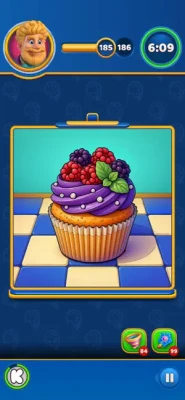
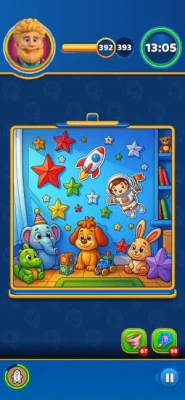
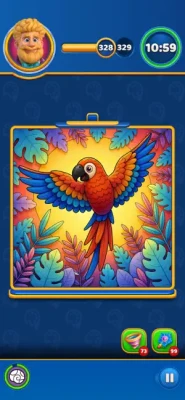
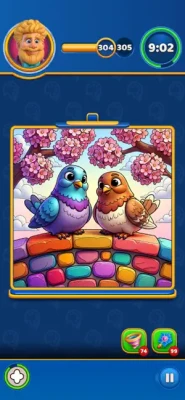
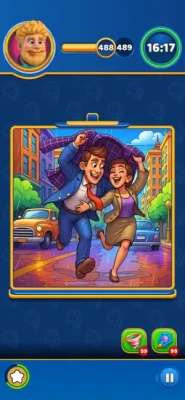
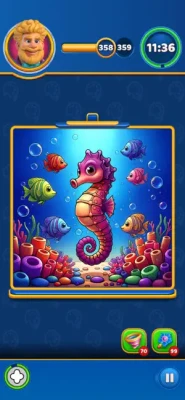
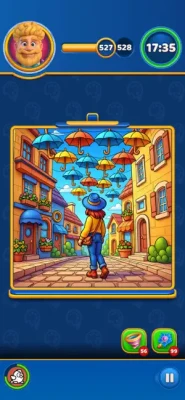
Instead of choosing colors from a traditional palette, you complete an illustration by finding the correct objects hidden inside a busy item grid. Each part of the picture tells you what it needs, and your job is to locate those objects and collect them quickly.
The game adds a time limit to the otherwise relaxing coloring concept. You need to recognize the requested item, locate matching objects on the grid, collect them, and fill the illustration before the clock reaches zero.
The App Store describes the game as a combination of item collection and coloring, with hundreds of illustrations ranging from mandalas and landscapes to cute characters and modern pop-art designs.
What Makes Color By Objects Different?
The game does not work like a conventional coloring book.
You are not simply choosing a color and filling an empty space.
Instead, the objects are your colors.
Every level gives you a line-art illustration containing sections that need to be completed. Selecting one of those sections reveals which objects you need to find on the grid.
That creates a gameplay loop based on:
Observation
Object recognition
Matching
Fast tapping
Memory
Time management
Picture completion
The result is a hybrid of a coloring game and a visual sorting puzzle.
How Color By Objects Gameplay Works
The basic gameplay process is easy to understand.
Step 1: Examine the Illustration
Look at the unfinished picture and identify the areas that still need to be completed.
Step 2: Select a Cell
Tap an empty section of the coloring page.
The game shows which object or objects are required for that particular section.
Step 3: Find the Objects
Search the grid for the requested items.
Step 4: Collect Them
Tap the matching objects as quickly and accurately as possible.
Step 5: Fill the Illustration
The collected items are converted into color for the selected section of the artwork.
Step 6: Continue
Choose another unfinished section and repeat the process.
Step 7: Beat the Timer
Complete the entire illustration before time expires.
The official App Store instructions follow this same basic structure: identify what a cell needs, collect the matching objects from the grid, and finish the coloring page before the timer runs out.
The Most Important Skill: Fast Object Recognition
Color By Objects looks like a coloring game, but the real skill is visual recognition.
You need to identify a requested object and find it among many other items.
The faster you can recognize shapes, colors, and silhouettes, the more time you have to finish the picture.
Don't Read Every Object
Trying to inspect every item individually wastes valuable seconds.
Instead, scan the grid for the overall shape and dominant characteristics of the requested object.
For example, if you need a particular round object, immediately search areas where similar shapes appear rather than examining unrelated items.
How to Beat the Timer
The countdown changes the way you should approach every level.
You are not simply trying to complete the artwork.
You are trying to complete it efficiently.
Use this routine:
Identify → Scan → Collect → Move On
Avoid spending too much time searching for one difficult item.
If you cannot immediately locate it, move your eyes systematically across the grid instead of repeatedly checking the same area.
Color By Objects Strategy Guide
1. Start With Easy Sections
If several coloring cells are available, begin with the section whose required objects are easiest to recognize.
This can give you quick progress while preserving more time for difficult searches later.
2. Learn the Object Grid
The grid may contain many different objects, but objects often have recognizable visual patterns.
Train yourself to search by:
Shape
Size
Color
Orientation
Silhouette
Distinctive details
3. Avoid Random Tapping
Randomly tapping the grid wastes time.
Look first, then tap.
4. Keep Your Eyes Moving
When searching for an object, scan systematically from one region to another.
A consistent search pattern is faster than jumping randomly around the screen.
5. Complete One Target at a Time
When possible, concentrate on the currently requested item instead of mentally tracking every possible object on the board.
6. Watch the Clock
Always keep the timer in mind.
A puzzle that feels relaxing can suddenly become difficult if you spend too long searching for a single object.
How to Search the Object Grid Efficiently
One of the best techniques is to divide the grid mentally into sections.
For example:
Top → Middle → Bottom
or:
Left → Center → Right
Search each area once before returning to an earlier section.
This prevents you from repeatedly checking the same locations.
Use Shape Before Color
Color can be useful, but shapes are often more reliable when the grid is visually crowded.
If you are searching for a specific object, first identify its basic silhouette.
Ask:
Is it round?
Is it long?
Is it square?
Does it have a handle?
Does it have a distinctive top?
Is it symmetrical?
Once you recognize the shape, use color and details to confirm the match.
Use Color as Confirmation
After identifying a likely object by shape, use its color to verify that you have found the correct item.
This two-stage process is useful:
Shape → Color → Confirm
It reduces the chance of wasting time tapping similar-looking objects.
Handling Similar Objects
Some objects can look very similar at first glance.
When two possible matches appear, compare their most distinctive feature.
Look at:
Outline
Main color
Small details
Orientation
Size
Accessories or markings
Do not automatically select the first visually similar object.
Prioritize Easy Wins
When the illustration contains several incomplete areas, look for the targets you can identify quickly.
Completing easy sections early can simplify the picture and reduce the number of remaining targets.
It also gives you more time to concentrate on difficult objects.
When You Cannot Find an Object
Getting stuck on one object is one of the biggest threats to a timed level.
Use a systematic search.
First Pass
Search the entire grid quickly.
Second Pass
Look specifically for the object's silhouette.
Third Pass
Check similar-looking objects and compare their details.
Final Check
Return to the areas where the grid is most crowded.
Avoid staring at one location for too long.
Managing Time During Difficult Levels
A useful approach is to divide the level into phases.
Early Phase
Work quickly and complete obvious targets.
Middle Phase
Use the extra space created by completed sections to focus on more difficult objects.
Final Phase
Stop experimenting and concentrate entirely on remaining requirements.
The final seconds should be about execution rather than deciding what to do.
Advanced Strategy: Build a Visual Vocabulary
The more you play, the more familiar you become with recurring object types.
Instead of seeing dozens of individual items, your brain starts recognizing familiar shapes immediately.
This creates a significant advantage.
You begin thinking:
"I need that object."
rather than:
"What am I looking at?"
That difference saves time.
Advanced Object-Scanning Technique
Try using peripheral vision.
Instead of staring at one object at a time, scan a larger section of the grid and look for something that visually stands out.
Once you notice a possible match, focus on it to confirm the details.
This can be faster than inspecting every object individually.
Avoiding Mistakes
Accuracy is just as important as speed.
Tapping the wrong object wastes time and interrupts your search.
Before tapping a questionable match, quickly confirm:
Shape
Color
Distinctive details
If all three match, collect it.
Understanding the Coloring System
The coloring process provides the game's visual reward.
You start with an incomplete line-art illustration.
As you collect the required objects, the corresponding sections become filled with color.
This creates a satisfying transformation from:
Blank line art → Partially colored image → Finished artwork
The App Store specifically highlights the combination of crisp line art, vibrant colors, and the satisfying flow of color filling the canvas.
Why the Coloring Reward Matters
The finished illustration gives each puzzle a clear sense of progression.
You are not simply clearing a grid.
You are building a complete picture.
That visual result encourages continued play because every successful object match contributes to a larger finished image.
Types of Illustrations
The current App Store description says the game includes hundreds of illustrations covering several styles and subjects.
These include:
Intricate mandalas
Peaceful landscapes
Cute characters
Modern pop-art designs
This variety helps prevent the coloring experience from feeling visually repetitive.
ASMR and Satisfying Feedback
The game is designed to make object collection feel satisfying.
The App Store highlights the "pop" feedback when collecting objects and the smooth visual flow as color fills the artwork.
This feedback is an important part of the experience.
The game combines:
Visual completion
Object collection
Color filling
Tapping feedback
Short puzzle challenges
Together, these mechanics create a satisfying casual gameplay loop.
Color By Objects Beginner Tips
Tip 1: Look Before You Tap
A quick visual scan is usually faster than random tapping.
Tip 2: Search Systematically
Move across the grid in a consistent direction.
Tip 3: Recognize Shapes
Shape can help you locate objects faster than color alone.
Tip 4: Confirm Before Collecting
Make sure the object matches the requested target.
Tip 5: Start With Easy Targets
Use early time efficiently by completing obvious sections.
Tip 6: Don't Get Stuck on One Object
If you cannot find something immediately, change your scanning method.
Tip 7: Keep an Eye on the Clock
Timed levels require both accuracy and speed.
Tip 8: Learn From Repeated Objects
As you play more levels, familiar objects become easier to recognize.
How to Improve Your Speed
Improving at Color By Objects is largely about reducing unnecessary eye movement and hesitation.
Try to develop a consistent routine:
Read target → identify shape → scan grid → confirm object → tap → return to artwork
The less time you spend deciding what to do next, the more time you have to complete the picture.
Common Mistakes to Avoid
Random Tapping
It wastes time and makes the grid harder to read.
Searching Without a Pattern
Jumping between random areas can cause you to repeatedly inspect the same locations.
Ignoring Shape
Color alone may not be enough when several objects look similar.
Spending Too Long on One Target
A difficult object can consume the time needed for the rest of the illustration.
Forgetting the Timer
The coloring theme feels relaxing, but the levels are still time-based challenges.
Rushing Every Tap
Speed is important, but inaccurate taps can be more damaging than taking a fraction of a second to confirm the target.
How to Handle the Final Seconds
When the timer is almost finished, change your approach.
Do not waste time studying the entire picture.
Focus only on the remaining unfinished sections.
For each target:
Recognize → Locate → Tap
Move immediately to the next target.
The final stage is about execution.
Progressive Difficulty
The game starts with straightforward object-matching concepts but becomes more demanding as the illustrations become more intricate and the time pressure becomes more important.
The App Store describes the progression as simple mechanics developing into faster and more challenging puzzles as players unlock increasingly intricate illustrations.
The difficulty therefore comes from a combination of:
More complicated artwork
More objects
Faster searching
Greater visual clutter
Time pressure
More demanding target recognition
Graphics and Visual Style
The game's visual identity is built around crisp line art and colorful finished illustrations.
The contrast between an unfinished drawing and the completed artwork gives each level a clear visual objective.
The combination of colorful objects and polished illustrations also makes the game suitable for players who enjoy coloring games but want more interaction than traditional paint-by-number gameplay.
Controls
The controls are simple and touch-focused.
The primary interaction is tapping:
A section of the artwork
A required object
The next target
There are no complicated movement controls.
The challenge comes from recognizing objects quickly and making accurate taps.
The App Store lists the game for iPhone and iPad and requires iOS 15.0 or later.
Game Features
Object-Matching Puzzles
Find specific objects hidden inside a busy grid.
Interactive Coloring
Collected objects contribute to completing sections of the illustration.
Time-Based Challenges
Each coloring page must be completed before the timer expires.
Hundreds of Illustrations
The game offers a broad collection of artwork, including mandalas, landscapes, characters, and pop-art designs.
Crisp Line Art
Unfinished illustrations provide a clear visual target.
Vibrant Colors
Completed sections gradually transform the artwork.
Satisfying Collection Feedback
Object collection includes tactile-looking visual feedback designed to make every successful match feel rewarding.
Progressive Difficulty
Later illustrations require faster recognition and more efficient searching.
Color By Objects Difficulty
The basic controls are extremely easy to learn.
The challenge comes from combining speed and accuracy.
A player who recognizes objects quickly can progress comfortably through simpler levels.
As the illustrations become more detailed, however, the crowded object grid and countdown timer make mistakes more costly.
The game therefore has an unusual balance:
Simple controls + increasingly demanding visual challenges.
Is Color By Objects Relaxing?
The game has a relaxing visual concept, but the timer adds pressure.
The coloring and ASMR-style feedback can feel calming when you are progressing smoothly.
However, difficult levels can become fast-paced because you need to search for objects before time runs out.
This makes the game more accurately described as a combination of relaxing coloring and timed visual puzzle gameplay rather than a completely pressure-free coloring app.
Who Should Play Color By Objects?
The game is a good fit for players who enjoy:
Coloring games
Object-matching puzzles
Hidden-object challenges
Visual sorting games
ASMR-style mobile games
Casual puzzle games
Timed brain games
Digital coloring books
Observation games
Fast tapping challenges
Relaxing but interactive games
It is particularly suitable for players who enjoy the satisfaction of completing artwork but also want a gameplay objective beyond simply choosing colors.
Pros and Cons
Pros
Creative combination of coloring and object matching
Simple controls
Hundreds of illustrations
Attractive line-art presentation
Vibrant completed artwork
Satisfying object-collection feedback
Progressive challenge
Encourages visual recognition
Short, engaging puzzle sessions
Good combination of relaxation and challenge
Cons
The timer can make otherwise relaxing coloring sessions feel stressful
Busy grids can make similar objects difficult to distinguish
Later levels require increasingly fast visual recognition
Advertising is included
Optional in-app purchases are available
The current App Store rating is based on only a small number of ratings, so it is not yet a strong measure of broad player reception.
Color By Objects App Information
Developer: Radiant Cat Studio
Category: Casual
Age Rating: 4+
Platforms: iPhone, iPad, iPod touch, compatible Apple Silicon Mac, and Apple Vision
Language: English
App Size: Approximately 548.4 MB
Requires: iOS 15.0 or later
iPad: iPadOS 15.0 or later
Mac: macOS 12.0 or later with an Apple M1 chip or newer
Vision: visionOS 1.0 or later
Contains: Advertising
In-App Purchases: Yes
The current App Store listing provides these compatibility specifications and lists the game as free with optional purchases.
In-App Purchases
Color By Objects: ASMR Puzzle is free to download and includes optional in-app purchases.
The current App Store listing includes several coin packages and larger bundles, ranging from small purchases through Master, Ultra, Giant, and Legendary bundles.
These purchases are optional, while the central gameplay loop remains based on finding objects and completing the illustrations.
Best Strategy for Completing Pictures
The most reliable approach is to treat every level as two connected puzzles.
Puzzle One: What Does the Picture Need?
Tap an unfinished section and determine the required object.
Puzzle Two: Where Is That Object?
Search the grid efficiently and collect it before moving on.
This gives you a simple mental sequence:
Picture → Target → Grid → Match → Color
Repeating that process keeps the gameplay organized and reduces wasted time.
A Strong Routine for Difficult Levels
When a level becomes challenging, use this method:
Step 1
Select a clear unfinished section.
Step 2
Identify the required object.
Step 3
Determine its basic shape and color.
Step 4
Scan the grid systematically.
Step 5
Confirm the match.
Step 6
Collect the object.
Step 7
Immediately move to the next target.
Step 8
Monitor the remaining time.
This approach is especially useful when the grid becomes crowded.
Final Verdict
Color By Objects: ASMR Puzzle is an interesting hybrid of coloring book, object-matching puzzle, and timed observation game.
Its strongest idea is that the "paint" for the artwork is hidden inside the object grid. Instead of simply selecting colors, you have to locate the correct items and collect them quickly.
The completed illustrations provide a satisfying visual reward, while the countdown timer adds a layer of challenge that prevents the game from becoming a passive coloring experience.
For players who enjoy coloring games, hidden-object puzzles, ASMR-style feedback, visual challenges, and casual brain games, Color By Objects offers a distinctive combination of creativity and quick thinking.
The key to mastering it is simple:
Recognize the target, scan efficiently, collect accurately, and never let the timer control your decisions.
Frequently Asked Questions
What is Color By Objects: ASMR Puzzle?
Color By Objects: ASMR Puzzle is a casual puzzle game that combines object collection with interactive coloring.
How do you play Color By Objects?
Select an unfinished section of the illustration to see which object is required, find that object in the grid, and collect it to fill the corresponding part of the picture.
Is Color By Objects a coloring game?
Yes, but it adds an object-matching mechanic. Instead of simply choosing a color, you collect specific objects to complete the artwork.
Is there a timer?
Yes. Players must complete the entire coloring page before the available time runs out.
Does Color By Objects have many pictures?
Yes. The App Store description says the game contains hundreds of illustrations, including mandalas, landscapes, cute characters, and modern pop-art designs.
Is Color By Objects an ASMR game?
The game uses satisfying collection feedback and smooth color-filling effects that contribute to its ASMR-style presentation.
Is Color By Objects difficult?
The basic controls are easy to learn, but later challenges require faster object recognition and more accurate searching because of the time limit.
What is the best strategy for Color By Objects?
Identify the required object first, recognize its shape and color, scan the grid systematically, collect it accurately, and immediately move to the next unfinished section.
What should I do if I cannot find an object?
Search the grid systematically rather than repeatedly checking the same area. Look for the object's silhouette first, then confirm its color and distinctive details.
Is Color By Objects available on iPhone?
Yes. The game supports iPhone and requires iOS 15.0 or later.
Is Color By Objects available on iPad?
Yes. It supports iPad and requires iPadOS 15.0 or later.
Is Color By Objects free?
Yes. The App Store lists it as free with advertising and optional in-app purchases.
Who developed Color By Objects: ASMR Puzzle?
The game was developed by Radiant Cat Studio.
What age rating does Color By Objects have?
The current App Store listing gives it a 4+ age rating.
Rate the Game
User Reviews






Popular Games



















 Android
 iOS
iOS Windows
 Xbox
Xbox