




Latest Version
September 08, 2024
Vita Studio.
Card
Android
0
com.vitastudio.solitaire
Report a Problem
More About :game
The game is based around familiar Solitaire gameplay while adding modern features such as Draw 1 and Draw 3 modes, daily and weekly challenges, trophies, rewards, statistics, hints and unlimited undo. It can also be played offline, making it suitable for relaxing sessions without an internet connection.
Vita Solitaire is especially aimed at seniors, but its straightforward controls and large card design make it suitable for anyone who enjoys classic Solitaire and casual card games.
Vita Solitaire Game Information
Game: Vita Solitaire for Seniors
Developer: Vita Studio
Developer company: VITA GAMES STUDIO PTE. LTD.
Genre: Card / Solitaire / Casual
Platform: Android
Game Mode: Single-player
Content Rating: Everyone
Downloads: 5M+
Displayed Rating: 4.9 stars
Reviews: 342K+ currently displayed
Gameplay: Classic Solitaire
Game Modes: Draw 1 and Draw 3
Offline Play: Yes
Devices: Phones and tablets
Accessibility: Colorblind mode, left-handed mode and dark mode
Additional Games: Freecell, Spades and Mahjong Solitaire
Monetization: Ads and optional in-app purchases
Latest listed update: September 16, 2026
What Is Vita Solitaire for Seniors?
Vita Solitaire takes the familiar Solitaire experience and adapts it for players who want clearer cards and simpler controls.
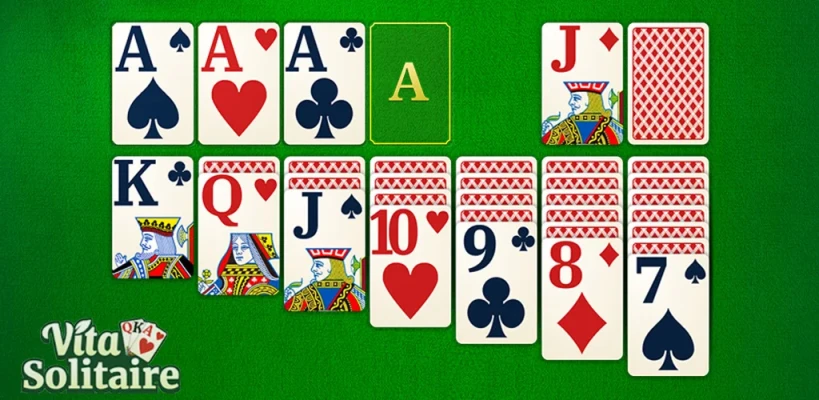
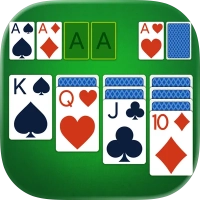
The large card design makes suits, numbers and card colors easier to identify. The interface is also designed to work across different phone and tablet screen sizes.
The result is a casual Solitaire game that can be enjoyed for a few minutes or for much longer sessions.
Main Features
Large Card Design
One of Vita Solitaire's defining features is its oversized card presentation.
Large fonts and cards make it easier to distinguish:
Card values
Suits
Colors
Available moves
Face-up cards
Foundation piles
This is particularly useful on smaller phone displays or for players who prefer a less crowded interface.
Classic Solitaire Gameplay
The core game follows familiar Solitaire rules.
Cards are arranged in descending order with alternating colors, while the objective is to move cards toward the foundation piles according to suit and sequence.
Players who already know classic Klondike Solitaire can understand the basic gameplay quickly.
Draw 1 and Draw 3
Vita Solitaire offers both Draw 1 and Draw 3 modes.
Draw 1 is generally more forgiving because fewer cards are revealed at once.
Draw 3 provides a more challenging experience and requires greater planning because the order in which cards appear can affect your available moves.
Daily and Weekly Challenges
The game includes daily and weekly challenges where players can work toward trophies and improve their performance.
These challenges add goals beyond simply completing another Solitaire deal.
Hints and Undo
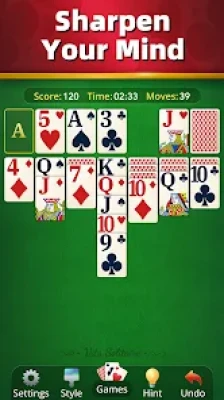
Vita Solitaire provides unlimited hints and undo functionality.
These features are particularly useful for beginners who are learning Solitaire strategy or for experienced players who want to experiment with different moves.
Offline Solitaire
The game supports offline play, allowing you to enjoy Solitaire without Wi-Fi.
This makes Vita Solitaire useful for travel, waiting rooms or other situations where an internet connection is unavailable.
How to Play Vita Solitaire
The basic objective is to move cards around the tableau and ultimately place every card into the four foundation piles.
Cards in the tableau are generally arranged in descending order with alternating colors.
For example:
A red 8 can be placed on a black 9.
A black Queen can be placed on a red King.
A red 5 can be placed on a black 6.
The foundation piles are built upward by suit:
Ace → 2 → 3 → 4 → 5 → ... → King
The game provides a familiar version of Solitaire while making the cards easier to see and manipulate.
Complete Vita Solitaire Strategy Guide
1. Start by Revealing Hidden Cards
One of the most important priorities in Klondike Solitaire is exposing face-down cards.
When deciding between two possible moves, favor the move that reveals a hidden card whenever practical.
Why?
Because an exposed card gives you additional information and potentially creates new moves.
2. Do Not Automatically Move Every Available Card
Just because a card can move does not mean moving it is always the best decision.
Before making a move, ask:
Will this reveal a hidden card?
Will it create another useful move?
Will it block an important card?
Will I need the current position later?
A move should contribute to your overall plan rather than simply being legal.
3. Prioritize Empty Columns
Creating an empty tableau column can be extremely valuable.
An empty column allows you to move a King into that space, which can then provide room for additional sequences.
However, do not create an empty column without considering whether you have a useful King ready to occupy it.
4. Move Kings Carefully
Kings are special because they can be placed into empty tableau columns.
If you have a choice between two Kings, consider which one creates the better opportunity for exposing hidden cards or building a useful sequence.
Do not move a King simply because an empty column becomes available.
5. Build Long Sequences
Long descending sequences can be powerful because they allow multiple cards to move together.
For example:
Black 10 → Red 9 → Black 8 → Red 7
A well-organized sequence can open up more options later.
However, always consider whether moving the sequence will expose or hide important cards.
Draw 1 Strategy
Draw 1 is the easier of the two primary modes because each draw gives you more direct access to the next card.
This makes it an excellent choice for:
Beginners
Relaxed sessions
Learning Solitaire strategy
Practicing efficient moves
Completing easier challenges
Best Draw 1 Approach
Focus on revealing hidden tableau cards.
When multiple moves are available, choose the sequence that opens the most future possibilities.
Avoid moving cards to the foundation too aggressively if those cards could still be useful in the tableau.
Draw 3 Strategy
Draw 3 requires more planning.
Because cards are revealed in groups, the order of the draw pile becomes more important.
A card that is currently inaccessible may become available later, but only if you organize your moves carefully.
Draw 3 Tips
Think ahead.
Before taking a card from the waste pile, consider what it will expose.
Track important cards.
Remember where key cards are located.
Avoid unnecessary cycling.
Repeatedly moving through the deck without improving the tableau can reduce your options.
Plan foundation moves carefully.
A card that looks useful for the foundation may still be needed to build a tableau sequence.
Foundation Strategy
Moving cards into the foundation is ultimately necessary, but timing matters.
A common mistake is to move every available card to the foundation immediately.
Sometimes a card is more useful in the tableau.
For example, a low card may help you build or move another sequence before it is sent to the foundation.
The best approach is to balance:
Foundation progress + Tableau flexibility
When Should You Use Hints?
Hints are useful when you cannot see an obvious move.
However, do not depend on them for every decision.
Try to identify the available moves yourself first. Then use the hint system when you are genuinely stuck.
This helps you learn the game's patterns rather than simply following suggested moves.
When Should You Use Undo?
Undo is particularly useful for learning.
If you make a move and discover that it blocks an important sequence, undo it and try another approach.
You can also use undo to compare two possible strategies.
For example:
Option A: Move a card to the foundation.
Option B: Keep the card in the tableau.
Try one approach, examine the result and undo it if necessary.
Daily Challenge Strategy
Daily challenges provide an additional reason to return to the game.
Instead of treating every challenge as a race, concentrate on making efficient moves.
Before committing to an important move:
Look at all available tableau moves.
Check the waste pile.
Consider the foundation.
Look for hidden cards that can be exposed.
Decide which move creates the most future options.
This approach is often more reliable than simply making the first available move.
Weekly Challenge Tips
Weekly challenges can be approached as a long-term improvement goal.
Keep track of the types of situations that repeatedly cause problems.
For example:
Getting stuck with several face-down cards
Running out of tableau moves
Poor use of empty columns
Moving cards to the foundation too early
Losing track of the draw pile
Recognizing these patterns can improve your future games.
Best Beginner Strategy
If you are new to Solitaire, use this simple sequence:
Reveal → Organize → Build → Expose → Foundation
Reveal
Expose face-down cards whenever possible.
Organize
Create useful descending sequences with alternating colors.
Build
Develop longer sequences when they give you additional flexibility.
Expose
Continue opening hidden cards.
Foundation
Move cards to the foundation when doing so does not unnecessarily reduce your options.
Advanced Solitaire Strategy
Experienced players should focus less on individual moves and more on the overall position.
Before moving a card, consider what the board will look like afterward.
A strong move should ideally accomplish one or more of the following:
Reveal a hidden card
Create an empty column
Build a useful sequence
Unlock a blocked card
Improve foundation progress
Preserve future options
The strongest plays often create several benefits at once.
Common Vita Solitaire Mistakes
Moving Cards Too Quickly
A legal move is not necessarily a good move.
Ignoring Hidden Cards
Revealing face-down cards should usually be a major priority.
Wasting Empty Columns
An empty column is valuable because it provides flexibility for Kings.
Sending Everything to the Foundation
Foundation progress is important, but some cards may still be useful in the tableau.
Ignoring the Draw Pile
Especially in Draw 3, you need to consider the order and accessibility of cards.
Refusing to Undo
Undo is a learning tool. If a move clearly makes the position worse, there is little reason to continue with it.
Accessibility Features
Vita Solitaire includes several accessibility-oriented options.
The current listing specifically mentions:
Colorblind mode
Left-handed mode
Dark mode
Large cards
Large fonts
Portrait and landscape options
Phone and tablet optimization
These options allow players to customize the presentation according to their preferences.
Other Card Games
Vita Solitaire also includes access to additional card-based experiences beyond traditional Solitaire.
The current Google Play listing mentions:
Freecell
Spades
Mahjong Solitaire
This gives players more variety when they want something different from standard Solitaire.
Themes and Customization
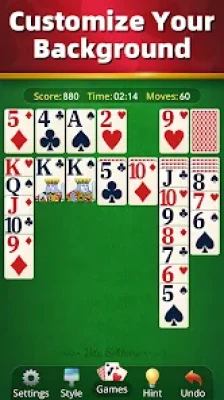
The game provides different card styles and backgrounds.
Players can customize the visual presentation while retaining the familiar Solitaire gameplay.
Portrait and landscape modes are also supported, allowing players to choose whichever orientation feels more comfortable.
Offline Gameplay
One of Vita Solitaire's most convenient features is offline support.
You can play without Wi-Fi, making it a practical casual game for:
Travel
Airplane trips
Waiting rooms
Commuting
Relaxing at home
Places with limited connectivity
Vita Solitaire Pros and Cons
Pros
Classic Solitaire gameplay
Large, easy-to-see cards
Large fonts
Draw 1 and Draw 3 modes
Daily and weekly challenges
Hints and unlimited undo
Offline gameplay
Dark mode
Colorblind mode
Left-handed mode
Phone and tablet support
Additional card games
Detailed statistics
Regular updates
Cons
Contains advertisements
Optional in-app purchases are available
Some recent user reviews report occasional glitches
Players focused on fast competitive play may notice occasional interaction issues
Recent Google Play reviews include complaints about ads and some reports of freezing or card-dragging problems during competitive play, although the overall displayed rating remains very high.
Is Vita Solitaire for Seniors Worth Playing?
Vita Solitaire is a strong choice for players who want a familiar Solitaire experience without a visually crowded interface.
Its large cards and simple controls are particularly useful for seniors, while features such as Draw 3, weekly challenges, statistics and trophies provide additional depth for experienced Solitaire players.
The combination of classic rules, offline play and accessibility settings makes it suitable for both short casual sessions and longer games.
Who Should Play Vita Solitaire?
Vita Solitaire is especially suitable for:
Seniors who enjoy classic card games
Solitaire fans
Casual gamers
Players who prefer large cards
People looking for offline card games
Players who enjoy daily challenges
Fans of traditional Klondike Solitaire
Players who want accessibility options
Anyone looking for a relaxing single-player game
Vita Solitaire Tips at a Glance
Best beginner tip: Focus on revealing hidden cards.
Best Draw 1 tip: Use the extra flexibility to expose tableau cards quickly.
Best Draw 3 tip: Think ahead and remember important cards in the draw sequence.
Best King tip: Use Kings strategically when creating empty columns.
Best foundation tip: Do not automatically send every available card upward.
Best challenge tip: Prioritize efficient moves over unnecessary speed.
Best accessibility tip: Try dark mode, colorblind mode or left-handed mode if they make the game more comfortable.
Best learning tip: Use undo to test alternative strategies.
Frequently Asked Questions
What is Vita Solitaire for Seniors?
Vita Solitaire for Seniors is a classic Solitaire card game from Vita Studio designed with large cards, readable fonts and accessibility-focused controls.
Is Vita Solitaire free?
The game is available to download and play, with advertisements and optional in-app purchases.
Can Vita Solitaire be played offline?
Yes. The Google Play listing identifies Vita Solitaire as an offline game.
Does Vita Solitaire have Draw 1?
Yes. Draw 1 is one of the two main Solitaire modes.
Does Vita Solitaire have Draw 3?
Yes. Draw 3 provides a more challenging version of the classic gameplay.
Does Vita Solitaire have hints?
Yes. The game includes unlimited hints and undo functionality.
Can I play Vita Solitaire on a tablet?
Yes. The game is optimized for both phones and tablets.
Does Vita Solitaire have dark mode?
Yes. Dark mode is one of the accessibility options listed by the developer.
Does Vita Solitaire support colorblind players?
Yes. A colorblind mode is included among the game's accessibility features.
Is Vita Solitaire suitable for seniors?
Yes. The game was specifically designed with seniors in mind, using large cards, large fonts and a simple interface.
What other games are included?
The current listing mentions Freecell, Spades and Mahjong Solitaire in addition to classic Solitaire.
Final Verdict
Vita Solitaire for Seniors combines the familiarity of classic Solitaire with a more accessible presentation.
Its large cards, large fonts, Draw 1 and Draw 3 modes, daily and weekly challenges, hints, undo, offline play and accessibility options give it considerably more flexibility than a basic Solitaire app.
For beginners, the best approach is to focus on revealing hidden cards, building alternating-color sequences and using empty columns intelligently. More experienced players can increase the challenge with Draw 3 and daily or weekly challenges.
If you enjoy traditional Solitaire and prefer a clear, comfortable interface, Vita Solitaire is an easy game to pick up and a good choice for relaxing card-game sessions.
Rate the Game
User Reviews








Popular Games



















 Android
 iOS
iOS Windows
 Xbox
Xbox