
Latest Version
April 04, 2026
Mobility Ware
Card
iOS
0
Report a Problem
More About :game
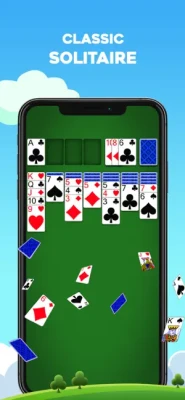
Solitaire by MobilityWare is a mobile version of the classic Klondike Solitaire card game developed by MobilityWare. It takes the familiar Solitaire experience many players know from computers and adapts it for touchscreen devices.
The game combines traditional card-stacking rules with modern features such as Daily Challenges, monthly themed calendars, leaderboards, achievements, customizable card backs and backgrounds, and multiplayer Solitaire.
The result is a Solitaire game that works equally well for a quick casual round or a longer session focused on improving your score and completing daily goals.
<iframe width="560" height="315" src="https://www.youtube.com/embed/hmP-y-T0y88?si=LEhQsve-dcf0pk3V" title="YouTube video player" frameborder="0" allow="accelerometer; autoplay; clipboard-write; encrypted-media; gyroscope; picture-in-picture; web-share" referrerpolicy="strict-origin-when-cross-origin" allowfullscreen></iframe>
Classic Klondike Solitaire Gameplay
At its heart, this is traditional Klondike Solitaire.
The objective is to organize all four suits into their foundation piles, beginning with the Ace and building upward through the King. During the game, cards are arranged in descending order while alternating red and black suits.
You can move cards between tableau columns, reveal hidden cards, use the draw pile strategically, and gradually transfer completed sequences to the foundations.
The rules are familiar, but winning consistently requires planning rather than simply moving cards whenever a legal move appears.
Daily Challenges and Monthly Trophies
One of the biggest reasons to keep returning to Solitaire by MobilityWare is its Daily Challenge system.
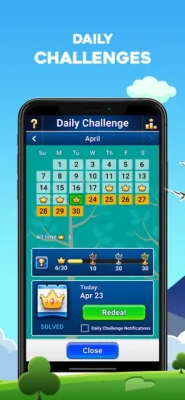
Each day provides a unique Solitaire challenge. Successfully completing it earns a crown, while collecting crowns contributes toward monthly trophies. The Daily Challenge calendar also uses different themes throughout the year.
This gives the traditional card game a stronger sense of progression. Instead of playing completely random hands every time, you have a reason to return and maintain your daily streak.
Why Daily Challenges Are Fun
- A new challenge every day
- Crown rewards for completed challenges
- Monthly trophy progression
- Themed challenge calendars
- A reason to improve your Solitaire skills
- Replay-friendly daily gameplay
Draw 1 vs. Draw 3 Solitaire
Players can choose between two familiar ways of drawing cards.
Draw 1
Draw 1 provides a more accessible Solitaire experience because each available card is revealed individually. It is a good option for beginners or players who prefer a more relaxed game.
Draw 3
Draw 3 introduces an additional strategic layer because three cards are drawn at a time. Choosing which cards to play and when to cycle through the deck becomes much more important.
For experienced Solitaire players, Draw 3 can provide a more demanding challenge.
Solitaire Features
Solitaire by MobilityWare includes a substantial collection of features designed around both classic gameplay and long-term replayability.
Main Features
- Classic Klondike Solitaire
- Daily Challenges
- Monthly themed challenge calendars
- Draw 1 gameplay
- Draw 3 gameplay
- Ad-free gameplay
- Multiplayer Solitaire
- Global leaderboards
- Achievements
- Custom card backs
- Custom backgrounds
- Modern card faces
- Standard scoring
- Vegas scoring
- Unlimited Undo
- Auto Complete
- Statistics tracking
- Portrait orientation
- Landscape orientation
- Left-handed play
- Right-handed play
- “Show Me How To Win” assistance for difficult deals
Custom Cards, Backgrounds and Themes
Solitaire doesn't have to look exactly the same every time you play.
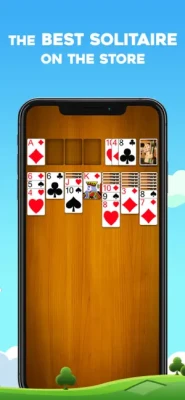
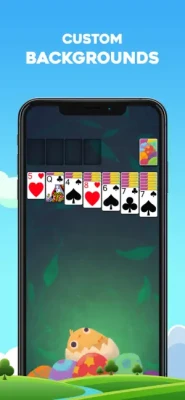
Players can personalize the experience using different card backs and backgrounds, while themed content gives the game a more visually varied presentation. The modern card-face option also updates the appearance of the playing cards while retaining the recognizable Solitaire style.
This customization is particularly useful for players who spend a lot of time with the game and want their table to feel more personal.
Multiplayer and Leaderboards
Although Solitaire is traditionally a single-player card game, MobilityWare adds competitive elements through leaderboards and multiplayer features.
Leaderboards allow players to compare their Solitaire performance against other players around the world. This creates an extra incentive to improve completion times, scores, and overall consistency.
For players who normally enjoy Solitaire as a relaxing game, these features can remain optional. For competitive players, they provide another reason to keep playing.
Scoring Systems
The game supports both Standard Scoring and Vegas Scoring, giving players different ways to approach their games.
Standard scoring provides the familiar traditional approach, while Vegas Scoring adds a different scoring structure that can make each move feel more consequential.
Players can therefore choose the scoring style that best matches how they like to play Solitaire.
Controls and Interface Guide
The touchscreen controls are designed around simple card movement.
Basic Controls
Tap a card: Select or automatically move a card when an appropriate destination is available.
Drag a card: Move individual cards or available sequences between tableau columns.
Move cards to the foundation: Build each suit upward from Ace through King.
Draw cards: Access cards from the draw pile according to your selected Draw 1 or Draw 3 mode.
Undo: Reverse previous moves when you want to reconsider your strategy.
The interface supports both portrait and landscape orientations, while left-handed and right-handed play options make the controls more comfortable for different players.
How to Play Solitaire
If you're new to Klondike Solitaire, the basic objective is straightforward.
- Arrange tableau cards in descending numerical order.
- Alternate red and black suits when building tableau sequences.
- Reveal hidden cards whenever possible.
- Move Aces to the foundation as soon as strategically appropriate.
- Build each foundation pile upward by suit.
- Use Kings carefully when opening empty tableau spaces.
- Manage the draw pile instead of playing every available card immediately.
- Continue until all four suits reach their Kings.
The challenge comes from deciding which legal move is actually the best move.
Solitaire Strategy Tips
1. Reveal Hidden Cards
Opening face-down cards should generally be a priority because it increases the number of available moves.
2. Don't Move Cards Automatically
A legal move isn't always a good move. Consider how moving a card will affect the cards underneath it and the remaining tableau.
3. Think Before Moving an Ace
Moving an Ace to the foundation is usually helpful, but consider whether that move could interfere with another useful sequence.
4. Use Empty Columns Carefully
An empty tableau column is particularly valuable because Kings can be moved into it. Don't create empty spaces without considering what you can place there afterward.
5. Plan Several Moves Ahead
Strong Solitaire players don't simply look for the next available move. They consider how today's move affects the next several possibilities.
6. Use Undo as a Learning Tool
Unlimited Undo allows you to experiment with different approaches and understand which decisions lead to better outcomes.
Beginner's Guide
If you're just starting with mobile Solitaire, begin with Draw 1. It gives you a clearer view of the available cards and makes it easier to understand the basic mechanics.
Focus on:
- Revealing face-down cards
- Creating useful tableau sequences
- Moving Aces and low cards toward foundations
- Preserving useful cards for later
- Avoiding unnecessary empty columns
- Thinking ahead before using the draw pile
Once you're comfortable with Draw 1, try Draw 3 for a more strategic experience.
Advanced Solitaire Strategy
Experienced players can focus on maximizing both efficiency and score.
Rather than immediately moving every card to a foundation, consider whether keeping certain cards in the tableau will allow you to uncover hidden cards or create more useful sequences.
When playing Draw 3, remember that the order of cards in the draw pile matters. Your decisions can determine whether an important card becomes accessible later.
For competitive players, studying the relationship between moves, time, score, and card exposure can make a significant difference.
Progression and Achievements
Solitaire by MobilityWare adds long-term motivation through Daily Challenge crowns, monthly trophies, achievements, statistics, and leaderboards.
This creates several different goals:
- Complete today's challenge
- Collect crowns
- Earn monthly trophies
- Improve your Solitaire statistics
- Beat previous scores
- Compete on leaderboards
- Unlock achievements
- Improve your win consistency
Instead of having only one objective—winning a hand—the game provides multiple ways to measure progress.
Game Difficulty
Difficulty: Easy to challenging
The basic Solitaire rules are easy to learn, making the game accessible to new players. However, consistently winning difficult deals can require considerably more planning.
Draw 1 is generally more approachable, while Draw 3 can demand greater attention to card order and future moves.
Daily Challenges can also provide an additional challenge for experienced players.
Who Is This Solitaire Game For?
Solitaire by MobilityWare is a good fit for:
- Classic Solitaire fans
- Klondike players
- Casual card-game players
- Players looking for short gaming sessions
- Daily challenge enthusiasts
- Competitive Solitaire players
- People who enjoy customizable card games
- Players who prefer traditional card-game mechanics
Its straightforward rules make it easy to pick up, while the Daily Challenges, statistics, trophies and leaderboards provide reasons to continue playing.
Game Modes and Options
| Mode / Option | Description |
|---|---|
| Classic Solitaire | Traditional Klondike gameplay |
| Draw 1 | One card is drawn at a time |
| Draw 3 | Three cards are drawn at a time |
| Standard Scoring | Traditional scoring approach |
| Vegas Scoring | Alternative scoring system |
| Daily Challenge | A unique daily Solitaire challenge |
| Multiplayer | Competitive Solitaire experience |
| Leaderboards | Compare performance with other players |
| Portrait | Vertical screen orientation |
| Landscape | Horizontal screen orientation |
These options allow the game to accommodate both casual and experienced Solitaire players.
Accessibility and Convenience
The game includes several options designed to make the playing experience more comfortable. Players can choose left-handed or right-handed play, switch between portrait and landscape orientations, and use features such as unlimited Undo and Auto Complete.
MobilityWare has also previously added accessibility-related options to its Solitaire experience, including features developed with attention to players with dementia.
Technical Details
Game: Solitaire by MobilityWare
Developer: MobilityWare
Genre: Card / Casino
Subgenre: Klondike Solitaire
Platforms: iPhone and iPad
Age Rating: 4+
App Size: Approximately 234.5 MB according to the current U.S. App Store listing
Languages: English plus additional supported languages
App Store Rating: 4.8/5 from approximately 138K ratings at the time of checking
The current App Store listing identifies the app as designed for iPad and available on iPhone and iPad, with iMessage support.
What Makes Solitaire by MobilityWare Stand Out?
The biggest strength is its combination of traditional Klondike Solitaire and modern replay features.
The core gameplay remains recognizable, but Daily Challenges, crowns, trophies, customization, statistics, achievements and leaderboards give players more reasons to return.
It's particularly appealing if you want a Solitaire app that feels familiar rather than reinventing the card game with complicated new mechanics.
Solitaire by MobilityWare vs. Classic Solitaire
Traditional Solitaire is easy to understand: arrange the cards, build the four foundations and try to win.
MobilityWare's version preserves that familiar formula while adding:
- Daily challenges
- Monthly trophies
- Custom card designs
- Custom backgrounds
- Leaderboards
- Multiplayer
- Statistics
- Achievements
- Multiple scoring options
- Draw 1 and Draw 3
- Helpful gameplay tools
That combination makes it more suitable for players who want both classic Solitaire gameplay and modern mobile features.
Pros and Cons
Pros
- Authentic Klondike Solitaire gameplay
- Easy-to-learn rules
- Daily Challenges
- Draw 1 and Draw 3 options
- Customizable cards and backgrounds
- Leaderboards
- Achievements
- Statistics
- Multiplayer features
- Unlimited Undo
- Auto Complete
- Left- and right-handed options
- Portrait and landscape support
- Ad-free version available
Cons
- Players looking for many different Solitaire variants may prefer a collection with multiple card-game types.
- Competitive features may be unnecessary for players who only want an extremely basic Solitaire experience.
- The app is focused primarily on the classic Klondike format rather than offering a large collection of unrelated Solitaire variants.
Player Experience
The appeal of Solitaire by MobilityWare comes from its simplicity.
You can start a game in seconds, make a few moves while waiting for an appointment, or settle into a longer session trying to complete a challenging deal.
The Daily Challenge system adds a daily routine, while customizable cards and backgrounds make repeated sessions feel less repetitive. Leaderboards and statistics are there for players who want to turn casual Solitaire into a personal competition.
Expert Rating
Gameplay: 9/10
Controls: 9/10
Features: 9/10
Customization: 9/10
Replay Value: 9/10
Accessibility: 8.5/10
Overall: 9/10
Final Verdict
Solitaire by MobilityWare is a strong choice for anyone who wants classic Klondike Solitaire on a modern mobile device.
Its biggest advantage isn't a radical change to Solitaire—it is how effectively it builds additional features around a familiar card game. Daily Challenges, trophies, achievements, statistics, customization and leaderboards give the classic formula plenty of staying power.
If you're searching for a polished Klondike Solitaire game for iPhone or iPad, this is one of the more feature-rich ways to enjoy the traditional card game.
Frequently Asked Questions
Is Solitaire by MobilityWare free?
The specific App Store listing provided is presented as an ad-free version priced at $4.99.
Is Solitaire by MobilityWare the classic Klondike game?
Yes. MobilityWare identifies its Solitaire game as the classic Solitaire experience associated with Klondike.
Does Solitaire by MobilityWare have Daily Challenges?
Yes. Players receive a unique Daily Challenge and can earn crowns and monthly trophies by completing challenges.
Can I play Draw 1 Solitaire?
Yes. The game supports Draw 1 as well as Draw 3.
Does the game have Draw 3 Solitaire?
Yes. Draw 3 is one of the available gameplay options.
Can I customize the cards?
Yes. Players can customize card backs and backgrounds, while modern card-face options are also available.
Does Solitaire by MobilityWare have leaderboards?
Yes. The game includes leaderboards where players can compare Solitaire performance.
Does it support statistics?
Yes. Statistics are included so players can track their Solitaire performance over time.
Does Solitaire by MobilityWare have achievements?
Yes. Achievements are included as part of the game's progression features.
Can I undo moves?
Yes. The game provides unlimited Undo.
Does Solitaire have an Auto Complete option?
Yes. Auto Complete can help finish a game when the remaining moves are straightforward.
Rate the Game
User Reviews





Popular Games



















 Android
 iOS
iOS Windows
 Xbox
Xbox