

Latest Version
September 12, 2026
Runyou Game
Card
iOS
0
Report a Problem
More About :game
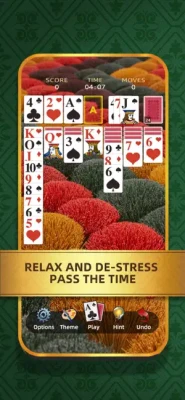
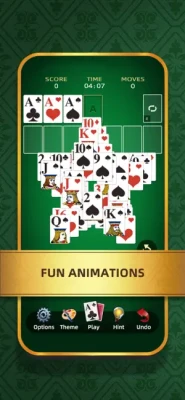
The game offers draw-one and draw-three modes, allowing players to choose between a more relaxed experience and a more challenging card sequence. It also includes bigger cards, unlimited undos, hints, and offline play, making it suitable for casual sessions without needing a Wi-Fi connection.
What Is Wonder Solitaire?
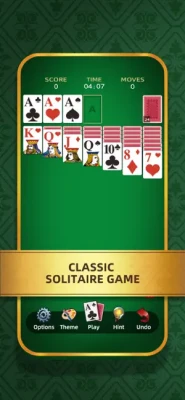
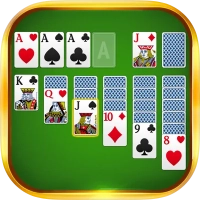
Wonder Solitaire takes the traditional solitaire formula and presents it as a straightforward mobile card game.
The objective is to move all four suits to their respective foundation piles, building each suit from Ace to King.
At the same time, you must manage the tableau by arranging cards in descending numerical order while alternating red and black suits.
Although the rules are simple, winning consistently requires careful planning. A move that looks useful immediately can sometimes prevent you from revealing an important hidden card or creating the empty tableau space you need later.
How to Play Wonder Solitaire
The main gameplay follows classic Klondike solitaire rules.
Tableau
The main playing area contains several columns of cards. Some cards are face up while others remain hidden.
Your goal is to uncover the hidden cards while organizing the face-up cards into useful sequences.
Descending Order
Cards in the tableau are arranged in descending order.
For example:
9 → 8 → 7 → 6
But the colors must alternate.
A black 9 can receive a red 8, while a red 9 can receive a black 8.
Foundation Piles
The four foundation piles are built separately by suit.
The normal progression is:
Ace → 2 → 3 → 4 → ... → Queen → King
Whenever an Ace becomes available, consider whether moving it to the foundation will help open the board.
Stock and Draw Piles
When you need additional cards, you draw from the available stock.
Wonder Solitaire lets you choose between:
- Draw One – easier to manage and more relaxed
- Draw Three – more challenging and requires stronger planning
The App Store specifically lists both options.
Wonder Solitaire Strategy Guide
1. Prioritize Face-Down Cards
One of your first priorities should be exposing hidden cards.
A move that uncovers a face-down card is often more valuable than a move that simply creates a longer visible sequence.
Why?
Because every newly revealed card gives you another potential move.
When choosing between two legal moves, ask:
Which move gives me more information?
Usually, revealing a hidden card is the stronger choice.
2. Don't Move Cards Automatically to the Foundation
Moving cards to the foundation is important, but doing it too early can sometimes reduce your flexibility.
Before sending a card to the foundation, check whether that card could be useful in the tableau.
For example, a low card may be needed to help arrange another sequence.
A good general rule is:
Build the tableau first when it helps reveal more cards; move cards to the foundation when the move is clearly useful.
3. Create Empty Columns Carefully
An empty tableau column is extremely valuable.
It allows you to move a King and potentially place an entire descending sequence beneath it.
Therefore, don't create an empty column without thinking about what you will do with it.
Before clearing a column, ask:
- Do I have a King available?
- Can I move a useful sequence into the empty space?
- Will this reveal another hidden card?
- Will the empty column improve my future options?
4. Use Kings Wisely
Kings are special because they can normally occupy an empty tableau column.
If you have multiple Kings available, don't automatically move the first one you see.
Consider:
- Whether the King has a useful sequence underneath it
- Whether another King will reveal a hidden card
- Which King gives you the greatest flexibility
- Whether the empty column may be needed later
A King with a long useful sequence can be more valuable than a King that has little underneath it.
5. Look for Moves That Reveal Cards
A strong solitaire move often accomplishes two things at once.
For example:
Move a red 7 onto a black 8 → uncover a face-down card
That is much better than simply rearranging two already-visible cards if both options are otherwise legal.
Try to maximize the number of hidden cards you expose.
6. Plan Before Drawing
Don't tap the stock automatically whenever you have no immediate tableau move.
Before drawing, examine the tableau and consider whether you have overlooked a legal move.
Then think about what the next card might allow you to do.
This is especially important in Draw Three, where the order of cards can make a significant difference.
Draw-One Strategy
Draw One is the easier mode and is a good place to develop your solitaire habits.
Because cards are revealed individually, you have greater control over the available options.
Best Draw-One Tips
- Reveal hidden tableau cards whenever possible.
- Don't rush cards into the foundation.
- Keep useful low cards available for tableau construction.
- Create empty columns with a purpose.
- Use Kings strategically.
- Review the tableau before drawing another card.
Draw One is also useful for learning how different cards interact before moving to the more demanding Draw Three mode.
Draw-Three Strategy
Draw Three requires more planning because cards appear in groups rather than individually.
A card that you need may be temporarily inaccessible behind other cards.
This makes stock management much more important.
Best Draw-Three Tips
Study the stock sequence.
Don't only think about the card currently available. Think about what cards are coming next.
Avoid wasting useful cards.
If a useful card is available but you can postpone taking it until it creates a better sequence, consider waiting.
Remember the cycle.
Pay attention to which cards you have already passed. This helps you understand when useful cards may become available again.
Plan around accessibility.
A card is not truly useful if you cannot reach it at the right moment.
How to Use the Foundation Efficiently
The foundation is where each suit eventually needs to end up, but building it too aggressively can sometimes hurt your tableau.
A useful approach is to move cards to the foundation when they are unlikely to be needed for tableau construction.
Low cards deserve particular attention because they are often useful in arranging other cards.
As the board becomes more organized, you can usually become more aggressive about completing the foundations.
The Importance of Aces
Aces are the starting point for the four foundation piles.
When an Ace becomes available, it is often a good candidate for immediate foundation placement.
However, don't make the move blindly.
Check whether moving the Ace affects another sequence or reveals a useful card.
Because Aces have no lower card that can be placed on them in the tableau, they generally have limited tableau utility compared with higher cards.
The Importance of Twos
Once an Ace is in the foundation, the corresponding 2 becomes useful.
Keep an eye on the lowest cards in each suit because they control how quickly you can build the foundation.
A useful progression is:
Ace → 2 → 3 → 4
But don't sacrifice a winning tableau position simply to advance the foundation by one card.
How to Win More Often
A consistent solitaire player usually focuses on board control rather than simply making every available move.
Use this priority order:
- Reveal face-down cards.
- Create useful tableau sequences.
- Open a tableau column when you have a good reason.
- Manage Kings carefully.
- Advance the foundations when appropriate.
- Track the stock.
- Avoid moves that reduce future options.
This approach gives you a better chance of avoiding dead-end positions.
What to Do When You Get Stuck
Wonder Solitaire includes unlimited undo and hint functionality, so you don't have to treat every mistake as permanent.
When you reach a difficult position:
Step 1: Undo the Most Recent Move
Ask whether your last move actually improved the board.
Step 2: Try the Alternative
Sometimes the solution is simply choosing a different sequence of legal moves.
Step 3: Look for a Hidden-Card Opportunity
You may have overlooked a move that exposes another face-down card.
Step 4: Check the Empty Columns
If a tableau column is empty, determine whether a King or King sequence can use it.
Step 5: Reconsider the Foundation
A card placed in the foundation too early may have been more useful in the tableau.
Step 6: Use a Hint
If you cannot find the next useful move, the built-in hint can help you identify a possible action.
How to Use Unlimited Undo Effectively
Unlimited undo is more than a recovery tool.
You can use it to test strategies.
For example:
- Make a move.
- Observe what it reveals.
- Continue for a few moves.
- If the resulting position is worse, undo.
- Try the alternative sequence.
This turns undo into a learning mechanism.
Instead of being afraid of mistakes, you can experiment and learn which sequences create better positions.
Common Wonder Solitaire Mistakes
Moving Every Available Card to the Foundation
Not every foundation move is immediately beneficial.
Ignoring Face-Down Cards
The hidden tableau cards contain information you need to reveal.
Creating Empty Columns Without a Plan
An empty column is valuable only when you can use it effectively.
Moving the First Available King
Kings should be placed where they create the greatest future flexibility.
Drawing Without Checking the Tableau
Always make sure there isn't another useful move available.
Forgetting the Stock Order
Especially in Draw Three, the order of cards matters.
Giving Up Too Early
Use undo and hints before restarting or abandoning a promising game.
Advanced Solitaire Techniques
Think in Terms of Access
A card may technically exist on the board, but that doesn't mean it is accessible.
Always consider what must happen before you can reach a specific card.
Preserve Flexible Cards
Cards that can be placed in multiple locations are valuable.
Avoid using a flexible card simply because a legal move exists.
Build Long Sequences Carefully
Long sequences can be powerful because they allow you to move multiple cards together.
However, don't build a sequence that prevents you from accessing important cards underneath it.
Manage Color Balance
Because tableau sequences require alternating colors, think ahead about which red and black cards you'll need.
A shortage of one color can prevent an otherwise obvious sequence.
A Practical Decision-Making System
When several moves are available, evaluate them using these questions:
1. Does it reveal a hidden card?
If yes, that's a strong advantage.
2. Does it create an empty column?
Potentially valuable.
3. Does it improve a useful sequence?
Good, especially if it opens future moves.
4. Does it advance the foundation safely?
Usually useful when it doesn't reduce tableau flexibility.
5. Does it consume an important card?
If so, think twice.
6. Does it leave more options than before?
This is one of the best tests of a good move.
Tips for Beginners
- Start by looking for Aces and obvious tableau moves.
- Prioritize revealing face-down cards.
- Learn the red-black alternating rule.
- Don't rush foundation moves.
- Save empty columns for useful Kings.
- Use Draw One while learning the basics.
- Try Draw Three once you are comfortable with stock management.
- Use undo to learn from mistakes.
- Use hints when genuinely stuck.
- Take your time—solitaire is a planning game, not a reflex game.
Tips for Experienced Players
- Track the order of the stock.
- Think several moves ahead.
- Compare alternative sequences before committing.
- Preserve flexible low cards.
- Don't automatically make every legal move.
- Create empty columns deliberately.
- Use Kings to unlock the board rather than simply relocating them.
- Balance foundation progress with tableau development.
- Use undo to test whether a different sequence produces a stronger position.
Draw One vs Draw Three
| Mode | Difficulty | Best For |
|---|---|---|
| Draw One | Easier | Beginners and relaxed play |
| Draw Three | Harder | Experienced solitaire players |
The two modes provide different levels of challenge while using the same fundamental solitaire principles. The App Store describes Draw One as the more relaxing option and Draw Three as the more challenging brain teaser.
Is Wonder Solitaire Offline?
Yes. The App Store listing explicitly says the game can be played offline without Wi-Fi.
That makes it useful for travel, waiting rooms, commutes, or any situation where you want a simple card game without relying on a continuous connection.
Features
Wonder Solitaire currently lists several core features:
- Classic solitaire gameplay
- Draw One mode
- Draw Three mode
- Bigger cards
- Simple controls
- Unlimited undo
- Unlimited hints
- Offline play
- iPhone and iPad support
These features are listed in the current App Store description.
Ads and Updates
Wonder Solitaire is listed as a free game. Its version history shows updates addressing advertising-related bugs and an iPad table-layout optimization. The current App Store page lists version 1.0.6, dated May 11, 2024.
The update history includes fixes for situations where rewards were not received after watching ads and improvements to the iPad layout.
iPhone and iPad Requirements
The App Store currently lists Wonder Solitaire for iPhone, iPad, and iPod touch. It requires:
- iOS 12.0 or later
- iPadOS 12.0 or later
- English language support
- 4+ age rating
- Approximately 154.8 MB in size
The developer is listed as Runyou Game, with Chengdu Runyou Technology Co., Ltd. shown as the seller.
Player Ratings
The U.S. App Store currently shows 5.0 out of 5 from one rating, which is far too small a sample to draw broad conclusions about player satisfaction.
For that reason, the rating should be viewed as an early signal rather than a reliable overall review score.
Pros and Cons
Pros
- Classic solitaire rules
- Easy controls
- Draw One and Draw Three options
- Large cards
- Unlimited undo
- Unlimited hints
- Offline gameplay
- Suitable for short sessions
- Available on iPhone and iPad
- Relaxed pace
Cons
- Very limited current rating volume
- English-only listing
- Advertising is part of the experience
- The game offers a relatively traditional solitaire formula
- Players looking for multiplayer may find it too simple
Who Should Play Wonder Solitaire?
Wonder Solitaire is a good choice for players who enjoy:
- Classic solitaire
- Klondike-style card games
- Offline games
- Casual puzzle games
- Brain-training-style activities
- Relaxed card sessions
- Draw One solitaire
- Draw Three solitaire
- Traditional card-game mechanics
It is especially suitable for players who prefer thoughtful, slower-paced gameplay instead of competitive multiplayer or fast action.
Frequently Asked Questions
What is Wonder Solitaire?
Wonder Solitaire is a classic solitaire card game from Runyou Game that uses descending alternating-color tableau sequences and suit foundations built from Ace to King.
Is Wonder Solitaire free?
Yes. The App Store lists Wonder Solitaire as free.
Does Wonder Solitaire work offline?
Yes. The App Store specifically states that the game can be played without Wi-Fi.
Does Wonder Solitaire have Draw One?
Yes. Players can select a one-card draw mode for a more relaxed solitaire experience.
Does Wonder Solitaire have Draw Three?
Yes. Draw Three is available for a more challenging solitaire experience.
Does Wonder Solitaire have hints?
Yes. The game lists unlimited hints among its features.
Does Wonder Solitaire have unlimited undo?
Yes. Unlimited undo is one of the features listed by the developer.
What is the best Wonder Solitaire strategy?
Focus on uncovering face-down cards, preserve useful empty columns, use Kings carefully, avoid unnecessary foundation moves, and think several moves ahead.
Which is easier, Draw One or Draw Three?
Draw One is generally the more forgiving mode because cards are revealed individually. Draw Three requires more planning because the stock is revealed in groups.
Final Verdict
Wonder Solitaire keeps the classic solitaire formula simple and accessible while adding a few useful quality-of-life features.
The biggest strengths are its straightforward controls, larger cards, unlimited undo and hints, offline support, and choice between Draw One and Draw Three. Those options make the game flexible enough for both relaxed players and people looking for a more demanding solitaire challenge.
The key to progressing consistently is not simply making every legal move. Strong solitaire play comes from revealing hidden cards, preserving flexible positions, managing empty columns, controlling the stock, and deciding when foundation moves are genuinely beneficial.
If you enjoy classic solitaire, Klondike-style card games, offline puzzles, and relaxing brain games, Wonder Solitaire provides a straightforward way to play the familiar card game on iPhone and iPad.
Rate the Game
User Reviews












Popular Games




















 Android
 iOS
iOS Windows
 Xbox
Xbox