


Latest Version
August 12, 2026
HOMA GAMES
Card
iOS
0
Report a Problem
More About :game
Spider Solitaire has remained one of the most recognizable patience and solitaire card games because it combines simple rules with meaningful strategic decisions.
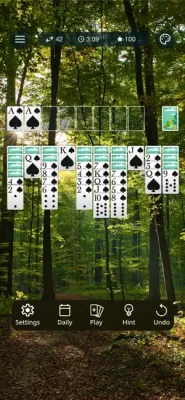
Spider Solitaire: Classic Card brings that familiar experience to mobile devices with a clean interface, touch-friendly controls, smooth animations and an auto-complete option.
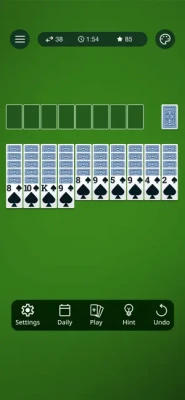
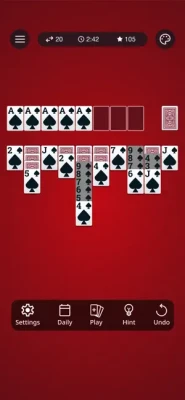
The objective is straightforward: organize the cards on the tableau into descending sequences and clear the board. Although the basic rules are easy to understand, successful games require planning, careful card movement and awareness of which cards should be uncovered first.
Developed by HOMA GAMES, the game is available for iPhone and iPad and is rated 4+ on the U.S. App Store.
Game Concept
Spider Solitaire: Classic Card is built around the traditional patience card-game formula.
Rather than competing against another player, you compete against the puzzle presented by the current card layout. Every move can affect the options available later, so thoughtful planning is more important than simply moving cards as quickly as possible.
The basic gameplay loop is:
Deal Cards → Organize the Tableau → Build Descending Sequences → Clear Completed Sequences → Finish the Game
How to Play Spider Solitaire
The main objective is to arrange cards into complete descending sequences.
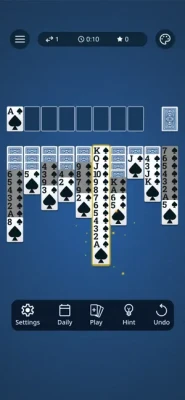
A completed sequence runs from King down to Ace in the appropriate suit. Once a complete sequence has been formed, it can be removed from the tableau, helping clear space for additional moves.
The App Store description emphasizes arranging cards in descending order within the tableau and completing the board.
Basic Steps
- Examine the tableau before making your first move.
- Look for cards that can be moved immediately.
- Build descending card sequences.
- Expose hidden cards whenever possible.
- Create empty spaces strategically.
- Use the available cards carefully.
- Complete full sequences.
- Clear the tableau to win.
Spider Solitaire Strategy
Although Spider Solitaire can look simple, good play depends on making moves that preserve future possibilities.
Reveal Hidden Cards
One of your biggest priorities should be uncovering hidden cards. Revealing new cards gives you additional options and can open previously blocked sequences.
Create Empty Columns
Empty spaces can be extremely valuable because they give you greater flexibility when rearranging cards.
Try not to fill an empty column immediately unless doing so creates a useful sequence or exposes another important card.
Think Ahead
Before moving a card, consider what that move will allow you to do next.
A move that looks beneficial now may create problems later if it blocks an important card.
Complete Sequences Carefully
Completing a sequence is useful because it removes cards from the tableau, but rushing toward a completed sequence isn't always the best move.
Sometimes keeping certain cards available provides more flexibility.
Touch Controls
Spider Solitaire: Classic Card is designed specifically for touchscreen play.
The App Store highlights drag-and-drop controls as well as tapping cards to move them, making the game accessible for both experienced solitaire players and newcomers.
Drag and Drop
Touch a card and drag it to the desired location.
Tap to Move
Tap a card to make a move without requiring a long drag.
The simple control system works particularly well for short sessions on iPhone and larger-screen iPad gameplay.
Auto-Complete Feature
One of the game's convenience features is Auto-Complete.
When the remaining cards are already arranged sufficiently for the game to finish the puzzle, the auto-complete feature can help complete the final stage without requiring every remaining card to be moved manually.
This is especially useful when you have already solved the strategic portion of a deal and simply want to see the game completed.
Graphics and Presentation
Spider Solitaire: Classic Card focuses on a polished and approachable visual experience rather than elaborate game environments.
The App Store highlights:
- Beautiful graphics
- Smooth animations
- Intuitive controls
- Clear card interactions
- Mobile-friendly gameplay
These design choices help preserve the familiar feeling of traditional Spider Solitaire while making it comfortable to play on a touchscreen.
Relaxing Card Gameplay
Spider Solitaire works well as a casual game because there is no requirement to compete against another player in real time.
You can take your time studying the tableau and considering your next move.
This makes the game suitable for:
- Short breaks
- Relaxing sessions
- Casual puzzle gaming
- Solitaire enthusiasts
- Players who enjoy strategy card games
- Fans of traditional patience games
The App Store itself positions the game as a relaxing solitaire experience while also emphasizing skill and strategy.
Game Difficulty
The basic rules are easy to learn, but completing difficult Spider Solitaire layouts can require considerable planning.
The challenge comes from:
- Limited available moves
- Hidden cards
- Managing empty columns
- Choosing which sequence to move
- Avoiding blocked cards
- Planning several moves ahead
This creates a useful balance between accessibility and strategic depth.
Beginner's Guide
Start by Studying the Board
Don't immediately move the first card you see. Look across the tableau and identify moves that reveal hidden cards.
Prioritize Useful Reveals
When you have several possible moves, favor those that expose previously hidden cards or create additional flexibility.
Avoid Unnecessary Moves
Every move changes the board. Don't move cards simply because they can be moved.
Use Empty Columns Wisely
An empty column can dramatically increase your ability to rearrange cards.
Learn From Failed Deals
If a game reaches an unsolvable position, consider which earlier move created the problem. Spider Solitaire rewards learning from previous decisions.
Advanced Spider Solitaire Tips
Build Long Sequences
Long, organized sequences can make the tableau easier to manage, but they should be built carefully.
Preserve Flexibility
Don't sacrifice multiple useful moves just to create one attractive sequence.
Use Empty Spaces as Temporary Storage
An empty column can act as a strategic resource, allowing you to move cards and reorganize the tableau.
Reveal Cards Before Optimizing
In many positions, exposing a hidden card is more valuable than making a visually neat sequence.
Plan Around the Next Deal
Think about what cards may become available after using the stock. Avoid creating a position where the new cards cannot be incorporated.
Progression and Replayability
Spider Solitaire does not rely on a traditional character-level progression system.
Instead, its replayability comes from solving different card layouts and improving your own decision-making.
Every new deal creates another puzzle to solve.
The long-term progression is therefore personal:
Learn the Rules → Improve Your Strategy → Solve Harder Layouts → Reduce Mistakes → Become a Better Spider Solitaire Player
Single-Player Experience
Spider Solitaire: Classic Card is designed as a personal card-game experience.
There is no need to wait for another player, coordinate with teammates or compete in real-time.
That makes it particularly convenient for mobile gaming because you can start a game whenever you have a few minutes available.
Player Ratings and Reception
The U.S. App Store currently lists Spider Solitaire: Classic Card with a 4.9 out of 5 rating from approximately 30,000 ratings.
Player feedback includes praise for the game's smooth gameplay and graphics. One reviewer described it as a favorite version of the classic game and specifically mentioned its smooth performance and good graphics.
Some reviews also criticize the frequency of advertisements, showing that player opinions can vary depending on expectations around the free-to-play experience.
Updates and Version History
The App Store's current version history shows continued maintenance and performance work.
Recent listed updates include:
- Version 1.22.8 — December 12, 2025: Bug fixes and performance improvements
- Version 1.22.5 — June 4, 2025: Bug fixes
- Version 1.22.3 — May 27, 2025: Bug fixing
- Version 1.22.2 — April 30, 2025: Bug fixes and performance improvements
Earlier updates introduced features such as tutorials, daily bonuses, daily challenges, customization options, suit options and puzzle events.
Pros and Cons
Pros
- Classic Spider Solitaire gameplay
- Easy-to-learn rules
- Smooth touch controls
- Drag-and-drop functionality
- Tap-to-move option
- Auto-complete feature
- Attractive graphics
- Smooth animations
- Relaxing single-player experience
- Strong App Store rating
- iPhone and iPad support
Cons
- Advertising may interrupt some players
- The game remains familiar rather than radically changing the Spider Solitaire formula
- Advanced layouts can become challenging for new players
Technical Details
| Feature | Information |
|---|---|
| Game | Spider Solitaire: Classic Card |
| Developer | HOMA GAMES |
| Category | Card |
| Genre | Solitaire / Strategy Card |
| Platform | iPhone, iPad |
| Age Rating | 4+ |
| Language | English |
| App Size | 273.7 MB |
| Price | Free |
| Rating | 4.9/5 |
| Ratings | 30K+ |
| Controller Style | Touch / Drag and Drop |
| Auto-Complete | Yes |
| Multiplayer | No real-time multiplayer focus |
Current store information is based on the U.S. App Store listing.
Is Spider Solitaire: Classic Card Free?
Yes. The U.S. App Store lists Spider Solitaire: Classic Card as a free game.
Is Spider Solitaire: Classic Card Available on iPad?
Yes. The game is listed for both iPhone and iPad.
Is Spider Solitaire: Classic Card a Multiplayer Game?
The core experience is a single-player solitaire game. The objective is to solve the card layout rather than compete against another player in a live match.
Is Spider Solitaire Easy to Learn?
Yes. The fundamental objective is straightforward: organize cards into descending sequences and clear the tableau.
However, winning consistently can require considerably more strategy than learning the basic rules.
Is Spider Solitaire Good for Short Sessions?
Yes. A single deal can be played whenever you have a few spare minutes, making it a natural fit for mobile gaming.
Spider Solitaire vs Traditional Solitaire
Although both games belong to the solitaire family, Spider Solitaire uses a different arrangement and strategic structure.
Traditional Klondike Solitaire typically focuses on building four foundation piles, while Spider Solitaire centers around arranging sequences within the tableau and completing full sequences.
For players who enjoy traditional patience games but want a deeper card-arrangement challenge, Spider Solitaire is an excellent alternative.
Why Play Spider Solitaire: Classic Card?
This game is a strong choice if you're looking for a traditional card experience without complicated rules or an elaborate storyline.
Its biggest strengths are simplicity and replayability.
You can start a game quickly, understand the objective almost immediately and spend as much time as you want planning your next move.
The combination of classic Spider Solitaire rules, smooth controls, attractive presentation and auto-complete convenience makes it accessible to both longtime solitaire fans and casual mobile players.
Frequently Asked Questions
What is Spider Solitaire: Classic Card?
Spider Solitaire: Classic Card is a classic card game developed by HOMA GAMES for iPhone and iPad. Players arrange cards into descending sequences and clear the tableau.
How do you win Spider Solitaire?
You win by arranging the cards into complete descending sequences and clearing all the cards from the tableau.
Can you drag cards in Spider Solitaire?
Yes. The game supports drag-and-drop controls, and players can also tap cards to make moves.
Does Spider Solitaire have auto-complete?
Yes. The App Store listing specifically identifies an Auto-Complete feature.
Is Spider Solitaire: Classic Card free?
Yes. It is listed as a free game on the U.S. App Store.
Is Spider Solitaire available for iPhone?
Yes. The game supports iPhone and iPad.
Who developed Spider Solitaire: Classic Card?
The game is developed by HOMA GAMES.
What age rating does the game have?
The U.S. App Store currently gives it a 4+ age rating.
How large is Spider Solitaire: Classic Card?
The current U.S. App Store listing shows an app size of approximately 273.7 MB.
Final Verdict
Spider Solitaire: Classic Card keeps the appeal of the traditional Spider Solitaire formula while adapting it for modern touchscreen devices.
Its easy-to-understand objective, responsive card controls, attractive presentation and auto-complete option make it a convenient choice for players who want a familiar solitaire experience on iPhone or iPad.
The game's 4.9-star rating from around 30,000 App Store ratings also indicates strong overall reception.
If you enjoy Spider Solitaire, classic card games, patience games, strategy puzzles or relaxing mobile games, this version is worth considering.
Rate the Game
User Reviews









Popular Games



















 Android
 iOS
iOS Windows
 Xbox
Xbox