


Latest Version
October 23, 2026
Lion Studios
Casual
Android
0
com.portbliss.ipeelgood
Report a Problem
More About :game
What Is i Peel Good?
i Peel Good is a relaxing mobile game built around the simple pleasure of peeling objects. Instead of completing complicated missions or competing against other players, you focus on removing layers from different items and watching the results unfold.
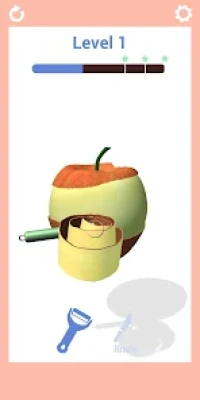
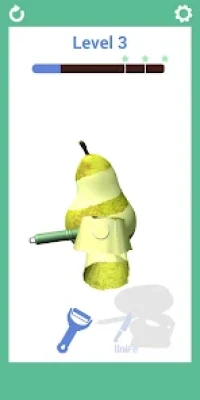
The gameplay combines easy controls with a surprisingly engaging precision challenge. You can rotate objects, use peeling tools, and gradually work toward their centers. Each movement changes the appearance of the object, creating satisfying visual effects as shavings fall away.
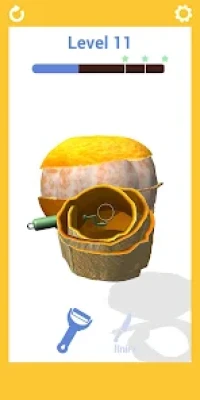
Developed by Lion Studios, i Peel Good features a variety of objects, including fruits, vegetables, and other unusual items. The game encourages you to take your time, control your movements, and enjoy the peeling process rather than rushing through every level.
Its casual design makes it suitable for short gaming sessions. Whether you want a simple distraction or enjoy games with repetitive, relaxing interactions, i Peel Good offers a straightforward experience centered on precision and visual satisfaction.
Main Features of i Peel Good
Satisfying Peeling Gameplay
The main attraction is the ability to remove layers from different objects. Each cut or shaving gradually changes the surface, allowing you to watch the object transform as you continue peeling.
The simple objective makes the game easy to understand, while the visual feedback provides a rewarding feeling when you remove the outer layer cleanly.
Realistic Peeling Physics
The game emphasizes the movement of the peeling tool and the way shavings come away from an object. These effects help make the activity feel more interactive and give each movement a satisfying visual result.
A Variety of Objects
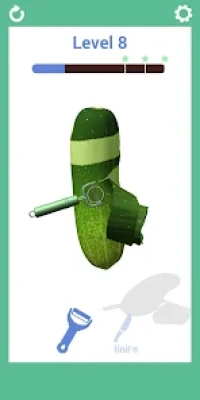
i Peel Good includes numerous objects to peel, carve, and shave. Different shapes and surfaces provide variety, encouraging you to adjust your movements depending on the item in front of you.
Object Rotation
You can rotate objects to reach different sides and maintain a comfortable peeling angle. This feature is useful when working around curved surfaces or trying to remove the outer layer evenly.
Multiple Peeling Tools
The game features tools such as a knife and a peeler. Each tool offers a different way to interact with the object, giving you another aspect of the peeling experience to explore.
Relaxing Visuals and Sound
The peeling animations, falling shavings, and accompanying soundtrack contribute to the game's calming atmosphere. The focus on small, repetitive actions makes it appealing to players who enjoy satisfying simulation games.
Easy-to-Learn Controls
The touch-based controls are simple enough for beginners. Most of the challenge comes from controlling the peeling motion and rotating the object, rather than learning complicated combinations or memorizing instructions.
Offline Gameplay
The Google Play listing identifies offline play as a supported feature. This makes i Peel Good a convenient option for playing without a continuous internet connection, although advertisements and certain app-related features may still depend on connectivity.
How to Play i Peel Good
Choose an Object
Begin a level and examine the object presented on the screen. Notice its shape, surface, and any areas that may require more careful peeling.
Select or Use the Available Tool
Depending on the current level, use the available peeling tool to begin removing the outer layer. Become familiar with how the tool responds to your touch before making large movements.
Start Peeling Gradually
Move the tool along the surface and watch how the shavings come away. Use controlled movements to avoid removing too much material in one area.
Rotate the Object
Turn the object to expose another side when necessary. Rotation helps you maintain a better angle and reach sections that are difficult to peel from your current position.
Work Toward the Center
Continue peeling around the object, gradually removing the outer layers. Pay attention to the remaining surface and adjust your movements as the shape changes.
Complete the Level
Follow the level's requirements until the object is sufficiently peeled. The exact objective can vary, so pay attention to the game's progress indicators and on-screen instructions.
Continue with New Objects
After completing a level, move on to the next available challenge. Use what you have learned about tool movement, rotation, and surface control to improve your results.
Complete Strategy Guide for i Peel Good
Focus on Control Rather Than Speed
One of the most useful strategies is to avoid rushing. Fast movements can make it difficult to control the amount of material removed, particularly around curved or narrow areas.
Use steady gestures and observe the results after each movement. This approach helps you maintain a more consistent peeling pattern and makes it easier to correct mistakes before they become noticeable.
Understand the Shape of Each Object
Different objects have different contours. A round fruit may require continuous adjustments as you rotate it, while a longer object may be easier to peel in extended strokes.
Before starting, examine the object's shape and think about how the tool should move across its surface. Adapting your technique to the object can make peeling smoother and more predictable.
Rotate the Object Regularly
Do not concentrate on one side for too long. Turn the object periodically to reach areas that are difficult to access and check whether the remaining surface is evenly peeled.
Rotating also helps you maintain a comfortable tool angle. Instead of forcing the tool into an awkward position, change the object's orientation and continue from a better angle.
Use Short Movements on Difficult Areas
Long strokes can work well on broad surfaces, but smaller movements are often easier to control around narrow sections and curved edges.
When you encounter an awkward area, slow down and use shorter strokes. Check the result before continuing so that you do not remove more material than intended.
Keep the Peeling Pattern Consistent
A consistent approach can make the process easier to manage. Work around the object systematically rather than repeatedly switching between unrelated areas.
For example, you can peel one section, rotate the object, and continue around its circumference. This method helps you notice areas that remain untouched and reduces the chance of overlooking a section.
Watch the Shavings Carefully
The shavings provide visual feedback about your movement. Their size, direction, and consistency can help you understand how the tool is interacting with the surface.
If the peeling result becomes uneven, adjust your movement and angle. Observing these small details can help you develop a better feel for the game's physics.
Avoid Overworking One Section
Repeatedly peeling the same area may leave the surface uneven or cause you to remove more material than necessary. Once a section appears sufficiently peeled, move to another part of the object.
Return to the original area only if the level's objective or visible surface indicates that more work is needed.
Adapt to Different Tools
A peeler and a knife may behave differently during gameplay. Pay attention to how each tool responds and adjust the length and direction of your movements accordingly.
Do not assume that the same gesture will produce identical results with every tool. A little experimentation at the beginning of a level can help you understand which movements are easiest to control.
Work Gradually Toward the Center
The game's description encourages players to peel toward the center of each object. As the outer layer becomes thinner, pay closer attention to the remaining shape and avoid treating the final stages exactly like the beginning.
Gradual peeling makes it easier to maintain control and appreciate how the object changes throughout the level.
Learn from Every Completed Level
Each object provides an opportunity to improve your technique. Notice which movements produced smooth results and which ones made the process more difficult.
Apply those lessons to later levels, while remembering that different shapes may require different approaches. Consistency is useful, but flexibility is equally important.
Beginner Tips for i Peel Good
Start Slowly
Take a few moments to understand the controls before trying to peel quickly. Gentle, deliberate movements make it easier to learn how the tool behaves.
Rotate Before Reaching Awkward Areas
If a section is difficult to reach, turn the object instead of forcing the tool into an uncomfortable position.
Watch the Surface
Pay attention to the difference between peeled and unpeeled areas. Visual feedback helps you identify where to continue working.
Try Both Available Tools
Experiment with the knife and peeler when the game makes them available. Understanding their behavior can help you choose a more comfortable approach for each object.
Use Short Strokes for Better Control
Small movements are useful when peeling narrow sections or adjusting your position near a curved edge.
Enjoy the Process
i Peel Good is designed around relaxing, repetitive interactions. Focus on the satisfying visual results instead of treating every level as a race.
Advanced Tips for Better Peeling Results
Develop a Repeatable Routine
Create a simple pattern for each object: inspect the surface, begin peeling, rotate regularly, and check your progress. A repeatable routine helps you avoid missing sections.
Change Your Angle Frequently
If the tool stops producing the result you expect, rotate the object and try a different angle. Small changes in orientation can make curved surfaces easier to handle.
Match Stroke Length to the Surface
Use longer movements where the surface allows them and shorter strokes in areas that require more precision. Adjusting your movement to the shape is more effective than using the same stroke everywhere.
Maintain Even Coverage
Check the object from multiple angles to see whether some sections have received more attention than others. Balanced coverage creates a more consistent result and helps you understand your progress.
Avoid Unnecessary Repetition
Once an area is sufficiently peeled, move forward instead of continuing to work on it without a clear reason. Efficient movement helps you maintain a steady rhythm.
Stay Patient with Unusual Objects
Some items may have irregular shapes or surfaces that are less predictable. Slow down, rotate the object more frequently, and experiment with shorter strokes until you find a comfortable technique.
Common Mistakes to Avoid
Peeling Too Quickly
Rapid movements can reduce control and make it harder to maintain a consistent surface. Slow down whenever accuracy becomes difficult.
Ignoring Object Rotation
Remaining at one angle can make parts of an object difficult to reach. Rotate it regularly to improve visibility and access.
Using the Same Movement Everywhere
Different shapes require different techniques. Adjust your stroke length and angle to suit the surface rather than repeating the same gesture without considering the object's contours.
Removing Too Much from One Area
Concentrating on a single section can leave the rest of the object uneven. Work systematically and inspect the result as you go.
Ignoring Visual Feedback
The appearance of the shavings and the changing surface provide useful clues. Watch the results of each movement and adjust your approach when necessary.
Expecting Complex Simulation Mechanics
i Peel Good focuses on a straightforward peeling activity rather than a complete cooking or food preparation system. Players looking for elaborate recipes, ingredient management, or competitive objectives may find the gameplay limited.
Is i Peel Good Worth Playing?
i Peel Good is worth considering if you enjoy relaxing mobile games, simple simulation mechanics, and satisfying visual effects. Its main appeal lies in the process of peeling different objects and watching their surfaces change with each movement.
The game is easy to understand and does not require extensive gaming experience. The combination of object rotation, peeling tools, and visual feedback provides enough variety to make the basic activity engaging for casual players.
It can also be a good choice for short sessions because the central mechanic is straightforward. You can focus on a single object without needing to remember complicated rules or manage a large collection of resources.
However, players who prefer deep progression systems, elaborate objectives, or complex challenges may find the experience repetitive over time. Advertisements and in-app purchases can also influence the overall playing experience.
Overall, i Peel Good is best suited to players who appreciate simple, tactile gameplay and want a casual way to relax while completing small peeling challenges.
Frequently Asked Questions
What Is i Peel Good?
i Peel Good is a casual simulation game where you peel, shave, and carve different objects using simple touch controls.
Who Developed i Peel Good?
The game is developed by Lion Studios, a publisher known for casual mobile titles.
How Do You Play i Peel Good?
Choose an object, use the available tool to remove its outer layer, rotate it to reach different sides, and continue peeling until the level's objective is completed.
Is i Peel Good Difficult?
The controls are easy to learn. The main challenge is maintaining control over your movements and adjusting your technique to different object shapes.
What Objects Can You Peel?
The game features a variety of objects, including fruits, vegetables, and other items. The available selection may change with game updates.
Does i Peel Good Have Different Tools?
Yes. The game includes tools such as a knife and a peeler, offering different ways to remove the outer layer of objects.
Can You Play i Peel Good Offline?
Yes. Offline mode is listed as a supported feature on Google Play, although certain app features may still require an internet connection.
Does i Peel Good Contain Advertisements?
Yes. The Google Play listing indicates that the game contains advertisements and in-app purchases.
What Is the Best Strategy for i Peel Good?
Use controlled movements, rotate objects regularly, adapt your strokes to each shape, and pay attention to visual feedback. Working gradually is generally more effective than rushing.
Final Thoughts
i Peel Good turns a simple everyday activity into a casual mobile simulation built around precision, movement, and satisfying visual effects. Its easy controls and variety of peelable objects make it accessible to players who want a relaxing game without complicated mechanics.
To get the most from each level, focus on steady movements, rotate objects to reach difficult areas, and adjust your technique to the shape of the surface. With patience and practice, the peeling process becomes easier to control and more enjoyable.
Whether you enjoy simulation games or simply want a satisfying activity to fill a few spare minutes, i Peel Good offers a straightforward experience centered on one simple goal: peel carefully and enjoy the result.
Rate the Game
User Reviews















Popular Games



















 Android
 iOS
iOS Windows
 Xbox
Xbox