



Latest Version
October 22, 2026
Lion Studios
Casual
0
com.tgame.silhouetteartnew
Report a Problem
More About :game
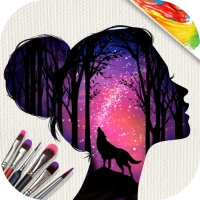
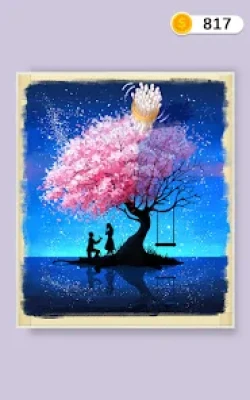
Silhouette Art is a casual painting and coloring game developed by Lion Studios. It invites players to create attractive digital artwork through a series of simple, guided activities. Instead of requiring players to draw every object from scratch, the game provides a canvas and visual outlines that make the creative process accessible to beginners.
The main idea is to build an image step by step. Players begin by adding colors to the canvas, then move on to decorative details such as glitter and stickers. Once the finishing touches are complete, removing the covering reveals the final silhouette artwork.
The game features a range of scenes and subjects, including romantic landscapes, animals, and other colorful compositions. Each finished picture provides a small sense of accomplishment, encouraging players to continue exploring new designs.
Silhouette Art also presents the idea of running your own art studio. As players progress through different stages, they can work on additional pictures and discover new creative possibilities. Its straightforward mechanics make it suitable for short gaming sessions, relaxing breaks, and players who want to enjoy digital art without complicated controls.
Silhouette Art Gameplay Overview
The gameplay follows a simple painting process that combines coloring, decorating, and revealing a completed picture. Each stage guides players through the steps needed to finish an artwork.
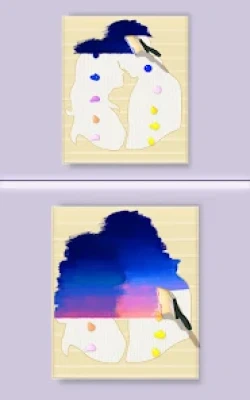
At the beginning, players work with a canvas that contains a predefined image or silhouette. The first task is to apply the required colors to the appropriate areas. After the painting stage, the game introduces additional decorative steps, such as applying glitter or placing stickers.
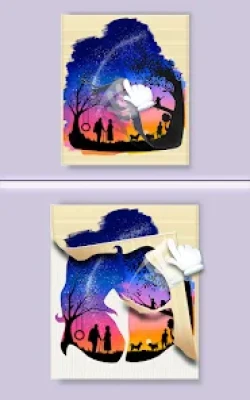
The final reveal is one of the most satisfying parts of the experience. Once the necessary steps are complete, the covering is removed to show the finished design. The contrast between the earlier canvas and the completed artwork gives each level a rewarding conclusion.
As players continue, they encounter more pictures and different visual themes. Although the core mechanics remain easy to understand, the changing artwork provides variety and gives players a reason to keep progressing.
Main Features of Silhouette Art
Easy Painting Mechanics
Silhouette Art is designed for players who want to create pictures without needing advanced drawing skills. The provided outlines guide the painting process, allowing beginners to focus on applying colors and completing the artwork.
Colorful Digital Artwork
The game includes a variety of pictures featuring different subjects and visual styles. Each scene offers a fresh opportunity to work with colors and discover the final composition.
Glitter Effects
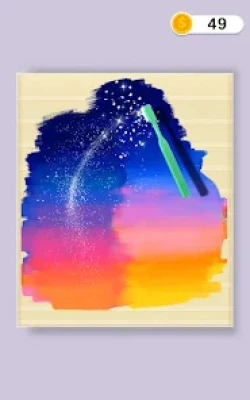
Glitter adds a decorative finish to the painting process. Applying this effect after coloring can make the finished artwork appear brighter and more polished.
Decorative Stickers
Stickers provide another way to enhance the canvas. These finishing details help complete the composition and give the artwork a more distinctive appearance.
Satisfying Silhouette Reveals
The final reveal is a central part of the gameplay. Removing the covering shows the completed image, turning the earlier painting and decorating steps into a finished piece of digital art.
Art Studio Progression
The game presents a continuing series of pictures and scenarios. Completing one artwork leads toward further creative activities, making progression feel like an ongoing artistic journey.
Relaxing Casual Experience
The simple controls and guided activities make Silhouette Art suitable for players who prefer calm, accessible gameplay. There is no need to master complicated movement systems or competitive mechanics.
Offline Play
The game is listed as supporting offline play. However, some features, advertisements, or optional rewards may still require an internet connection depending on the current version and how the game is being used.
How to Play Silhouette Art
Start With the Canvas
When a new artwork appears, take a moment to examine its shape and the areas that need to be filled. The provided design gives you a guide for where to apply color.
Apply the Required Colors
Follow the game's instructions and move the painting tool across the designated areas. Try to cover the intended sections carefully instead of making unnecessary movements.
Add Glitter
Once the coloring stage is complete, follow the prompts for adding glitter. Apply the effect to the indicated areas and check that the task has been completed before moving forward.
Place Decorative Stickers
The next step may involve adding stickers to the composition. Follow the visual guidance to position the available decorations where the game expects them.
Reveal the Finished Artwork
After completing the required painting and decoration steps, remove the covering as instructed. This reveals the completed silhouette picture and marks the end of the artwork's creation process.
Continue to the Next Picture
Once the current level is finished, move on to the next available artwork. Each new picture offers another opportunity to enjoy the painting process and discover a different design.
Complete Silhouette Art Strategy Guide
Understand the Order of Each Stage
The most reliable strategy is to follow the intended sequence: color the canvas, add glitter, place stickers, and reveal the finished image. Completing these steps in order helps prevent confusion and makes it easier to recognize what the game expects.
If the game highlights a particular tool or area, pay attention to that guidance before moving the brush. A little observation at the beginning can make the rest of the level smoother.
Paint Carefully and Consistently
When filling the canvas, focus on the intended areas and use steady movements. The game is designed to make painting accessible, so there is usually no need to rush through the process.
If the brush movement seems ineffective, check whether you are working on the correct section or whether the current step requires a different tool. Deliberate movements can help you understand the interaction more clearly.
Follow Visual Prompts
Silhouette Art uses guided tasks to lead players through each picture. These prompts are particularly useful when the game introduces a new decorative effect or a different stage of the painting process.
Rather than experimenting randomly with every available tool, follow the instruction shown on the screen. This keeps the activity focused and reduces unnecessary actions.
Finish Coloring Before Decorating
Treat the painting stage as the foundation of the artwork. Make sure the required coloring is complete before moving on to glitter and stickers. This approach helps maintain a clear sequence and prevents you from overlooking unfinished areas.
If the game automatically advances after a stage is complete, allow it to do so before attempting the next action.
Use Glitter as a Finishing Detail
Glitter is meant to enhance the artwork rather than replace the coloring process. Apply it when prompted and concentrate on the designated area. Once the effect has been added, check the canvas before continuing.
The important point is not to rush. Follow the instructions and let the game guide you through the decorative stage.
Place Stickers With Care
When a level introduces stickers, observe where the game indicates they should go. Position each decoration deliberately and make sure the required placement has registered before proceeding.
Avoid tapping multiple areas without checking the result. If the game does not respond as expected, look for a prompt that indicates the correct location.
Enjoy the Final Reveal
The reveal is the payoff for completing the earlier steps. Follow the game's instructions to remove the covering and view the finished artwork. There is no need to rush this part of the experience; it is an opportunity to appreciate how the individual elements come together.
Keep Progress Steady
The game is built around completing one picture after another. A steady approach helps you enjoy the variety without turning the experience into a race. Finish the current artwork, review any newly introduced tools, and then begin the next available stage.
Learn From Unfamiliar Stages
When a new picture introduces an unfamiliar action, treat it as an opportunity to learn the mechanic. Watch the screen carefully and follow the first instructions rather than assuming every level works exactly like the previous one.
The overall process remains straightforward, but paying attention to small differences can make new stages easier to complete.
Beginner Tips for Silhouette Art
Follow the instructions. The on-screen prompts explain which action to perform and help keep each stage organized.
Complete one step at a time. Finish coloring before moving to glitter, stickers, and the final reveal.
Use steady brush movements. Careful painting makes it easier to cover the intended areas without unnecessary actions.
Watch for new tools. A newly introduced brush or decoration may be part of the current task, so read the instructions before using it.
Check the canvas before advancing. Make sure the current activity is complete before moving to the next step.
Take your time. The game is designed around relaxing creative activities, so speed is less important than enjoying the process.
Experiment when the game allows it. Explore the available decorations when there is freedom to make creative choices.
Keep expectations simple. You do not need professional art skills to enjoy the game because the guided canvas does much of the planning for you.
Advanced Tips for Better Progress
Recognize the Current Painting Stage
Before making a move, identify whether you are coloring, decorating, or revealing the artwork. Knowing the current stage helps you choose the appropriate action and avoid repeating completed steps.
Avoid Unnecessary Tool Changes
When the game has already selected or highlighted the required tool, focus on completing the task with it. Switching attention too often can make a simple stage feel more complicated than it needs to be.
Pay Attention to Canvas Coverage
During the coloring stage, observe the areas you have already completed. If part of the intended design remains unfinished, continue working there rather than repeatedly brushing over sections that are already covered.
Treat Each Artwork as a Short Project
Think of every level as a small creative project with a beginning, middle, and end. The coloring establishes the base, the decorations add detail, and the reveal completes the process. This mindset makes the gameplay easy to follow.
Stay Patient With New Features
When a new effect or decoration appears, take a moment to understand how it works. Following the instructions carefully is usually more effective than trying several random actions.
Manage Your Play Sessions
Because the levels are based on short creative tasks, you can play a few pictures at a time and return later. This is a useful way to enjoy the game without feeling pressured to complete a large number of stages in one sitting.
How to Complete a Painting in Silhouette Art
Completing a painting is straightforward when you follow the intended workflow.
Start by examining the canvas and identifying the sections that require color. Use the available painting tool to fill those areas according to the instructions. Continue until the game indicates that the coloring step is finished.
Next, move to the glitter stage. Apply the effect as directed and check whether the activity has been registered as complete. After that, add the required stickers to finish decorating the picture.
Once the painting and decorative steps are complete, follow the instructions to remove the covering. The finished silhouette appears, revealing the final composition.
If the game does not advance, review the current prompt and look for an unfinished step. It is generally better to identify the missing action than to repeat the entire painting process.
How the Art Studio Progression Works
Silhouette Art encourages players to continue creating pictures by presenting different scenarios and artworks as they progress. Each completed stage provides a sense of achievement and leads toward more creative opportunities.
The studio theme gives the experience a broader purpose than simply coloring one image. Players can think of each completed picture as another addition to their artistic journey.
The best way to make consistent progress is to complete every required step in the current artwork before moving forward. Pay attention when a new tool, effect, or decoration becomes available, since these may form part of later activities.
Rather than worrying about finishing every picture quickly, enjoy the process of discovering different designs. The steady flow of artwork is one of the main reasons the game can be appealing to casual players.
Is Silhouette Art Suitable for Beginners?
Yes. Silhouette Art is designed to be accessible even for players who do not have drawing or painting experience. The provided canvas and guided instructions remove much of the difficulty associated with creating a picture from a blank page.
Instead of requiring freehand drawing, the game focuses on filling outlined areas and adding decorative effects. This allows players to enjoy the creative process without needing to learn complex techniques.
Beginners should focus on following the instructions and completing the stages in order. As they become familiar with the controls, the painting process becomes easier to understand.
Is Silhouette Art a Relaxing Game?
Silhouette Art is well suited to players who enjoy calm, visually focused activities. Its painting mechanics, glitter effects, stickers, and final reveals create a simple rhythm that can make short gaming sessions enjoyable.
The game does not rely on complex combat systems or demanding competitive objectives. Instead, it encourages players to concentrate on the artwork and progress at a comfortable pace.
Individual preferences differ, but people who enjoy coloring books, casual art games, and simple creative tasks may find its style particularly appealing.
Common Mistakes to Avoid
Rushing Through the Instructions
Skipping the prompts can make it harder to understand what the current stage requires. Take a moment to read each instruction before acting.
Painting Without Checking the Target Area
Moving the brush randomly can waste time or leave the intended section unfinished. Focus on the area indicated by the game.
Moving to Decorations Too Early
Complete the required coloring before trying to add glitter or stickers. Following the intended order keeps the activity clear and organized.
Repeating an Action That Has Already Worked
Once a task is complete, check whether the game has advanced to the next step. Repeating the same movement may not be necessary.
Ignoring New Tools or Effects
When a new feature appears, read the prompt to understand its role. Do not assume that every tool works in the same way.
Expecting Freehand Drawing
The main appeal of Silhouette Art is guided painting rather than unrestricted drawing. Players who understand this design can enjoy the game without expecting a full digital illustration program.
Ads and Optional Purchases
Silhouette Art is listed as a game that contains advertisements and offers in-app purchases. Depending on the version and current game flow, advertisements may appear between activities or be associated with certain optional items and rewards.
If you prefer uninterrupted play, review the available settings and purchase descriptions carefully before spending money. Check exactly what an optional purchase includes instead of assuming it removes every advertisement or unlocks all content.
You can also enjoy the core painting experience at your own pace without treating every optional reward as essential to progress.
Silhouette Art Frequently Asked Questions
What Is Silhouette Art?
Silhouette Art is a casual digital painting game in which players color guided canvases, add glitter and stickers, and reveal finished silhouette pictures.
Who Developed Silhouette Art?
The game is developed and published by Lion Studios.
How Do You Play Silhouette Art?
Start by coloring the designated areas of the canvas. Then follow the prompts to add glitter and stickers before removing the covering to reveal the finished artwork.
Do You Need Drawing Skills to Play?
No. The game provides guided designs, making it accessible to players who have little or no drawing experience.
What Is the Main Goal of Silhouette Art?
The main goal is to complete the available pictures by following the painting and decorating steps. Progressing through the game allows players to discover more artwork.
Can You Add Glitter and Stickers?
Yes. Glitter and stickers are part of the decorative process and help give the finished silhouette pictures their final appearance.
Is Silhouette Art Difficult?
The basic mechanics are simple. Most of the challenge comes from following the instructions and completing each stage in the correct order.
Can You Play Silhouette Art Offline?
The game is listed as supporting offline play. Some online-dependent features, advertisements, or optional rewards may still require an internet connection.
Does Silhouette Art Contain Advertisements?
Yes. The game listing indicates that advertisements are included. Optional in-app purchases are also available.
How Can You Progress Faster?
Follow the on-screen instructions, complete the coloring stage before decorating, and check that every required action has registered before advancing.
What Should You Do if a Painting Does Not Progress?
Review the current instruction and look for an unfinished part of the task. Make sure the required area has been colored or the requested decoration has been applied.
Is Silhouette Art Good for Relaxing?
Players who enjoy casual painting, colorful pictures, and simple guided activities may find the game relaxing. Its short stages make it easy to play during breaks.
Final Thoughts on Silhouette Art
Silhouette Art offers an approachable way to enjoy digital painting through guided coloring, decorative effects, stickers, and satisfying picture reveals. Its straightforward mechanics make it suitable for beginners, while the variety of artwork gives players reasons to keep progressing.
The best strategy is to follow each stage in order, paint carefully, pay attention to visual prompts, and enjoy the finishing details. There is no need to rush or have professional artistic skills to appreciate the experience.
For players who like casual art games and relaxing creative activities, Silhouette Art provides an enjoyable combination of simple gameplay and colorful results. Each completed picture adds another small achievement to the journey through its digital art studio.
Rate the Game
User Reviews











Popular Games



















 Android
 iOS
iOS Windows
 Xbox
Xbox