

Latest Version
October 23, 2026
Lion Studios
Puzzle
Android
0
com.supertapx.drawin
Report a Problem
More About :game
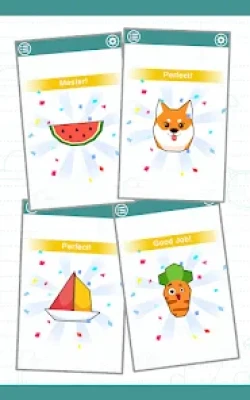
Draw In is a simple but engaging drawing puzzle game developed by Lion Studios. Instead of asking you to draw freely or create pictures from scratch, the game challenges you to estimate how long a line needs to be to cover the outline of a given shape.
Each level presents an outline that you must trace with a single drawn line. The challenge is judging the correct length before you begin. If the line is too short, it may not cover the entire shape. If it is too long, it can extend beyond the outline and reduce your score.
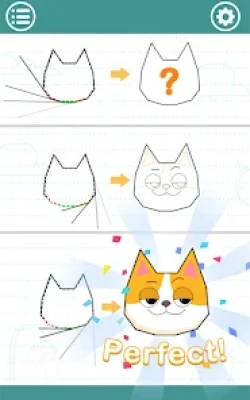
The closer your line matches the shape's outline, the more stars you can earn. Successfully completing a drawing also helps reveal the hidden object, making every level a small test of observation and estimation.
Draw In is easy to understand, making it suitable for quick gaming sessions. However, earning the best results takes practice, especially when shapes become less familiar or have more complicated curves.
Main Features of Draw In
Simple One-Touch Controls
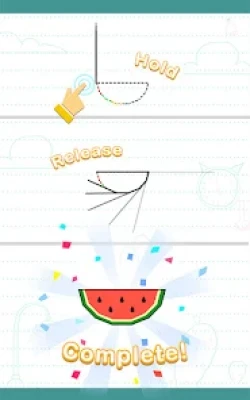
The game uses straightforward touch controls, allowing you to draw a line by pressing and dragging on the screen. You do not need advanced artistic skills or complicated combinations of buttons. The main challenge is estimating the length of the line rather than drawing detailed artwork.
Precision-Based Puzzle Gameplay
Every level asks you to judge the length of an outline before drawing. A successful attempt depends on how closely your line covers the complete shape without extending too far beyond its edges.
Hidden Objects and Pictures
The outlines represent different objects and designs. As you improve your drawing accuracy, the shapes become easier to recognize, adding a discovery element to the puzzle experience.
Star-Based Performance
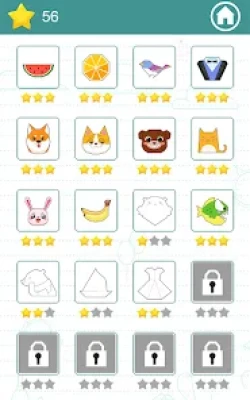
Your results depend on the accuracy of your line. Better-fitting outlines earn more stars, giving you a reason to replay completed levels and improve your previous performance.
Short and Accessible Levels
Draw In is designed around quick challenges that can fit into a short break. You can complete a level without committing to a long gaming session, making it convenient for casual players.
Free-to-Play Access
The game is available as a free download, with advertisements and optional in-app purchases. The core concept is easy to access, although the overall experience may include promotional interruptions.
How to Play Draw In
Understand the Objective
Your goal is to draw a line that covers the complete outline of the displayed shape. The line should be long enough to reach the entire outline but not so long that it extends noticeably beyond it.
Study the Shape Before Drawing
Take a moment to inspect the outline. Look at its overall size, curves, corners, and proportions. Although you cannot see the exact required length, examining the shape helps you make a more informed estimate.
Draw a Carefully Estimated Line
Press the screen and draw the line using the game's controls. Aim for a length that you believe will cover the entire outline. Avoid making a random guess when you can use the shape's proportions to estimate more accurately.
Check Your Result
After your attempt, observe how well the line matches the outline and how many stars you receive. A result that falls short or extends too far gives you useful information for your next attempt.
Replay Levels to Improve
If you do not achieve the result you want, try again. Replaying a level helps you understand the required length and develop a better sense of proportion.
Complete Draw In Strategy Guide
Learn to Estimate Length Visually
The most important skill in Draw In is visual estimation. Before drawing, imagine following the outline from its starting point all the way around the shape. Consider every curve, corner, and straight section instead of judging the distance from the shape's width or height alone.
A shape that looks small can have a surprisingly long outline if it contains many curves or narrow sections. Likewise, a wide shape with a simple boundary may require less line than you initially expect.
With practice, you will become more comfortable estimating the total length without needing to measure anything.
Focus on the Entire Boundary
One common mistake is concentrating on the overall appearance of a shape rather than its complete outline. The length of a line depends on the path around the boundary, not simply the distance between the shape's farthest points.
For example, a rounded object may appear compact, but its outline continues around every side. A shape with several bends can require more line than a basic geometric figure of a similar size.
Train yourself to mentally trace the whole boundary before making your move.
Aim for Accuracy Instead of Speed
Because the game revolves around estimating length, rushing rarely improves your results. Give yourself enough time to study each shape and make a reasonable prediction.
You do not need to spend a long time on every level. Even a brief pause to identify the shape's general structure can help you avoid careless mistakes.
Once you become familiar with the gameplay, you can naturally make faster and more accurate estimates.
Use Previous Attempts as Feedback
A failed attempt is an opportunity to learn. If the line is too short, your estimate was below the required length. If it extends too far, your estimate was too generous.
Use that feedback to adjust your next attempt. Rather than changing the length randomly, think about how much your original estimate differed from the outline.
This approach turns repeated attempts into a practical learning process and helps you develop a more consistent sense of proportion.
Pay Attention to Curves and Corners
Curved outlines can be difficult to estimate because they do not follow a simple straight path. Shapes with multiple corners or irregular edges can also be misleading.
When examining a complicated design, mentally divide the outline into smaller sections. Estimate the straight portions first, then consider the extra length created by bends and curves.
You do not need an exact mathematical calculation. The purpose is to avoid underestimating shapes that contain more detail than they initially appear to have.
Understand the Importance of Star Ratings
Stars provide a useful indication of how accurately you completed a level. If your result is lower than expected, consider whether your line was too short, too long, or poorly matched to the outline.
Try to improve one result at a time. Instead of replaying every level immediately, focus on the shapes where you believe a better estimate is possible.
Higher star totals can serve as a personal progress goal and make familiar levels more rewarding.
Recognize Familiar Shapes
As you play, you may begin to recognize recurring types of objects and outlines. Familiarity can make it easier to estimate their boundaries because you already understand their general proportions.
However, do not rely entirely on identifying the object. Two objects with similar appearances can have different outlines. Always inspect the actual boundary displayed in the current level.
Build a Consistent Drawing Rhythm
A steady approach is often more useful than repeatedly changing your technique. Study the shape, estimate the boundary, draw your line, and review the result.
Following the same routine helps you avoid impulsive guesses and makes it easier to identify what went wrong when an attempt does not earn the desired score.
Beginner Tips for Draw In
Start With a Careful Visual Inspection
Before touching the screen, look at the complete shape. Notice whether it is rounded, angular, narrow, wide, or irregular. This first impression can help you form a reasonable estimate.
Do Not Confuse Width With Outline Length
The widest point of a shape does not tell you how long its entire boundary will be. A narrow but winding design may require a longer line than a broader shape with fewer curves.
Avoid Random Repeated Attempts
Repeating a level can help, but only when you learn from the previous result. Make a deliberate adjustment based on whether your last line was too short or too long.
Practice on Easier Shapes
Use simpler outlines to develop your estimation skills. Familiar geometric forms can help you understand how the size and complexity of a shape affect its boundary length.
Keep Your Expectations Realistic
Perfect results may take practice. Focus first on understanding the mechanics and completing levels consistently. Better accuracy should develop as you gain experience.
Advanced Tips for Better Results
Break Complex Shapes Into Sections
Mentally divide a complicated outline into several parts. Consider the length of each section and combine your estimates into one overall judgment. This is especially useful for shapes with several curves or changes in direction.
Compare Similar Outlines
When two shapes have similar dimensions, look for differences in their boundaries. Extra corners, narrow extensions, or deeper curves can increase the length you need to estimate.
Adjust Your Estimate Gradually
If your line is slightly too long, avoid making a dramatically shorter guess on the next attempt. Small, thoughtful changes can help you find a more accurate result.
Develop a Personal Reference System
As you play, remember the general appearance of shapes that required longer or shorter lines than expected. These experiences can help you judge new outlines more confidently.
Replay Levels With a Specific Goal
When returning to a completed level, decide what you want to improve. You might focus on estimating a curved boundary more accurately or avoiding a line that extends beyond the outline. A clear goal makes practice more effective.
Common Mistakes to Avoid
Drawing Before Studying the Outline
Starting immediately can lead to avoidable errors. A quick inspection gives you a better understanding of the shape and the length you need.
Estimating Only From the Shape's Size
A shape's height and width are not the same as its outline length. Always consider the full boundary, including curves and corners.
Assuming Every Shape Is Equally Difficult
Some outlines are easier to estimate than others. Irregular designs may require more thought, so adjust your approach according to the shape rather than using the same guess every time.
Ignoring the Result of a Failed Attempt
If you do not learn from an unsuccessful drawing, you may repeat the same mistake. Pay attention to whether your estimate was too short or too long and use that information on the next attempt.
Chasing Stars Without Improving Your Technique
Stars are a useful goal, but they should not replace careful observation. Improving your estimation process is a more reliable way to earn better results over time.
Expecting a Traditional Drawing Experience
Draw In is not primarily a freehand art application. Its main challenge is estimating the length of a line that follows a preset outline. Players looking for unrestricted drawing tools may prefer a different type of game.
Is Draw In Worth Playing?
Draw In is a good choice for players who enjoy simple puzzles, visual challenges, and short casual gaming sessions. Its main attraction is the easy-to-understand concept: estimate a shape's outline, draw the line, and see how accurately you completed the design.
The game can also be satisfying for players who enjoy improving their results. Replaying a level provides a clear opportunity to refine an estimate and earn a better star rating.
However, its straightforward mechanics may feel repetitive to players who prefer complex puzzles, extensive customization, or deeper progression systems. Advertisements may also interrupt the experience, depending on how the game is presented during play.
Overall, Draw In is best suited to casual players who want an accessible drawing-based challenge that rewards patience and visual judgment.
Frequently Asked Questions About Draw In
What Is Draw In?
Draw In is a casual puzzle game in which you estimate the length of a shape's outline and draw a line that covers it as accurately as possible.
How Do You Play Draw In?
Examine the displayed outline, estimate its total length, and draw a line that follows the shape. Your score depends on how closely the line matches the boundary.
How Do You Earn More Stars in Draw In?
To improve your star rating, estimate the outline carefully and avoid drawing a line that is too short or too long. Reviewing previous attempts can help you make better adjustments.
Is Draw In Easy for Beginners?
Yes. The controls and objective are simple to understand. The main challenge is developing the visual judgment needed to estimate the correct line length.
Does Draw In Require Drawing Skills?
You do not need professional drawing skills. The game focuses more on estimating length and understanding outlines than on creating original artwork.
Can You Replay Levels in Draw In?
The game encourages replaying levels to improve your results and achieve higher records. Repeated attempts can help you become more accurate.
Is Draw In Free to Play?
Draw In is available as a free download and includes advertisements and in-app purchases. The exact experience may vary depending on the current version and your device.
Is Draw In Suitable for Short Gaming Sessions?
Yes. Its simple controls and compact puzzle format make it suitable for quick sessions during breaks or while relaxing.
What Is the Best Strategy for Difficult Levels?
Study the complete boundary, mentally divide complicated shapes into smaller sections, and estimate the total length before drawing. Use the result of each attempt to refine your next estimate.
Does Draw In Test Creativity or Accuracy?
It primarily tests accuracy, visual estimation, and observation. Recognizing the hidden object adds an element of discovery, but success depends on how closely your line matches the outline.
Final Thoughts
Draw In turns a simple drawing action into a puzzle about precision, observation, and visual estimation. Its accessible controls make it easy to start playing, while the challenge of matching each outline gives players a reason to improve their results.
The best way to progress is to study every shape, consider its complete boundary, and learn from each attempt. Rather than rushing or guessing repeatedly, develop a consistent method and make small adjustments when necessary.
For anyone looking for a casual mobile game with straightforward mechanics and satisfying accuracy-based challenges, Draw In offers an approachable way to pass the time and sharpen visual judgment.
Rate the Game
User Reviews







Popular Games



















 Android
 iOS
iOS Windows
 Xbox
Xbox