




Latest Version
April 01, 2026
Aleksandar Tomic
Action
iOS
0
Report a Problem
More About :game
Designed for quick sessions, a round can be completed in under a minute, making it ideal when you want a short challenge without committing to a lengthy game. As the kill count rises, the available reaction time becomes shorter, turning a simple tapping challenge into an increasingly demanding test of speed and concentration.
What Is Time Kill: Duel?
Time Kill: Duel is a minimalist arcade action game developed by Aleksandar Tomic.
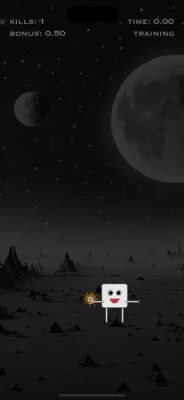
The entire experience revolves around one deceptively simple task: find and tap a robot before the timer reaches zero.
The robot can appear anywhere on the screen, including near the edges, so players need fast reactions and accurate taps. Every successful hit keeps the run going, while a missed opportunity ends the game.
The game is built specifically around short, repeatable sessions. You can start playing almost immediately, attempt a high score, fail, restart, and try again.
Time Kill: Duel Gameplay
The core gameplay is extremely easy to understand.
- Start the game.
- Wait for the robot to appear.
- Tap the robot before the timer reaches zero.
- Earn a kill.
- Receive bonus points based on your remaining time.
- Continue to the next challenge.
- Survive as long as possible.
- Try to beat your previous high score.
The simplicity is intentional. There are no complicated inventories, lengthy tutorials, or large maps to learn.
Instead, the game focuses almost entirely on speed, timing, accuracy, and concentration.
The Race Against the Clock
The timer is the game's biggest enemy.
At the beginning, players have enough time to understand the basic mechanic. As the run progresses, however, the available reaction window becomes increasingly demanding.
The App Store listing explains that the early stages begin with a 1-second countdown, with difficulty changes occurring at kill milestones including 10, 20, 30, 50, and 70 kills.
This creates a natural difficulty curve.
What feels easy during the first few taps can become extremely difficult after a long streak.
Robot Target System
The robot is your only target, but its position keeps you alert.
It can spawn in different locations around the screen, including close to the edge.
That means players cannot simply develop one repetitive tapping pattern.
You need to visually locate the target and react immediately.
This makes Time Kill: Duel particularly suitable for players who enjoy reflex challenges and reaction-speed games.
Kill Counter
Every successful tap counts as a kill.
The kill counter tracks how far you have progressed during the current run.
A higher kill count means you have survived more encounters and successfully reacted to more demanding situations.
The kill total also contributes directly to your final score.
Bonus Time Scoring
Time Kill: Duel does not only reward successful hits.
The time remaining after a successful robot hit is converted into bonus points.
This means speed has a double benefit.
If you tap the robot quickly, you keep the game alive and also generate a larger bonus.
The result is a scoring system that rewards both:
- Accuracy
- Reaction speed
How the Score Works
Your final score is calculated from:
Total Kills + Total Bonus Points
This gives players an incentive to react as quickly as possible rather than simply surviving each stage.
A player who survives for a long time but reacts slowly may therefore score less than someone who consistently taps the robot almost immediately.
High Score System
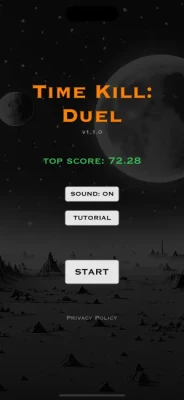
Time Kill: Duel keeps track of your best performances.
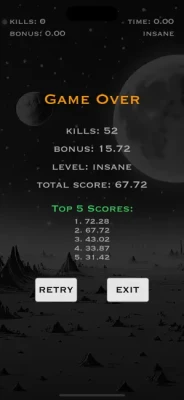
The game records the top five scores from your previous sessions, giving you a reason to keep replaying even after completing a run.
Instead of progressing through a traditional campaign, your personal high score becomes the main long-term challenge.
Game Center Leaderboards
The current App Store version supports Game Center leaderboards.
This adds a competitive element to the otherwise simple arcade formula. Players can compare their performance and work toward a higher position on the leaderboard.
For a game built around quick sessions, leaderboard competition gives each attempt a clear purpose:
Can you beat your previous score?
Difficulty Progression
The game becomes harder as your kill count increases.
According to the App Store listing, time limits decrease at several progression milestones, including:
- 10 kills
- 20 kills
- 30 kills
- 50 kills
- 70 kills
A new level was also added at the 70-kill stage in version 1.1.0.
This progression transforms the game from a simple tapping exercise into a genuine reaction-speed challenge.
Level Progression
The current level is displayed during gameplay so you can understand how far you have progressed.
As levels become faster, players need increasingly precise timing.
The challenge is not about learning complicated mechanics. It is about mastering a very small number of mechanics at increasingly high speeds.
Game Over
A run ends when you fail to tap the robot before the timer reaches zero.
At the end of the run, the game displays your kills and bonus points before showing the final total score.
From there, you can retry and immediately attempt to improve your performance.
This quick restart structure makes the game well suited to repeated attempts.
Quick Play Sessions
One of Time Kill: Duel's biggest strengths is its short-session design.
The developer describes the game as suitable for quick moments such as commuting, waiting, or taking a short break. The App Store listing also states that a full round can be completed in under a minute.
You can therefore play:
- For less than a minute
- During a short break
- Between tasks
- While waiting
- For repeated high-score attempts
Controls
The controls are deliberately simple.
Main Control
Tap the robot.
That's essentially the entire control system.
There is no virtual joystick or complicated button combination.
Your ability to play successfully depends primarily on how quickly you can locate and tap the target.
Reaction Speed Challenge
Time Kill: Duel can be viewed as a reaction-speed test disguised as a simple arcade game.
Players need to combine:
- Visual recognition
- Hand-eye coordination
- Finger accuracy
- Reaction time
- Concentration
- Consistency
As the timer becomes shorter, even small delays can cause a game-ending mistake.
Strategy and Tips
Watch the Entire Screen
Don't concentrate only on the center.
The robot can appear in different positions, including near the edges.
React Instead of Guessing
Trying to predict where the robot will appear can lead to unnecessary mistakes.
Focus on quickly identifying the actual target.
Tap Accurately
Speed is important, but an inaccurate tap can cost the run.
Stay Calm
The faster stages can create pressure. Panicking can make your movements less precise.
Chase Bonus Points
Fast successful taps give you more remaining-time bonus points.
Practice the Early Levels
Repeated runs help you develop faster target recognition before the game becomes extremely demanding.
Beginner's Guide
If you're playing Time Kill: Duel for the first time, don't worry about the leaderboard immediately.
Your first goal should be learning the rhythm of the game.
Step 1: Start a Run
Tap START and prepare for the first robot.
Step 2: Locate the Target
Look across the entire screen rather than focusing on one area.
Step 3: Tap Quickly
The faster you react, the more bonus time you preserve.
Step 4: Learn the Difficulty Changes
Pay attention to what happens as your kill count increases.
Step 5: Build Consistency
Once you can reliably survive the early stages, focus on improving your reaction time.
Step 6: Chase Your Best Score
After learning the mechanics, your personal high score becomes the main target.
Advanced Strategy
At higher levels, survival requires more than simply tapping quickly.
Improve Target Recognition
Train yourself to identify the robot immediately when it appears.
Minimize Movement
Large finger movements waste valuable time.
Maintain Focus
A single moment of distraction can end a long run.
Prioritize Accuracy
A fast but inaccurate tap is useless if it fails to hit the target.
Build Consistency
High scores come from repeating successful reactions over many consecutive targets.
Sound Options
The game includes a Sound ON/OFF option.
When sound is enabled, actions such as shooting and collecting bonuses produce sound effects.
The sound setting is saved for future sessions.
This is useful if you want to play silently in public places or use audio feedback during a focused session.
Pause Feature
The current version also includes a pause screen.
Version 1.1.1, released March 3, 2025, added the pause screen according to the App Store version history.
Latest Update
The App Store currently lists version 1.1.2, released July 15, 2025.
The update added Game Center leaderboards.
Previous updates included:
- 1.1.1 — Pause screen added
- 1.1.0 — Top five scores, level names, and a new level at 70 kills
- 1.0.1 — Mac support added as a destination designed for iPad
- 1.0.0 — Original release
Game Modes
Time Kill: Duel is centered around its primary timed survival/high-score experience rather than a collection of traditional game modes.
Timed Robot Challenge
Tap the robot before the countdown reaches zero.
High Score Challenge
Try to achieve a better total score than your previous attempts.
Game Center Competition
Compare scores through Game Center leaderboards.
Characters and Enemies
There is no traditional character roster.
The primary target is a rogue robot, and the player's role is essentially that of a fast-reacting shooter trying to eliminate each target before time expires.
The developer describes the game as featuring quick micro-duels against a rogue AI.
Game Theme and Atmosphere
Time Kill: Duel has a lightweight arcade presentation centered on:
- Robots
- Speed
- Countdown pressure
- Quick reactions
- High scores
- Short sessions
- Competitive replay
The game's design avoids lengthy storytelling and instead puts the player's attention directly on the next target.
Graphics and Presentation
The visual design is focused on clarity rather than complexity.
Because the robot can appear anywhere on the screen and reaction time is central to the gameplay, the target needs to be easy to recognize quickly.
This minimalist approach supports the game's core idea: see the target, tap the target, survive the timer.
Accessibility
The developer has not indicated any specific accessibility features on the current App Store listing.
The game does, however, use a very simple touch-control system consisting primarily of tapping the target.
Devices and Compatibility
Time Kill: Duel is available for:
- iPhone
- iPad
- Mac on supported Apple hardware
The App Store currently requires iOS 16.6 or later on iPhone, iPadOS 16.6 or later on iPad, and macOS 13.5 or later with an Apple M1 chip or later for Mac compatibility.
Technical Details
| Feature | Details |
|---|---|
| Game | Time Kill: Duel |
| Developer | Aleksandar Tomic |
| Genre | Action |
| Platform | iPhone, iPad |
| Mac | Supported on Apple M1 or later |
| Price | Free |
| Language | English |
| App Size | 15 MB |
| Age Rating | 9+ |
| Violence | Infrequent Cartoon or Fantasy Violence |
| Game Center | Yes |
| Leaderboards | Yes |
| Current Version | 1.1.2 |
| Latest Listed Update | July 15, 2025 |
| Minimum iOS | iOS 16.6 |
| Minimum iPadOS | iPadOS 16.6 |
| Mac Requirement | macOS 13.5 + Apple M1 or later |
Time Kill: Duel Pros and Cons
Pros
- Extremely easy to learn
- Very fast gameplay
- Excellent for short sessions
- Simple touch controls
- Increasing difficulty
- High-score system
- Top five scores
- Game Center leaderboards
- Bonus scoring rewards speed
- Small 15 MB download
- Available on iPhone and iPad
- Mac support on compatible hardware
Cons
- Very simple gameplay loop
- Limited variety compared with larger arcade games
- No deep story or character progression
- Primarily designed around repeated high-score attempts
- Fast difficulty increase can be challenging for casual players
Player Experience
Time Kill: Duel is built around the satisfaction of improving by just a little bit each time.
Your first attempt may end quickly.
Then you learn where to look.
You react faster.
You reach another level.
Eventually, you begin chasing the top of your own leaderboard.
Because each round is short, failure doesn't feel like a major commitment. You can simply restart and try again.
Who Should Play Time Kill: Duel?
The game is a good fit for players who enjoy:
- Reflex games
- Tap games
- Arcade action
- High-score challenges
- Reaction-time games
- Quick mobile games
- One-minute gaming sessions
- Competitive leaderboards
- Simple controls with increasing difficulty
It is particularly suitable for players who prefer games they can start and understand immediately.
Who May Not Enjoy It?
Players looking for:
- Long story campaigns
- RPG progression
- Character customization
- Multiplayer battles
- Open-world exploration
- Complex strategy systems
may find the game's intentionally minimalist design too limited.
Time Kill: Duel is not trying to be a large adventure.
It is trying to make a few seconds of gameplay exciting.
Is Time Kill: Duel Worth Playing?
Time Kill: Duel is worth trying if you enjoy quick reflex-based arcade games.
Its greatest strength is its simplicity.
You don't need to learn complicated controls or spend hours understanding a progression system. The game gives you a target, a timer, and one job: tap quickly.
The decreasing time limits provide the challenge, while bonus points and Game Center leaderboards give you reasons to keep improving.
For players searching for a fast iPhone action game, robot tapping game, reaction game, or quick arcade game, Time Kill: Duel offers an accessible pick-up-and-play experience.
Expert Rating
Overall Rating: 7.8/10
Gameplay: 8.0/10
Simple but effective tap-based gameplay.
Controls: 9.0/10
Almost anyone can understand the controls immediately.
Challenge: 8.5/10
The shrinking reaction window creates genuine difficulty.
Replay Value: 8.0/10
High scores and Game Center leaderboards encourage repeated attempts.
Content Variety: 6.0/10
The deliberately simple concept provides limited mechanical variety.
Quick-Play Value: 9.2/10
Excellent for short sessions.
Final Verdict
Time Kill: Duel takes an extremely simple idea and turns it into a surprisingly demanding reflex challenge.
The objective never changes: tap the robot before time reaches zero.
But as your kill count rises, the timer becomes less forgiving, the robot can appear in difficult positions, and the pressure increases. Successful taps also convert remaining time into bonus points, creating an extra incentive to react as quickly as possible.
The addition of Game Center leaderboards gives the game a competitive layer, while the top-five score system provides a personal target even when you're playing alone.
With its small download size, simple controls, short rounds, and escalating difficulty, Time Kill: Duel is best viewed as a quick reaction and high-score arcade game for iPhone and iPad.
Frequently Asked Questions
What is Time Kill: Duel?
Time Kill: Duel is a fast-paced action and reflex game in which players tap a robot before the countdown reaches zero.
Is Time Kill: Duel free?
Yes. The current App Store listing identifies it as a free game.
Is Time Kill: Duel available on iPhone?
Yes. It is available for iPhone and requires iOS 16.6 or later.
Is Time Kill: Duel available on iPad?
Yes. The game is designed for iPad and requires iPadOS 16.6 or later.
Can I play Time Kill: Duel on Mac?
Yes, on supported Macs. The App Store lists macOS 13.5 or later with an Apple M1 chip or later.
How do you play Time Kill: Duel?
Start the game and tap the robot before the timer reaches zero. Each successful hit adds a kill and gives you bonus points based on the remaining time.
Does Time Kill: Duel get harder?
Yes. The available reaction time decreases as you progress through the kill milestones.
How does scoring work?
Your total score combines your number of kills with the bonus points earned from remaining time.
Does Time Kill: Duel have leaderboards?
Yes. Game Center leaderboards were added in version 1.1.2.
Does Time Kill: Duel have high scores?
Yes. The game records the top five scores from your previous sessions.
How long is a game of Time Kill: Duel?
A full round can be completed in under a minute, although the exact duration depends on how long you survive.
Can the robot appear anywhere?
Yes. The robot can spawn in different locations around the screen, including near the edges.
Does Time Kill: Duel have sound effects?
Yes. The game includes a sound ON/OFF option, with effects for actions such as shooting and collecting bonuses.
Is Time Kill: Duel multiplayer?
The current listing focuses on single-player high-score gameplay. Game Center leaderboards allow players to compete through scores rather than direct real-time multiplayer.
What age rating is Time Kill: Duel?
The current US App Store listing gives the game a 9+ rating with infrequent cartoon or fantasy violence.
Rate the Game
User Reviews














Popular Games



















 Android
 iOS
iOS Windows
 Xbox
Xbox