

Latest Version
September 26, 2026
Yso Corp
Action
iOS
0
Report a Problem
More About :game
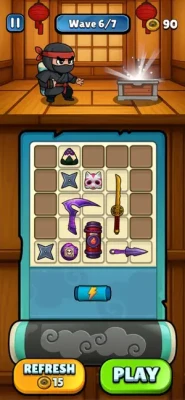
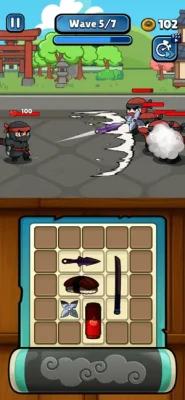
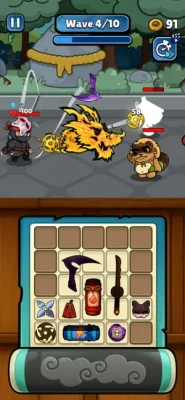
The game lets you combine weapons such as shurikens, katanas, and kunai, manage limited space inside the scroll, collect loot during runs, and rearrange your equipment to create stronger attacks. Once the scroll is prepared, the ninja automatically moves forward and fights enemies.
That makes Ninja Scroll Rush less about traditional button-heavy combat and more about making good equipment decisions before the next wave.
What Is Ninja Scroll Rush?
Ninja Scroll Rush is an Action game from Yso Corp that mixes automatic side-scrolling combat with weapon merging and inventory management.
The basic gameplay loop is:
Collect Weapons → Arrange Your Scroll → Merge Items → Enter Combat → Collect Loot → Improve Your Build → Fight the Next Waves
The limited space inside the ninja scroll is particularly important. You cannot simply carry everything, so every placement decision can affect the strength and flexibility of your build.
Main Features
Ninja Weapon Merging
The game allows you to combine ninja weapons to create a stronger arsenal. The App Store specifically mentions shurikens, katanas, and kunai.
Limited Scroll Space
Your weapons have to fit inside a limited scroll, creating a backpack-management puzzle before and during combat.
Automatic Ninja Combat
Once your scroll is prepared, your ninja automatically runs forward and attacks enemies using the equipment you've selected.
Wave-Based Enemies
Your objective is to survive successive groups of enemies while making your equipment stronger.
Loot Collection
Loot can be collected during runs and used as part of your ongoing progression.
Rearrange Your Equipment
The game allows you to merge or rearrange your scroll while playing, giving you opportunities to react to changing combat situations.
How to Play Ninja Scroll Rush
The most important thing to understand is that your equipment arrangement is your main combat strategy.
You are not constantly attacking enemies manually. Instead, you prepare the ninja's arsenal and let the automatic combat system handle the running and attacks.
That means your decisions happen primarily around:
- Which weapons to keep
- Which weapons to merge
- Where to place them
- When to reorganize the scroll
- How much space to reserve
- Which loot is worth keeping
A good run starts with a good scroll.
Complete Ninja Scroll Rush Strategy Guide
1. Treat the Scroll Like a Puzzle
The scroll is not just an inventory screen.
Its limited space means you should think about every available position.
When you receive a new weapon, don't immediately place it wherever you find an empty slot.
Instead, ask:
Can this item help complete a merge?
If the answer is yes, position it where it will be easiest to combine with the matching equipment.
2. Prioritize Useful Merges
Weapon merging is one of the game's central mechanics.
When you have matching weapons available, combining them can turn several weaker pieces into a stronger piece while also reducing the amount of space they occupy.
That creates a valuable cycle:
Weak Weapons → Merge → Stronger Weapon → Free Space → New Loot
Don't think about merging only as an attack upgrade. It is also an inventory-management tool.
3. Don't Fill Every Slot Immediately
One of the biggest mistakes in backpack-style games is assuming that empty space is wasted space.
In Ninja Scroll Rush, empty space gives you flexibility.
You may need room for:
- A matching weapon
- New loot
- A stronger replacement
- A future merge
- Rearranging your current build
Keeping some space available can prevent your scroll from becoming cluttered.
4. Keep Matching Weapons Organized
If you have multiple copies of a weapon, try to keep them easy to identify and combine.
For example, if you have several kunai, don't scatter them unnecessarily across the scroll.
Organized equipment makes it easier to recognize potential merges quickly.
This matters even more when the action becomes faster and you have less time to think.
5. Don't Judge a Weapon Only by Its Appearance
A new item may look attractive simply because it is new.
But your current arrangement matters too.
Before replacing or moving an existing weapon, consider:
- Does the new item improve the build?
- Does it complete a merge?
- Does it consume valuable space?
- Will removing the old item break an important combination?
- Can the new item become stronger through merging?
This prevents you from constantly rebuilding your scroll without a clear reason.
6. Use Katanas, Kunai and Shurikens Carefully
The App Store specifically identifies katanas, kunai, and shurikens as weapons that can be combined.
Rather than automatically favoring one weapon type, pay attention to the equipment currently available to you.
A practical approach is to build around the combinations you can actually complete.
If you have several matching weapons, merging them may be more valuable than collecting several unrelated weapons.
7. Reorganize Before Difficult Waves
If your current scroll is messy, don't wait until you are already struggling.
Use the preparation period to:
- Merge duplicates
- Remove unnecessary clutter
- Create open spaces
- Position useful weapons together
- Make your next upgrade easier
A clean scroll gives you more flexibility when new loot appears.
8. Use Loot to Improve Your Next Run
Loot should be viewed as part of your progression rather than simply something to collect.
After a run, think about what the loot allows you to improve.
Ask:
What does this reward help me build next?
Instead of making random upgrades, use your rewards to strengthen the overall structure of your equipment.
9. Don't Overreact During Combat
Ninja Scroll Rush allows players to merge and rearrange the scroll during the action.
That can be useful, but constantly changing your setup can also create unnecessary confusion.
Before moving an item, make sure the change has a purpose.
Good reasons to reorganize include:
- Completing a valuable merge
- Making room for an important item
- Replacing a weak component
- Fixing an inefficient arrangement
Avoid rearranging simply because you can.
10. Build for Consistency
A strong build isn't only about having one powerful weapon.
You want a scroll that remains useful as the run continues.
A balanced setup should give you:
- Strong merged equipment
- Enough flexibility for new loot
- Useful open space
- A clear upgrade path
- A manageable inventory
This is particularly important in wave-based combat because a build that works for one encounter may not remain comfortable if your inventory becomes overcrowded.
11. Learn From Failed Runs
If you lose, don't simply start another run without changing anything.
Look at what caused the problem.
Was your scroll too crowded?
Did you have too many weak weapons?
Did you miss useful merges?
Did you spend too much space on items that weren't contributing enough?
Did you wait too long to reorganize?
Each failed run can reveal a weakness in your equipment strategy.
12. Prepare Before You Need the Upgrade
Don't wait until your ninja is already struggling before thinking about the next improvement.
If you know your current equipment is becoming outdated, begin preparing your next merge or replacement early.
This creates smoother progression:
Current Build → Prepare Upgrade → Merge → Reorganize → Stronger Build
Instead of:
Current Build → Lose → Panic → Rebuild
Best Beginner Tips for Ninja Scroll Rush
Keep Some Empty Space
You don't need to fill every position immediately.
Merge Whenever It Improves the Build
Merging saves space while creating stronger equipment.
Group Similar Weapons
Keep matching items easy to identify.
Think Before Replacing Gear
A new weapon isn't automatically better for your current arrangement.
Reorganize With a Purpose
Move items when it improves your build, not simply to make the scroll look different.
Save Useful Loot
Don't immediately discard something that could become part of a future combination.
Learn Your Scroll
The better you understand your available space, the easier the game becomes.
Advanced Scroll Management
Once you understand the basic mechanics, start treating your scroll as a constantly evolving weapon system.
Build Around Your Strongest Merges
If you already have a strong weapon combination developing, give it priority.
Instead of spreading resources evenly across many different items, consider concentrating your available equipment around combinations that can actually be completed.
Keep a Reserve Area
Try to maintain at least some flexibility in your scroll.
A completely packed inventory leaves little room to react when valuable loot appears.
Consolidate Weak Equipment
Several weak items can take up more space than a smaller number of stronger merged items.
Whenever possible, consolidate them.
Avoid Permanent Clutter
If an item is clearly no longer contributing to your build, reconsider whether its position is worth keeping.
Ninja Scroll Rush Wave Strategy
Because the ninja automatically moves forward and attacks enemies, your preparation has a major influence on what happens during a wave.
Before the Wave
Check:
- Available weapons
- Potential merges
- Empty spaces
- Current equipment
- Possible replacements
During the Wave
Pay attention to:
- Loot
- Equipment changes
- Opportunities to merge
- Whether your scroll is becoming crowded
After the Wave
Take a moment to reorganize before immediately pushing forward.
This is especially useful when the next stage introduces stronger enemies.
How to Handle Difficulty Spikes
Some App Store reviewers report that the difficulty increases sharply around later stages, with one reviewer specifically mentioning Level 10. These are individual player experiences rather than an official difficulty description.
If you reach a difficult section, avoid assuming that the solution is simply to collect more items.
Instead, review your entire setup.
Try:
- Merging weaker equipment.
- Reducing unnecessary inventory clutter.
- Creating a cleaner scroll.
- Improving your strongest combinations.
- Making sure new loot has room to enter your build.
- Replaying earlier content if needed to improve your equipment.
Common Mistakes to Avoid
Filling the Scroll With Random Items
More equipment isn't necessarily better.
Ignoring Merges
Keeping several weaker matching weapons can waste valuable space.
Constantly Rearranging
Too much movement can make your build harder to manage.
Keeping Everything
Inventory space is limited, so eventually you need to decide what contributes to your build.
Waiting Too Long to Upgrade
If your equipment is falling behind, prepare the next merge before the problem becomes severe.
Ignoring Bugs or App Problems
Current App Store reviews mention bugs involving wave transitions and advertisements. If the game becomes stuck, restarting the app may be worth trying, although the developer's updates should be the main source for fixes.
Ninja Scroll Rush Difficulty and Player Feedback
The current US App Store listing shows a 3.4/5 rating from 12 ratings. Because the number of ratings is relatively small, this score should be treated as a snapshot rather than a broad measure of the entire player base.
Recent individual reviews mention both enjoyment of the backpack-style gameplay and technical issues. Players have reported problems involving wave transitions, advertisements, and difficulty progression. Other feedback requests clearer information about item strength and item levels.
This feedback is useful when approaching the game because the inventory system can require experimentation, while some technical problems may depend on the current version.
Updates and Current Version
The App Store currently lists version 0.3.7, with the latest version history entry marked as a bug-fix update. Recent versions include 0.3.6 on September 18, 0.3.5 on September 11, and 0.3.4 on September 5.
The frequent bug-fix releases indicate that the game is still receiving active maintenance.
Earlier versions also received repeated bug-fix updates, so players should keep the game updated when possible.
Ads and In-App Purchases
Ninja Scroll Rush is listed as a free game with advertising and optional in-app purchases. The current App Store listing includes rewarded skips, a No Ads Pack, an Advanced Pack, a Beginner Pack, and gem packs.
The listed US prices include:
- Beginner Pack — $1.49
- No Ads — $2.99
- No Ads Pack — $4.99
- Advanced Pack — $4.99
- 50 Rewarded Skip — $2.99
- 100 Rewarded Skip — $4.99
- 500 Gem Pack — $5.99
- 1,500 Gem Pack — $17.99
The exact availability and pricing can change over time.
Ninja Scroll Rush Atmosphere
Ninja Scroll Rush has a fast, colorful action-game atmosphere built around classic ninja weapons and automatic side-scrolling combat.
The distinctive part is the combination of ninja action with a compact inventory puzzle. Instead of controlling every movement, you spend much of your strategic attention on preparing the scroll and making the ninja's equipment as efficient as possible.
That gives the game two different rhythms:
Planning: Organize and merge your weapons.
Action: Watch your ninja rush forward and fight.
The contrast between those two phases is the main character of the gameplay.
Ninja Scroll Rush FAQs
What is Ninja Scroll Rush?
Ninja Scroll Rush is an action game that combines automatic side-scrolling combat with weapon merging and limited-space scroll management.
How does combat work?
After preparing the scroll, your ninja automatically moves forward and attacks enemies using the weapons you've equipped.
Which weapons can you merge?
The App Store specifically mentions shurikens, katanas, and kunai as mergeable ninja weapons.
Does Ninja Scroll Rush have backpack-style gameplay?
Yes. The scroll acts as a limited-space equipment area, making inventory organization and merging important parts of the game.
Can you rearrange weapons during a run?
Yes. The App Store description states that players can merge or rearrange their scroll on the fly.
Is Ninja Scroll Rush free?
Yes. It is listed as free with advertising and optional in-app purchases.
Is Ninja Scroll Rush difficult?
Difficulty depends on progression and equipment. Some recent player reviews describe significant difficulty increases at later levels, including around Level 10. These are individual reports rather than an official difficulty scale.
What is the current version?
The App Store currently lists version 0.3.7, with bug fixes in the latest update.
What age rating does the game have?
The App Store currently gives Ninja Scroll Rush a 13+ rating and lists frequent cartoon or fantasy violence and guns or other weapons.
Ninja Scroll Rush Game Information
| Information | Details |
|---|---|
| Game Title | Ninja Scroll Rush |
| Developer | Yso Corp |
| Category | Action |
| Price | Free with In-App Purchases |
| App Store Rating | 3.4/5 from 12 ratings |
| Age Rating | 13+ |
| Current Version | 0.3.7 |
| App Size | 327.1 MB |
| Platforms | iPhone, iPad, iPod touch |
| iOS Requirement | iOS 15.0 or later |
| iPad Requirement | iPadOS 15.0 or later |
| Languages | English + 13 more |
| Advertising | Yes |
| In-App Purchases | Yes |
| Core Mechanics | Weapon merging, scroll management, automatic combat, loot |
| Main Weapons Mentioned | Shurikens, Katanas, Kunai |
The details above are based on the current US App Store listing.
Final Ninja Scroll Rush Strategy
The key to Ninja Scroll Rush is understanding that your scroll is effectively your combat build.
The ninja may run and attack automatically, but your decisions determine what weapons the ninja carries into battle.
Keep matching weapons organized, merge them whenever doing so strengthens your setup, protect useful empty space, and avoid filling the scroll with items that don't contribute to your progression.
When a difficult wave stops you, don't immediately assume you need more equipment. First look at the equipment you already have.
A strong strategy is:
Organize → Merge → Free Space → Collect Loot → Rebuild → Strengthen → Push Forward
Once you start treating the scroll as a strategic weapon system instead of a simple inventory, Ninja Scroll Rush becomes much easier to understand and much more rewarding to optimize.
Rate the Game
User Reviews










Popular Games



















 Android
 iOS
iOS Windows
 Xbox
Xbox