
Latest Version
August 25, 2026
Oakever Games
Board
iOS
0
Report a Problem
More About :game
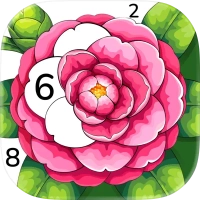
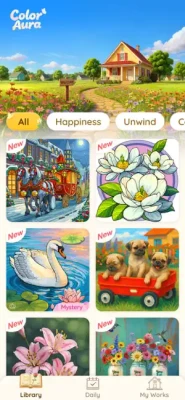
Color Aura takes the familiar paint-by-number concept and turns it into an accessible mobile coloring experience for iPhone and iPad.
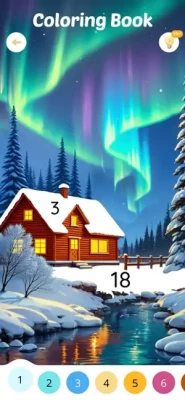
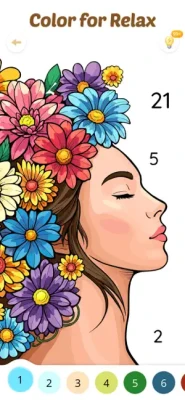
Instead of needing physical coloring books, pencils, or paints, everything is available digitally. Select an illustration, follow the numbered sections, and watch the image gradually transform from an unfinished outline into a colorful finished artwork.
The App Store lists Color Aura as a free Board game with optional in-app purchases. It is developed by Oakever Games, supports iPhone and iPad, has a 4+ age rating, and currently holds a 4.8-star rating from approximately 176,000 ratings on the U.S. App Store.
How to Play Color Aura
The basic gameplay is intentionally simple:
- Choose a coloring picture.
- Select the number or color you want to work on.
- Find the matching numbered areas.
- Tap the correct sections to fill them.
- Continue through the remaining colors.
- Complete the artwork and enjoy the finished image.
- Choose another illustration and start a new coloring project.
The straightforward controls make the game easy to pick up, while more detailed illustrations provide additional concentration and patience challenges.
10,000+ Free Coloring Pictures
One of Color Aura's biggest attractions is its large library of artwork.
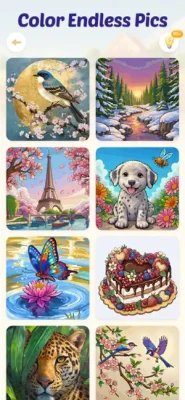
The App Store advertises more than 10,000 free pictures, ranging from simple and relaxing illustrations to more challenging designs.
This variety means players can choose an image according to their mood and preferred difficulty instead of being restricted to a small collection.
High-Quality HD Artwork
Color Aura emphasizes detailed, high-resolution digital artwork.
The App Store describes its illustrations as clear and richly detailed, with bright colors and strong contrast designed to make completed images look vivid.
The artwork includes a wide selection of visual styles, giving the coloring experience more variety than a collection built around one artistic theme.
Artist-Crafted Illustrations
The developer says Color Aura works with more than 100 artists worldwide to create original drawings in different styles.
This helps explain the variety found throughout the picture collection, from realistic scenes to fantasy-inspired artwork and more playful illustrations.
Coloring Themes
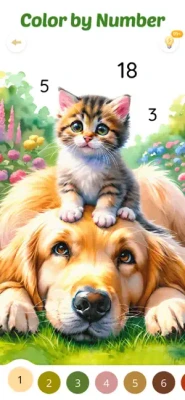
Color Aura includes artwork across many subjects.
Players can find illustrations involving:
- Animals
- Pets
- People
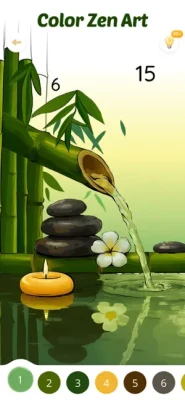
- Landscapes
- Nature
- Architecture
- Interior design
- Fantasy scenes
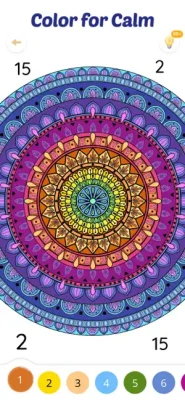
- Abstract artwork
- Places and environments
- Colorful everyday scenes
Recent App Store reviews also highlight the range of people, pets, places, landscapes, animals, architecture, interiors, realism, fantasy, and abstract designs available in the coloring collection.
Easy Paint-by-Number Controls
Color Aura is designed around a simple tap-to-color system.
You do not need artistic experience to create a finished image. The numbered areas provide the instructions, while the game handles the coloring process.
This makes it suitable for players who enjoy the appearance of finished artwork but do not necessarily want the complexity of drawing or painting from scratch.
Different Difficulty Levels
Not every picture requires the same amount of concentration.
The game provides artwork ranging from relatively simple designs to more intricate illustrations.
This allows beginners to start with easier pictures before moving toward artwork containing more sections and smaller details.
Relaxing Coloring Experience
Color Aura is designed around a calm, low-pressure gameplay loop.
There are no combat systems, complicated controls, or fast reflex requirements. Instead, the experience centers on choosing colors, completing sections, and watching an image gradually develop.
The App Store specifically positions the game as a way to relax, focus, and enjoy creative coloring.
Why Paint by Number Is So Satisfying
The appeal of paint-by-number games comes from the gradual transformation of the image.
At the beginning, an illustration may look incomplete and fragmented. As each numbered section is filled, recognizable shapes and colors emerge.
This creates a strong sense of progression without requiring complicated gameplay mechanics.
Every completed picture provides a small visual accomplishment and gives players another finished artwork to enjoy.
Beginner's Guide
If you're new to Color Aura, start with an illustration containing larger and easier-to-identify sections.
Start With Simple Pictures
Choose an artwork that does not contain too many tiny areas. This lets you become comfortable with the controls before attempting more intricate designs.
Follow One Color at a Time
Working systematically through the available colors can make the image easier to manage.
Zoom In When Necessary
Detailed artwork may contain smaller sections. Take your time and inspect the image carefully rather than tapping randomly.
Don't Rush
The game is designed for relaxed coloring. There is no reason to treat each picture like a race.
Finish Your Artwork
Completing an entire picture is part of the appeal. Seeing the final image can be more satisfying than simply coloring a few sections.
Advanced Coloring Tips
Experienced players can make their sessions more efficient by developing a consistent approach.
Work From Large Areas to Small Details
Large sections quickly establish the major colors of the picture and make smaller details easier to understand.
Pay Attention to Similar Shades
When an illustration contains several similar colors, carefully check the number associated with each section.
Use the Artwork as a Whole
Don't focus exclusively on individual numbered cells. Step back occasionally and look at how the colors are shaping the complete image.
Choose Pictures Based on Your Mood
Simple designs are ideal when you want a quick, relaxing session, while intricate artwork provides a longer concentration challenge.
Game Difficulty
Color Aura has a flexible difficulty curve rather than a single fixed challenge.
Simple images can be completed relatively quickly, while highly detailed illustrations may require considerably more patience.
The App Store describes the collection as ranging from casual and relaxing designs to more challenging pictures.
This makes the game suitable for both beginners and experienced digital coloring fans.
Artwork and Visual Style
The visual variety is one of Color Aura's strongest features.
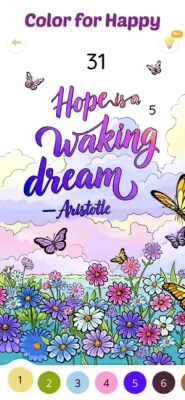
The collection includes colorful, realistic, playful, fantasy, and abstract artwork. Recent player feedback specifically praises the range of drawings and describes the colors as clear, bright, and well blended.
The completed images provide a visual reward for the time spent coloring.
Major Update: Joyful Runner
The current App Store page features a “Joyful Runner” major update, centered around a runner moving through wildflowers. The event description encourages players to color the scene and bring its green landscape to life.
This illustrates how Color Aura can introduce themed artwork and events alongside its broader coloring collection.
Features
- Paint-by-number gameplay
- More than 10,000 advertised free pictures
- HD-quality artwork
- Bright and vivid colors
- Artist-created illustrations
- More than 100 collaborating artists
- Animals and pets
- People and portraits
- Landscapes and nature
- Architecture
- Interior scenes
- Fantasy artwork
- Abstract designs
- Multiple difficulty levels
- Simple tap-to-color controls
- Relaxing gameplay
- iPhone support
- iPad support
- Frequent content and performance updates
- Free-to-play model with optional purchases
Game Atmosphere
Color Aura has a peaceful and creative atmosphere.
The focus is not on competition or fast reactions. Instead, players spend their time completing artwork at their own pace.
The combination of bright colors, detailed illustrations, and gradual visual progression makes the game particularly suited to players who enjoy casual creative experiences.
Who Should Play Color Aura?
Color Aura is a good fit for players who enjoy:
- Paint-by-number games
- Digital coloring books
- Adult coloring games
- Relaxing mobile games
- Creative casual games
- Art and illustration
- Coloring apps for iPhone
- Coloring apps for iPad
- Animal coloring
- Landscape coloring
- Fantasy coloring
- Abstract art
- Casual brain activities
- Low-pressure puzzle experiences
The App Store currently rates the game 4+, making it broadly accessible.
Player Experience
Color Aura has a very strong overall reception on the U.S. App Store, with 4.8 stars from approximately 176,000 ratings.
Players frequently praise the large selection of artwork, colorful designs, and relaxing nature of the game. One recent review highlighted the variety of people, pets, places, landscapes, animals, architecture, interiors, realistic scenes, fantasy designs, and abstract artwork.
Another recurring point in player feedback concerns advertisements. Some users have criticized longer or more intrusive advertisements compared with earlier versions of the app.
Some players also have mixed opinions about changes to coloring controls following updates, particularly how colors and small areas are selected.
Pros and Cons
Pros
- Huge advertised library of 10,000+ pictures
- Attractive HD artwork
- Many different visual themes
- More than 100 contributing artists
- Easy paint-by-number mechanics
- Suitable for beginners
- More challenging artwork for experienced players
- Relaxing gameplay
- iPhone and iPad support
- Strong App Store rating
- Regular updates
- Free to download
Cons
- Advertising can interrupt the experience
- Some players dislike changes to coloring controls
- Highly detailed pictures can require significant time
- Optional in-app purchases are available
- Large app size may require considerable device storage
Controls and Interface
The core interface is deliberately simple.
Players select a color or numbered area and tap the corresponding sections of the artwork. The goal is to remove unnecessary complexity so that attention stays on the picture.
The game supports both iPhone and iPad, giving players flexibility when choosing a larger or smaller screen.
Progression and Replay Value
Color Aura does not rely on traditional character levels or combat progression.
Instead, its long-term appeal comes from the enormous collection of artwork.
Players can repeatedly return to discover new images, experiment with different difficulty levels, and complete themed or newly added pictures.
With more than 10,000 advertised free pictures, the game has substantial potential replay value.
Updates and New Content
Color Aura continues to receive updates focused on performance, bug fixes, and improvements to the coloring experience.
The current App Store listing shows version 2.14.5, released on August 14, with the update described as providing an easier coloring experience along with general optimizations and bug fixes.
Recent versions have also included similar optimization and stability improvements, showing that the developer continues to maintain the app.
Technical Details
Game: Color Aura: Paint by Number
Subtitle: Color by Number, Coloring Book
Developer: Oakever Games
Category: Board
Platforms: iPhone, iPad
Age Rating: 4+
Size: 413.4 MB
Languages: English plus 24 additional languages
Current listed version: 2.14.5
In-App Purchases: Yes
Price: Free with optional purchases
Latest Version
The latest version listed by the U.S. App Store is 2.14.5, with the release focused on an easier coloring experience, general optimization, and bug fixes.
The update history shows multiple releases during 2026, suggesting an actively maintained coloring app.
Privacy Information
The App Store provides developer privacy information for Color Aura. As with other Apple App Store privacy disclosures, the information is supplied by the developer and has not been independently verified by Apple.
Color Aura vs Traditional Coloring Books
Traditional coloring books require physical paper and coloring materials.
Color Aura offers the same basic satisfaction digitally, but with several advantages: a huge collection of illustrations, instant color selection, no need for physical supplies, and the ability to switch between different artwork whenever you want.
For someone who prefers coloring on a phone or tablet, this makes the experience considerably more convenient.
Color Aura vs Other Paint-by-Number Games
Color Aura's main advantage is the scale and variety of its artwork collection.
The App Store advertises more than 10,000 free pictures and artwork created in collaboration with more than 100 artists.
Its combination of high-quality illustrations, varied difficulty, simple controls, and a strong player rating makes it a notable option in the digital coloring category.
Is Color Aura Worth Playing?
Yes, especially if you enjoy relaxing digital coloring.
Color Aura provides a large selection of artwork, simple paint-by-number mechanics, bright visuals, and different difficulty levels. Its extensive collection means there is plenty of content to explore, while the basic gameplay is easy enough for newcomers.
The biggest consideration is advertising. Some player reviews indicate that ads have become more intrusive over time, and some users have expressed dissatisfaction with changes to the coloring interface.
Overall, the combination of 10,000+ pictures, HD artwork, diverse themes, and straightforward coloring gameplay makes Color Aura a strong choice for fans of digital coloring books.
Expert Rating
Artwork Quality: 9.2/10
Color Variety: 9.1/10
Gameplay: 9/10
Ease of Use: 9.2/10
Content Variety: 9.5/10
Relaxation: 9.4/10
Replay Value: 9.3/10
Overall: 9.2/10
Final Verdict
Color Aura: Paint by Number turns digital coloring into a simple, colorful, and highly replayable mobile experience.
Its greatest strength is the sheer amount of content. With more than 10,000 advertised free pictures, artwork from more than 100 artists, multiple visual styles, different difficulty levels, and support for both iPhone and iPad, there is plenty for coloring fans to explore.
The straightforward controls make it easy to start, while more intricate designs provide longer and more detailed coloring sessions.
If you're looking for a paint-by-number game for iPhone, a relaxing coloring app for iPad, or a digital coloring book with thousands of pictures, Color Aura is a strong option to consider.
Frequently Asked Questions
What is Color Aura: Paint by Number?
Color Aura is a digital paint-by-number coloring game featuring thousands of illustrations that players complete by filling numbered sections with the corresponding colors.
Is Color Aura free?
Yes. Color Aura is free to download and includes optional in-app purchases.
How many coloring pictures does Color Aura have?
The App Store advertises more than 10,000 free pictures.
Is Color Aura available on iPhone?
Yes. Color Aura supports iPhone and iPad.
Does Color Aura work on iPad?
Yes. The app is specifically listed as designed for iPad as well as being available on iPhone.
What types of pictures are available?
The collection includes animals, pets, people, landscapes, architecture, interiors, fantasy artwork, abstract designs, and other colorful illustrations.
Is Color Aura suitable for beginners?
Yes. Its paint-by-number system is designed to be easy to understand, while the varied difficulty levels provide more challenging artwork for experienced players.
Does Color Aura have HD pictures?
Yes. The developer describes the artwork as high-quality and highly detailed, with vivid colors and clear digital imagery.
Who developed Color Aura?
Color Aura was developed by Oakever Games.
What is the latest version of Color Aura?
The current U.S. App Store listing shows version 2.14.5, released August 14, with optimization and bug fixes.
Does Color Aura have in-app purchases?
Yes. The App Store lists Color Aura as free with optional in-app purchases.
Rate the Game
User Reviews





Popular Games



















 Android
 iOS
iOS Windows
 Xbox
Xbox