




Latest Version
August 04, 2025
Splend Apps
Board
Android
0
com.splendapps.checkmate
Report a Problem
More About :game
The current Google Play listing reports 10M+ downloads and a 4.7-star rating, with roughly 497,000 reviews at the time of checking. It is listed as containing ads and in-app purchases.
The latest listed update was August 20, 2026, with usability improvements and minor bug fixes.
What Is Chess Online & Offline?
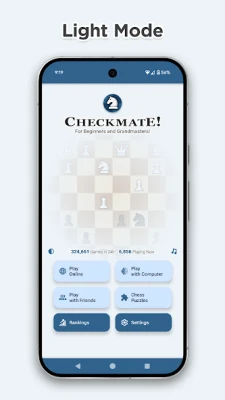
Chess Online & Offline is essentially a complete mobile chess platform rather than a simple offline chessboard.
It provides several ways to play:
- Online chess against other players
- Offline chess against the computer
- Chess with friends
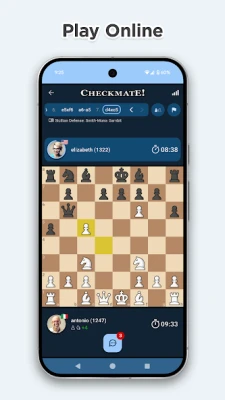
- Timed online matches
- Tactical chess puzzles
- Opening recognition
- Player rankings
- Game statistics
- Different chessboard themes
- Multiple chess piece designs
- Light and dark themes
- Premoves
- Game-history browsing
The app supports players ranging from beginners to advanced competitors, with online opponents of different playing levels and 16 computer strength settings for offline practice.
Chess Online Features
Play Chess Against Real Players
The online mode lets you play chess against people from around the world.
Online matches contribute to rating points, making the mode useful for players who want a competitive experience rather than simply practicing against an AI opponent.
You can encounter opponents ranging from beginners to highly experienced players.
This also means that every game can present a different challenge. One opponent may play aggressively in the opening, while another may prefer a slow positional approach.
Play Chess Offline Against the Computer
The offline mode is useful when you want to practice without entering a rated online match.
The game provides 16 computer strength levels, ranging from approximately 600 to 2100 Elo according to the current Google Play description. Offline games do not contribute online rating points.
For beginners, starting at a lower level can help you concentrate on basic tactics without being overwhelmed.
More experienced players can gradually increase the computer strength as they improve.
Chess With Friends
Chess Online & Offline also allows players to invite friends and accept invitations to play.
This creates a more relaxed alternative to competitive matchmaking, particularly when you want to practice a particular opening or simply play a casual game.
Chess Time Controls
The game includes several timed formats.
Classic
Classic games are available with:
- 10 minutes
- 20 minutes
- 30 minutes
Blitz
Blitz options include:
- 3 minutes
- 5 minutes
- 3 minutes + 2 seconds per move
Bullet
Bullet options include:
- 1 minute
- 1 minute + 1 second per move
- 2 minutes + 1 second per move
These different time controls allow players to choose between slower strategic games and fast reaction-based matches.
Complete Chess Strategy Guide
Knowing the rules of chess is only the beginning. Improving requires better decision-making, tactical awareness and a consistent approach to each phase of the game.
1. Control the Center
At the beginning of a chess game, central squares are extremely important.
Try to influence the center with your pawns and pieces.
The central squares allow pieces to reach more areas of the board and can make development easier.
Do not move every pawn simply because it is available. Think about how each move affects your pieces and your opponent's options.
2. Develop Your Pieces Early
A common beginner mistake is moving the same piece repeatedly during the opening.
Instead, aim to develop your:
- Knights
- Bishops
- Queen when appropriate
- Rooks after castling and opening lines
Development gives your army more active pieces and prepares you for the middlegame.
3. Castle Before the Position Becomes Dangerous
Castling usually serves two purposes:
- It moves your king toward greater safety.
- It connects your rooks.
Do not treat castling as an automatic move in every position, though.
First check whether the squares and conditions allow a safe castle and whether the resulting position actually improves your king's security.
4. Avoid Moving the Queen Too Early
Beginners often bring the queen out immediately because it is the most powerful piece.
That can give your opponent opportunities to gain time by attacking the queen with developing pieces.
Develop your minor pieces first when possible and bring the queen into the game when there is a clear reason.
5. Look for Checks, Captures and Threats
Before making a move, use a simple mental checklist:
Checks → Captures → Threats
Ask:
- Do I have a forcing check?
- Can I win material?
- Is there a tactical capture?
- Can I create a serious threat?
- What is my opponent threatening?
This habit can prevent many one-move blunders.
Chess Tactics You Should Learn
Chess Online & Offline includes more than 500,000 tactical puzzles, covering themes such as checkmate, forks, pins, skewers, sacrifices, perpetual check and endgames.
Learning these tactical patterns can significantly improve your ability to recognize opportunities during real games.
Fork
A fork occurs when one piece attacks two or more valuable targets.
Knights are particularly famous for creating forks because of their unusual movement.
Always check whether a knight can attack:
- King
- Queen
- Rook
- Other valuable pieces
at the same time.
Pin
A pinned piece cannot move freely because moving it would expose a more valuable piece behind it.
A common example is a bishop or rook pinning a knight against the king.
Look for pins both when attacking and defending.
Skewer
A skewer resembles a reverse pin.
A valuable piece is attacked first, forcing it to move and exposing a less valuable piece behind it.
Rooks, bishops and queens can all create powerful skewers.
Discovered Attack
A discovered attack occurs when one piece moves away and reveals an attack from another piece behind it.
Discovered checks are especially powerful because the opponent must respond to the king's check immediately.
Double Check
A double check occurs when the king is attacked by two pieces simultaneously.
Because the king is under two attacks, ordinary blocking or capturing one attacking piece may not solve the problem.
The king normally needs to move.
Sacrifice
A sacrifice deliberately gives up material to obtain a tactical or positional advantage.
Do not sacrifice simply because a move looks aggressive.
Before sacrificing, calculate:
- What do I gain?
- Can the opponent accept the sacrifice?
- Is the king exposed?
- Can I recover the material?
- Does the resulting position favor me?
Chess Opening Guide
The current app recognizes more than 3,000 chess openings and variations, including well-known openings such as the Sicilian Defense, Queen's Gambit, Caro-Kann Defense, Italian Game and French Defense.
You do not need to memorize thousands of opening variations.
Instead, learn the ideas behind a few openings.
Italian Game
The Italian Game generally develops pieces toward active central squares and can lead to tactical or positional middlegames.
It is useful for beginners because the opening teaches several fundamental concepts:
- Development
- Center control
- Castling
- Piece activity
Sicilian Defense
The Sicilian Defense begins with:
1. e4 c5
It creates an asymmetrical position and can lead to complicated tactical battles.
It is widely studied because Black immediately avoids symmetrical central pawn structures.
Beginners should focus on understanding the resulting positions rather than memorizing long variations.
French Defense
The French Defense begins:
1. e4 e6
2. d4 d5
It creates a structured central battle and often produces strategic play around pawn chains and breaks.
Caro-Kann Defense
The Caro-Kann begins:
1. e4 c6
Black prepares to challenge the center with ...d5.
It is often studied by players who want a solid response to 1.e4.
Queen's Gambit
The Queen's Gambit commonly begins:
1. d4 d5
2. c4
White immediately challenges Black's central pawn structure.
Despite its name, the pawn offered on c4 does not necessarily have to remain permanently sacrificed.
How to Improve at Chess Online & Offline
Practice Tactics Every Day
The app's large tactical puzzle collection makes short daily training sessions possible.
Instead of solving hundreds of puzzles without thinking, concentrate on understanding why the solution works.
After solving a puzzle, ask:
What pattern did I miss before seeing the answer?
That question makes puzzle practice more useful.
Play Longer Games
If your main goal is improvement, do not play only Bullet.
Fast chess can improve calculation speed and time management, but longer games provide more opportunity to think about strategic decisions.
Use Classic time controls to practice:
- Opening development
- Calculation
- Positional planning
- Endgames
- Candidate moves
Then use Blitz and Bullet for faster decision-making.
Bullet Chess Strategy
Bullet games are extremely fast.
You cannot calculate every variation.
Focus on:
- Opening familiarity
- Safe king placement
- Quick development
- Recognizing tactical patterns
- Avoiding obvious blunders
- Managing your clock
Do not spend 30 seconds calculating a complicated line when only a few seconds remain.
Blitz Chess Strategy
Blitz gives you more time than Bullet but still rewards quick calculation.
A good Blitz habit is to identify your opponent's threat immediately after every move.
Ask:
"What changed?"
Then determine your response.
Classic Chess Strategy
Longer games reward deeper calculation.
Before committing to an important move:
- Identify candidate moves.
- Calculate the opponent's strongest response.
- Compare the resulting positions.
- Check for tactical mistakes.
- Make the move.
This approach takes more time but can dramatically reduce blunders.
Endgame Strategy
Many chess games are decided after the queens disappear.
Important endgame principles include:
Activate Your King
In the middlegame, the king is usually something to protect.
In many endgames, the king becomes an active fighting piece.
Push Passed Pawns
A passed pawn can become a major threat because there is no opposing pawn blocking its path.
Activate Your Rook
Rooks are often strongest when they become active behind passed pawns or on open files.
Avoid Unnecessary Pawn Moves
Every pawn move permanently changes the structure.
In endgames, a careless pawn move can create a permanent weakness.
How to Use the Chess Puzzles
The puzzle system is one of the most substantial training features in the game.
The current listing reports more than 500,000 tactical puzzles, including:
- Mate in 1
- Mate in 2
- Mate in 3
- Perpetual check
- Endgames
- Pins
- Forks
- Skewers
- Sacrifices
Fast solutions can also receive speed bonuses.
A useful training routine is:
5–10 puzzles → review mistakes → identify the tactical pattern → play a slower game.
This connects tactical training with practical play.
Understanding the Elo Rating
Chess Online & Offline uses the Elo rating system for its rankings and computer strength descriptions.
Your online rating is not simply a measure of how many games you have played.
Your results against other rated players affect your rating.
Because opponents have different ratings, the rating change after a result can vary.
Do not obsess over a single game's rating change.
Instead, look at your rating over many games.
How to Improve Your Online Rating
Avoid Playing When Distracted
Chess requires concentration.
If you are tired or distracted, you are more likely to overlook simple tactics.
Choose an Appropriate Time Control
If you frequently lose because of the clock, try a longer time control.
Review Your Mistakes
After every loss, identify the first important mistake rather than focusing only on the final blunder.
Reduce One-Move Errors
Before every move, check:
Can my opponent capture something for free?
This simple habit can save many games.
Premoves
Chess Online & Offline supports premoves, allowing a player to prepare a move before the opponent's move has been completed. The move can then be executed automatically when the position permits it.
Premoves are particularly useful in:
- Bullet chess
- Simple recaptures
- Forced sequences
- Time-pressure situations
However, use them carefully.
A premove can become a serious mistake if the opponent makes an unexpected move.
Game History
The app allows players to browse the game history during a match.
This can be useful for checking:
- Previous tactical sequences
- Opening moves
- Missed opportunities
- Material exchanges
- Earlier positions
Using the history as a learning tool can help you understand how a position developed.
Chess Board and Piece Customization
Chess Online & Offline provides substantial visual customization.
The current listing advertises:
- 21 chessboard styles
- 16 chess piece sets
- Light theme
- Dark theme
- Material Design 3 interface
The customization does not change the rules or strength of the game, but it allows players to create a board that is more comfortable to use.
Helpful Chessboard Indicators
The game provides visual indicators for information such as:
- Legal moves
- Last move
- Possible captures
- King in check
These indicators can be particularly helpful for beginners learning how each piece moves.
As your experience grows, you can gradually rely more on your own board awareness rather than visual prompts.
Offline Chess Computer Levels
The 16 computer strength levels provide a gradual way to practice.
A beginner can start at a lower level and increase the difficulty after becoming comfortable.
Rather than immediately selecting the strongest setting, choose a level that forces you to think while still allowing you to recognize and learn from mistakes.
The listed computer range is approximately 600 to 2100 Elo.
Chess Online & Offline Pros and Cons
Pros
- Online multiplayer chess
- Offline computer games
- 16 computer strength levels
- More than 500,000 tactical puzzles
- More than 3,000 recognized openings
- Classic, Blitz and Bullet time controls
- Play with friends
- Global and country rankings
- Premove support
- Game-history browsing
- 21 board styles
- 16 piece sets
- Light and dark themes
- Regular usability improvements and bug fixes
Cons
- Contains advertisements
- Includes in-app purchases
- Very fast Bullet games can be difficult for beginners
- Online play can expose players to connection or timing issues
- The app currently does not advertise a full engine-style post-game analysis feature in its Google Play description
The last point is worth noting because one recent Google Play review specifically requested game analysis and move evaluation as a future feature; that is a user request, not confirmation of a missing feature beyond what the listing currently describes.
Chess Online & Offline Game Information
| Feature | Details |
|---|---|
| Game | Chess Online & Offline |
| Developer | Splend Apps |
| Package | com.splendapps.checkmate |
| Genre | Chess / Board / Strategy |
| Multiplayer | Yes |
| Offline | Yes |
| Online | Yes |
| Computer levels | 16 |
| Computer strength | 600–2100 Elo |
| Tactical puzzles | 500,000+ |
| Recognized openings | 3,000+ |
| Board styles | 21 |
| Piece sets | 16 |
| Classic | 10, 20, 30 minutes |
| Blitz | 3, 5, 3+2 seconds |
| Bullet | 1 minute, 1+1, 2+1 |
| Downloads | 10M+ |
| Google Play rating | 4.7 stars at time of checking |
| Monetization | Ads and in-app purchases |
| Latest listed update | August 20, 2026 |
| Content rating | Everyone |
Current figures and features are based on the Google Play listing checked in September 2026 and may change with future updates.
Frequently Asked Questions
Is Chess Online & Offline free?
The game is free to download and use, although the current Google Play listing states that it contains ads and in-app purchases.
Can I play chess offline?
Yes. You can play against the computer without an internet connection, and the game provides 16 computer strength levels.
Can I play Chess Online & Offline with friends?
Yes. The app allows players to invite friends and accept game invitations.
Does Chess Online & Offline have online multiplayer?
Yes. You can play rated online games against players from around the world.
What is the strongest computer level?
The current listing describes 16 computer strength levels ranging from approximately 600 to 2100 Elo.
Does the game have chess puzzles?
Yes. The game advertises more than 500,000 tactical puzzles covering checkmates, forks, pins, skewers, sacrifices, endgames and other tactical themes.
Does it include chess openings?
Yes. The game recognizes more than 3,000 openings and variations, including the Sicilian Defense, Queen's Gambit, Caro-Kann Defense, Italian Game and French Defense.
Can I play Bullet chess?
Yes. The game includes several Bullet time controls, including 1-minute and increment-based options.
Does Chess Online & Offline have Blitz?
Yes. Blitz options include 3-minute, 5-minute and 3-minute + 2-second-per-move formats.
Does it support premoves?
Yes. Premoves are available, which can be particularly useful in fast chess games.
Can I customize the chessboard?
Yes. The current listing advertises 21 board styles and 16 chess piece sets.
Does the game have rankings?
Yes. It provides global and country rankings, with the ranking system using Elo-related results and other game and puzzle information described by the developer.
Final Thoughts
Chess Online & Offline is designed to cover several sides of chess in one mobile app. You can play rated games against real opponents, practice against the computer, challenge friends, solve tactical puzzles and explore a large collection of recognized openings.
For beginners, the combination of offline computer levels and tactical puzzles provides a straightforward way to practice. More experienced players can use the online modes, different time controls, rankings and premove system for faster competitive games.
The most effective way to improve is not simply to play more games. Combine actual matches with tactical puzzles, opening principles and post-game reflection. Focus especially on reducing simple blunders, recognizing recurring tactical patterns and understanding why your opponent's moves work.
Rate the Game
User Reviews






Popular Games



















 Android
 iOS
iOS Windows
 Xbox
Xbox