

Latest Version
September 14, 2026
Al Games FZ
Puzzle
iOS
0
Report a Problem
More About :game
The game combines visual discovery with traditional logic-puzzle thinking. As the levels become more complicated, the key is no longer simply finding an arrow that can move—it is understanding how one move changes the possibilities for the next several moves.
What Is Tap Arrows Gallery?
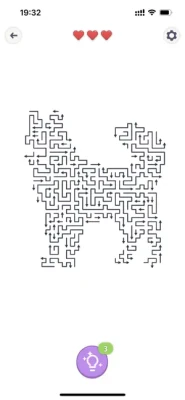
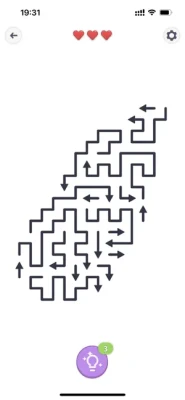
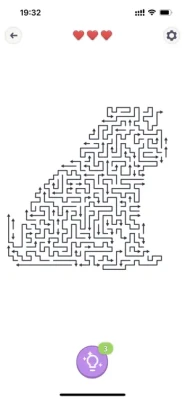
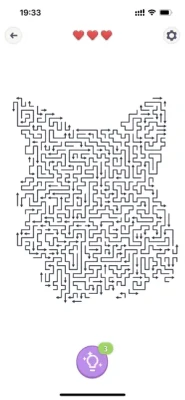
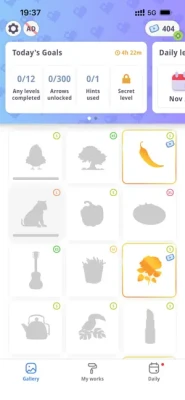
Tap Arrows Gallery is a puzzle game from AI Games FZ for iPhone and iPad. The App Store listing describes hundreds of levels featuring hidden illustrations such as animals, landscapes, household objects, and fantasy-themed images. The game is designed around calm, pressure-free play, with no timer or move limit.
The current App Store version requires iOS 15 or later and is listed at roughly 385 MB. It is free to download with advertising and optional in-app purchases.
Main Features
- Arrow-based logic puzzles
- Hidden pictures revealed as you solve
- Hundreds of levels
- Increasing puzzle complexity
- Animals, landscapes, objects and other illustrations
- Relaxing visual presentation
- Soft sounds and smooth animations
- No countdown timer
- No move limit
- iPhone and iPad support
- Game Center support
- Optional in-app purchases and ad removal
How to Play Tap Arrows Gallery
The basic rule is easy to understand.
Each puzzle contains a collection of arrows. Tap an arrow and it disappears in the direction it points. Your objective is to remove every arrow and clear the board so that the hidden picture is completely revealed.
The difficulty comes from the order.
An arrow may appear to be ready, but another element can prevent it from being removed. That means you need to inspect the board, identify the arrows that can move safely, and then use each successful move to expose new possibilities.
Think of every puzzle as a chain:
Available arrow → newly opened space → newly available arrow → more space → completed picture
The better you understand this chain, the easier the later levels become.
Full Strategy Guide
1. Don't Tap the First Arrow You Notice
The biggest beginner mistake is treating the puzzle like a reaction game.
It isn't.
There is no timer forcing you to make an immediate move, so take a moment before tapping. Look across the entire board and identify arrows whose path appears unobstructed.
The first useful question should be:
“Which arrow can safely disappear without creating a problem later?”
Starting with an obvious free arrow is often better than randomly testing arrows in the middle of a crowded section.
2. Read the Arrow Direction Carefully
The direction of an arrow is the most important piece of information on the board.
Before tapping, trace its intended path mentally.
Ask yourself:
- Which direction does this arrow point?
- Is another element in that path?
- If I remove it, what area will become visible?
- Could removing it expose another useful arrow?
- Is there a different arrow that should be cleared first?
This simple habit prevents many unnecessary mistakes.
3. Work From the Outside Toward the Blocked Areas
When a puzzle looks crowded, begin by studying the edges and open spaces.
Outer arrows are often easier to understand because there are fewer surrounding elements competing for attention. Removing them can expose portions of the hidden image and make the remaining structure easier to read.
Instead of attacking the densest part of the board first, gradually reduce the outer layers.
A useful mental pattern is:
Open space → edge arrows → newly exposed arrows → central structure
This isn't a rigid rule for every puzzle, but it is an excellent starting point.
4. Look for Dependency Chains
The hardest Tap Arrows Gallery puzzles are essentially dependency puzzles.
One arrow may need to disappear before another arrow becomes usable. That second arrow can then expose a third arrow.
For example:
Arrow A → clears space for Arrow B → opens Arrow C → finishes the section
When you notice this relationship, don't focus only on the next move. Try to predict two or three moves ahead.
This is where the game changes from simple tapping into genuine logic solving.
5. Use the Newly Revealed Image as Information
The hidden artwork isn't only a reward.
As pieces disappear, more of the image becomes visible. This can make the remaining board easier to understand because you can distinguish the puzzle elements from the background more clearly.
When the board becomes less cluttered, pause and reassess rather than continuing automatically.
Every successful sequence should make the next sequence easier to see.
6. Solve One Problematic Area at a Time
Large boards can become overwhelming if you attempt to analyze everything simultaneously.
Break the puzzle mentally into sections.
For example:
- Upper-left area
- Upper-right area
- Center
- Lower-left
- Lower-right
Find the easiest available sequence in one section and clear it. Then reassess the whole board.
This reduces visual overload and helps you recognize newly opened paths.
7. Don't Assume the Largest Arrow Is the Best Move
A visually prominent arrow can attract your attention, but size or position doesn't necessarily make it the correct choice.
Instead, prioritize accessibility.
An arrow that can immediately be cleared and opens several other pieces may be much more valuable than an isolated arrow that does little to change the board.
Think about the consequences of each move rather than the appearance of the arrow itself.
8. Plan Before Entering a Dense Cluster
Dense clusters are where careless tapping usually causes trouble.
When several arrows are packed together, don't simply pick one at random.
Look for:
- The arrow with the clearest path.
- The arrow that removes an important obstruction.
- The arrow that creates access to multiple others.
- The sequence that gradually opens the cluster.
The objective is not just to remove arrows. It is to unlock the board efficiently.
9. Use a Two-Pass Method on Difficult Levels
When a puzzle becomes confusing, use two passes.
First Pass: Observation
Don't immediately tap.
Scan the board and identify:
- Free arrows
- Blocked arrows
- Dense clusters
- Potential dependency chains
- Areas that could open after one move
Second Pass: Execution
Start with the safest sequence you identified.
After several arrows disappear, stop and reassess.
This approach is especially useful because the board changes after every successful move.
10. Don't Rush Because There Is No Timer
One of the game's biggest advantages is also one of its most useful strategic features.
The App Store specifically describes Tap Arrows Gallery as having no timers or limits, allowing players to solve puzzles at their own pace.
Use that freedom.
If you're uncertain between two arrows, spend a few seconds comparing them. There is no benefit to making a fast guess when careful observation can reveal the better move.
11. Reveal Space Before Chasing the Picture
It's tempting to concentrate on the artwork as it appears.
But when you're stuck, return your attention to the arrows.
Ask:
Which remaining arrow is preventing the next section from opening?
Once that obstruction disappears, the picture will continue revealing itself naturally.
12. Recovering From a Difficult Position
If the remaining arrows seem impossible to solve, don't keep tapping randomly.
Instead:
Step 1
Stop making moves.
Step 2
Look at every remaining arrow.
Step 3
Identify which arrows currently have the clearest paths.
Step 4
Look for a dependency: which arrow is preventing another from becoming accessible?
Step 5
Choose the move that opens the most useful area.
Step 6
After the board changes, reassess before continuing.
The important skill is learning to recognize why you're stuck rather than simply trying more taps.
Advanced Tap Arrows Gallery Tips
Think in Paths, Not Individual Arrows
Beginners tend to see:
“I need to remove this arrow.”
Experienced players start seeing:
“If I remove this arrow, it opens this path, which gives me access to those three arrows.”
That shift in thinking is the biggest improvement you can make.
Prioritize Moves That Change the Board
A move is particularly valuable when it exposes several new possibilities.
If one arrow simply disappears while another move opens an entire section, the second move is usually more strategically interesting.
Reassess After Every Major Opening
Don't continue following an old plan after the board changes significantly.
A move that looked correct five seconds ago may no longer be the best option once a new section has opened.
Treat each major opening as a fresh puzzle state.
Use Visual Simplicity to Your Advantage
As arrows disappear, the board becomes less cluttered.
Don't overlook this advantage.
A puzzle that looked complicated at the beginning can become almost obvious after several carefully chosen moves.
Learn From Failed Sequences
If you discover that an arrow was inaccessible because another piece had to be removed first, remember that relationship.
Future puzzles often reward the same type of spatial reasoning.
Common Mistakes to Avoid
Tapping Randomly
Random taps ignore the game's central mechanic: sequence planning.
Focusing Only on the Center
The most obvious area isn't necessarily the best starting point.
Ignoring Direction
Every arrow provides information. Always read where it points before tapping.
Moving Too Quickly
There is no timer, so speed should never replace observation.
Forgetting to Reassess
The board changes after each removal. Your strategy should change with it.
Treating Every Arrow Equally
Some moves open the board dramatically, while others have little immediate effect.
Difficulty Progression
Tap Arrows Gallery starts with straightforward arrow puzzles and gradually introduces more involved arrangements. The official description emphasizes that the challenges become deeper as you progress, requiring increasingly careful sequencing.
The progression feels less about learning new controls and more about improving your ability to:
- Recognize patterns
- Predict consequences
- Identify dependencies
- Read spatial relationships
- Plan several moves ahead
- Stay patient when the board becomes crowded
That makes the game accessible to beginners while still giving experienced puzzle players something to think about.
Hidden Picture Experience
The gallery element gives the puzzles an additional reward beyond simply completing a board.
As arrows disappear, the hidden illustration gradually emerges. The artwork can feature animals, scenery, household objects, fantasy elements and other subjects.
This creates a satisfying rhythm:
Observe → plan → tap → reveal → reassess → complete
The calm presentation and gradual image reveal are a large part of the game's appeal.
Atmosphere and Presentation
Tap Arrows Gallery is designed as a relaxed puzzle experience rather than a high-pressure challenge.
Its minimal presentation, soft sounds and smooth animations support the slower pace of the gameplay. The absence of timers and move limits also makes it suitable for short sessions or longer relaxed puzzle sessions.
The visual reveal gives each completed puzzle a small sense of discovery.
Graphics and Controls
The control system is intentionally simple: tapping an arrow is the main interaction.
There are no complicated movement systems or extensive menus to learn. The challenge comes almost entirely from reading the board correctly and choosing the right order.
That simplicity is one of the game's strengths because you can understand the rules within minutes while still having plenty of room to improve your puzzle-solving ability.
Updates and Current Version
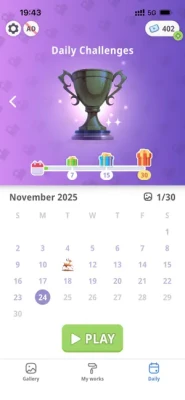
The App Store lists version 0.7.1 as an August 6, 2026 update, with previous updates adding further levels and challenge content. The update history shows a steady series of releases since the game's initial 0.1.1 version.
The Android version was also updated on September 8, 2026 and has surpassed 1 million downloads on Google Play.
Platforms and Requirements
iPhone: iOS 15.0 or later
iPad: iPadOS 15.0 or later
Mac: macOS 12.0 or later on Apple M1 or newer, according to the App Store compatibility information.
The App Store lists the game in the Puzzle category with a 13+ age rating.
The game is also available on Android, and the Google Play listing shows more than 1 million downloads.
Ratings and Player Feedback
The US App Store currently shows a 4.7/5 rating from approximately 1.2K ratings, indicating generally strong player reception.
Players commonly praise the game's engaging puzzle structure and visual presentation. Some reviews, however, criticize advertising and changes to the sound experience, while another player complained about having to watch advertisements or use tickets for additional puzzles.
That makes the experience particularly appealing to players who enjoy the core puzzle mechanic but may be less attractive to people who strongly dislike advertisements or ticket-based progression systems.
Pros and Cons
Pros
- Easy-to-understand arrow mechanic
- Genuine sequence-based puzzle solving
- Hundreds of levels
- Hidden pictures provide a satisfying reward
- Gradually increasing difficulty
- No timer
- No move limit
- Relaxing presentation
- Simple controls
- Good fit for short puzzle sessions
Cons
- Advertising can interrupt the experience
- Some players dislike the ticket/ad system
- Sound changes have received criticism
- Later puzzles can require significant visual concentration
- The core mechanic remains relatively simple, so players seeking many different puzzle types may want more variety
Is Tap Arrows Gallery Worth Playing?
Yes, especially if you enjoy arrow puzzles, hidden-picture games, relaxing brain teasers and sequence-based logic challenges.
The strongest part of Tap Arrows Gallery is the relationship between a very simple rule and increasingly complicated board arrangements. You don't need complicated controls or a long tutorial; the challenge comes from learning to see the correct sequence.
The lack of a timer is another major advantage. You can stop, inspect the board and think through your next move instead of being pushed into quick decisions.
The main drawback is the monetization experience. Some App Store reviews specifically complain about advertisements and the use of tickets for additional puzzles.
Final Verdict
Tap Arrows Gallery: Brain Game is a polished casual logic game built around one excellent idea: every arrow is both a move and a clue.
The best way to play isn't to tap quickly. It's to read the board, identify dependencies, clear the safest paths and constantly reassess what has become available.
If you approach difficult puzzles as a sequence of interconnected problems rather than a collection of individual arrows, the later levels become much easier to understand.
Recommended for: puzzle fans, hidden-picture enthusiasts, casual brain-game players, and anyone looking for a calm logic challenge.
Gameplay style: Relaxing • Visual • Logic-based • Single-player • No-timer puzzle
Frequently Asked Questions
What is Tap Arrows Gallery?
Tap Arrows Gallery is a logic puzzle game where you remove arrows in their indicated directions to gradually reveal hidden images.
How do you solve Tap Arrows Gallery puzzles?
Study the direction of every arrow, identify accessible moves, and plan the sequence carefully. Some arrows can only be removed after other elements have been cleared.
Does Tap Arrows Gallery have a timer?
No. The App Store description states that the game has no timers or limits, allowing you to play at your own pace.
Does the difficulty increase?
Yes. The game begins with simpler puzzles and gradually introduces more challenging arrangements requiring greater attention and planning.
What pictures can you reveal?
The gallery includes a variety of illustrations, including animals, landscapes, household objects and fantasy-themed items.
Is Tap Arrows Gallery free?
The game is free to download, but the App Store lists advertising and optional in-app purchases, including premium and ad-removal options.
Is Tap Arrows Gallery available on iPad?
Yes. The App Store lists both iPhone and iPad compatibility.
Can I play Tap Arrows Gallery on Android?
Yes. The Google Play listing is available for Android and currently shows more than 1 million downloads.
What is the best strategy for difficult levels?
Don't guess. Look for dependency chains, prioritize arrows that open new sections, and reassess the board after every major group of arrows disappears.
Is Tap Arrows Gallery good for relaxing?
It is specifically designed around calm, pressure-free puzzle solving, with minimal presentation, soft sounds and no timer.
Rate the Game
User Reviews













Popular Games



















 Android
 iOS
iOS Windows
 Xbox
Xbox