
Latest Version
October 01, 2026
Edujoy Games Sociedad Limitada
Puzzle
iOS
0
Report a Problem
More About :game
Players can collect packages, color characters, match memory cards, find hidden objects, solve mazes, complete puzzles, race across the desert and take part in other simple activities. The variety gives children different ways to practice observation, memory, visual recognition, problem-solving and basic learning skills while playing.
Super Wings: Educational Games Information
Game: Super Wings: Educational Games
Developer: Edujoy Games S.L.
Category: Puzzle
Platform: iPhone and iPad
Age Rating: 4+
Price: Free with in-app purchases
US App Store Rating: 3.9/5 from 15 ratings
Current Listed Version: 9.3
Latest Listed Update: December 18, 2025
Size: 176.1 MB
Languages: English, French, German, Italian, Portuguese, Russian and Spanish
Compatibility: iOS 14.0 or later
Advertising: Yes
In-App Purchases: Yes
The App Store listing also shows support for iPad, while Mac compatibility requires macOS 11 or later and an Apple M1 chip or newer.
What Is Super Wings: Educational Games?
The game is essentially a Super Wings learning playground. A world map acts as the starting point for discovering different mini-games, with each activity focusing on a slightly different skill.
The developer describes the activities as being designed around skills such as imagination, memory and visual acuity.
This makes the game particularly suitable for short play sessions. A child can move from a memory challenge to a coloring activity or a maze without needing to learn an entirely new game system.
Main Mini-Games
Catch the Packages
In this activity, players help Jett collect the packages he needs.
The game also introduces basic numbers and letters, making it more than a simple collection challenge. Players need to pay attention to what appears on screen while controlling Jett.
Best skills practiced: number recognition, letter recognition and visual attention.
Museum of Painting
The painting activity gives children an opportunity to color Super Wings characters.
This is the most creative part of the collection because there is less emphasis on finding the correct answer and more opportunity to experiment with colors.
Best skills practiced: creativity, visual expression and hand-eye coordination.
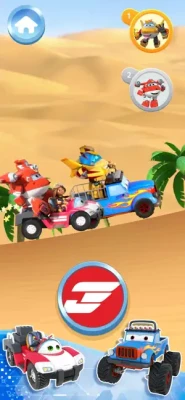
Fun Race
The racing mini-game places players in a desert environment and challenges them to reach the finish line.
Players need to control the vehicle and react to the course while trying to maintain a good pace.
Best skills practiced: reaction, coordination and basic control.
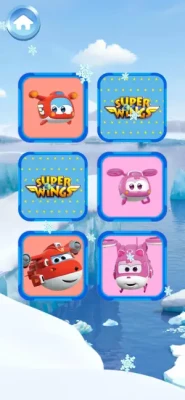
Memory Cards
Memory Cards uses the classic matching concept.
Players turn over cards and try to remember where matching pictures are located. The Super Wings theme features characters such as Jett, Sky and Paul.
Best skills practiced: memory, concentration and visual recognition.
Find Objects
This activity asks players to locate objects hidden within different scenes.
Success depends on carefully examining the environment rather than simply tapping around randomly.
Best skills practiced: observation, concentration and visual search.
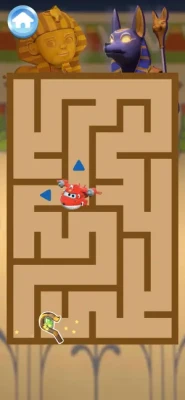
Museum Maze
The maze challenges players to find their way through a series of paths and reach the exit.
It is a straightforward concept, but children need to remember where they have already traveled and pay attention to possible routes.
Best skills practiced: spatial awareness, planning and problem-solving.
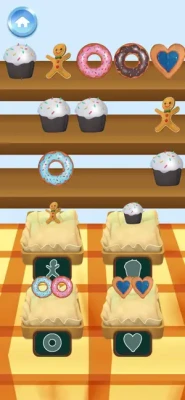
Cookie Store
The cookie-shop activity adds another type of interactive mini-game to the collection.
It helps break up the puzzle-heavy activities and gives the overall experience more variety.
Obstacle Maze
The obstacle maze adds another navigation-focused challenge.
Players need to pay attention to the environment and work out how to move through the available route without getting lost.
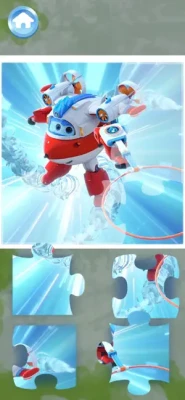
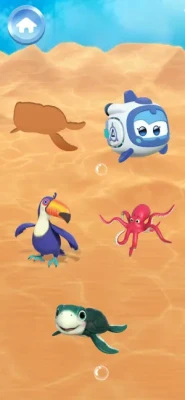
Puzzles
The puzzle activities provide another familiar learning format where players need to recognize how pieces fit together.
These activities complement the memory, maze and hidden-object games by providing a more traditional visual puzzle challenge.
Key Features
A Variety of Learning Games
The game brings several different activities together instead of concentrating on one mechanic. This includes memory, coloring, racing, hidden objects, mazes, puzzles and package collection.
Super Wings Characters
Children can interact with familiar characters from the animated series, including Jett, Sky and Paul, while exploring the different activities.
Simple Mini-Game Structure
Each activity has a straightforward objective, making it easier for younger players to understand what they need to do.
Learning Through Play
The activities cover several different forms of interaction, including visual search, matching, navigation, coloring and basic number and letter recognition.
Multiple Languages
The current listing supports English, French, German, Italian, Portuguese, Russian and Spanish.
Full Super Wings: Educational Games Strategy Guide
Although this is primarily a children's learning game, each mini-game has its own way of approaching the challenge.
Catch the Packages Strategy
Take a moment to identify what the activity is asking you to collect before moving quickly.
When numbers or letters are involved, encourage the child to say them aloud. This turns a simple collection activity into a small recognition exercise.
Helpful approach:
Look at the target carefully.
Identify the relevant letter or number.
Move toward the correct package.
Avoid rushing just for speed.
Repeat the letter or number after collecting it.
Memory Cards Strategy
Memory games become easier when players stop treating every card as an isolated guess.
Try to remember cards in pairs.
If you turn over a card and cannot find its match, remember both positions. When one of those images appears again, the location of its partner is already known.
A good routine is:
Reveal → remember → search → match.
For younger children, starting slowly is more useful than trying to finish as quickly as possible.
Find Objects Strategy
Avoid tapping randomly across the entire screen.
Instead, divide the scene into sections:
Top-left
Top-right
Center
Bottom-left
Bottom-right
Search one section at a time.
This systematic approach makes hidden-object puzzles easier and also teaches children how to perform a visual search.
Museum Maze Strategy
The most important rule is simple: don't keep moving in the same direction just because it feels faster.
When reaching a junction, check the available paths before committing.
If you reach a dead end, remember it and avoid taking the same route again.
Obstacle Maze Strategy
Watch the route before making rapid movements.
Some children naturally want to move as quickly as possible, but maze challenges are usually easier when they slow down and identify the safest route first.
Fun Race Strategy
The racing game rewards attention and coordination.
Rather than concentrating exclusively on the finish line, keep your eyes on the path immediately ahead of the vehicle.
A useful rhythm is:
Look ahead → react → adjust → continue.
The goal is controlled movement rather than simply pressing controls as quickly as possible.
Painting Strategy
There is no single correct artistic solution.
Encourage children to experiment with different colors rather than trying to reproduce the same image every time.
This activity is especially useful as a break between more structured puzzle challenges.
Puzzle Strategy
Start by identifying pieces with obvious positions.
Corners and edges are usually easier to recognize than pieces from the middle. Once those areas are established, the remaining pieces become easier to organize.
Encourage children to compare shapes and visual details rather than forcing a piece into a location where it does not naturally fit.
How to Make the Learning More Effective
The best way to use an educational mini-game collection is not necessarily to play every activity for a long time.
Short sessions can work well.
For example:
Session 1: Catch the Packages + Memory Cards
Session 2: Find Objects + Museum Maze
Session 3: Painting + Puzzles
Session 4: Fun Race + Obstacle Maze
This rotation keeps the activities varied and prevents one mechanic from becoming repetitive.
Parents can also turn the game into a conversation. Ask questions such as:
"What letter did you see?"
"Where was the matching card?"
"Can you remember where we found that object?"
"Which way should we go in the maze?"
"What color would you like to use?"
The game then becomes a starting point for interaction rather than simply something running on a screen.
Skills Practiced
Memory
Memory Cards directly asks players to remember the locations of matching images.
Visual Attention
Find Objects and the maze activities require children to examine the screen carefully.
Problem-Solving
Puzzles and maze challenges require players to determine what action should come next.
Hand-Eye Coordination
Racing and interactive activities require players to connect what they see with their actions.
Number and Letter Recognition
The package-catching activity introduces numbers and letters as part of the gameplay.
Creativity
The painting activity gives children space to experiment with colors and visual ideas.
Difficulty and Progression
Super Wings: Educational Games is designed around individual mini-games rather than a traditional adventure campaign.
There is no need to build a character, collect equipment or manage a complicated skill tree. The challenge instead comes from completing the individual activities and becoming more comfortable with their mechanics.
This makes the game accessible for younger children who may not yet be ready for games with complicated progression systems.
Is Super Wings: Educational Games Good for Kids?
The app is rated 4+ on the US App Store and is specifically presented as a collection of fun and educational activities for children.
Its strongest feature is variety. A child who loses interest in memory cards can switch to coloring, a maze, racing, hidden objects or puzzles.
However, parents should pay attention to the monetization and advertising. The App Store currently indicates that the app contains advertising and offers in-app purchases, including options labeled "Remove ads" and "Play without interruptions."
The App Store also contains user reviews raising concerns about advertising. Those are individual user reports rather than independently verified findings, but they are worth considering when evaluating the app for a young child.
Honest Review
Super Wings: Educational Games has a straightforward idea: take familiar educational mini-games and place them inside a recognizable Super Wings world.
That approach works well for children who already enjoy the characters. The variety is also useful because the app can move from memory and observation to creativity, racing and puzzle solving.
The game is less suitable for players looking for a deep adventure, complex progression or competitive gameplay. Its purpose is much simpler: short, accessible activities that combine entertainment with basic learning-oriented challenges.
The advertising situation is something parents should consider before handing the device to a young child, particularly because the App Store listing confirms that advertising is present and user reviews have raised concerns about ads.
Pros and Cons
Pros
Several different mini-games in one app
Familiar Super Wings characters
Includes memory, maze, puzzle and hidden-object activities
Coloring activity encourages creativity
Package activity introduces letters and numbers
Simple gameplay suitable for young players
Available in seven languages
Supports iPhone and iPad
Cons
Advertising is included
Optional in-app purchases are available
Some activities may become repetitive
Limited traditional progression
The game is aimed primarily at younger children
App Store reviews include complaints about advertising
Frequently Asked Questions
What is Super Wings: Educational Games?
It is a collection of educational and puzzle mini-games based on the Super Wings animated series. The activities include memory cards, hidden objects, mazes, coloring, racing, puzzles and package collection.
Is Super Wings: Educational Games free?
Yes. The App Store lists the app as free with optional in-app purchases.
What mini-games are included?
The current description lists Catch the Packages, Museum of Painting, Fun Race, Memory Cards, Find Objects, Museum Maze, Cookie Store, Obstacle Maze and Puzzles.
Can children learn numbers and letters?
Yes. The Catch the Packages activity is specifically described by the developer as an activity for learning numbers and letters.
Does the game include Jett?
Yes. Jett is one of the Super Wings characters featured in the game. Other characters mentioned by the developer include Sky and Paul.
Is there a coloring game?
Yes. The Museum of Painting activity lets children color Super Wings characters.
Is there a memory game?
Yes. The Memory Cards activity requires players to remember card positions and match cards showing the same drawings.
What age is the game rated for?
The US App Store currently gives Super Wings: Educational Games a 4+ rating.
Does the game contain advertisements?
Yes. The current App Store listing indicates that the app contains advertising and offers several optional purchases.
What devices can run Super Wings: Educational Games?
The listing supports iPhone and iPad with iOS/iPadOS 14 or later. It also lists Mac compatibility for Macs with an Apple M1 chip or later and macOS 11 or later.
Final Thoughts
Super Wings: Educational Games is a colorful collection of simple mini-games designed around learning, observation and familiar Super Wings characters.
Its variety is the main attraction. Children can practice memory, search for hidden objects, solve mazes, color characters, complete puzzles and work with basic letters and numbers without leaving the same app.
For parents, the main point to consider is the presence of advertising and optional purchases. For children who enjoy Super Wings, however, the combination of recognizable characters and short learning activities provides an accessible way to mix play with basic educational challenges.
Rate the Game
User Reviews






Popular Games



















 Android
 iOS
iOS Windows
 Xbox
Xbox