





Latest Version
September 07, 2026
Easybrain Ltd
Card
iOS
0
Report a Problem
More About :game
Spider Solitaire – Card Games is a digital version of the classic Spider Solitaire card game developed by Easybrain Ltd.
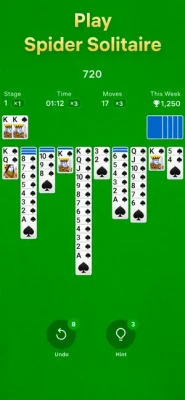
The main objective is to arrange cards of the same suit in descending order, from King down to Ace, and complete full sequences. Once a complete sequence is formed, it can be cleared from the playing area.
What makes this version more than a basic solitaire game is its progression system. Consecutive wins allow players to reach higher stages and earn more points, while daily challenges and seasonal events provide additional reasons to return.
Gameplay Overview
Spider Solitaire is easy to start but can become surprisingly demanding as the number of suits increases.
The game offers three main difficulty settings:
- 1 Suit: Best for beginners and learning the fundamentals.
- 2 Suits: A moderate challenge requiring more planning.
- 4 Suits: The most demanding option, where card management and long-term strategy become essential.
The basic goal remains the same across all modes: organize cards into complete same-suit sequences from King to Ace.
How to Play Spider Solitaire
Step 1: Look at the Tableau
Before moving anything, examine the visible cards and identify sequences that can be built immediately.
Step 2: Build Descending Sequences
Cards can be arranged in descending order. For example:
9 → 8 → 7 → 6
The strongest combinations are same-suit sequences because they can eventually be moved together.
Step 3: Reveal Hidden Cards
One of your most important goals is uncovering face-down cards. Every newly revealed card can create additional possibilities.
Step 4: Create Empty Spaces
Empty columns are extremely valuable because they give you room to move card sequences and reorganize the tableau.
Step 5: Complete Full Suits
Continue arranging cards until you create a complete sequence from King through Ace of the same suit.
Step 6: Clear the Completed Sequence
Once a complete same-suit sequence is assembled, it can be removed from play.
Step 7: Finish the Board
Continue exposing hidden cards, building sequences, and clearing completed suits until the game is solved or no useful moves remain.
Main Features
Three Difficulty Levels
The 1-, 2-, and 4-suit options allow players to adjust the challenge to their experience.
Stages and Progression
Winning consecutive games lets players advance through stages. Higher stages can provide more points, giving experienced players an additional progression goal.
Daily Challenges
Daily Spider Solitaire challenges allow players to build a regular playing habit and earn trophies over the course of a month.
Seasonal Events
Seasonal events introduce collectible postcard-style pictures. Players can complete event objectives while playing games at different difficulty levels.
Custom Cards and Backgrounds
Players can customize the visual presentation with different card and background themes.
Hints
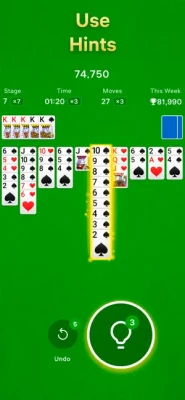
Smart hints can help when you are uncertain about your next move.
Undo
Undo functionality gives you an opportunity to reverse mistakes and reconsider your previous decision.
Tap and Drag Controls
Cards can be moved using either tapping or dragging, keeping the controls simple on a touchscreen.
Auto-Save
The game can save your progress so you can return to an unfinished session later.
Left-Hand Mode
A dedicated left-handed interface provides an alternative layout for players who prefer using their left hand.
Spider Solitaire Rules
The central rule is straightforward: build cards in descending order, from King to Ace.
However, there is an important strategic distinction between simply creating descending sequences and building same-suit sequences.
For example, combining cards from different suits may help you temporarily organize the board, but a completed Spider Solitaire sequence must consist of cards from the same suit.
That makes suit management increasingly important in 2-suit and 4-suit games.
Beginner's Guide
If you're new to Spider Solitaire, start with the 1-suit mode.
This removes much of the complexity and lets you focus on the fundamentals:
- Reveal hidden cards whenever possible.
- Avoid blocking useful cards.
- Look for opportunities to create empty columns.
- Keep same-suit sequences together when possible.
- Think about your next several moves before committing.
- Use Undo when a move creates a worse position.
- Use Hints when you genuinely cannot identify a useful move.
Once you can consistently solve 1-suit games, move to 2 suits.
Advanced Strategy Tips
Prioritize Hidden Cards
Revealing a face-down card often creates more possibilities than simply extending an existing sequence.
Protect Empty Columns
An empty column is one of the most valuable resources on the board. Avoid filling it immediately unless the move provides a clear advantage.
Build Same-Suit Runs
Same-suit sequences are much more flexible than mixed-suit sequences because they can be moved together.
Avoid Premature Moves
A move can look useful because it places a card in descending order while actually preventing a more important sequence later.
Plan Before Drawing or Rearranging
Before making a major change to the tableau, consider which cards you will be able to access afterward.
Think About the Whole Column
Do not look only at the card you are moving. Consider what the move does to the entire column and what it exposes underneath.
1-Suit Strategy
The 1-suit mode is the ideal starting point because every descending sequence uses the same suit.
Your primary objectives should be:
- Reveal hidden cards quickly.
- Create empty columns.
- Build long descending sequences.
- Clear complete King-to-Ace runs.
- Avoid unnecessarily breaking useful sequences.
Although 1-suit Spider Solitaire is easier than the other modes, learning efficient column management here provides a strong foundation for harder games.
2-Suit Strategy
Two-suit Spider Solitaire introduces another layer of decision-making.
Now you need to think about which suit a sequence belongs to before moving it.
Try to build same-suit runs whenever possible and avoid creating a board full of mixed sequences that are difficult to relocate.
The key is to create flexibility while steadily exposing hidden cards.
4-Suit Strategy
Four-suit Spider Solitaire is the most demanding version available in the app.
Here, every move matters more because cards from multiple suits compete for the same spaces.
Strong 4-suit play requires:
- Careful planning
- Efficient use of empty columns
- Same-suit sequence management
- Controlled rearrangement
- Patience
- Awareness of future moves
Don't rush simply because a legal move is available. In difficult Spider Solitaire games, a legal move is not necessarily a good move.
Daily Challenges
Daily Challenges provide a recurring objective for players who want something beyond ordinary games.
The app states that players can earn trophies each month by completing daily Spider Solitaire challenges.
This creates a simple reason to return regularly without requiring a long gaming session.
Seasonal Events
Seasonal Events add a collectible element to the traditional card-game formula.
Players can reveal unique images while completing Spider Solitaire games across different difficulty levels. Completing events contributes to a collection of specially designed postcards.
For casual players, these events provide extra motivation without changing the fundamental solitaire rules.
Stages and Scoring
The progression system is based around consecutive wins and stages.
As you successfully complete games, you can move to higher stages and pursue better scores. The app states that higher stages provide more points.
This gives experienced players another goal beyond simply solving a single deal.
Hints and Undo
Hints are useful when the board becomes difficult to read or when you cannot identify a productive move.
Undo is particularly valuable for learning because it allows you to examine the consequences of a decision and try another approach.
For serious players, however, these tools are best treated as safety nets rather than automatic solutions.
Customization
Spider Solitaire – Card Games includes customizable cards and backgrounds.
Changing the visual theme can make longer sessions feel more personal and can help players choose a presentation that is easier to focus on.
The App Store listing also includes a left-hand mode for players who prefer an alternative control layout.
Controls and Interface
The controls are intentionally simple.
You can:
- Tap cards to move them.
- Drag cards between columns.
- Use Undo to reverse eligible moves.
- Use Hints when you need assistance.
- Customize cards and backgrounds.
- Enable the left-hand interface.
This makes the game accessible to players who are already familiar with touchscreen card games.
Difficulty
Easy – 1 Suit
Best for beginners and casual players. The single-suit structure makes planning much simpler.
Medium – 2 Suits
A good middle ground for players who understand Spider Solitaire and want more strategic depth.
Hard – 4 Suits
The most challenging option. Successful play requires careful sequencing, efficient use of empty columns, and strong forward planning.
Is Spider Solitaire Good for Beginners?
Yes.
The 1-suit mode provides an accessible introduction to the game's mechanics. Players can learn how sequences work before gradually moving to two and four suits.
The hint and undo functions also make mistakes less frustrating during the learning process.
Is Spider Solitaire Good for Experienced Players?
Yes, particularly if you enjoy progressively harder card puzzles.
The 4-suit mode requires considerably more planning than the beginner setting, while stages, scores, daily challenges, and seasonal events provide additional long-term goals.
Player Experience
The App Store currently shows a 4.5/5 rating from about 39,000 ratings in the U.S. listing. Players frequently praise the simple interface and smooth gameplay.
Advertising is one recurring criticism in user reviews. The app offers a paid Spider Solitaire No Ads purchase currently listed at $14.99 in the U.S. App Store.
Some players have also commented on features such as the Joker and requested additional visual options, including darker themes. These are useful examples of how player expectations can differ even when the core card gameplay is well received.
Ads and In-App Purchases
The app is free to download but contains advertising and optional in-app purchases.
The U.S. App Store currently lists:
Spider Solitaire No Ads — $14.99
Players who prefer an uninterrupted experience can therefore choose the paid ad-removal option.
Offline and Casual Play
Spider Solitaire is particularly well suited to short casual sessions.
You can play a game during a break, while traveling, or whenever you want a quiet puzzle that does not require learning complicated controls.
The app's auto-save feature also makes it convenient to leave a game and return to it later.
Pros and Cons
Pros
- Classic Spider Solitaire gameplay
- 1-, 2-, and 4-suit difficulty levels
- Daily challenges
- Monthly trophy progression
- Seasonal events
- Custom card and background themes
- Hints and Undo
- Tap and drag controls
- Auto-save
- Left-hand mode
- iPhone and iPad support
- Large existing player base
Cons
- Contains advertising
- Optional ad removal costs $14.99 in the U.S. listing
- Some players dislike particular newer features
- The visual presentation may feel basic to players looking for extensive customization
- No need for complicated controls, but 4-suit games can become demanding
Technical Details
Game: Spider Solitaire – Card Games
Developer: Easybrain Ltd
Category: Card
Platforms: iPhone and iPad
Age Rating: 13+
Price: Free with in-app purchases
U.S. App Store Rating: 4.5/5 from 39K ratings
App Size: 250.2 MB
Required OS: iOS 15.0 or later
Languages: English plus 19 additional languages
In-App Purchases: Yes
Ad Removal: $14.99 in the U.S. App Store
Latest Updates
The current App Store version history lists version 1.7.0, dated August 28, with performance and stability improvements.
Earlier releases, including versions 1.6.0 and 1.5.0, also focused on performance and stability.
This suggests that recent development has concentrated primarily on keeping the core Spider Solitaire experience stable and smooth rather than changing the fundamental rules.
Privacy Information
According to the App Store privacy disclosure, Easybrain indicates that information such as purchases, location, identifiers, usage data, and diagnostics may be handled for purposes including tracking, advertising, analytics, personalization, and app functionality. Apple notes that these privacy practices are developer-provided and have not been verified by Apple.
Who Should Play Spider Solitaire – Card Games?
This game is a strong choice for:
- Classic solitaire fans
- Card-game enthusiasts
- Puzzle players
- Casual mobile gamers
- Players who enjoy gradual difficulty
- People who like daily challenges
- Players who want short, relaxing sessions
- Beginners learning Spider Solitaire
- Experienced players looking for 4-suit challenges
It is less appealing if your priority is a multiplayer card game or if you strongly dislike advertising in free mobile games.
Spider Solitaire vs Traditional Solitaire
Spider Solitaire differs from standard Klondike Solitaire mainly in how cards are organized and completed.
Instead of building four foundation piles by suit from Ace upward, Spider Solitaire focuses on constructing complete descending sequences from King to Ace.
That gives Spider Solitaire a more column-management-focused style of play.
Spider Solitaire vs Other Card Games
Spider Solitaire is less dependent on direct competition than games such as poker or online card battlers.
Its challenge comes from finding the best sequence of moves within the current layout.
That makes it particularly suitable for players who enjoy quiet, analytical gameplay rather than fast multiplayer competition.
Expert Rating
Gameplay: 9/10
Strategy: 9/10
Controls: 9/10
Customization: 8/10
Beginner Friendly: 9/10
Replay Value: 9/10
Progression: 8.5/10
Overall: 8.8/10
Final Verdict
Spider Solitaire – Card Games is a polished mobile interpretation of one of the most recognizable classic card puzzles.
Its biggest strength is the way it accommodates different skill levels. A new player can begin with one suit, while experienced players can move to four suits for a significantly more demanding challenge.
Daily challenges, seasonal events, stages, trophies, customizable cards, hints, undo functionality, auto-save, and left-hand controls add useful layers around the traditional game without replacing its core identity.
The main drawbacks are advertising and some player disagreement over individual features. Nevertheless, if you want a classic Spider Solitaire game for iPhone or iPad with progression and extra challenges, this is a strong option.
Frequently Asked Questions
Is Spider Solitaire – Card Games free?
Yes. The app is free to download but contains advertising and optional in-app purchases.
How many suits are available?
You can play with 1, 2, or 4 suits, allowing you to adjust the difficulty.
What is the easiest Spider Solitaire mode?
The 1-suit mode is the easiest because there is only one suit to manage.
What is the hardest mode?
The 4-suit mode provides the greatest strategic challenge.
Does the game have daily challenges?
Yes. The app includes daily challenges and a monthly trophy system.
Does Spider Solitaire have seasonal events?
Yes. Seasonal Events let players complete challenges and collect specially designed postcard images.
Can I customize the cards?
Yes. The game provides customizable cards and backgrounds.
Does Spider Solitaire have hints?
Yes. Smart hints are included to help players identify possible moves.
Can I undo a move?
Yes. The game includes an Undo feature.
Does it save my progress?
Yes. Auto-save allows you to continue an unfinished game later.
Does the game support left-handed players?
Yes. A dedicated left-hand mode is included.
Does Spider Solitaire work on iPad?
Yes. The App Store lists support for both iPhone and iPad.
What iOS version is required?
The current listing requires iOS 15.0 or later, with iPadOS 15.0 or later for iPad.
Is there an ad-free option?
Yes. The U.S. App Store currently lists Spider Solitaire No Ads for $14.99.
Rate the Game
User Reviews














Popular Games



















 Android
 iOS
iOS Windows
 Xbox
Xbox