




Latest Version
March 07, 2024
gameone
Simulation
12
com.my.cooking.chef.kitchen.craze.fever
Report a Problem
More About :game
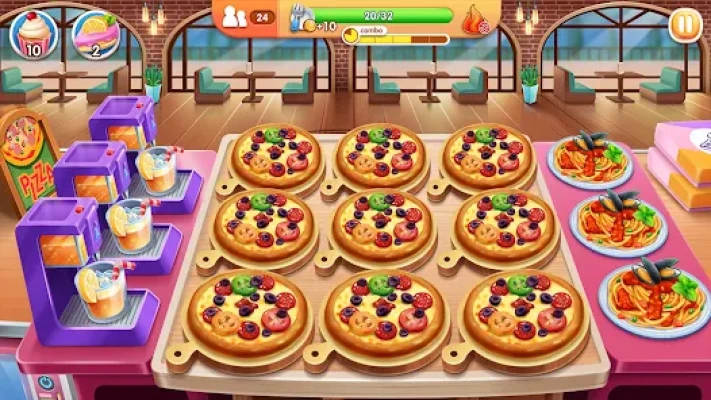
Step into the role of a master chef and manage restaurants across different cities. Every restaurant introduces new recipes, ingredients, and kitchen equipment, requiring quick thinking and efficient time management.
From juicy burgers and grilled seafood to sushi, desserts, coffee, and international specialties, every level brings fresh cooking challenges. As customers become more demanding, you'll need to improve your speed, upgrade appliances, and plan every move carefully to earn maximum rewards. The game also supports offline play, making it easy to enjoy anytime.
Main Features
- Thousands of challenging cooking levels
- More than 200 recipes from around the world
- Over 800 cooking ingredients
- Multiple restaurants and cities to unlock
- Time management gameplay
- Kitchen appliance upgrades
- Daily rewards and special events
- Offline gameplay support
- One-touch controls
- Colorful graphics and smooth animations
- Frequent content updates with new restaurants and recipes
Gameplay Overview
Each level begins with customers arriving at your restaurant.
Your objectives include:
- Preparing meals quickly
- Serving customers before they lose patience
- Completing level goals
- Earning coins and stars
- Unlocking new restaurants
- Upgrading your kitchen
As you advance, the pace increases with more customers, complex recipes, and tighter time limits.
How to Play
- Tap ingredients to prepare dishes.
- Cook food without burning it.
- Serve completed meals quickly.
- Collect coins and tips.
- Upgrade equipment between levels.
- Unlock new restaurants and cuisines.
- Complete daily missions for extra rewards.
Restaurant Upgrade Guide
Spend your coins wisely on upgrades such as:
- Faster cooking appliances
- Better ingredients
- Additional serving plates
- Drink machines
- Dessert stations
- Increased customer patience
- Faster food preparation
Prioritize equipment that reduces cooking time early in the game.
Beginner Tips
- Upgrade your busiest cooking stations first.
- Learn the most common customer orders.
- Prepare ingredients before customers arrive.
- Serve impatient customers first.
- Replay completed levels to earn more coins.
- Log in daily to collect rewards.
Advanced Strategies
Experienced players often:
- Prepare multiple dishes simultaneously.
- Memorize each restaurant's menu.
- Save boosters for difficult levels.
- Upgrade kitchen speed before decorations.
- Chain customer orders for faster service.
- Balance upgrades across all cooking stations.
Best Kitchen Management Tips
- Keep every cooking station active.
- Never leave food unattended.
- Avoid wasting ingredients.
- Watch customer patience meters carefully.
- Finish orders in the correct sequence.
- Upgrade appliances before cosmetic items.
Boosters and Power-Ups
Useful boosters include:
- Instant Cooking
- Extra Time
- Burn Protection
- Coin Bonus
- Faster Customers
- Double Rewards
Using boosters strategically can help clear the toughest levels.
Progression System
As you continue playing, you'll unlock:
- New cities
- International cuisines
- Advanced cooking equipment
- Holiday-themed restaurants
- Challenging event stages
- More difficult customer orders
- Additional recipes and ingredients
Common Mistakes to Avoid
- Ignoring customer patience
- Spending coins on unnecessary upgrades
- Letting food burn
- Serving incorrect orders
- Using boosters too early
- Forgetting daily rewards
Player Experience
Players frequently praise My Cooking for its colorful visuals, smooth controls, large variety of recipes, and satisfying restaurant progression. Many enjoy unlocking new restaurants and experimenting with different cuisines.
Some players mention that advertisements can become frequent, especially after completing levels, while later stages require stronger kitchen upgrades and careful planning.
Pros
- Easy to learn
- Thousands of levels
- Hundreds of recipes
- Offline gameplay
- Excellent progression
- Large variety of restaurants
- Smooth controls
- Frequent updates
Cons
- Later levels become more challenging.
- Advertisements may interrupt gameplay for free players.
- Some upgrades require considerable coin investment.
Why Players Enjoy My Cooking
The game blends cooking simulation with time management in a rewarding way. New restaurants, recipes, and equipment keep gameplay fresh, while increasingly difficult levels encourage players to improve their speed and strategy.
Recommendations
For the best experience:
- Upgrade cooking equipment before decorations.
- Complete daily challenges for extra rewards.
- Save premium boosters for difficult restaurants.
- Replay earlier stages to collect coins.
- Focus on speed and customer satisfaction.
- Learn each restaurant's menu to improve efficiency.
Similar Games
- Cooking Fever
- Cooking Madness
- Cooking Diner
- Cooking Craze
- Cooking Diary
- Good Pizza, Great Pizza
- World Chef
- My Cafe
Frequently Asked Questions
Is My Cooking free to play?
Yes. The game is free to download and play, with optional in-app purchases available.
Can I play offline?
Yes. Most game modes support offline play.
How many recipes are available?
The game features more than 200 dishes prepared using over 800 ingredients from various international cuisines.
What should I upgrade first?
Focus on cooking appliances and food preparation speed to serve customers more efficiently.
Is My Cooking suitable for children?
Yes. Its colorful graphics, intuitive controls, and family-friendly gameplay make it suitable for players of all ages.
YouTube Gameplay
Final Verdict
My Cooking: Restaurant Game is an engaging restaurant simulation that combines cooking, time management, and strategic upgrades into a rewarding experience. With thousands of levels, hundreds of recipes, numerous restaurants, and offline support, it offers long-lasting entertainment for fans of cooking games. Whether you're a beginner or an experienced virtual chef, the game delivers plenty of variety and satisfying progression.
Rate the Game
User Reviews














Popular Games



















 Android
 iOS
iOS Windows
 Xbox
Xbox