







Latest Version
Visit PageMore About :game
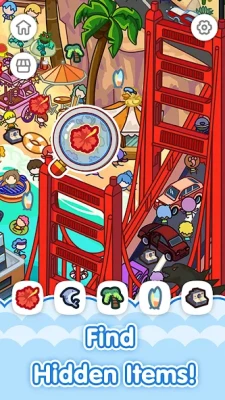
You can zoom into the artwork when objects are difficult to see and use hints when you become stuck. With hundreds of levels and regular updates, Magic Find is designed for players who enjoy scavenger hunts, spot-the-difference-style observation challenges, and relaxing brain games.
What Is Magic Find: Hidden Object Game?
Magic Find turns the classic hidden-object concept into a simple mobile puzzle experience. Each scene contains a collection of objects that need to be located. Your task is to carefully examine the picture, identify the requested items, and find everything required to complete the level.
The early stages are approachable, but the challenge increases as objects become harder to notice. Small details can blend into the background, hide behind other artwork, or become difficult to distinguish when several objects have similar shapes.
The game is particularly well suited to short sessions because there are no complicated controls to learn. Most of the challenge comes from paying attention and developing a reliable search method.
How to Play Magic Find
The basic gameplay loop is straightforward:
- Study the entire scene before tapping randomly.
- Look for the objects requested by the level.
- Scan different sections of the picture systematically.
- Zoom in when objects are too small to identify clearly.
- Use a hint if you have searched thoroughly and cannot locate an item.
- Find all required objects to complete the level and move forward.
The Google Play description specifically highlights observing, searching, zooming, using hints, and completing the scene as the core gameplay process.
Main Features
Hidden Object Puzzle Gameplay
The central attraction is finding objects concealed inside illustrated scenes. Instead of relying on reflexes, Magic Find rewards patience and visual attention.
Increasingly Challenging Scenes
The game states that levels become progressively more difficult. This means the same search technique that works easily in early stages may need to be refined as you advance.
Zoom Function
Zooming is one of the most useful tools in the game. It allows you to inspect small areas of the scene and makes tiny hidden objects easier to recognize.
Hint System
When you cannot find a particular object, hints can help point you in the right direction. It is generally better to use hints selectively rather than immediately whenever an item is difficult.
Hundreds of Levels
The developer describes the game as offering hundreds of levels with regular updates, giving players a large collection of hidden-object challenges to work through.
Relaxing Puzzle Experience
Magic Find combines observation challenges with a casual, relaxing presentation. It can work well for players who want a puzzle game without complicated controls or fast-paced action.
Offline Play
Google Play lists the game as an offline, single-player puzzle experience, making it suitable for casual play without depending on a constant internet connection.
Complete Magic Find Strategy Guide
1. Scan the Scene Before Searching
One of the biggest mistakes in hidden-object games is immediately focusing on the first object you notice.
Instead, spend a few seconds looking across the entire scene.
Pay attention to:
- Large objects
- Unusual shapes
- Bright colors
- Repeated patterns
- Objects that appear partially covered
- Areas with unusually dense artwork
- Items that look slightly different from their surroundings
This first scan gives you a mental map of the scene.
2. Divide Every Picture Into Sections
Don't search randomly.
Imagine the screen divided into four or six sections and inspect each section in order.
For example:
Top-left → top-right → center-left → center-right → bottom-left → bottom-right
Once you develop a consistent pattern, you are much less likely to repeatedly search the same area.
3. Search by Shape First
When the object is difficult to recognize, don't concentrate only on its color.
Look for its outline.
A small circular object may be easier to identify from its silhouette than from its color. The same applies to objects with distinctive handles, corners, curves, or long shapes.
4. Search by Color Second
After identifying the general shape, look for its likely color.
If the target is red, don't inspect every red object equally. Search for the specific combination of shape + color.
This reduces false matches.
5. Use Zoom Strategically
Zoom is especially useful when:
- An object appears extremely small.
- Several objects overlap.
- The background contains many similar colors.
- You suspect an item is partially hidden.
- You have only a few objects remaining.
Rather than zooming into the entire picture immediately, use it on areas that deserve closer inspection.
6. Search the Busy Areas
Hidden objects are often difficult because they blend into complicated artwork.
Look carefully around:
- Shelves
- Tables
- Buildings
- Trees
- Decorative objects
- Crowded backgrounds
- Groups of characters
- Areas containing multiple overlapping items
A visually busy section deserves a slower scan than an empty part of the picture.
7. Don't Forget the Edges
When you are missing one final object, check the edges of the scene.
Players naturally concentrate on the center because that is where most visual information appears. Small objects near the borders can therefore be overlooked.
Check:
- Top corners
- Bottom corners
- Left edge
- Right edge
This is one of the best techniques for finishing difficult levels.
How to Find the Last Hidden Object
Finding the final item is often harder than finding the first several because you have already searched the obvious areas.
When one object remains, change your strategy.
Step 1: Stop Random Tapping
Random tapping wastes time and makes it harder to remember where you have already searched.
Step 2: Zoom In
Increase the size of the scene and inspect smaller details.
Step 3: Check Previously Skipped Areas
Look again at areas you dismissed because they appeared empty.
Step 4: Search for Partial Objects
The hidden item may not be completely visible.
Look for:
- A small portion of an object
- An unusual edge
- A familiar shape behind another item
- A color that doesn't belong
- An object that blends into the background
Step 5: Use a Hint
If you have carefully searched the scene and still cannot locate the item, a hint can save considerable time.
Using a hint after a serious search is usually more efficient than repeatedly tapping around the screen.
Advanced Search Techniques
Use a Spiral Search
Instead of moving randomly around the screen, begin near one corner and gradually move toward the center.
A spiral pattern works especially well for complicated scenes because it creates a predictable search path.
Look for Visual Inconsistencies
Hidden objects often stand out subtly.
Ask yourself:
"What doesn't look like it belongs here?"
A small object may share the same color as the background but have a slightly different texture or shape.
Compare Similar Objects
If you need to find an item such as a particular tool, animal, or household object, don't assume the first similar-looking object is correct.
Compare:
- Shape
- Size
- Orientation
- Color
- Position
Small differences can separate the target from background decoration.
Change Your Viewing Distance
If you have been zoomed in for a long time, zoom back out.
Sometimes an object becomes easier to recognize when you see its relationship to surrounding objects rather than examining it as an isolated detail.
Best Strategy for Difficult Levels
When a level becomes difficult, use this sequence:
Scan → Divide → Search → Zoom → Recheck → Hint
This is more effective than tapping randomly.
Start with a complete overview, divide the scene into sections, search methodically, zoom into suspicious areas, recheck the locations you may have skipped, and finally use a hint if necessary.
Common Mistakes to Avoid
Searching Randomly
Random searching causes you to overlook sections and repeatedly inspect the same locations.
Staying Zoomed In Too Long
Zoom is useful, but excessive zoom can make it difficult to understand where you are in the larger picture.
Ignoring the Background
Some objects are designed to blend into scenery rather than stand prominently in the foreground.
Assuming Objects Are Fully Visible
A hidden object may be partially obscured or visually blended into another element.
Using Hints Too Quickly
Hints are valuable when you are genuinely stuck. Try a systematic search first.
Focusing Only on the Center
The edges and corners of a scene can contain easy-to-miss details.
Tips for Faster Completion
- Start each level with a complete visual scan.
- Search from one section to another instead of randomly.
- Look at shape as well as color.
- Zoom into complicated areas.
- Check corners when only one object remains.
- Search busy backgrounds carefully.
- Don't repeatedly inspect the same location.
- Use hints only after a thorough search.
- Zoom back out periodically to regain the full scene.
- Take your time on difficult levels instead of tapping rapidly.
Is Magic Find Difficult?
Magic Find is designed to start relatively simply and become more challenging as players progress. The difficulty comes primarily from increasingly well-concealed objects and more detailed scenes rather than complicated controls.
For beginners, the most important skill is learning to search systematically. Once you stop scanning randomly and start dividing each scene into sections, difficult pictures become much more manageable.
Ads and In-App Purchases
Magic Find is free to play but contains advertisements and in-app purchases. Google Play currently lists both ads and in-app purchases on the game's store page.
Player feedback is mixed on the advertising experience. Some reviewers have described the game as enjoyable and relaxing, while others have complained about ads. These are individual experiences rather than a universal description of gameplay.
Android Availability
Magic Find: Hidden Object Game is available on Android and is listed by Google Play as a Puzzle, Hidden Object, Casual, Single Player and Offline game. The current Google Play listing shows an update dated August 5, 2026.
The current listing also shows:
- Developer: Runyou
- Genre: Puzzle
- Content rating: Everyone
- Downloads: 50K+
- Google Play rating: 4.6 stars
- Reviews: 642
- Contains: Ads and in-app purchases
- Mode: Single player
- Offline: Yes
Pros and Cons
Pros
- Simple hidden-object gameplay
- Easy controls
- Useful zoom feature
- Hint system
- Increasing challenge
- Hundreds of levels
- Relaxing puzzle format
- Offline single-player support
- Regular content updates
Cons
- Advertisements can interrupt some sessions
- Later scenes require considerably more patience
- Similar-looking objects can make some searches frustrating
- Players who prefer fast action may find the gameplay slow
Who Should Play Magic Find?
Magic Find is a good choice for players who enjoy:
- Hidden-object games
- Scavenger hunts
- Observation puzzles
- Casual brain games
- Picture-search challenges
- Relaxing mobile games
- Short puzzle sessions
- Games that reward patience and concentration
It is less suitable for players looking for combat, racing, competitive multiplayer, or fast reflex-based gameplay.
Frequently Asked Questions
What is Magic Find: Hidden Object Game?
Magic Find is a hidden-object puzzle game from Runyou where players search detailed scenes for concealed objects and progress through increasingly challenging levels.
Does Magic Find have a zoom feature?
Yes. The game includes zoom controls to help players inspect small or difficult-to-see objects.
Does Magic Find have hints?
Yes. Hints are available to help players locate difficult objects when they become stuck.
Is Magic Find offline?
Google Play lists Magic Find as an offline game.
Is Magic Find multiplayer?
No. Google Play categorizes it as a single-player game.
How do you get better at hidden-object games?
The best approach is to search systematically. Divide each scene into sections, inspect one area at a time, use shape and color clues, zoom into complicated areas, and check the edges before using a hint.
Is Magic Find free?
The game is free to play, but Google Play currently lists advertisements and in-app purchases.
Final Verdict
Magic Find: Hidden Object Game is a straightforward and relaxing puzzle experience built around one simple idea: carefully search each scene until you find everything you need.
Its strongest feature is the accessibility of the gameplay. There are no complicated controls to master, while the zoom and hint systems give players useful tools when the hidden objects become difficult to spot. The increasing challenge also gives experienced hidden-object players a reason to keep improving their observation skills.
If you enjoy hidden object games, scavenger hunts, picture puzzles, brain games, and relaxing observation challenges, Magic Find is worth trying. Its combination of detailed scenes, progressive difficulty, zoom functionality, hints, and offline single-player play makes it a natural fit for casual puzzle sessions.
Rate the Game
User Reviews











Popular Games



















 Android
 iOS
iOS Windows
 Xbox
Xbox