

Latest Version
January 20, 2026
Pham Anh
Simulation
iOS
0
Report a Problem
More About :game
Laser Cutter 3D turns the process of laser cutting and toy assembly into an accessible mobile game.
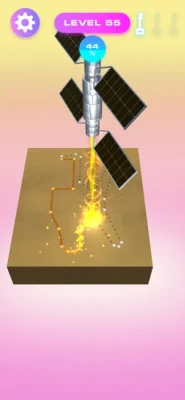
The basic idea is simple: position a metal board, let the laser cut it into the required components, and then put those pieces together to create a finished toy.
Instead of focusing on complicated industrial simulation, the game presents laser cutting as a relaxing and satisfying crafting activity.
The App Store categorizes the game as a Simulation title and lists it as a free game designed for iPhone and iPad.
How to Play Laser Cutter 3D
The gameplay follows a straightforward crafting loop:
- Start a new toy project.
- Position the metal board.
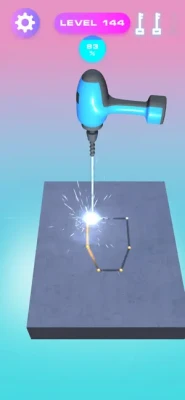
- Watch the laser cut the required shapes.
- Collect the resulting components.
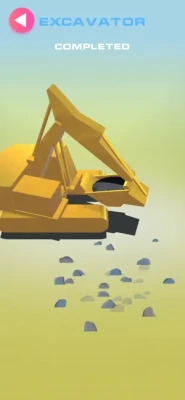
- Assemble the individual parts.
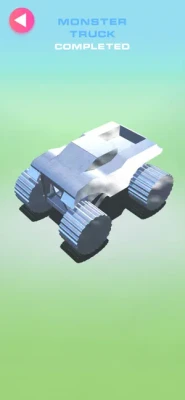
- Finish the toy.
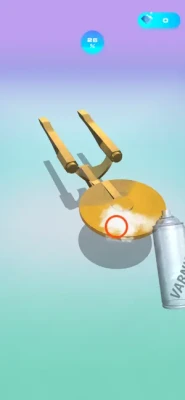
- Polish the completed creation.
- Enjoy its animation.
- Add the toy to your collection.
- Move on to the next project.
The App Store specifically describes moving the metal board, watching the laser create component parts, assembling those components into toys, and collecting different toys.
Laser Cutting Gameplay
The laser cutter is the centerpiece of the experience.
You begin with a metal board that needs to be transformed into specific components. Moving the board allows the laser to work across the required areas and create the pieces needed for the final toy.
There's something naturally satisfying about watching a flat metal sheet gradually become a collection of recognizable parts.
Move the Metal Board
Your interaction begins with the metal board.
Positioning it correctly allows the laser to cut the required components.
This simple mechanic gives players a direct role in the manufacturing process without overwhelming them with complicated controls.
Turn Parts Into Toys
Laser cutting is only the first stage.
Once the individual pieces have been created, you need to assemble them into a finished toy.
This creates a satisfying transformation:
Metal Board → Laser Cutting → Components → Assembly → Finished Toy
The finished product gives you a visible reward for completing the process.
Toy Collection System
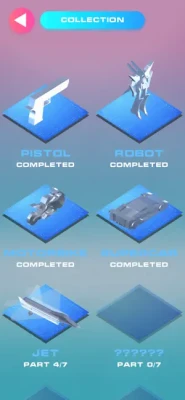
One of the game's main attractions is collecting the toys you create.
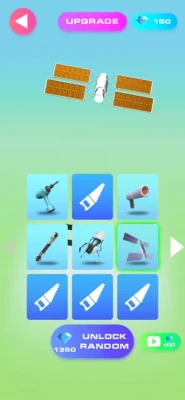
The App Store description says that there are plenty of fun toys waiting to be collected, making the collection aspect an important part of the overall progression.
Each new project gives you another opportunity to create something different and expand your collection.
Toy Polishing
The game also includes a Toy Polishing feature.
This was introduced in the major version 2.0.0 update alongside Toy Animation.
Polishing gives the finished creations an additional step beyond simple assembly.
Instead of stopping as soon as the pieces fit together, you can refine the completed toy before adding it to your collection.
Toy Animation
Toy Animation was also added in version 2.0.0.
This feature gives completed toys an additional visual element after they have been assembled.
It helps make the finished creations feel more like actual collectibles rather than static objects.
300 Levels
One of the biggest milestones in the game's version history was the addition of 300 levels in version 2.0.0.
The game's progression therefore goes well beyond a short demonstration of the laser-cutting mechanic.
Players can work through a large collection of projects while discovering new toy creations.
Main Features
🔥 3D Laser Cutting
Move the metal board and watch the laser transform it into the required components.
🧩 Build Toys From Parts
Assemble the laser-cut pieces into complete toy creations.
🧸 Collect Fun Toys
Build a collection of different creations as you progress.
✨ Polish Your Creations
The Toy Polishing feature adds another step to the crafting process.
🎬 Toy Animation
Completed toys can feature animation, adding extra personality to your collection.
🎯 Hundreds of Levels
The version history records an update bringing the game to 300 levels.
🎨 Improved Graphics and Effects
The game's version history includes improvements to graphics, effects, performance, and controls.
📱 Mobile-Friendly Controls
The game is designed around touchscreen interaction and simple crafting actions.
🆓 Free to Play
Laser Cutter 3D is currently listed as a free game on the App Store.
Game Progression
The progression system is based around completing projects and expanding your toy collection.
The basic loop is:
Cut → Assemble → Polish → Animate → Collect → Continue
Every completed toy represents another step in your collection.
With hundreds of listed levels, the game provides a substantial number of projects to work through.
The Satisfaction of Laser Cutting
Part of Laser Cutter 3D's appeal comes from the visual process.
Watching a laser carefully cut through a metal board provides the kind of satisfying transformation that makes crafting and simulation games enjoyable.
You start with raw material.
You finish with recognizable pieces.
Then you transform those pieces into something new.
Assembly Gameplay
The assembly stage changes the pace of the experience.
After watching the laser produce the components, you need to turn those separate pieces into a complete toy.
This adds a construction element to the game and gives the player a clear sense of progression from raw material to finished product.
Toy Collection and Creativity
The collection system gives players another reason to continue playing.
Instead of simply completing levels and moving on, you gradually accumulate a set of finished creations.
This makes the game appealing to players who enjoy:
- Collecting
- Crafting
- Building
- Simulation games
- Satisfying transformations
- Toy-making games
Beginner's Guide
Follow the Cutting Process
Pay attention to how the metal board moves and how the laser creates the required components.
Complete Every Step
Don't think of laser cutting as the entire objective. The pieces still need to be assembled into the final toy.
Take Your Time
The game's appeal comes partly from watching the manufacturing process unfold.
Finish Your Creations
Use the available finishing mechanics to complete the toy rather than stopping after assembly.
Build Your Collection
Continue progressing through projects to discover more toys.
Advanced Tips
Watch the Board Position
Small differences in positioning can affect how the laser interacts with the material.
Learn the Workflow
Become familiar with the full process:
Cutting → Assembly → Finishing → Collection
Focus on Completion
Don't stop at producing the individual components. The completed toy is the real reward.
Explore New Projects
The game contains a large number of levels, so continuing forward is the best way to discover more creations.
Game Difficulty
Difficulty: Easy to Moderate
The game is designed around straightforward interactions rather than complicated controls.
The challenge comes primarily from completing the required crafting process and progressing through different projects.
This makes it accessible to casual players who enjoy simulation and satisfying crafting games.
Game Theme and Atmosphere
Laser Cutter 3D has a playful toy-making and workshop theme.
Instead of presenting laser cutting as an industrial or technical simulation, the game turns the process into something colorful, interactive, and collection-focused.
The ultimate reward is not simply completing a manufacturing task—it's creating a fun toy.
Controls and Interface
The gameplay is designed around touchscreen interaction.
Core Interaction
Move: Position the metal board.
Cut: Allow the laser to create the required components.
Assemble: Put the pieces together.
Polish: Finish the toy.
Collect: Add completed creations to your collection.
The App Store specifically identifies improved game control as part of the game's update history.
Game Modes
The current App Store listing focuses on the game's main level-based crafting and simulation experience.
It does not advertise multiplayer, PvP, or competitive online modes.
For your page, it is best described as a single-player 3D crafting and simulation game.
Replay Value
The game's replay value is primarily connected to its large number of levels and collectible creations.
Players who enjoy satisfying crafting processes can continue progressing through the available projects and expanding their toy collection.
The introduction of Toy Polishing and Toy Animation also gives completed creations more personality.
Player Ratings and Feedback
The current U.S. App Store listing shows 4.7 out of 5 from 114 ratings, which represents a considerably larger sample than many older mobile games.
Player feedback includes praise for the game's toy-making concept. One review specifically mentioned enjoying the metal toy creations, while another praised the game but requested improvements to spray-paint sensitivity and the ability to skip post-level animations.
These comments suggest that the game's tactile toy-building concept is one of its strongest attractions.
Pros and Cons
Pros
- Satisfying laser-cutting mechanic
- Build toys from individual parts
- Large level collection
- 300 levels documented in version history
- Toy collection system
- Toy polishing
- Toy animation
- 3D simulation presentation
- Simple controls
- Free to play
- Strong App Store rating
- Suitable for casual gaming
Cons
- Core gameplay follows a relatively repetitive crafting loop
- Players looking for deep industrial simulation may find it too casual
- Some player feedback mentions advertisements
- One review requested a skip option for completion animations
- The latest listed update is from 2020
Technical Details
| Detail | Information |
|---|---|
| Game | Laser Cutter 3D |
| Subtitle | Toy Craft |
| Developer | Pham Anh |
| Category | Simulation |
| Price | Free |
| Size | 165 MB |
| iPhone | Yes |
| iPad | Yes |
| iPod touch | Yes |
| Required iOS | iOS 9.0 or later |
| Required iPadOS | iPadOS 9.0 or later |
| Mac | macOS 11.0+ with Apple M1 or later |
| Apple Vision | visionOS 1.0 or later |
| Language | English |
| Age Rating | 4+ |
| Ratings | 4.7/5 from 114 ratings |
| Latest Listed Version | 2.3.0 |
| Latest Listed Update | February 3, 2020 |
| Levels | 300 documented in version 2.0.0 |
These details are based on the current App Store listing and its version history.
Updates and Version History
Laser Cutter 3D received several updates during its active development period.
Version 2.3.0
The February 3, 2020 update focused on improved performance and game controls.
Version 2.2.0
This update improved graphics, UI, performance, and controls while also fixing bugs.
Version 2.1.0
The January 23, 2020 update brought improvements to graphics, effects, and performance and fixed bugs.
Version 2.0.0
The major January 20, 2020 update introduced:
- 300 levels
- Toy Polishing
- Toy Animation
Privacy Information
Apple currently indicates that the developer has not provided details about its privacy practices and handling of data. Apple notes that privacy details will be required when the developer submits its next update.
Is Laser Cutter 3D Worth Playing?
If you enjoy satisfying simulation games, crafting games, toy-building games, and creative 3D experiences, Laser Cutter 3D has a distinctive concept.
The most enjoyable part is the transformation from raw metal to finished toy.
You watch the laser create individual components, assemble those parts, polish the creation, and eventually add it to your collection.
The combination of laser cutting + assembly + toy collecting gives the game a clear identity.
Laser Cutter 3D vs Traditional Crafting Games
| Feature | Laser Cutter 3D | Traditional Crafting Game |
|---|---|---|
| Laser Cutting | ✓ | Rare |
| Metal Components | ✓ | Sometimes |
| Toy Assembly | ✓ | Varies |
| Toy Collection | ✓ | Sometimes |
| Polishing | ✓ | Varies |
| Toy Animation | ✓ | Rare |
| 3D Simulation | ✓ | Varies |
| 300 Listed Levels | ✓ | Varies |
| Simple Controls | ✓ | ✓ |
| Multiplayer | Not advertised | Varies |
Who Should Play Laser Cutter 3D?
This game is especially suited to players who enjoy:
- Laser cutting games
- Crafting games
- Toy-building games
- Simulation games
- 3D crafting games
- Satisfying games
- Construction games
- Collecting games
- Casual simulation games
- Creative mobile games
- iPhone simulation games
- iPad crafting games
Frequently Asked Questions
What is Laser Cutter 3D?
Laser Cutter 3D is a 3D simulation and crafting game where players use a laser to cut metal boards into components and assemble those components into toys.
How do you play Laser Cutter 3D?
You move the metal board, allow the laser to cut the required parts, then assemble the resulting components into toys.
How many levels does Laser Cutter 3D have?
The game's version 2.0.0 update introduced 300 levels.
Can you collect toys in Laser Cutter 3D?
Yes. The App Store description specifically highlights the large number of toys waiting to be collected.
Can you polish toys?
Yes. Toy Polishing was added in the game's major version 2.0.0 update.
Does Laser Cutter 3D have toy animations?
Yes. Toy Animation was introduced in version 2.0.0.
Is Laser Cutter 3D free?
Yes. The current App Store listing shows it as free.
Is Laser Cutter 3D a simulation game?
Yes. Apple currently categorizes it under Simulation.
Can I play Laser Cutter 3D on iPhone?
Yes. The game supports iPhone and requires iOS 9.0 or later.
Can I play Laser Cutter 3D on iPad?
Yes. It supports iPad and requires iPadOS 9.0 or later.
Is Laser Cutter 3D multiplayer?
The current App Store listing does not advertise a multiplayer mode, so it is best described as a single-player experience.
Is Laser Cutter 3D suitable for casual players?
Yes. Its simple interaction system and toy-building concept make it particularly accessible to casual players.
Final Verdict
Laser Cutter 3D takes an unusual real-world process—laser cutting metal—and turns it into a colorful mobile toy-building experience.
The gameplay loop is satisfying and easy to understand:
Cut the metal → Build the parts → Assemble the toy → Polish it → Watch it animate → Collect it.
The addition of 300 levels, Toy Polishing, Toy Animation, and a large collection of toys gives the game more depth than its simple premise might initially suggest.
With a current App Store rating of 4.7/5 from 114 ratings, it has also received generally positive player feedback.
Recommended for: Crafting fans, simulation players, toy collectors, satisfying-game enthusiasts, creative gamers, and anyone who enjoys watching raw materials transform into finished objects.
Rate the Game
User Reviews













Popular Games



















 Android
 iOS
iOS Windows
 Xbox
Xbox