










Latest Version
January 18, 2026
ABI GLOBAL LTD.
Simulation
iOS
0
Report a Problem
More About :game
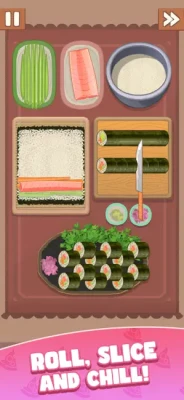
The game combines relaxing visuals and food-focused ASMR sounds with detailed cooking interactions. You can prepare dishes such as ramen, pancakes, charcuterie boards, and chocolate lava cake while unlocking new recipes, ingredients, tools, kitchen decorations, and chef outfits.
What Is Cookingdom?
Cookingdom is a cooking simulation game from ABI GLOBAL LTD. that focuses on preparing food step by step.
Rather than using a single button to complete an entire recipe, the game breaks cooking into individual activities. You may need to chop vegetables, mix ingredients, cook food, add toppings, season a dish, and finally arrange everything for presentation.
The result is a game that combines:
- Cooking simulation
- Recipe preparation
- Interactive mini-games
- Food ASMR
- Kitchen customization
- Chef customization
- Recipe progression
- Special events
- Casual simulation gameplay
The App Store describes Cookingdom as a cozy kitchen experience designed around step-by-step cooking and relaxing presentation.
How to Play Cookingdom
The basic cooking process follows a simple pattern:
- Select a recipe.
- Read the available cooking instructions.
- Prepare the ingredients.
- Chop or dice ingredients when required.
- Mix or stir ingredients.
- Cook food using the appropriate method.
- Add seasonings and toppings.
- Assemble the finished dish.
- Plate the food carefully.
- Complete the recipe and unlock additional content.
Different recipes use different combinations of these activities, so learning the basic interaction patterns is important for progressing smoothly.
Cookingdom Gameplay Features
Step-by-Step Cooking
Cookingdom's main feature is its interactive recipe system.
Each dish is divided into individual cooking tasks rather than being completed automatically.
You may find yourself:
- Slicing vegetables
- Chopping herbs
- Mixing batter
- Stirring soup
- Flipping pancakes
- Sautéing vegetables
- Grilling meat
- Adding toppings
- Applying sauces
- Arranging food on a plate
This makes every recipe feel like a sequence of small cooking challenges.
Food ASMR
Sound plays a major role in the presentation.
The App Store highlights sounds such as chopping vegetables, simmering soup, and seasoning food. These effects are designed to make the cooking interactions feel more tactile and satisfying.
Recipe Collection
Cookingdom includes a variety of dishes.
The App Store specifically highlights examples such as:
- Miso ramen
- Pancakes
- Charcuterie boards
- Chocolate lava cake
Completing dishes can unlock additional recipes, ingredients, and cooking tools.
Kitchen Customization
Your kitchen can be personalized with decorative items such as:
- Fairy lights
- Plants
- Wooden shelves
- Decorative objects
- Themed kitchen accessories
The goal is not simply to prepare food but also to create a kitchen environment that matches your preferred style.
Chef Outfits
Cookingdom also allows players to customize the chef.
Available styles can include items such as:
- Aprons
- Fuzzy slippers
- Sweaters
- Themed outfits
These cosmetic options add another layer of personalization to the cooking experience.
Complete Cookingdom Strategy Guide
1. Learn the Recipe Before Trying to Rush
One of the most useful strategies is to understand the recipe sequence.
Before moving quickly through a new dish, pay attention to:
- Ingredient preparation
- Cooking order
- Seasoning requirements
- Plating requirements
- Tool usage
- Where ingredients need to be placed
Some player reviews specifically mention that certain recipes require actions in a particular order, so learning the sequence can make later attempts much smoother.
2. Follow the Instructions Carefully
Cookingdom can be particular about the order of actions.
If an ingredient does not appear to work when you place it somewhere, do not immediately assume the game is broken.
Check whether another cooking step needs to be completed first.
A useful rule is:
If something does not work, look at the previous unfinished step before trying random actions.
3. Prepare Ingredients Efficiently
When a recipe requires several ingredients, identify all preparation tasks before starting.
For example:
Wash → Chop → Mix → Cook → Season → Plate
Understanding the overall sequence reduces unnecessary movements.
4. Pay Attention to Cooking
Cooking actions can require timing and interaction.
Watch the food carefully while:
- Grilling
- Sautéing
- Flipping
- Heating
- Simmering
Do not assume every cooking step can be left unattended.
5. Learn the Correct Order of Seasonings
Some player reviews report that certain recipes require ingredients or seasonings to be added in a particular order.
If a seasoning does not appear to register, check whether another ingredient needs to be added first.
This is especially important during longer recipes.
6. Plate Carefully
Plating is more than a final cosmetic step.
The game includes interactive placement of food and toppings, so take a moment to identify where each item belongs.
A useful approach is:
- Place the main food.
- Add larger side items.
- Add toppings.
- Apply sauces.
- Finish with smaller garnishes.
7. Avoid Unnecessary Movements
When a recipe has a time constraint, unnecessary actions can cost valuable seconds.
Try to move directly from one required action to the next rather than experimenting with every object on the screen.
8. Learn From Failed Attempts
A failed recipe attempt can teach you the exact sequence needed for the next try.
Pay attention to:
- Which step took too long
- Which ingredient was difficult to identify
- Which action needed a particular order
- Where you made an unnecessary movement
- Which cooking stage caused the problem
Then repeat the recipe with a cleaner sequence.
Cookingdom Time Management
Although the game's promotional description emphasizes relaxing cooking, some player reviews on the current App Store page report timed stages and say that certain recipes can become stressful when the available time is limited.
If you are playing a timed recipe, use this strategy:
Before Starting
Look over the available ingredients and tools.
During Preparation
Complete obvious preparation tasks quickly.
During Cooking
Watch the food rather than repeatedly switching between unrelated actions.
During Plating
Know where each item belongs before you begin arranging the plate.
Near the End
Avoid experimenting. Finish the known sequence cleanly.
How to Complete Difficult Cookingdom Recipes
When a recipe becomes difficult, break it into stages.
Stage 1: Preparation
Identify and prepare every ingredient that the recipe requires.
Stage 2: Cooking
Complete the required heating, frying, grilling, simmering, or other cooking action.
Stage 3: Seasoning
Follow the correct order for sauces, spices, and other additions.
Stage 4: Assembly
Combine the prepared components.
Stage 5: Plating
Arrange the finished food and toppings carefully.
Thinking about a recipe as five smaller problems makes complicated dishes easier to manage.
Cookingdom Tips for Beginners
If you are just starting, keep these tips in mind:
- Read every instruction carefully.
- Do not rush through a new recipe.
- Remember the order of successful actions.
- Watch cooking stages closely.
- Learn where tools and ingredients are located.
- Keep plating organized.
- Repeat difficult recipes to learn their sequence.
- Avoid unnecessary movements in timed stages.
- Use mistakes as information for the next attempt.
- Customize your kitchen whenever you want to change the atmosphere.
Advanced Cookingdom Strategy
Memorize Repeated Actions
Once you understand how a particular cooking interaction works, remember it.
Repeated actions become faster when you already know the correct gesture or sequence.
Plan Long Recipes in Advance
For longer dishes, mentally divide the recipe into sections.
For example:
Preparation → Main Cooking → Sauce → Assembly → Plating
This prevents you from becoming confused when several ingredients are visible at once.
Prioritize Time-Sensitive Actions
If one cooking step can spoil or fail when left unattended, handle that step before less urgent preparation.
Minimize Corrections
If you repeatedly place ingredients incorrectly, slow down slightly and identify the intended placement before tapping.
A single accurate action is faster than several failed attempts.
Cookingdom Recipe Strategy
The recipes in Cookingdom are not simply visual decorations. Each one can require a different combination of interactions.
For example, a recipe may involve:
Chopping
Use controlled movements to prepare vegetables, herbs, or garnishes.
Mixing
Combine ingredients until the mixture reaches the expected state.
Cooking
Watch the food and perform the required interaction at the correct moment.
Seasoning
Add the requested ingredients in the correct sequence.
Plating
Arrange the completed components carefully.
Learning these individual systems gives you a strong foundation for future recipes.
Cookingdom Kitchen Customization Guide
Your kitchen can be customized with decorative items.
The App Store mentions:
- Fairy lights
- Potted plants
- Rustic wooden shelves
- Decorative kitchen items
- Themed accessories
When designing your kitchen, you can create different moods by combining decorative elements.
A cozy kitchen can use warm-looking furniture and plants, while a more playful setup can focus on colorful accessories.
The customization system is primarily about creating a kitchen that feels personal to your play style.
Cookingdom Chef Customization
The chef can also be dressed in different outfits.
The App Store highlights examples such as bunny-themed aprons, fuzzy slippers, and sweaters.
Since these are cosmetic choices, you can change the appearance based entirely on your preferred style or the recipe you are preparing.
Cookingdom Events
Cookingdom also features special events.
The current App Store listing highlights a Mid-Autumn Family Meal event featuring mooncakes, family meals, and a festive setting.
The listing also references Memories in the Kitchen, an event centered around preparing family meals with grandparents and completing challenges.
When an event is available, check its objectives before starting so you understand what the event asks you to complete.
Cookingdom Event Tips
When participating in a special event:
- Read the event objective first.
- Identify the recipe or activity involved.
- Learn the sequence before trying to maximize speed.
- Avoid unnecessary movements.
- Pay attention to any special ingredients.
- Repeat difficult stages until the sequence becomes familiar.
Event stages can be a good opportunity to practice the game's cooking mechanics in a different setting.
Common Cookingdom Mistakes
Rushing a New Recipe
The first attempt is often better used to learn the sequence than to chase a perfect run.
Ignoring Action Order
Some recipes can require actions to be completed in a particular order.
Moving Too Quickly During Plating
Fast placement can lead to mistakes if you have not identified the correct position.
Forgetting Cooking Timing
Food may require attention during active cooking stages.
Repeating the Same Mistake
If you fail at the same step repeatedly, stop and identify exactly what went wrong.
Using Extra Time Without a Plan
Some player reviews mention using additional time after struggling with timed recipes. A better approach is to first learn the sequence so the extra time is used productively.
Cookingdom Troubleshooting Strategy
If an ingredient or tool does not respond as expected:
- Check whether the previous step was completed.
- Look for an action that must happen first.
- Confirm that you are using the correct tool.
- Try the interaction again carefully.
- If the issue persists, restart the recipe.
Several App Store reviews have reported occasional problems with taps not registering or the game freezing on certain devices. These are individual player reports, not a confirmation that every player experiences the same issue.
Cookingdom Progression Tips
Progression is closely connected to completing dishes.
The App Store says completed dishes can unlock:
- New recipes
- Ingredients
- Cooking tools
This means that learning each recipe rather than simply rushing through it can help you understand the mechanics needed for later dishes.
A useful progression loop is:
Complete recipe → Learn mechanics → Unlock content → Master new recipe → Customize kitchen
Cookingdom Game Information
| Feature | Details |
|---|---|
| Game | Cookingdom |
| Developer | ABI GLOBAL LTD. |
| Genre | Simulation |
| Platform | iPhone, iPad |
| Price | Free with In-App Purchases |
| Age Rating | 4+ |
| Size | About 3.4 GB |
| iPhone Requirement | iOS 15.0 or later |
| iPad Requirement | iPadOS 15.0 or later |
| Mac | macOS 12.0+ with Apple M1 or later |
| Apple Vision | visionOS 1.0 or later |
| Languages | English, French, German, Japanese, Korean, Simplified Chinese, Spanish, Traditional Chinese |
| Game Center | Supported |
| Advertising | Yes |
| In-App Purchases | Yes |
The current US App Store listing provides these compatibility, size, language, monetization, and platform details.
Cookingdom In-App Purchases
The App Store currently lists optional purchases including:
- Remove Ads
- Gold packs
- Ad-free periods
- Starter Pack
- Booster Packs
- Revive Pack
- Chef Packs
The game is free to download but includes advertising and optional in-app purchases.
Cookingdom Player Rating
At the time of checking, the US App Store page displayed a 4.7/5 rating from approximately 144,000 ratings.
Player feedback is mixed in its details. Some reviewers praise the game's cute visual style, relaxing presentation, realistic-looking food preparation, and variety of cooking activities. Other reviews specifically mention frustration with timed stages, strict action sequences, and occasional interaction or performance problems.
Is Cookingdom a Relaxing Cooking Game?
Cookingdom is clearly designed around a cozy and relaxing presentation, with soft visuals, food sounds, customization, and a step-by-step cooking concept.
However, player experiences can differ. Some current reviews describe timed recipes as stressful, particularly when learning a complicated dish for the first time.
For players who enjoy both relaxing cooking interactions and occasional puzzle-like challenges, the combination may provide more variety than a purely passive cooking game.
Is Cookingdom Difficult?
The basic interactions are easy to understand, but difficulty can increase when recipes require several actions in a specific sequence.
The biggest challenges tend to come from:
- Learning unfamiliar recipes
- Remembering action order
- Managing cooking timing
- Correct ingredient placement
- Completing longer recipes efficiently
- Avoiding mistakes during timed stages
The difficulty is therefore more about learning the correct sequence than mastering complicated controls.
Best Cookingdom Strategy
The most useful overall strategy is:
Learn first, optimize second.
On your first attempt at a new recipe, concentrate on understanding the ingredients and sequence.
On your second attempt, remove unnecessary movements.
On later attempts, focus on speed and accuracy.
This approach is particularly useful for recipes that combine many cooking steps.
Frequently Asked Questions
What is Cookingdom?
Cookingdom is a cozy cooking simulation game where players prepare dishes through interactive cooking mini-games, customize a kitchen, and unlock recipes, ingredients, and cooking tools.
What can you cook in Cookingdom?
The App Store highlights dishes including miso ramen, pancakes, charcuterie boards, and chocolate lava cake, with additional recipes available through progression.
Does Cookingdom have cooking mini-games?
Yes. Recipes are divided into interactive steps such as chopping, mixing, stirring, cooking, and plating.
Can you customize the kitchen?
Yes. Players can decorate the kitchen with items such as plants, fairy lights, wooden shelves, and other accessories.
Can you customize the chef?
Yes. Cookingdom includes cosmetic chef outfits such as aprons, slippers, and themed clothing.
Does Cookingdom have events?
Yes. The current App Store listing features special events including Mid-Autumn Family Meal and Memories in the Kitchen.
Is Cookingdom free?
Yes. Cookingdom is free to download and includes optional in-app purchases and advertising.
Does Cookingdom have timers?
Some player reviews on the App Store report timed recipe stages, despite the game's promotional description emphasizing a relaxed cooking experience.
What devices support Cookingdom?
The App Store lists Cookingdom for iPhone and iPad, requiring iOS 15.0 or later and iPadOS 15.0 or later. It also lists compatibility with Apple silicon Macs running macOS 12.0 or later and Apple Vision.
Who developed Cookingdom?
Cookingdom is developed by ABI GLOBAL LTD.
Final Thoughts
Cookingdom stands out by turning individual cooking actions into interactive mini-games instead of reducing recipes to simple taps.
The key to progressing smoothly is to learn each recipe's sequence before trying to perform it quickly. Pay attention to preparation, cooking, seasoning, and plating order, then repeat the recipe with fewer unnecessary movements.
The cozy kitchen customization, chef outfits, food sounds, recipes, and seasonal events add variety beyond the basic cooking stages. For difficult recipes, patience and memorizing the correct sequence are usually more useful than simply tapping faster.
Rate the Game
User Reviews















Popular Games



















 Android
 iOS
iOS Windows
 Xbox
Xbox