

Latest Version
September 07, 2024
GamoVation
Board
0
com.gamovation.chessclubpilot
Report a Problem
More About :game
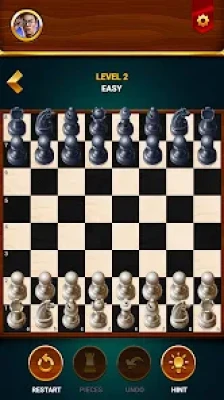
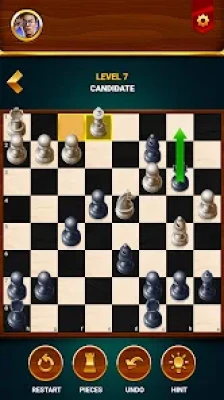
The game supports offline chess, multiple difficulty levels, hints, undo moves, game statistics, 2D and 3D boards, and a two-player mode. Google Play currently lists it for Android and Windows, with more than 100 million downloads and a 4.8-star rating from more than 1 million reviews.
The game is free to install but contains advertisements and optional in-app purchases.
What Is Chess Club?
Chess Club is built around the traditional rules of chess while adding features designed to make practice more accessible.
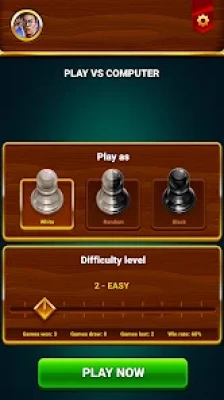
You can choose a computer opponent, select a difficulty level, play as White or Black, receive hints when you are stuck, undo mistakes, and review your personal game statistics.
The current Google Play description also highlights chess puzzles and tactics as part of the learning experience.
Main Features
- Offline chess games
- Computer opponents
- Eight difficulty levels
- Two-player mode
- Chess puzzles and tactical practice
- Hint system
- Unlimited undo
- 2D chess board
- 3D chess board
- Win, loss and draw statistics
- Android and Windows support
- Free-to-play model
- Advertisements
- Optional purchases
How to Play Chess Club
The basic gameplay follows standard chess rules.
At the beginning of a game, choose your preferred side and difficulty. You can play White, Black, or allow the game to select your color.
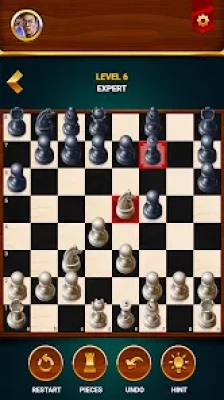
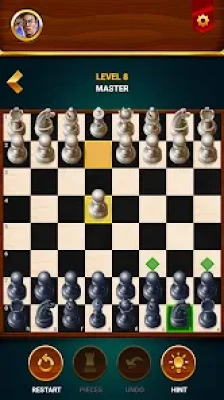
Once the game starts, select a piece and choose a legal destination. The app highlights possible moves, making it easier for newer players to understand how the pieces move.
Your ultimate objective is to checkmate the opposing king.
However, winning a chess game usually depends on what happens much earlier than the final attack. Good development, king safety, material management and tactical awareness all matter.
Chess Club Beginner Strategy
If you're new to chess, don't try to memorize dozens of openings immediately.
Instead, learn a few fundamental principles.
1. Control the Center
The central squares are important because pieces placed there can influence many parts of the board.
Try to establish control of the center with your pawns and pieces without moving the same piece repeatedly for no reason.
2. Develop Your Pieces
Bring your knights and bishops into useful positions during the opening.
Avoid spending too many moves moving one piece back and forth while your other pieces remain on their starting squares.
3. Castle Early When Appropriate
King safety should be a priority.
Castling can help move your king away from the center while connecting your rooks.
4. Don't Bring Your Queen Out Too Early
The queen is powerful, but moving it repeatedly during the opening can allow your opponent to gain development by attacking it.
Develop your minor pieces first when possible.
5. Look Before You Move
Before every move, ask:
What does my opponent threaten?
This simple question prevents many beginner mistakes.
The Three-Question Chess Check
Before making an important move, use this quick mental routine:
1. What can my opponent capture?
2. What checks and threats do they have?
3. What happens after my move?
This habit is more useful than playing quickly.
How to Use the Hint Feature
Chess Club includes a hint feature that can show a recommended move when you need help.
However, don't use hints immediately whenever you become uncertain.
A better learning method is:
- Analyze the position yourself.
- Identify two or three candidate moves.
- Calculate what might happen.
- Make your choice.
- Use the hint only if you remain unsure.
- Compare the suggested move with your own idea.
This turns the hint system into a learning tool rather than simply an automatic solution button.
How to Use Undo Effectively
Chess Club allows you to undo moves and try again.
Instead of using undo only to erase mistakes, use it as a training mechanism.
For example:
- Make a move.
- Notice your opponent's response.
- Undo the move.
- Try a different idea.
- Compare the resulting positions.
This is particularly useful for understanding tactical mistakes.
Don't Become Dependent on Undo
When practicing seriously, occasionally play without immediately reversing mistakes.
Making yourself continue from an imperfect position teaches you how to defend difficult positions rather than always resetting them.
Chess Club Opening Strategy
You don't need to memorize a huge opening database to improve.
Focus on these principles:
Move Central Pawns
Fight for the center early.
Develop Knights
Knights generally have useful development squares near the center.
Develop Bishops
Once your central pawns move, your bishops can often become active.
Castle
Protect your king and prepare your rooks for the middlegame.
Connect Your Rooks
Once the minor pieces and queen have moved appropriately, your rooks can become more active.
The goal is not to follow a fixed sequence regardless of your opponent's moves. The goal is to reach a healthy position while responding to threats.
Chess Club Tactical Strategy
Tactics are short combinations that can win material, deliver checkmate or create another concrete advantage.
Common tactical ideas include:
- Forks
- Pins
- Skewers
- Discovered attacks
- Double attacks
- Back-rank tactics
- Removing a defender
- Deflection
- Simple mating patterns
The game's puzzle and tactics features provide an opportunity to practice these patterns.
Look for Checks First
When analyzing a position, checks deserve immediate attention.
Ask:
Can I check the king?
Then consider:
Can I capture something valuable?
And finally:
Can I create a direct threat?
This is often remembered as a practical checks, captures and threats routine.
How to Improve at Chess Club
Playing hundreds of games without analyzing your mistakes does not guarantee improvement.
A better routine is:
Play
Complete a game against a suitable opponent.
Review
Identify the first major mistake.
Understand
Ask why the move was bad.
Repeat
Try another game while actively avoiding the same mistake.
This creates a much stronger learning loop.
Choosing the Right Difficulty
Chess Club offers eight difficulty levels according to the Google Play listing.
Don't automatically select the hardest available level.
Choose a level that gives you enough resistance to make you think without turning every game into a sequence of unexplained defeats.
Beginner
Use this level to learn piece movement, opening principles and basic tactics.
Intermediate
Start focusing on calculation and positional decisions.
Advanced
Spend more time calculating variations before making tactical moves.
Highest Levels
Treat these games as serious practice rather than casual matches.
The exact strength and behavior of the computer opponent can vary by level, so your own results are a better guide than simply choosing the highest setting.
Chess Club Two-Player Mode
The Google Play listing describes a two-player mode in which another person can play on the same device.
This is useful for casual games with:
- Friends
- Family members
- Chess students
- Training partners
A two-player game can also be useful because you are no longer playing against predictable computer behavior. Your opponent may make completely different decisions from the computer.
Chess Club Puzzle Strategy
The puzzle and tactics mode can help you practice pattern recognition.
When approaching a puzzle, don't immediately move the first piece that looks active.
Instead:
- Look for checks.
- Look for captures.
- Identify loose pieces.
- Search for forks or pins.
- Examine the opponent's king position.
- Calculate the opponent's strongest response.
Many tactical positions are solved by noticing something that is already present on the board rather than inventing a complicated combination.
Material Management
Chess pieces have different relative values, but beginners should avoid treating these values as absolute rules.
A common rough guide is:
- Pawn = 1
- Knight = 3
- Bishop = 3
- Rook = 5
- Queen = 9
The king is not assigned a normal trading value because losing it ends the game.
Before exchanging pieces, consider more than material.
Ask:
- Does the exchange improve my position?
- Does it expose my king?
- Does it damage my pawn structure?
- Does it remove an important defender?
- Does it activate my opponent's pieces?
A three-point piece is not automatically worth exchanging for another three-point piece if the resulting position is unfavorable.
Chess Club Endgame Tips
When most pieces have been exchanged, the character of the game changes.
Activate Your King
In many endgames, the king becomes an important active piece.
Push Passed Pawns
A passed pawn can become a major threat if your opponent cannot stop it.
Don't Rush Pawn Moves
Every pawn move can permanently change the position.
Calculate Promotion Races
When both sides have advanced pawns, calculate whether either side can promote first.
Use Opposition
In king-and-pawn endings, opposition can determine whether a king can make progress.
These fundamentals are worth practicing even when you are primarily using Chess Club for casual games.
How to Avoid Common Chess Mistakes
Moving Too Quickly
Speed is not the objective in a normal offline chess game.
Take time to calculate.
Ignoring Your Opponent
Never assume your opponent will make the move you want.
Look for their strongest response.
Attacking Before Developing
A premature attack can leave your king and undeveloped pieces vulnerable.
Chasing Pieces
Repeatedly attacking one enemy piece can waste several moves.
Taking Every Available Capture
A capture may look attractive while creating a tactical problem afterward.
Always examine the position after the capture.
Forgetting the Back Rank
A poorly protected king can sometimes be vulnerable to a rook or queen attack along the back rank.
Chess Club 2D and 3D Boards
Chess Club supports both 2D and 3D chess pieces/boards, giving players a choice in how they view the game.
For serious analysis, a clean 2D view can make it easier to scan the board quickly.
A 3D presentation can provide a more traditional board-game feel.
Choose whichever makes it easier for you to recognize pieces and calculate moves.
Tracking Your Chess Statistics
The game keeps track of personal statistics such as wins, losses and draws.
Don't look only at your win percentage.
Your statistics can be more useful when combined with questions such as:
- Am I winning more games against the same difficulty?
- Am I losing because of opening mistakes?
- Do I frequently lose material?
- Do I reach endgames successfully?
- Am I improving against stronger opponents?
The goal should be identifying patterns in your play.
Offline Chess Gameplay
Offline play is one of Chess Club's central features.
The current Google Play listing specifically promotes playing chess offline against computer opponents.
This makes it suitable for playing when an internet connection isn't available.
Offline sessions can also be useful for focused practice because the core game does not require online competition.
Chess Club Ads and In-App Purchases
Google Play currently identifies Chess Club as a free game containing advertisements and optional in-app purchases.
Recent Google Play reviews include both positive comments about the learning features and complaints about advertising frequency. One August 2026 review specifically praised the educational aspects and hints while criticizing the amount of advertising.
These are individual player experiences and should not be treated as representative of every player.
Latest Chess Club Updates
The current Google Play listing shows an update dated September 3, 2026. The recent update information says the developers focused on improvements so players could continue playing without problems rather than introducing a major new feature set.
The listing also continues to show Android and Windows availability.
Chess Club Rating and Player Feedback
Google Play currently displays approximately 4.8 stars with more than 1.1 million reviews and 100M+ downloads. These figures can change as the store receives new reviews and downloads.
Recent feedback includes praise for the game's simplicity, hints and offline functionality, while other reviews have mentioned issues such as advertising and occasional situations where the computer appears to remain in a prolonged thinking state.
The developer has responded to reported technical issues and advised affected users to restart, update the application and contact support when necessary.
Pros and Cons
Pros
- Offline chess gameplay
- Eight difficulty levels
- Computer opponents
- Two-player mode
- Chess puzzles and tactical practice
- Hint system
- Undo function
- 2D and 3D boards
- Personal statistics
- Android and Windows availability
- Suitable for beginners and experienced players
- Free to install
Cons
- Contains advertisements
- Optional in-app purchases
- Some recent reviews mention advertising frequency
- Some players have reported occasional technical issues
- Computer-based play does not replace the variety of human opponents
Who Should Play Chess Club?
Chess Club can be useful for players who want:
- An offline chess game
- Beginner chess practice
- Computer opponents
- Tactical puzzles
- A two-player chess game on one device
- An accessible way to practice chess principles
- Multiple difficulty settings
- A simple chess interface
- 2D or 3D board presentation
It can work particularly well as a casual practice application when you want to play a few games without joining an online chess platform.
Best Chess Club Training Routine
If your goal is to become a stronger player, try this routine:
Game 1: Play without hints.
Review: Find your first serious mistake.
Puzzle Practice: Solve several tactical positions.
Game 2: Choose a slightly stronger opponent.
Analysis: Identify whether you repeated the same mistake.
Opening Practice: Work on development and king safety.
Endgame Practice: Study basic king-and-pawn positions.
The important part is consistency.
Chess Club Tips in 30 Seconds
- Control the center.
- Develop your minor pieces.
- Castle when appropriate.
- Don't move the queen unnecessarily early.
- Check your opponent's threats before every move.
- Look for checks, captures and threats.
- Don't sacrifice material without a reason.
- Protect your king.
- Use hints as learning tools.
- Use undo to understand mistakes.
- Practice tactics regularly.
- Choose a difficulty that challenges you.
- Review losses instead of immediately starting another game.
Frequently Asked Questions
Is Chess Club free?
Yes. Chess Club is free to install and play, although Google Play lists advertisements and optional in-app purchases.
Can I play Chess Club offline?
Yes. Offline chess against computer opponents is one of the game's main advertised features.
How many difficulty levels does Chess Club have?
The game's store description advertises eight difficulty levels.
Can two people play Chess Club?
Yes. The current listing describes a two-player mode where a friend can play against you.
Does Chess Club have chess puzzles?
Yes. The current Google Play description includes chess puzzles and tactics for practice.
Can I undo a chess move?
Yes. Chess Club provides an undo function that allows you to take back moves and try another approach.
Does Chess Club provide hints?
Yes. The hint feature can suggest a useful move when you need assistance.
Can I play with 2D and 3D chess pieces?
Yes. The game supports both 2D and 3D chess presentation.
Is Chess Club available on Windows?
Yes. Google Play currently lists the game as available on Android and Windows.
Is Chess Club good for beginners?
Its adjustable difficulty, legal-move assistance, hints, undo feature and offline computer games make it suitable for learning the fundamentals. However, improving at chess still requires studying positions and understanding why moves work rather than relying entirely on hints.
Final Thoughts
Chess Club - Offline Board Game combines traditional chess with practical features that make repeated practice convenient. Offline computer games, eight difficulty levels, hints, undo, puzzles, statistics and two-player play give beginners several ways to learn while still leaving room for more experienced players to challenge themselves.
Rate the Game
User Reviews




Popular Games



















 Android
 iOS
iOS Windows
 Xbox
Xbox