

Latest Version
September 08, 2026
Easybrain Ltd
Board
iOS
0
Report a Problem
More About :game
Pixel Art – Color by Number is a digital coloring game from Easybrain Ltd that combines traditional color-by-number mechanics with pixel art.
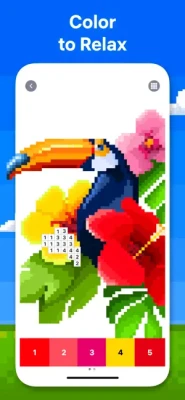
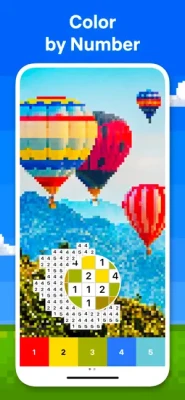
Instead of choosing colors freely, every section of an image contains a number that corresponds to a specific color. Your job is simply to select the correct color and fill the matching pixels.
As you continue, a blank or partially colored grid gradually transforms into a detailed picture.
The current App Store listing features more than 40,000 artworks, daily additions, 3D coloring, user-created pixel pictures, events, special tools, and the newer Flower Garden feature.
How to Play Pixel Art
The basic gameplay is deliberately simple.
Step 1: Choose a Picture
Browse through the available coloring collection and select an image that matches your interests.
There are categories covering subjects such as:
- Animals
- Birds
- Flowers
- Food
- Places
- Mandalas
- Patterns
- Objects
- 3D artwork
- Themed event pictures
Step 2: Select a Number
The game displays a palette of numbered colors. Choose the number you want to work on.
Step 3: Find Matching Pixels
The corresponding pixels on the image indicate where that color belongs.
Step 4: Fill the Pixels
Tap the matching cells to color them.
Step 5: Watch the Picture Appear
Continue working through the numbers until the entire pixel artwork is complete.
The result is a colorful image created one small square at a time.
Pixel Art Game Features
More Than 40,000 Artworks
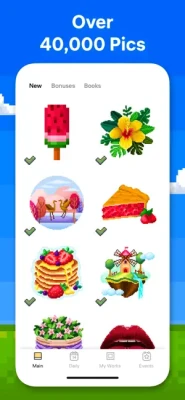
One of the biggest attractions is the huge library of available pictures. The current App Store description says players can discover more than 40,000 artworks, providing plenty of variety for different tastes and skill levels.
The collection includes:
- Animals
- Birds
- Flowers
- Food
- Places
- Mandalas
- Patterns
- Objects
- Fantasy-style pictures
- 3D designs
- Special event artwork
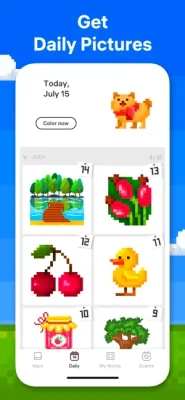
Daily New Pictures
The game regularly adds new images to its collection, giving returning players fresh artwork to color.
This makes Pixel Art more than a fixed coloring book. There is always another picture to discover and complete.
Flower Garden
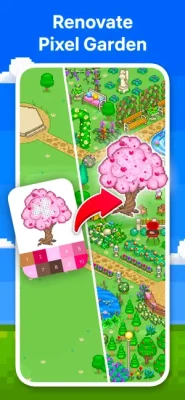
The current version introduces Flower Garden, a separate progression feature inside Pixel Art.
Players color unique objects, build their own garden, and earn rewards as they progress.
It adds a light collection and progression element to what would otherwise be a straightforward coloring experience.
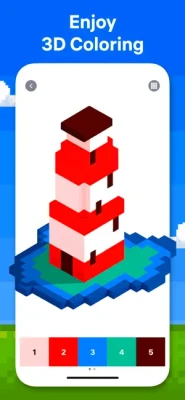
3D Coloring
Pixel Art isn't limited to traditional flat pixel pictures.
The game also includes 3D coloring, allowing players to color three-dimensional artwork for a different visual experience.
This gives the game some additional variety for players who eventually want something beyond standard 2D pixel grids.
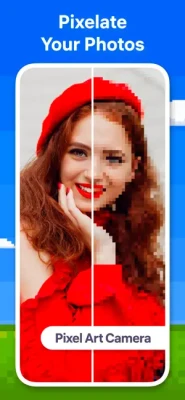
Pixel Art Camera
One of the most interesting features is Pixel Art Camera.
Instead of choosing an existing image, you can use a photo and turn it into a pixel-style coloring picture.
You can use:
- Selfies
- Personal photos
- Pets
- Landscapes
- Objects
- Other images from your device
The app converts the image into a pixel-art format with numbered colors, allowing you to color your own creation.
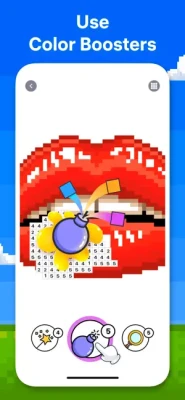
Magic Wand
The Magic Wand is designed to make coloring faster.
Rather than tapping every individual matching pixel, it can color multiple neighboring cells containing the same number.
This is particularly useful when working on larger pictures with many small areas of the same color.
Color Splash
Color Splash is another coloring tool that speeds up the process.
It can color multiple neighboring cells even when they contain different numbers.
This makes it useful for quickly completing larger sections of an image.
Timelapse Sharing
After completing an artwork, Pixel Art can create a timelapse video showing the picture coming together.
You can then share the finished process with friends through social networks or email.
This is particularly appealing for people who enjoy sharing their completed pixel art rather than simply keeping it inside the app.
Themed Events
Pixel Art regularly features special events where players can color themed pictures and earn rewards.
These events can include:
- Special artwork
- Limited-time themes
- Boosters
- Collectible rewards
- Event-specific coloring challenges
The event system gives regular players another reason to return after completing the standard picture collection.
Game Theme and Atmosphere
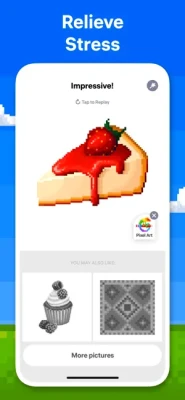
Pixel Art is designed around relaxation rather than competition.
There are no enemies to defeat, no complicated controls, and no traditional combat mechanics. The main activity is slowly filling a picture with the correct colors.
The experience can feel almost meditative:
Choose → Color → Watch the picture appear → Relax.
The developer specifically presents the game around the idea of coloring, relaxing, and enjoying the process.
Why Color-by-Number Games Are So Satisfying
Part of Pixel Art's appeal comes from the immediate feedback provided by every correct tap.
A large image may initially look complicated, but the numbered system breaks it into hundreds or thousands of small, manageable tasks.
Instead of thinking about the entire picture, you only need to solve one color at a time.
That gradual transformation creates a satisfying sense of completion.
Game Progression
Pixel Art doesn't use a traditional RPG leveling system.
Instead, progression is based around completing artwork and participating in the game's additional activities.
Players can:
- Complete more pictures
- Explore new categories
- Color daily artwork
- Participate in events
- Collect event rewards
- Build the Flower Garden
- Create personal pixel art
- Complete 3D artwork
- Improve coloring speed
- Share completed timelapses
This keeps progression focused on creativity and collection rather than character statistics.
Coloring Categories
The large artwork library gives players plenty of different subjects to explore.
Animals
Color pixel versions of different animals, from cute illustrations to more detailed artwork.
Birds
Bird-themed pictures provide colorful designs with varying levels of detail.
Flowers
Floral pictures are particularly well suited to the game's relaxing coloring format.
Food
Color pixel-art versions of different foods and culinary subjects.
Places
Explore illustrated locations and scenery through color-by-number artwork.
Mandalas
Detailed symmetrical patterns offer longer coloring sessions.
Patterns
Geometric and abstract designs provide a different experience from character or animal pictures.
The current App Store listing specifically identifies mandalas, patterns, animals, birds, flowers, places, and food among its available categories.
Beginner's Guide
If you're new to Pixel Art, start with smaller pictures.
Smaller images allow you to understand the coloring system without dealing with thousands of individual cells.
Beginner Tips
- Choose a simple picture.
- Start with a color that has many visible pixels.
- Use the zoom function for detailed areas.
- Work through colors systematically.
- Use the Magic Wand when many neighboring pixels share the same number.
- Try Color Splash for larger sections.
- Save more complicated pictures for longer sessions.
The goal isn't to finish as quickly as possible. The game is primarily about the coloring experience.
Advanced Coloring Tips
Work From Large Areas to Small Details
Large sections can quickly change the appearance of the picture and make the remaining pixels easier to identify.
Use Coloring Tools Strategically
The Magic Wand is useful for repeated neighboring cells, while Color Splash can speed up larger areas.
Choose Pictures Based on Your Mood
For a short session, select a small image.
For a longer coloring session, choose a detailed artwork with a larger pixel count.
Try 3D Artwork
Once you've become comfortable with standard pictures, experiment with 3D coloring for a different type of visual experience.
Create Your Own Pixel Art
The Pixel Art Camera lets you turn your own photographs into coloring projects, giving the game a much more personal element.
Controls and Interface
Pixel Art uses straightforward touchscreen controls.
The primary interactions are:
- Tap a numbered color
- Tap matching pixels
- Zoom into detailed areas
- Move around the artwork
- Use coloring tools
- Complete the picture
- Share the finished artwork
The interface is designed to keep the process accessible without requiring complicated controls.
Difficulty
Pixel Art's difficulty is largely determined by the complexity of the artwork you choose.
Learning Curve: ★★★★★
Relaxation: ★★★★★
Creativity: ★★★★☆
Variety: ★★★★★
Challenge: ★★★★☆
Replay Value: ★★★★★
Simple pictures can be completed quickly, while highly detailed artwork may require a much longer coloring session.
Who Should Play Pixel Art?
Pixel Art is a good fit for players who enjoy:
- Color by number games
- Pixel art games
- Digital coloring books
- Relaxing games
- Drawing games
- Art games
- Anti-stress games
- Creative mobile games
- Casual puzzle games
- 3D coloring
- Mandala coloring
- Animal coloring pages
- Coloring from personal photos
It's particularly appealing if you want a game that doesn't demand fast reactions or complex strategic decisions.
Player Experience
Pixel Art has built a very large player base. The current U.S. App Store listing shows a 4.7/5 rating from roughly 746,000 ratings, making it one of the more established mobile coloring games in its category.
Recent player feedback praises the large selection of artwork, regular new pictures, different picture sizes, 3D and special artwork, the daily calendar, and the ability to use personal images.
Some reviews also criticize the number of advertisements and occasional performance or progress issues. These are worth considering for visitors who prefer completely uninterrupted coloring sessions.
Pros and Cons
Pros
- More than 40,000 artworks
- Large variety of categories
- Daily new pictures
- Pixel Art Camera
- Create art from personal photos
- 3D coloring
- Flower Garden
- Seasonal and themed events
- Magic Wand
- Color Splash
- Timelapse sharing
- Simple controls
- Relaxing gameplay
- Regular updates
Cons
- Contains advertising
- Optional in-app purchases
- Detailed artwork can require considerable time
- Some players may find advertisements disruptive
- Performance can vary on some devices
The current App Store listing confirms advertising, in-app purchases, and a Premium subscription option that unlocks additional content and removes ads.
Technical Details
| Detail | Information |
|---|---|
| Game | Pixel Art – Color by Number |
| Developer | Easybrain Ltd |
| Genre | Puzzle / Coloring |
| Platform | iPhone, iPad |
| Price | Free with in-app purchases |
| Age Rating | 13+ |
| Current Size | 253.8 MB |
| Required iOS | iOS 15.0 or later |
| Languages | English + 14 more |
| Advertising | Yes |
| In-App Purchases | Yes |
The current U.S. App Store listing provides these specifications and lists iPhone and iPad compatibility.
Recent Updates
The App Store currently lists version 10.6.0, with the latest release focused on performance and stability improvements. The version history shows a series of similar updates throughout 2025 and 2026.
This indicates that the developer continues to maintain the application rather than leaving it as an unchanged legacy coloring game.
Pixel Art vs Traditional Coloring Books
Traditional coloring books require you to decide which colors to use.
Pixel Art removes that decision.
Every area has a number, and each number corresponds to a predetermined color.
That makes the experience more structured and accessible while still providing the visual satisfaction of creating finished artwork.
Pixel Art vs Paint by Number
Both formats use numbered sections, but Pixel Art adds a distinct pixel-based visual style.
Instead of large traditional shapes, images are broken into individual pixel cells.
The result is artwork that has a recognizable retro-digital aesthetic when completed.
The ability to turn personal photos into pixel pictures also gives Pixel Art an advantage for users who want to create more personalized projects.
Pixel Art vs Other Coloring Games
Many coloring apps focus on static coloring books.
Pixel Art expands the concept with:
- 40,000+ artworks
- 3D coloring
- Personal photo conversion
- Events
- Daily content
- Flower Garden
- Special coloring tools
- Timelapse sharing
This makes it feel more like an ongoing coloring platform than a simple digital coloring book.
Does Pixel Art Have Characters or Combat?
No.
Pixel Art is a creative coloring game rather than an action or adventure title.
There are no weapons, combat systems, playable heroes, enemies, or traditional RPG equipment.
The primary progression revolves around artwork, events, rewards, and personal creations.
Expert Rating
| Category | Rating |
|---|---|
| Artwork Variety | 10/10 |
| Relaxation | 10/10 |
| Creativity | 9/10 |
| Gameplay | 9/10 |
| Controls | 9/10 |
| Content Variety | 10/10 |
| Replay Value | 10/10 |
| Overall | 9.4/10 |
Final Verdict
Pixel Art – Color by Number is much more than a basic digital coloring book. Its enormous artwork library, personal-photo conversion, 3D coloring, Flower Garden, events, daily content, and specialized coloring tools give it plenty of variety for regular players.
The core gameplay remains wonderfully simple: choose a color, find its numbered pixels, and watch the picture come alive.
For anyone looking for a relaxing pixel art coloring game, color-by-number app, digital coloring book, or casual creative game, Pixel Art is a strong choice.
Frequently Asked Questions
What is Pixel Art – Color by Number?
Pixel Art is a mobile coloring game where players fill numbered pixel cells with their matching colors to reveal completed artwork.
Is Pixel Art free?
Yes. The app is free to download, but it contains advertising and optional in-app purchases. A Premium subscription is also available.
How many pictures are available in Pixel Art?
The current App Store description says the game offers more than 40,000 artworks.
Can I color my own photos?
Yes. Pixel Art Camera can transform photos into pixel-style coloring pictures.
Does Pixel Art have 3D coloring?
Yes. The game includes 3D pictures that provide a different coloring experience.
What is Flower Garden in Pixel Art?
Flower Garden is a feature where players color special objects, build a garden, and earn rewards.
Does Pixel Art add new pictures?
Yes. The developer says the game has a regularly updated collection of new images.
What is the Magic Wand?
The Magic Wand allows players to color multiple neighboring cells containing the same number at once.
What does Color Splash do?
Color Splash can color multiple neighboring cells regardless of their numbers, making it useful for quickly covering larger sections.
Can I share my finished artwork?
Yes. The game can create a timelapse video of your coloring process that can be shared through social networks or email.
Is Pixel Art available on iPad?
Yes. The current App Store listing supports both iPhone and iPad and requires iOS 15.0 or later.
Rate the Game
User Reviews


Popular Games



















 Android
 iOS
iOS Windows
 Xbox
Xbox