

Latest Version
September 25, 2026
MoonDrip FZ-LLC
Simulation
iOS
0
Report a Problem
More About :game
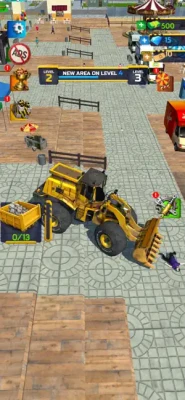
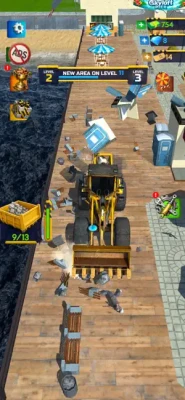
Bulldozer Demolition Simulator puts you behind the controls of a powerful construction machine and turns demolition work into a progression-based gameplay loop.
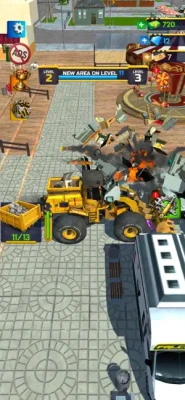
Instead of simply destroying everything in sight, you are rewarded for efficient demolition and debris collection. Objects break apart dynamically, producing rubble that can be gathered into your bulldozer's container and delivered to collection points. Your earnings can then be used to improve the machine.
The main gameplay cycle is:
Destroy → collect debris → deliver → earn → upgrade → tackle harder levels
The App Store categorizes the game as Simulation and lists MoonDrip FZ-LLC as the developer.
Main Gameplay Features
Heavy-Duty Bulldozer
The bulldozer is your main tool for clearing each environment.
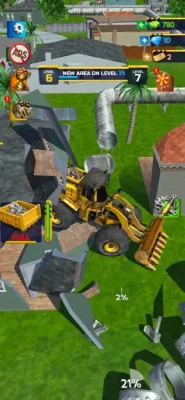
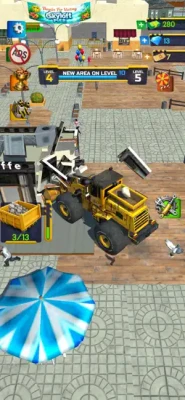
You can drive around the level and use the machine's power to demolish everything from smaller street objects to larger structures.
The satisfying part of the game comes from watching objects break apart and turn into collectible debris.
Dynamic Destruction
Objects do not simply disappear when hit.
The App Store describes dynamic destruction in which demolished objects break into debris that can subsequently be collected.
This gives each demolition job two stages:
- Break the object.
- Clean up the resulting rubble.
That distinction is important when planning an efficient run.
Debris Collection
After demolition, the rubble becomes a resource.
Drive through the debris and gather it into the bulldozer's container. Once you have collected enough material, transport it to the designated collection point.
Collection Points
Demolition is only part of the job.
You need to transport collected debris to designated collection areas to turn your work into earnings.
This creates an interesting balance between:
Destroying more objects
and
Returning to unload before the container becomes inefficient.
Speed Upgrades
Speed upgrades make the bulldozer faster across the level.
This becomes particularly useful on larger environments where traveling between demolition zones and collection points consumes significant time.
Power Upgrades
Power determines your ability to destroy tougher objects.
As environments become more complex, additional power becomes increasingly useful for maintaining an efficient demolition pace.
Capacity Upgrades
Capacity determines how much debris you can carry during a run.
A larger container means fewer trips to the collection point and can significantly improve the efficiency of a demolition route.
Different Levels
The game includes multiple environments with different layouts and challenges.
According to the App Store description, later environments become more complex and require improved strategy and equipment.
Additional Vehicles
The version history states that version 0.2.2 added new vehicles along with bug fixes and improvements.
This gives the progression system another layer beyond simply upgrading the original bulldozer.
Achievements and Milestones
The game includes achievements and milestones as additional long-term progression goals. It also supports Game Center achievements and leaderboards.
Complete Bulldozer Demolition Simulator Strategy Guide
1. Learn the Level Before Destroying Everything
When entering a new environment, do not immediately drive around randomly.
Take a moment to understand:
- Where the largest structures are
- Where smaller objects are concentrated
- Where debris can accumulate
- Where the collection point is
- How much travel is required between areas
The goal is to develop a route rather than simply destroy whatever happens to be closest.
2. Create a Demolition Route
A good route reduces unnecessary driving.
Instead of:
Destroy → travel → destroy → travel → unload
try to create a sequence where several nearby objects can be cleared before making one collection trip.
For example:
Area A → Area B → Area C → collection point
The exact route depends on the level layout, but the principle remains the same: combine nearby demolition work into efficient runs.
3. Upgrade Capacity Early When Trips Become Frequent
Capacity is one of the most useful efficiency upgrades because it directly affects how much debris you can transport at once.
If you repeatedly reach your container limit before completing the area you are working on, capacity should become a priority.
A larger container means:
- Fewer unloading trips
- More debris per run
- Less time spent traveling
- More continuous demolition
The App Store specifically identifies increased capacity as a way to carry more debris in a single run.
4. Upgrade Power for Tougher Objects
Power should become a priority when destruction itself becomes the bottleneck.
If you are spending too much time dealing with tougher structures, additional power can improve the pace of demolition.
Think of the problem this way:
If you cannot destroy efficiently → upgrade power.
If you can destroy efficiently but cannot carry enough → upgrade capacity.
If both are fine but travel takes too long → upgrade speed.
This simple distinction makes upgrade decisions much easier.
5. Upgrade Speed When Travel Becomes the Problem
Speed is especially valuable on large maps.
If you are spending a significant portion of a run driving between demolition zones and collection points, a speed upgrade can improve the entire work cycle.
Speed becomes more valuable as the distance between important areas increases.
A useful rule is:
Small level + short distances = prioritize power/capacity.
Large level + long distances = speed becomes increasingly valuable.
6. Balance Power, Speed, and Capacity
Do not put all of your earnings into one statistic forever.
A balanced bulldozer can often perform better across different types of levels because it can:
- Destroy efficiently
- Carry enough debris
- Travel quickly
- Complete collection cycles with fewer delays
The App Store presents speed, power, and capacity as the game's main machine upgrade categories.
7. Clear Dense Areas Together
When several destructible objects are close together, clear them as one work zone.
This reduces unnecessary movement and makes debris collection more organized.
A practical pattern is:
Clear → push/gather → collect → continue
Rather than constantly moving between isolated objects.
8. Do Not Ignore the Debris
Demolition itself is satisfying, but the debris is what ultimately matters for progression.
A common inefficient approach would be to focus entirely on destroying structures while leaving large amounts of rubble scattered around the environment.
Remember:
Destroyed object = potential resource
Collected debris = actual progress
Make cleanup part of your demolition route.
9. Know When to Return to the Collection Point
You do not always need to return after destroying a single object.
If there are several nearby objects available, continue working until your container is approaching its useful limit.
However, do not travel deep into another area when your container is already full.
A good rhythm is:
Destroy several nearby targets → collect rubble → unload → return.
The ideal number of targets depends on your current capacity and the level layout.
10. Use the Collection Point as Your Route Anchor
Once you know where the collection point is, use it to plan your work.
Imagine the map as several work zones surrounding one delivery location.
Instead of wandering around, organize your runs around that central objective.
This can make complicated environments much easier to manage.
11. Prioritize Large Structures When Power Allows
Large structures can provide a useful demolition objective, but do not assume that the largest target should always be your first target.
Consider:
- How long it takes to destroy
- How much debris it creates
- How far you must travel afterward
- Whether smaller nearby objects can be cleared first
The most profitable-looking target is not necessarily the most efficient first target.
Efficiency comes from combining demolition and collection into a smooth route.
12. Use Small Objects to Fill Gaps
Smaller street objects can be useful when they are directly along your route.
If you are already traveling toward a larger demolition area, clearing smaller objects along the way can prevent wasted movement.
This turns travel time into productive work.
13. Adapt Your Strategy to Each Level
Do not use exactly the same route on every map.
Different layouts create different challenges.
For a compact level:
Focus on power and capacity.
For a spread-out level:
Speed becomes more important.
For a level with tougher structures:
Prioritize power.
For a level with large quantities of debris:
Prioritize capacity.
This flexible approach is more effective than following a fixed upgrade order.
14. Upgrade Before a Level Becomes a Wall
If a new level suddenly feels much slower than the previous one, that is a useful signal.
Instead of repeatedly struggling with the same environment, improve the bulldozer.
Look at the problem:
Objects take too long to destroy?
Increase power.
Container fills too quickly?
Increase capacity.
Travel consumes too much time?
Increase speed.
The game's upgrade system is designed around exactly these three efficiency problems.
15. Build an Efficient Work Cycle
A strong general work cycle looks like this:
Step 1
Choose a demolition zone.
Step 2
Destroy nearby targets.
Step 3
Collect the resulting debris.
Step 4
Continue until the container is near capacity.
Step 5
Drive to the collection point.
Step 6
Unload and collect your earnings.
Step 7
Invest in the upgrade that addresses your biggest bottleneck.
Step 8
Return to the next work zone.
This cycle keeps destruction, collection, and progression connected.
Best Upgrade Strategy
There is no single upgrade order that is perfect for every level. A better approach is to let your current bottleneck determine the next investment.
Early Progression
A balanced starting priority can be:
Capacity → Power → Speed
Capacity reduces unnecessary collection trips, while power keeps demolition moving.
Larger Environments
Shift toward:
Speed → Capacity → Power
when travel becomes a major part of each run.
Tough Demolition Levels
Use:
Power → Capacity → Speed
when stronger structures are slowing the entire job.
Debris-Heavy Levels
Use:
Capacity → Speed → Power
when your container is filling constantly and collection trips are becoming the main problem.
Beginner Tips
Tip 1: Destroy With a Plan
Do not randomly drive around the map.
Tip 2: Collect What You Destroy
Rubble is part of your progression.
Tip 3: Watch Your Capacity
Frequent unloading is a sign that capacity needs attention.
Tip 4: Upgrade Power for Tough Objects
Do not try to compensate for insufficient power by simply driving around more.
Tip 5: Upgrade Speed for Large Maps
Travel time matters more as levels become bigger.
Tip 6: Combine Nearby Targets
Clear groups of objects before returning to the collection point.
Tip 7: Learn the Map
Knowing where the collection point is can dramatically improve route planning.
Tip 8: Do Not Over-Upgrade One Statistic
A bulldozer needs power, capacity, and mobility.
Advanced Demolition Strategy
Once you become comfortable with the controls, start measuring your performance by work cycles instead of individual objects.
A good cycle should answer three questions:
How much did I destroy?
You want a productive demolition route.
How much did I collect?
Destroyed debris is only useful when it reaches your container.
How much time did I spend traveling?
Long, unnecessary trips reduce overall efficiency.
The ideal run minimizes wasted movement while keeping the bulldozer continuously productive.
Capacity vs Power vs Speed
Capacity
Choose capacity when your container fills too quickly.
Best for: debris-heavy levels and reducing collection trips.
Power
Choose power when objects are difficult or slow to destroy.
Best for: tougher structures and faster demolition.
Speed
Choose speed when traveling between work zones and collection points takes too long.
Best for: larger maps and long routes.
The strongest long-term setup is one where none of these three areas becomes a major bottleneck.
Vehicle Progression
The game has more than one vehicle, with the App Store's version history specifically noting new vehicles added in version 0.2.2.
When additional vehicles become available, consider them as part of your progression rather than simply cosmetic alternatives.
Before switching vehicles, compare how the new option fits your preferred approach:
- Heavy demolition
- Fast movement
- High-capacity collection
- General-purpose work
The ideal choice depends on the level and the role you want the machine to perform.
Achievements and Leaderboards
Bulldozer Demolition Simulator includes Game Center achievements and leaderboards.
Achievements provide additional milestones beyond normal level progression, while leaderboards give players another way to compare their performance.
For achievement-focused players, try to combine milestone progress with normal demolition runs instead of treating achievements as a separate grind.
Recent Updates
The current App Store version history lists version 0.2.2, released June 12, with new vehicles and bug fixes. Earlier updates included additional bug fixes and improvements.
The listing also says more updates are coming, so vehicles, levels, balancing, and other gameplay systems may evolve over time.
Player Feedback
The U.S. App Store listing currently shows 4.6/5 from 55 ratings. Ratings can differ substantially between storefronts because each region has its own rating pool; for example, the Turkish listing currently shows 3.3/5 from 3 ratings.
Because the game has a relatively small rating sample in some storefronts, individual ratings should be viewed as early player feedback rather than a broad measure of the entire player base.
Game Information
| Information | Details |
|---|---|
| Game | Bulldozer Demolition Simulator |
| Subtitle | Demolish, Collect, Upgrade |
| Developer | MoonDrip FZ-LLC |
| Category | Simulation |
| Platforms | iPhone, iPad |
| Minimum OS | iOS 15.0 |
| Size | 401.7 MB |
| Age Rating | 13+ |
| Languages | English + 32 more |
| Business Model | Free with in-app purchases |
| Core Gameplay | Demolition, debris collection, upgrades |
| Upgrade Types | Speed, power, capacity |
| Vehicles | Multiple vehicles |
| Game Center | Achievements and leaderboards |
The current listing also identifies advertising, messaging/chat, user-generated content, and cartoon or fantasy violence in its age-rating information.
Pros and Cons
Pros
- Satisfying bulldozer destruction
- Dynamic object breaking
- Debris collection system
- Clear upgrade progression
- Speed, power, and capacity upgrades
- Multiple environments
- Additional vehicles
- Achievements and milestones
- Game Center leaderboards
- Suitable for both short and longer sessions
Cons
- Efficient progress depends on repeated demolition and collection cycles
- Larger levels require more route planning
- Poor capacity management can create unnecessary trips
- Power becomes increasingly important as structures get tougher
- Advertising and in-app purchases are part of the game
- Some systems may change as future updates arrive
Frequently Asked Questions
What is Bulldozer Demolition Simulator?
It is a demolition simulation game where you drive a heavy bulldozer, destroy objects and structures, collect debris, deliver it to collection points, and use your earnings to upgrade the machine.
What can I destroy?
The App Store describes everything from smaller street objects to large structures.
What happens to destroyed objects?
Destroyed objects break into debris, which you can collect in the bulldozer's container and transport to designated collection points.
What upgrades are available?
The main upgrade areas described by the App Store are speed, power, and container capacity.
Which upgrade should I buy first?
It depends on your current bottleneck. Use capacity when you are making too many unloading trips, power when demolition is slow, and speed when traveling around the level takes too much time.
Are there different levels?
Yes. The game features different environments with different layouts and challenges, with later areas becoming more complex.
Are there multiple vehicles?
Yes. The game's update history confirms that new vehicles were added in version 0.2.2.
Does the game have achievements?
Yes. It includes achievements and milestones and supports Game Center achievements and leaderboards.
Is Bulldozer Demolition Simulator free?
The game is listed as free with optional in-app purchases. The App Store currently lists purchases including vehicle packages, money packs, ticket packs, and a no-ads option.
What devices support the game?
The App Store lists iPhone and iPad support with iOS/iPadOS 15.0 or later. It also lists Mac compatibility with macOS 12.0 or later on Apple M1 or newer Macs, plus Apple Vision support.
Final Demolition Strategy
The key to Bulldozer Demolition Simulator is understanding that destruction and collection are two halves of the same job.
Do not simply chase the biggest structure on the map. Build efficient routes, clear groups of nearby objects, collect the resulting debris, and minimize unnecessary trips to the collection point.
When demolition slows down, upgrade power. When the container fills too quickly, upgrade capacity. When the map becomes large and travel takes too much time, upgrade speed.
The strongest strategy is to keep these three systems balanced while adapting your setup to each new environment.
Destroy efficiently, collect everything you can, upgrade intelligently, and turn every demolition run into a more productive one.
Rate the Game
User Reviews















Popular Games



















 Android
 iOS
iOS Windows
 Xbox
Xbox