


Latest Version
January 18, 2026
ABI GLOBAL LTD.
Puzzle
iOS
0
Report a Problem
More About :game
The concept is simple, but the puzzle-solving becomes more interesting when blocks interfere with one another. You have limited lives, which means careless taps can make a level harder to complete. Boosters are available when you need additional help.
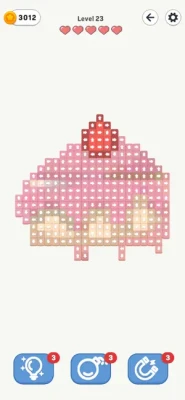
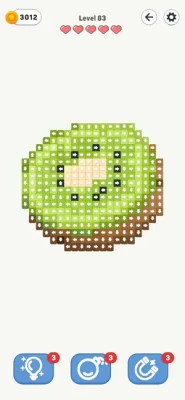
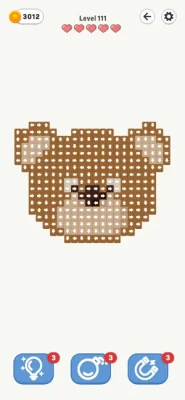
As blocks disappear, the board gradually reveals hidden images, giving the game an extra visual reward beyond simply clearing the puzzle.
Tap Block Out Game Information
- Game: Tap Block Out
- Developer: ABI GLOBAL LTD.
- Genre: Puzzle
- Platform: iPhone and iPad
- Age Rating: 9+
- Price: Free with in-app purchases
- Current App Store Rating: 4.8/5
- Ratings: About 2.4K
- App Size: 212.3 MB
- Required: iOS 13.0 or later
- Core mechanic: Tap arrow blocks to move them off the board
- Main objective: Clear all blocks
- Lives: Limited
- Boosters: Available
- Graphics: 3D
- Additional feature: Hidden-image collections
The current App Store listing identifies Tap Block Out as a Puzzle title and supports iPhone and iPad.
What Is Tap Block Out?
Tap Block Out is an arrow-based block puzzle in which every move matters.
Each block contains an arrow showing the direction it can move. Your task is to determine which blocks can safely leave the board and which ones must remain until other pieces have been removed.
That creates a simple but surprisingly strategic puzzle:
Observe → Plan → Tap → Clear → Reassess
The game also uses hidden images as a reward for successfully clearing the board.
How to Play Tap Block Out
The basic gameplay is straightforward:
- Examine the entire block formation.
- Look at every arrow.
- Determine which blocks have a clear path.
- Tap a block that can safely move in its indicated direction.
- Continue removing accessible blocks.
- Watch for newly available paths.
- Manage your remaining lives carefully.
- Clear every block to complete the level.
- Use a booster if you become stuck.
The most important rule is to follow the arrows. A block does not simply move wherever you want; its arrow determines its intended direction.
Full Tap Block Out Strategy Guide
1. Study the Entire Board First
Your first move should not be automatic.
Before tapping anything, examine the complete formation.
Look at:
- Arrow directions
- Block positions
- Open spaces
- Blocks surrounding other pieces
- Potentially blocked paths
- Groups of blocks pointing in similar directions
A few seconds of observation can prevent an unnecessary life loss.
2. Find the Blocks With a Clear Exit
The easiest starting point is usually a block whose arrow points toward an unobstructed path.
For example, if a block points toward the edge and nothing is blocking its route, it may be a natural first move.
These blocks can help reduce the board without creating additional complications.
3. Follow the Arrow, Not the Block's Position
One of the biggest beginner mistakes is looking at where a block is located rather than where its arrow points.
Always ask:
“If I tap this block, where does it need to travel?”
Then determine whether that path is open.
4. Look for Blocking Relationships
Some blocks are effectively waiting behind other blocks.
A piece may have the correct direction but still be unable to move because another block is occupying its path.
When this happens, identify the blocking piece first.
Think of the board as a chain:
Block A blocks Block B → remove A → B becomes available
This is the foundation of many difficult levels.
5. Plan Several Moves Ahead
Do not stop at the first available move.
Try to think:
Move 1 → Move 2 → Move 3
If removing one block opens a path for two more blocks, that is usually more useful than making an isolated move with no clear follow-up.
6. Prioritize Moves That Open the Board
Some blocks have a greater strategic value than others.
A block that removes itself and opens several paths can be more useful than a block that simply disappears without changing the rest of the formation.
Look for moves that create space.
7. Protect Your Lives
The App Store listing specifically states that players have limited lives and should plan their taps carefully.
That makes random tapping a poor strategy.
Before every uncertain move, check:
- Direction
- Path
- Nearby blocks
- Result of the move
- Possible next move
If you're not confident, inspect the board again before committing.
8. Use the Edge of the Board as a Clue
Blocks pointing toward an open edge are often easier to evaluate.
Check:
- Top edge
- Bottom edge
- Left edge
- Right edge
Then compare the arrow direction with the available path.
This gives you a quick way to identify potentially safe moves.
9. Clear Simple Paths First
If several blocks have unobstructed routes, clearing them can simplify the puzzle.
A smaller board is generally easier to analyze than a crowded one.
However, don't automatically clear every easy block without considering the next sequence. The best opening is the one that improves your overall position.
10. Recheck After Every Important Move
The board changes as blocks disappear.
After removing a key block, stop and inspect the new layout.
A block that was trapped a moment ago may now have a completely open path.
This means your original plan should be flexible.
11. Don't Assume the Closest Block Comes First
The physical position of a block does not necessarily determine the correct order.
A block near the edge may still be blocked, while a block deeper inside may have a completely open route.
Judge each piece by its arrow and path, not simply its location.
12. Identify Bottlenecks
A bottleneck is a block that prevents several other pieces from moving.
If removing one block creates multiple new exits, pay close attention to it.
Solving the bottleneck can sometimes turn a complicated formation into a much simpler one.
Advanced Tap Block Out Tips
Use Direction Groups
Mentally group blocks according to their arrows:
↑ Up
↓ Down
← Left
→ Right
Then determine which members of each group currently have clear paths.
This makes a complicated board easier to read.
Build a Dependency Chain
For difficult levels, think in terms of dependencies:
A must move before B.
B must move before C.
C opens D.
Once you recognize this sequence, the level becomes less about guessing and more about following the required order.
Look for Multiple-Purpose Moves
The most valuable move may do more than remove one block.
Ideally, a move should:
- Clear one block
- Open another path
- Reduce congestion
- Create a new available move
These compound effects are particularly useful on dense boards.
How to Avoid Losing Lives
Since Tap Block Out gives you a limited number of lives, make each tap deliberate.
Before tapping a questionable block, use this checklist:
Direction
Where does the arrow point?
Path
Is the route actually clear?
Blockers
Is another piece preventing movement?
Consequence
What changes after this block disappears?
Follow-up
Do you know what your next move could be?
If you can answer all five questions, you're much less likely to waste a life.
Tap Block Out Booster Strategy
Tap Block Out includes boosters for situations where you get stuck.
The best way to use a booster is deliberately rather than automatically.
Save Boosters for Difficult Positions
Don't use a booster simply because the board looks complicated.
First determine whether a normal sequence is available.
Use Boosters When Your Options Are Limited
A booster becomes more valuable when:
- Several blocks are obstructing one another.
- You cannot identify a safe next move.
- A single mistake could cost a life.
- You have carefully inspected the board.
- The booster can create a meaningful opening.
Don't Waste Assistance on Easy Boards
If several blocks have obvious exits, there is usually little reason to spend a valuable aid.
Tap Block Out Hidden Images
One of the game's distinctive features is its hidden-image system.
As you clear blocks, the board gradually reveals an image underneath. The App Store listing describes levels as containing unique image collections and says that clearing the blocks reveals stunning images.
This gives players an additional reason to complete each puzzle beyond simply reaching the next level.
The hidden image can also provide a satisfying visual conclusion to a successful solution.
Tap Block Out Level Strategy
Early Levels
Use the early stages to learn:
- Arrow directions
- Movement paths
- Safe taps
- Block dependencies
- Life management
Intermediate Levels
Start thinking about:
- Move order
- Bottleneck blocks
- Multi-step sequences
- Board-wide planning
Difficult Levels
Focus on:
- Dependency chains
- Multiple possible routes
- Preserving lives
- Strategic booster usage
- Rechecking the board after major moves
Common Tap Block Out Mistakes
Mistake 1: Tapping Without Checking the Arrow
The arrow determines the block's movement direction.
Fix: Always identify the arrow before tapping.
Mistake 2: Ignoring Other Blocks
A seemingly easy move may be blocked.
Fix: Trace the complete path before selecting the piece.
Mistake 3: Playing Too Quickly
Fast tapping can waste lives.
Fix: Take time to plan.
Mistake 4: Focusing on One Block
The solution may depend on another piece elsewhere on the board.
Fix: Look at the complete formation.
Mistake 5: Using Boosters Too Early
A board may look difficult while still having a straightforward solution.
Fix: Search for a normal sequence first.
Mistake 6: Forgetting to Reassess
The best move can change after every major block removal.
Fix: Recheck the board after important moves.
Tap Block Out Tips for Beginners
If you're just starting, remember these ten rules:
- Study the board before tapping.
- Follow every arrow carefully.
- Look for clear paths.
- Remove obvious blockers first.
- Think at least one move ahead.
- Don't waste lives on guesses.
- Recheck the board after each important move.
- Use the edges to identify possible exits.
- Save boosters for genuinely difficult situations.
- Keep track of which blocks are preventing others from moving.
Tap Block Out Puzzle-Solving Method
When a level looks complicated, use this five-step system:
Step 1: Scan
Look at every arrow.
Step 2: Identify
Find blocks with completely open paths.
Step 3: Prioritize
Choose the move that creates the most useful space.
Step 4: Clear
Remove the selected block.
Step 5: Recalculate
Study the new board before making another move.
This approach is more reliable than trying to memorize one fixed sequence.
Tap Block Out Graphics and Gameplay
Tap Block Out uses 3D graphics and smooth animations to present its block-clearing puzzles. The App Store description emphasizes the visual presentation alongside its simple tap-based controls.
The hidden-image system also gives the board a visual progression: the more blocks you remove, the more of the underlying image becomes visible.
Tap Block Out Features
Arrow-Based Blocks
Every block provides a directional clue.
Hidden Images
Clearing the board reveals images beneath the blocks.
Limited Lives
Mistakes matter, so move planning is important.
Boosters
Players can use boosters when they become stuck.
3D Presentation
The game uses 3D graphics and smooth animations.
Variety of Levels
The App Store listing describes a wide variety of levels and unique image collections.
iPhone and iPad Support
Tap Block Out is available for iPhone and iPad and requires iOS 13 or later.
Tap Block Out Pros and Cons
Pros
- Easy-to-understand controls
- Strategic arrow-based gameplay
- Hidden-image rewards
- 3D presentation
- Boosters for difficult situations
- Large variety of puzzles
- Requires planning rather than complicated controls
- Supports iPhone and iPad
Cons
- Limited lives can make mistakes costly
- Difficult boards require careful planning
- Boosters can become useful when stuck
- Some player reviews have raised concerns about advertising
- Player feedback has varied regarding timing and challenge systems
The App Store reviews include complaints about advertising frequency and, in some periods, time limits. Other reviews later praised changes that removed time limits and allowed more mistakes. Because the game has been updated repeatedly, these experiences may depend on the version or mode being played.
Tap Block Out Updates
Tap Block Out has received repeated level updates since its original 1.0 release. The App Store version history lists updates through version 2.8, with multiple releases specifically noting additional or updated levels.
This is useful for players who have already progressed through the available puzzles because the developer has continued adding or updating level content.
Tap Block Out Review
Tap Block Out takes a simple idea—tap blocks in the direction indicated by their arrows—and turns it into a spatial planning puzzle.
The controls are easy to learn, but the real challenge comes from determining the correct order. A block may appear ready to move while actually being part of a larger dependency chain. Clearing the wrong piece can therefore make the remaining board harder to understand.
The hidden-image system adds another layer of satisfaction because completing the puzzle gradually reveals the picture beneath the blocks.
The current US App Store listing shows a 4.8/5 rating from about 2.4K ratings.
Frequently Asked Questions
What is Tap Block Out?
Tap Block Out is a 3D puzzle game where players tap arrow-marked blocks to move them away from the board and reveal hidden images.
How do you play Tap Block Out?
Look at each block's arrow, determine whether its path is clear, and tap blocks in an order that allows the entire board to be cleared.
What is the objective in Tap Block Out?
The objective is to clear every block from the board and complete the level, eventually revealing the hidden image underneath.
Do the blocks have different directions?
Yes. The arrows indicate the direction in which the blocks move.
Does Tap Block Out have boosters?
Yes. Boosters are available to help players when they become stuck.
Does Tap Block Out have limited lives?
Yes. The App Store description states that players have limited lives and should plan their taps carefully.
Is Tap Block Out available on iPhone?
Yes. The game supports iPhone and requires iOS 13.0 or later.
Is Tap Block Out available on iPad?
Yes. The current App Store listing supports iPad and requires iPadOS 13.0 or later.
Is Tap Block Out free?
The game is listed as free with optional in-app purchases.
How do I solve difficult Tap Block Out levels?
Start by identifying blocks with clear paths, then remove pieces that open routes for other blocks. Avoid random taps and reassess the board after every major move.
Final Tap Block Out Tips
The most important rule in Tap Block Out is:
Don't tap first and think later.
Look at the arrow, trace the block's path, identify anything blocking it, and consider what happens after the block disappears.
For difficult puzzles, think of the board as a chain of dependencies:
Remove blocker → open path → move next block → create another opening → clear the board.
Once you start seeing these relationships, even crowded levels become easier to understand.
Take your time when the game allows it, protect your lives, and use boosters when they genuinely solve a problem rather than simply because a level looks complicated.
Rate the Game
User Reviews










Popular Games

















 Android
 iOS
 Windows
 Xbox