






Latest Version
September 14, 2024
Outfit7 Limited
Simulation
Android
0
com.outfit7.talkingtom
Report a Problem
More About :game
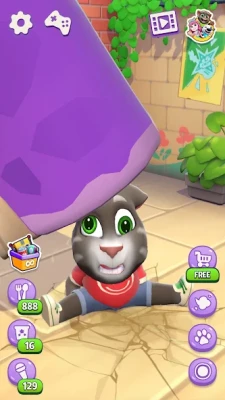
Talking Tom is a casual virtual pet game built around an interactive cat that responds to your actions. Tom reacts when you touch him, make him laugh, or interact with him in different ways. One of the game's most recognizable features is his ability to repeat spoken phrases in a humorous voice, turning everyday conversations into funny moments.
Unlike games that focus on difficult missions, competitive battles, or complicated controls, Talking Tom emphasizes playful experimentation and simple interactions. Players can return to check on Tom, keep him entertained, and discover different reactions through everyday activities.
Whether you enjoy digital pets, funny character animations, or relaxing mobile games, Talking Tom provides an accessible experience that is easy to pick up and enjoy in short sessions.
Talking Tom Game Features
1. Interactive Virtual Pet
Tom is designed to react to your actions. Tap different areas of the screen and watch his expressions, movements, and playful responses. Experimenting with these interactions is one of the easiest ways to discover what makes the game entertaining.
2. Funny Voice Repetition
Talking Tom can repeat what you say in his distinctive voice. Speak clearly near your device's microphone, try short sentences, and experiment with different sounds to create funny conversations.
3. Pet Care Activities
Looking after Tom is an important part of the experience. Depending on the version and features available, players can feed him, help him rest, and attend to his needs to keep him content.
4. Playful Animations and Reactions
Tom's expressions and physical reactions bring personality to the game. Simple actions can produce amusing results, making it fun to experiment with different taps and interactions.
5. Simple Touch Controls
The game is designed for straightforward touchscreen play. Most interactions involve tapping the screen, selecting an activity, or using the available on-screen controls.
6. Casual, Family-Friendly Entertainment
Talking Tom is suitable for short play sessions when you want something light and entertaining. It does not require the same time commitment as a complex strategy game or a long story-driven adventure.
Gameplay and Main Activities
Talking Tom revolves around interacting with your virtual cat rather than completing a traditional campaign.
Taking care of Tom: Check his needs and use the available care activities to keep him comfortable and happy.
Talking to Tom: Say a word or phrase and listen to his amusing repetition. Short, clear phrases are a good place to start.
Discovering reactions: Tap different parts of Tom and explore the animations triggered by your actions.
Enjoying casual sessions: Return to the game whenever you want a few minutes of lighthearted entertainment.
The exact activities, interface, and available features may vary depending on the version installed and subsequent updates.
Complete Talking Tom Strategy Guide
1. Learn the Basic Controls
Start by exploring the main screen. Tap Tom, try the available interaction buttons, and observe how he responds. Spend a little time learning where the care activities are located before moving between them.
Do not rush through the available options. Understanding the interface makes it easier to find your favorite interactions and respond to Tom's needs.
2. Check Tom's Needs Regularly
If your version includes hunger, energy, or other pet-care indicators, check them when you open the game. Addressing a need before spending time on optional interactions can help you maintain a comfortable routine.
A simple approach is to check the available indicators, complete the relevant care activity, and then return to playing.
3. Make the Most of Voice Repetition
The talking feature is one of Tom's signature attractions. For clearer and funnier results:
Speak in short, understandable phrases.
Hold your device at a comfortable distance.
Reduce background noise when possible.
Try different tones and expressions.
Experiment with greetings, questions, and silly sounds.
If Tom does not repeat your words as expected, check whether microphone access is enabled in your device settings and whether the game has permission to use it.
4. Experiment With Different Interactions
Do not limit yourself to tapping the same place every time. Explore the available touch interactions and observe how Tom's behavior changes.
Some reactions may be more entertaining than others, so experimenting is part of the fun. Try one action at a time to learn which interaction produces a particular response.
5. Build a Simple Pet-Care Routine
If you regularly return to Talking Tom, create a basic routine:
Open the game and check Tom's current needs.
Complete any available feeding or care activities.
Test the talking feature.
Explore a few character interactions.
Finish when you have enjoyed your session.
This routine helps you experience the main features without turning a casual game into a chore.
6. Troubleshoot Common Problems
Tom does not repeat my voice: Check microphone permissions, lower background noise, and test a short phrase.
The game does not respond properly: Close unnecessary applications, restart the game, and make sure your device has sufficient free memory.
The game runs slowly: Close background applications and check whether your device and installed game version meet the available requirements.
Sound is missing: Check the device volume, the game's sound settings, and whether audio is being routed to a connected headset or another device.
A feature looks different: The interface and available activities can change between releases. Check the version installed on your device.
7. Play Safely and Manage Settings
Parents should review the game's available settings and store listing before allowing younger children to play. Check any advertising, in-app purchase options, microphone permissions, and privacy information relevant to the installed version.
Use device-level parental controls where appropriate, and avoid granting permissions that are not needed for the features you want to use.
Tips for Enjoying Talking Tom
Explore the main screen before settling into a routine.
Use the voice feature in a quiet environment.
Check pet-care indicators if they are available in your version.
Try different interactions instead of repeating one action.
Keep your game updated through the official app store.
Review optional purchases before confirming any transaction.
Treat the game as a casual entertainment experience rather than a competitive challenge.
Graphics, Sound, and Overall Experience
Talking Tom's appeal comes from its expressive character, exaggerated reactions, and recognizable voice effects. The focus is on personality rather than realistic graphics or complex action sequences.
The colorful presentation and straightforward interface make it accessible to players who prefer casual mobile games. Sound and voice interactions add much of the humor, while Tom's animations help make even simple actions feel entertaining.
Is Talking Tom Difficult to Play?
Talking Tom is generally easy to learn because its core interactions use simple touchscreen controls. There are no complicated combat systems or advanced strategies to master.
New players can begin experimenting almost immediately. The main challenge is simply discovering the available interactions and learning how the installed version handles pet care and other activities.
Advantages and Disadvantages
Pros
Simple controls that are easy to understand.
Funny voice repetition and character reactions.
Suitable for short, casual play sessions.
Interactive virtual pet experience.
Entertaining animations and sound effects.
Cons
Repeated interactions may become predictable for some players.
The experience is less appealing to people who prefer complex missions or competitive gameplay.
Advertisements or optional purchases may be present, depending on the version and settings.
Some features may require permissions or behave differently across devices.
Frequently Asked Questions
What is Talking Tom?
Talking Tom is a virtual pet game from Outfit7 that lets players interact with a cartoon cat through touch controls, pet-care activities, and funny voice repetition.
How do you make Talking Tom talk?
Speak a short phrase near your device's microphone. If microphone access is enabled and the feature is available, Tom can repeat your words in his distinctive voice.
Is Talking Tom free to play?
The game may be available to download without an upfront charge, but advertisements or optional in-app purchases may apply. Check the current store listing for the exact terms in your region.
Can you play Talking Tom offline?
Offline availability can depend on the installed version and the feature being used. Some basic interactions may work without a connection, while certain content or services may require internet access.
Is Talking Tom suitable for children?
Its simple controls and playful character can appeal to children, but parents should review the current age rating, advertising, purchase options, microphone permissions, and privacy details.
Does Talking Tom need microphone access?
Microphone access is relevant to the voice-repetition feature. If you do not want to use that feature, review your device's app permissions and disable access if appropriate.
Is Talking Tom a strategy game?
No. Talking Tom is primarily a casual virtual pet game focused on interaction, entertainment, and care rather than tactical battles or complex planning.
What should beginners do first?
Explore the controls, check any pet-care indicators, try the voice feature, and experiment with Tom's reactions. These activities introduce the main elements of the game.
Final Verdict
Talking Tom remains an appealing choice for players who enjoy virtual pets, funny character interactions, and relaxed mobile entertainment. Its simple controls and voice-repetition feature make it easy to explore, while the pet-care activities provide a reason to return.
If you want a casual game that focuses on humor and interaction rather than difficult challenges, Talking Tom is worth trying. It is particularly suited to players who enjoy experimenting with character reactions and spending a few entertaining minutes with a digital pet.
Rate the Game
User Reviews















Popular Games



















 Android
 iOS
iOS Windows
 Xbox
Xbox