







Latest Version
October 07, 2025
Pixamo
Sports
iOS
0
Report a Problem
More About :game
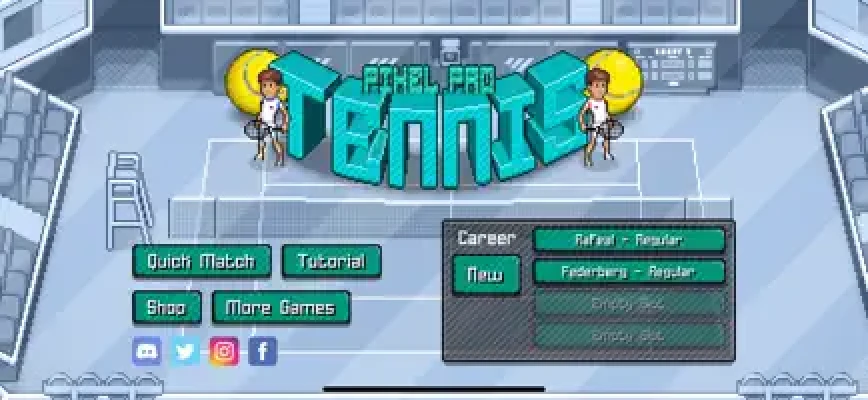
The game offers both quick matches and a longer Career experience. Career mode takes your player through tournaments around the world, with ranking points, winnings and skill points helping you progress toward the Grand Slams. There are more than 40 tournaments and over 250 opponents to face.
Pixel Pro Tennis Game Information
Game: Pixel Pro Tennis
Developer: Pixamo Pty Ltd
Genre: Sports / Arcade Tennis
Platform: iPhone and iPad
Price: Free with optional in-app purchases
Age Rating: 4+
Language: English
Latest listed version: 1.0.11
Latest listed update: December 8, 2025
Compatibility: iOS 13.0 or later
Game modes: Quick Play and Career
Court types: Grass, clay and hard court
Tournaments: 40+
Opponents: 250+
Features: Gesture controls, skill upgrades, rankings, tour news, achievements, leaderboards and multiple difficulty settings
What Makes Pixel Pro Tennis Different?
The main attraction is its gesture-based tennis system. Instead of relying on a traditional collection of virtual buttons, you interact with the ball through touch gestures. This allows you to produce different types of shots, including lobs, slices and top-spin attacks.
The pixel-art presentation gives the game a retro arcade identity, while the career structure adds progression beyond individual matches.
You can play a short match when you only have a few minutes or spend much longer developing a career and climbing the rankings.
Gameplay and Controls
The most important skill in Pixel Pro Tennis is learning to combine positioning, timing and shot selection.
Your objective is not simply to hit the ball as hard as possible. A successful rally depends on getting your player into position early and choosing an appropriate shot.
Basic Shot Strategy
Normal returns:
Use controlled returns when you are under pressure. Keeping the ball in play is often more valuable than attempting a winner from a difficult position.
Power shots:
Swipe deliberately when you want more pace. Power can put an opponent under pressure, but an aggressive shot from poor positioning can also give them an easy response.
Top-spin:
Top-spin is useful when you want a combination of depth and attacking pressure. Use it when you have enough time to prepare the shot.
Slice:
A slice can change the rhythm of a rally. It is particularly useful when you want to slow the exchange down or make the opponent deal with a different ball trajectory.
Lob:
A lob can be useful when the opponent is positioned aggressively. Rather than trying to overpower them, send the ball over their position and force them to recover.
Complete Pixel Pro Tennis Strategy Guide
1. Learn the Timing Before Chasing Power
New players often concentrate on hitting powerful shots immediately. That can make early matches unnecessarily difficult.
Spend time learning when your player is comfortably positioned to strike the ball. Once your timing becomes consistent, begin adding stronger gestures.
A reliable return followed by a well-placed attacking shot is usually more effective than repeatedly attempting maximum power.
2. Watch Your Player's Position
Positioning is one of the most important parts of the game.
When the opponent hits the ball wide, start moving toward the expected landing area rather than waiting until the last moment. Getting there early gives you more time to select a shot.
If you are constantly arriving late, increasing offensive power will not solve the underlying problem.
3. Do Not Attack Every Ball
A common mistake is treating every return as an opportunity for a winner.
When you are stretched toward the edge of the court, prioritize getting the ball back safely. When you have recovered to a strong position, look for an opportunity to attack.
Think of each rally as:
Recover → Position → Return → Pressure → Attack
rather than simply:
Hit hard → Hit harder → Hope for a winner
4. Use Different Shot Types
Mixing your shots makes your game harder to predict.
A rally can become much more effective when you alternate between controlled returns, top-spin, slices and occasional lobs.
If you use the same attacking pattern repeatedly, opponents can become easier to anticipate.
5. Use the Court Surface to Your Advantage
Pixel Pro Tennis features grass, clay and hard courts, with tournaments offering different playing conditions.
When entering a tournament, consider the court surface as part of your preparation.
On a grass court, quick points and aggressive serving can be valuable.
On clay, patience becomes more important. Longer rallies give you opportunities to move the opponent around before attacking.
On a hard court, balance your defensive movement with controlled aggression.
6. Upgrade Your Player Carefully
Career progression allows you to spend winnings and skill points on player improvements, including attributes such as serve power and court speed.
Do not automatically put every available point into one attribute.
If your serve is already effective but you frequently arrive late to wide shots, improving movement can have a greater practical impact.
A balanced player can adapt to more opponents and court situations.
7. Improve Court Speed if You Struggle Defensively
Speed becomes particularly important when opponents begin placing the ball toward the corners.
If you regularly lose points because your player cannot reach wide shots, improving court speed can make a noticeable difference to your defensive game.
Better movement also gives you more time to prepare your next shot.
8. Build a Strong Serve
A good serve gives you control of the opening exchange.
Rather than attempting maximum power on every serve, focus on consistency first. Once your serve becomes reliable, add more aggression.
A strong serve can help you start points on your terms and reduce the amount of defensive tennis you have to play.
9. Study Your Opponents
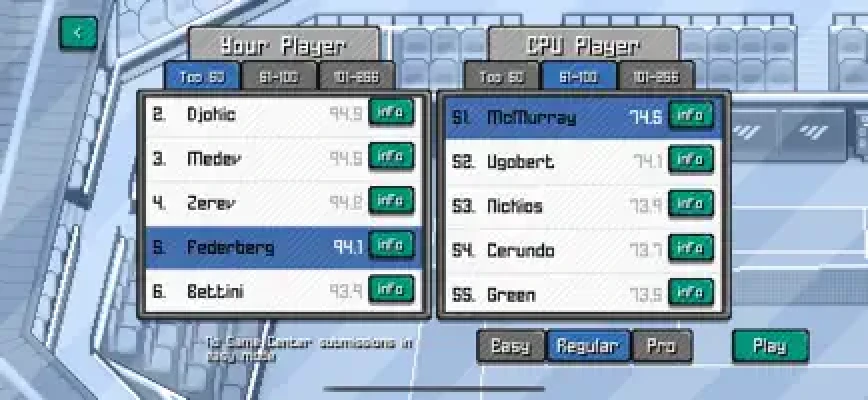
Career mode includes a large collection of opponents, with more than 250 listed in the game's feature description.
Pay attention to how opponents win points.
If an opponent constantly attacks one side of the court, adjust your positioning.
If they struggle against slower changes of pace, mix your shot selection instead of giving them the same ball repeatedly.
10. Choose Tournaments Strategically
Career mode lets you choose tournaments while progressing through the world tour. Tournament rewards can provide winnings and skill points, while ranking points help move you toward higher-level competition.
Avoid treating every tournament as exactly the same.
Consider:
Your current player rating
The tournament difficulty
Court surface
Potential rewards
Your ability to consistently beat the expected opponents
A tournament that you can finish successfully can sometimes be more useful for progression than repeatedly entering an event that is currently beyond your level.
11. Don't Rush the Grand Slams
The Grand Slams are part of the long-term Career progression.
Before focusing exclusively on the biggest events, build a stronger player through tournaments and skill upgrades. The extra experience can make difficult matches more manageable.
The goal is not simply reaching a major tournament. The goal is arriving there with a player capable of competing.
12. Practice Defensive Tennis
One of the easiest ways to improve is to deliberately practice keeping difficult rallies alive.
When an opponent sends the ball wide, concentrate on reaching it and returning it safely rather than immediately searching for a winner.
This teaches you the movement timing needed for harder Career opponents.
13. Use Difficulty Settings to Improve
Pixel Pro Tennis includes multiple difficulty settings.
If you are still learning the controls, start at a comfortable level and focus on shot timing.
Once rallies become predictable, increase the difficulty and use stronger opponents to test your positioning and tactical choices.
14. Keep an Eye on Your Career Progress
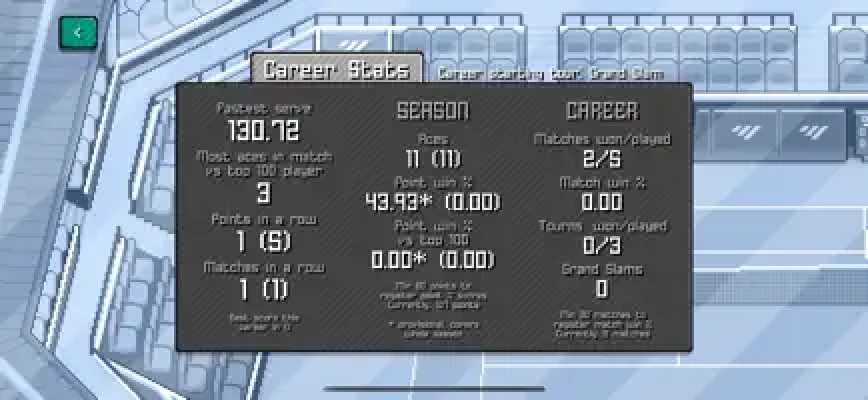
Career mode includes rankings, tournament progression, tour news and career achievements.
These systems give you reasons to continue beyond individual matches.
Track your progress and use weaker tournaments as opportunities to develop skills rather than simply farming wins.
Best Beginner Strategy
For new players, this simple approach works well:
Learn the basic touch controls.
Focus on returning the ball consistently.
Improve your movement and positioning.
Use controlled shots before attempting constant winners.
Learn when to use top-spin, slice and lob shots.
Upgrade weaknesses instead of blindly maximizing one statistic.
Enter tournaments appropriate for your current level.
Collect ranking points and skill points.
Gradually increase the difficulty.
Work toward the higher tours and Grand Slams.
Advanced Match Strategy
Once the basic controls become comfortable, start thinking several shots ahead.
Instead of asking "How can I hit this ball harder?", ask:
"Where will this shot force my opponent to move?"
For example, pushing an opponent toward one side can create space for the next shot.
A successful rally often comes from creating an opening rather than trying to finish the point immediately.
The Two-Shot Attack
A useful attacking pattern is:
Shot 1: Move the opponent away from the center.
Shot 2: Attack the open space.
This approach is safer than trying to hit a winner against an opponent who is already perfectly positioned.
The Recovery Rule
After every aggressive shot, prepare for the next return.
Do not admire a good shot and remain out of position. Recover toward a central defensive position as quickly as possible.
Career Mode Guide
Career mode is the long-term progression system in Pixel Pro Tennis.
You travel through tournaments, earn ranking points and winnings, improve your player and attempt to climb toward the top of the world rankings. The game advertises more than 40 tournaments and a roster of over 250 opponents.
A sensible career progression looks like this:
Early Career
Learn the controls
Build consistency
Enter manageable tournaments
Collect initial rewards
Improve important weaknesses
Mid Career
Face stronger opponents
Adapt your tactics
Improve movement and serving
Pay more attention to court surfaces
Pursue higher ranking positions
Late Career
Compete at the highest tours
Fine-tune your player
Handle stronger opponents
Chase major tournament victories
Aim for the world number one position
Quick Play vs Career Mode
Quick Play
Quick Play is ideal when you want an immediate tennis match without committing to a longer career progression.
It is also useful for practicing shot timing and experimenting with different playing styles.
Career
Career mode is designed for long-term progression.
You select tournaments, earn ranking points, receive rewards and improve your player while moving toward the biggest competitions.
If you enjoy progression systems and building a stronger character over time, Career provides considerably more depth than a single quick match.
Pixel Pro Tennis Tips and Tricks
Learn positioning before focusing on power.
Do not use the same shot repeatedly.
Use slices to change the rhythm of rallies.
Try lobs when an opponent is positioned aggressively.
Use top-spin when you have enough time to prepare.
Upgrade movement if you regularly miss wide balls.
Improve serve power when your serve becomes a weakness.
Keep difficult rallies alive rather than forcing winners.
Consider the court surface before entering tournaments.
Use easier matches to practice new techniques.
Recover toward a useful court position after attacking.
Increase difficulty once the controls feel comfortable.
Save skill points for upgrades that address your actual weaknesses.
Common Beginner Mistakes
Trying to Hit Winners Too Early
Power is tempting, but inconsistent attacking creates unnecessary errors.
Ignoring Movement
A powerful player cannot score if they cannot reach the ball.
Using One Shot All Match
Variety forces opponents to react instead of settling into one predictable rhythm.
Spending Upgrades Without a Plan
Look at how you are losing points and upgrade the attribute that addresses that weakness.
Ignoring Court Type
Different surfaces can change the way you approach matches, so tournament selection should be part of your strategy.
Difficulty and Learning Curve
Pixel Pro Tennis has a relatively accessible basic concept but rewards practice. The gesture controls require players to become comfortable with timing, positioning and different shot types.
Player feedback on the App Store is mixed on aspects such as touch controls and difficult returns, while other players specifically point to practice and player upgrades as important to improving the experience. These are individual user experiences rather than universal characteristics of the game.
Graphics and Atmosphere
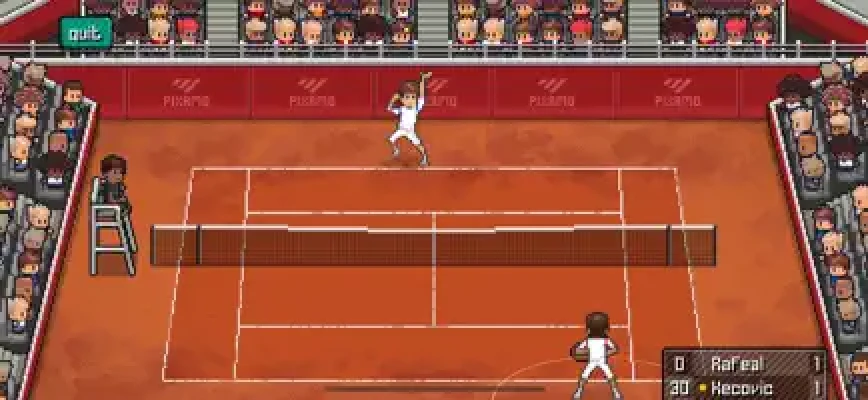
Pixel Pro Tennis uses a distinctive pixel-art visual style instead of attempting photorealistic tennis graphics.
The result is a retro-inspired presentation that keeps the focus on court action while giving different tournament locations their own visual character. The game features more than 40 pixelated arenas according to the App Store description.
Game Center Features
The game supports Game Center features including leaderboards, achievements and challenges. This gives players additional goals beyond completing the Career progression.
In-App Purchases
The App Store currently lists several optional purchases, including:
Remove Ads
Unlock Everything
Unlock Player Editing
Unlock All Players
Unlock Set Lengths
Unlock Multiple Save Slots
Unlock Quick Match Tournaments
The game itself is listed as free with optional in-app purchases.
Pixel Pro Tennis – Pros and Cons
Pros
Simple gesture-based tennis controls
Pixel-art presentation
Quick matches
Long-term Career mode
40+ tournaments
250+ opponents
Player skill progression
Grass, clay and hard courts
Multiple difficulty settings
Game Center achievements and leaderboards
Cons
Gesture controls can take practice
Difficult opponents can punish poor positioning
Some players have reported frustrations with movement and returning powerful serves
Some advanced features are tied to optional purchases
Frequently Asked Questions
Is Pixel Pro Tennis free?
Yes. Pixel Pro Tennis is listed as a free game with optional in-app purchases on the App Store.
Is Pixel Pro Tennis available on iPhone?
Yes. The game is available for iPhone and iPad and requires iOS 13.0 or later.
Does Pixel Pro Tennis have Career Mode?
Yes. Career mode lets players travel through tournaments, earn ranking points and rewards, improve their player and work toward the Grand Slams.
How many tournaments are in Pixel Pro Tennis?
The developer's App Store listing advertises more than 40 unique tournaments.
How many opponents are in Pixel Pro Tennis?
The feature list advertises more than 250 unique opponents.
What courts are available?
The game features grass, clay and hard courts.
Does Pixel Pro Tennis have multiplayer?
The App Store listing highlights Game Center leaderboards, achievements and challenges. It does not describe Pixel Pro Tennis as a conventional real-time online multiplayer tennis game.
Can you upgrade your player?
Yes. Career progression includes skill upgrades, with the App Store specifically mentioning improvements such as serve power and court speed.
Does Pixel Pro Tennis have different shot types?
Yes. The game uses gesture-based controls for different shots, including lobs, slices and top-spin shots.
What is the best way to improve in Pixel Pro Tennis?
Start by learning positioning and timing. Once you can consistently reach the ball, introduce stronger shots and more varied tactics. Player upgrades can then be used to address weaknesses in your game.
Final Thoughts
Pixel Pro Tennis blends arcade accessibility with a surprisingly structured tennis career. Its biggest appeal is the combination of gesture-based shot controls, authentic tennis physics, pixel-art courts and a progression system built around tournaments, rankings and player upgrades.
If you approach matches with patience rather than trying to hit every ball as a winner, the game becomes much easier to understand. Build your player's weaknesses, learn how different shots affect rallies and gradually work through the tournament circuit toward the Grand Slams.
Rate the Game
User Reviews















Popular Games



















 Android
 iOS
iOS Windows
 Xbox
Xbox