

Latest Version
October 07, 2025
Pixamo Pty Ltd
Sports
iOS
0
Report a Problem
More About :game
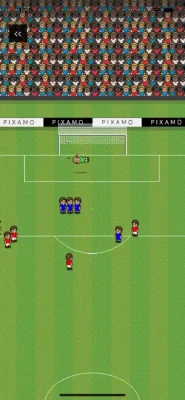
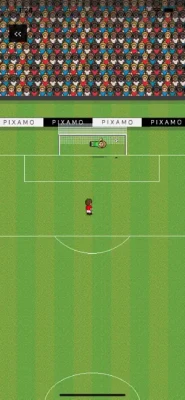
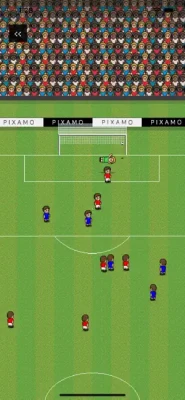
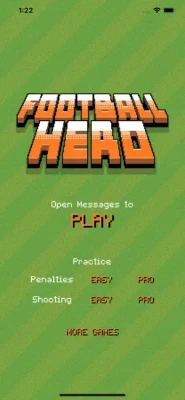
The gameplay centers on swipe controls that let you choose the direction, power and swerve of your shots. You can challenge friends to penalty shootouts or play full matches, with support for up to eight players. The game also includes Easy and Pro difficulty levels, a Practice mode, action replays and team customization.
Pixel Pro Message Soccer is particularly suited to quick multiplayer sessions because matches can be played through messages rather than requiring everyone to be online simultaneously.
Pixel Pro Message Soccer Game Information
Game: Pixel Pro Message Soccer
Developer: Pixamo
Genre: Sports / Soccer / Casual
Platform: iPhone, iPad and iMessage
Current Version: 2.0.1
Latest Listed Update: August 6, 2025
Age Rating: 4+
Language: English
Size: 13.2 MB
Required iOS: iOS 13.0 or later
Required iPadOS: iPadOS 13.0 or later
Multiplayer: Up to 8 players
Modes: Penalty Shootouts, Full Matches, Practice Mode
Difficulty: Easy and Pro
Controls: Swipe-based direction, power and swerve
Features: iMessage multiplayer, action replays, team selection and kit customization
Price: Free with an optional in-app purchase
Unlock Everything: $0.99
What Is Pixel Pro Message Soccer?
Pixel Pro Message Soccer is built around a simple idea: play soccer with your friends directly through iMessage.
Rather than focusing on a large career mode or complicated football management system, the game concentrates on short competitive interactions.
You take your turn.
You make your move.
Your opponent responds.
The result is a casual soccer experience that fits naturally into a messaging conversation.
The game supports both quick penalty shootouts and full matches, giving players different ways to compete.
How Pixel Pro Message Soccer Works
The game uses swipe-based controls.
Your swipe determines important parts of the action, including:
Direction
Power
Swerve
This means a successful shot isn't simply about tapping a button.
You need to control the swipe carefully and consider where you want the ball to travel.
Because the game is turn-based, you also have time to think about your next action instead of reacting instantly to a live match.
Pixel Pro Message Soccer Game Modes
Penalty Shootouts
Penalty shootouts provide the quickest way to challenge another player.
The objective is simple:
Score more penalties than your opponent.
However, the swipe mechanics add a layer of strategy.
You need to decide:
Where to aim
How much power to use
Whether to add swerve
Whether your opponent might anticipate your shot
Penalty shootouts are especially useful for learning the controls because each attempt gives you immediate feedback.
Full Matches
Full matches provide a more complete soccer experience.
Instead of concentrating only on penalties, you play through a larger sequence of turns.
This creates more opportunities to use different approaches and adapt to your opponent.
A full match is where patience becomes especially important.
You don't need to win every individual action.
You need to make enough good decisions to finish ahead.
Practice Mode
Practice Mode is the best place for new players to learn the controls.
Use it to experiment with:
Short swipes
Powerful shots
Curved shots
Different directions
Shooting angles
Ball control
Before challenging friends, spend a little time learning how your swipe affects the ball.
Pixel Pro Message Soccer Controls Guide
The controls are based around a swipe.
Think of every swipe as having three major components:
Direction
This determines where you want the ball to travel.
Power
The strength of your swipe affects how aggressively the ball moves.
Swerve
Adding curve can make your shot harder to predict.
The key is learning how these three elements interact.
A powerful shot isn't automatically better.
A straight shot isn't automatically safer.
The best option depends on the situation.
Beginner Shooting Strategy
1. Start With Straight Shots
When you're learning, don't immediately try complicated curved shots.
First learn how much distance and power you get from a straightforward swipe.
Once you understand the basic mechanics, start experimenting with swerve.
2. Don't Always Use Maximum Power
Maximum power can make your shot difficult to control.
If you're trying to place the ball accurately, a controlled swipe may be more useful.
3. Change Your Shot Direction
If you repeatedly shoot toward the same area, your opponent can begin anticipating your strategy.
Mix up your targets.
4. Experiment With Swerve
Curved shots are useful when you want to make your attack less predictable.
However, don't use swerve simply because you can.
Use it when it provides a meaningful advantage.
Pixel Pro Message Soccer Penalty Shootout Guide
Penalty shootouts are about reading your opponent as much as controlling your own shot.
Vary Your Placement
Avoid repeatedly choosing the same side.
If your opponent notices a pattern, your future attempts become easier to defend.
Mix Power Levels
Not every penalty needs maximum force.
Try different power levels so your opponent cannot easily predict your approach.
Use Swerve Selectively
A curved penalty can be difficult to anticipate, but excessive use can make your shots harder to control.
Don't Become Predictable
Your opponent is also learning from your previous attempts.
After several rounds, change your strategy.
Pixel Pro Message Soccer Multiplayer Strategy
The game supports up to eight players, making it possible to create larger iMessage soccer competitions with friends.
With multiple players, consistency becomes important.
Against one opponent
Study their habits.
Against several players
Don't focus too heavily on one person's strategy.
Instead, concentrate on making reliable plays throughout the match.
In a group game
Keep your strategy flexible.
A tactic that works against one player may not work against another.
Easy vs Pro Difficulty
Pixel Pro Message Soccer includes Easy and Pro difficulty modes.
Easy Mode
Easy mode is useful for:
New players
Learning swipe mechanics
Understanding shot power
Practicing direction
Casual matches
Pro Mode
Pro mode is better suited to players who already understand the controls.
Use it to challenge yourself and test whether your shooting decisions remain accurate when the game becomes more demanding.
Recommended progression
Start with Easy.
Learn the basic mechanics.
Practice different swipe combinations.
Then move to Pro when you feel comfortable controlling direction, power and swerve.
Advanced Shooting Strategy
Once you've mastered the basics, start thinking about your opponent.
Create Patterns — Then Break Them
You can intentionally establish a pattern and then change it.
For example:
First attempt: left
Second attempt: left
Third attempt: right
Your opponent may expect another shot to the left.
Changing direction at the right moment can make your attack harder to predict.
Don't Use the Same Power
Vary your shot strength.
A mixture of controlled and powerful attempts forces your opponent to respond to different situations.
Combine Direction and Swerve
A curved shot toward an unexpected area can be particularly difficult to anticipate.
However, accuracy should remain your priority.
How to Improve Your Swipe Accuracy
Swipe accuracy improves through repetition.
Use Practice Mode and test one variable at a time.
First session
Practice direction.
Second session
Practice power.
Third session
Practice swerve.
Final step
Combine all three.
This approach makes it easier to understand why a particular shot succeeded or failed.
Pixel Pro Message Soccer Team Customization
The game allows players to choose their team and customize their kit, while the full feature set can be unlocked through the optional purchase.
Customization includes:
Team selection
Team name
Kit customization
These features are primarily about personalization rather than improving your actual soccer performance.
Choose the setup you like and concentrate your practice on the controls.
Pixel Pro Message Soccer Action Replays
Action replays let you revisit important moments.
They can also be useful for learning.
After a successful shot, look at what made it effective.
After a failed shot, consider:
Was the direction wrong?
Was there too much power?
Did the swerve work as expected?
Was the shot predictable?
Did you choose the wrong target?
Reviewing your own decisions can help you improve faster than simply playing more matches without analyzing them.
Best Strategy for Full Matches
Full matches require a different mindset from penalty shootouts.
Play for the Long Game
Don't treat every turn as if it has to produce a goal.
Some turns are about creating a better opportunity later.
Avoid Predictability
If every attacking attempt looks identical, your opponent can adapt.
Take Calculated Risks
Riskier shots can be useful when you're behind, but unnecessary risks aren't always worth taking when you're already ahead.
Adapt to the Score
Your strategy should change depending on the match situation.
If you're leading
Favor controlled decisions.
If the match is close
Maintain a balanced approach.
If you're behind
Consider taking more aggressive opportunities.
Pixel Pro Message Soccer Tips for Beginners
1. Start in Practice Mode.
Learn the swipe mechanics before playing competitive matches.
2. Master direction first.
Accurate placement is more important than complicated techniques.
3. Learn power control.
A strong swipe isn't always the best swipe.
4. Experiment with swerve.
Use curved shots to make your attacks less predictable.
5. Change your targets.
Don't repeatedly shoot to the same location.
6. Watch your opponent.
Their previous choices can reveal patterns.
7. Use Easy mode to learn.
Move to Pro after the basic controls become comfortable.
8. Study action replays.
Look for reasons behind successful and unsuccessful shots.
9. Don't panic when behind.
One good turn can change the momentum of a match.
10. Keep your strategy unpredictable.
Variation is one of your biggest advantages.
Advanced Pixel Pro Message Soccer Tactics
The Pattern Break
Repeatedly make your opponent expect one type of shot, then suddenly change direction or power.
The Controlled Shot
When accuracy matters more than power, use a measured swipe.
The Power Shot
Use stronger attempts when you need a decisive attack or when the situation favors aggression.
The Curved Shot
Use swerve when a straight trajectory would be too predictable.
The Mind Game
Because matches are turn-based, your opponent has time to learn your habits.
Don't give them the same information every turn.
Pixel Pro Message Soccer: How to Win More Matches
There isn't one shot that guarantees victory.
Instead, successful play comes from combining several skills:
Accuracy + power control + variation + opponent awareness
A player who can consistently place the ball while changing their approach is harder to predict than someone who relies entirely on powerful shots.
Pixel Pro Message Soccer Pros and Cons
Pros
Designed specifically for iMessage multiplayer
Turn-based soccer gameplay
Up to 8 players
Penalty shootouts
Full matches
Easy and Pro difficulties
Practice mode
Swipe-based controls
Direction, power and swerve mechanics
Action replays
Team selection
Kit customization
No ads according to the App Store listing
Small 13.2 MB download size
Simple $0.99 option to unlock everything
Things to Consider
The game is heavily centered around iMessage multiplayer rather than a traditional standalone soccer career experience.
Some App Store reviewers have also reported problems involving iPad/iMessage compatibility and swipe controls. These are user-reported experiences rather than universal behavior, but they are worth knowing before playing.
The U.S. App Store currently displays 2.3 stars from 28 ratings, so player feedback is mixed.
Pixel Pro Message Soccer Updates
The current App Store version is 2.0.1, with the listed release dated August 6, 2025.
The update history shows:
Version 2.0.1 — Bug fixes
Version 2.0.0 — Bug fixes and UI enhancements
Version 1.0.2 — Minor UI improvements
Version 1.0.1 — Minor performance improvements
Version 1.0.0 — Initial release and bug fixes
Pixel Pro Message Soccer In-App Purchase
Pixel Pro Message Soccer is free to download and currently lists one optional purchase:
Unlock Everything — $0.99
The purchase unlocks:
Full matches
Team selection
Team name customization
Kit customization
The App Store listing also describes the game as having no ads.
Pixel Pro Message Soccer Device Compatibility
The current App Store listing states that Pixel Pro Message Soccer supports:
iPhone
iPad
iPod touch
Apple Vision
The iPhone and iPod touch versions require iOS 13.0 or later, while the iPad version requires iPadOS 13.0 or later. The listing also identifies iMessage as part of the game's platform experience.
Frequently Asked Questions
What is Pixel Pro Message Soccer?
Pixel Pro Message Soccer is a turn-based multiplayer soccer game designed for playing with friends through iMessage.
Can you play Pixel Pro Message Soccer with friends?
Yes. The game is designed around multiplayer matches through iMessage and supports up to eight players.
How many players can play Pixel Pro Message Soccer?
The App Store listing states that up to 8 players can participate.
Is Pixel Pro Message Soccer free?
Yes. The game is free to download with an optional in-app purchase.
How much does Unlock Everything cost?
The U.S. App Store currently lists Unlock Everything for $0.99.
Does Pixel Pro Message Soccer have penalty shootouts?
Yes. Penalty shootouts are one of the game's main modes.
Does Pixel Pro Message Soccer have full matches?
Yes. Full matches are available through the game's complete feature set.
Does the game have practice mode?
Yes. Practice Mode allows players to learn and improve their shooting technique.
What controls does Pixel Pro Message Soccer use?
The game uses swipe-based controls for direction, power and swerve.
Does Pixel Pro Message Soccer have different difficulty levels?
Yes. The game includes Easy and Pro difficulty modes.
Can you customize your soccer team?
Yes. The game allows team selection and kit customization, with additional customization features included in the unlock package.
Does Pixel Pro Message Soccer have replays?
Yes. Action replays are included as one of the game's features.
What is the latest version of Pixel Pro Message Soccer?
The current App Store listing shows version 2.0.1, released August 6, 2025.
Final Thoughts
Pixel Pro Message Soccer is built around quick, social soccer matches rather than a traditional football career or management system.
Its strongest feature is the turn-based iMessage format. You can challenge friends, make a move, send the game back and let the other player respond when they're available.
The gameplay itself is simple to understand but has room for skill through direction, power and swerve control. Penalty shootouts provide a quick competitive option, while full matches offer a longer experience. Practice Mode and Easy/Pro difficulties give new players a way to learn before challenging friends.
For the best results, concentrate on accuracy first. Learn your swipe power, experiment with swerve, vary your shooting direction and pay attention to your opponent's habits. Once you become comfortable with the basic mechanics, the psychological side of turn-based soccer becomes just as important as the shot itself.
Rate the Game
User Reviews















Popular Games



















 Android
 iOS
iOS Windows
 Xbox
Xbox