




Latest Version
October 07, 2025
Pixamo
Sports
iOS
0
Report a Problem
More About :game
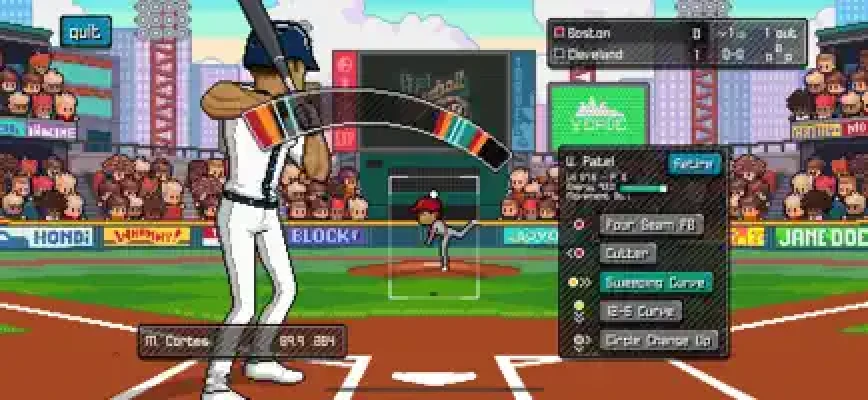
The game focuses on simple controls while giving players plenty to manage. Batting requires timing and precision, while pitching uses a more hands-on approach. Fielding is handled automatically, allowing you to concentrate on the most important moments of each play.
For players who enjoy baseball games with a classic pixel-art presentation, Pixel Pro Baseball offers a mixture of arcade action, statistics, career progression, roster management and franchise-style decisions.
The current App Store listing shows 4.5 stars from around 14,000 ratings, with the game available as a free download with optional in-app purchases.
Pixel Pro Baseball Game Information
Game: Pixel Pro Baseball
Developer: Pixamo
Genre: Sports / Baseball / Arcade
Platform: iPhone, iPad, iPod touch and Apple Vision
Age Rating: 4+
Current Version: 2.0.9
Latest Update: September 8, 2026
Languages: English and Japanese
Required System: iOS 13.0 or later
Game Style: Retro pixel-art baseball
Modes: Quick Game, Designated Hitter and Dynasty
Fielding: Automatic
Features: Batting, pitching, career progression, team management, drafting, free agents and trades
Leagues: 4
Teams: 120
Players: Thousands of generated players with different attributes
Game Length: Customizable
Season Length: Customizable
Achievements: Game Center achievements and leaderboards
The App Store confirms that the game supports iOS 13 or later and includes Game Center achievements and leaderboards.
What Makes Pixel Pro Baseball Different?
Pixel Pro Baseball takes a different approach from highly detailed baseball simulations. Instead of trying to reproduce every aspect of a professional baseball broadcast, it concentrates on the actions that matter most.
You hit.
You pitch.
You make important team decisions.
You develop a player or franchise.
That combination gives the game an approachable arcade feel while still providing enough depth for players who want to spend time building a successful team.
Its pixel-art presentation also gives the game a nostalgic style that works particularly well with its straightforward controls.
Pixel Pro Baseball Game Modes
Quick Game
Quick Game is the easiest place to start.
It allows you to get directly into a baseball match without committing to a long career or managing an entire franchise.
This mode is particularly useful when you want to:
Practice batting
Learn pitching
Test different difficulties
Play a short baseball match
Experiment with different game lengths
Improve your timing
Become comfortable with the controls
New players should spend some time here before jumping deeply into Dynasty Mode.
Designated Hitter Mode
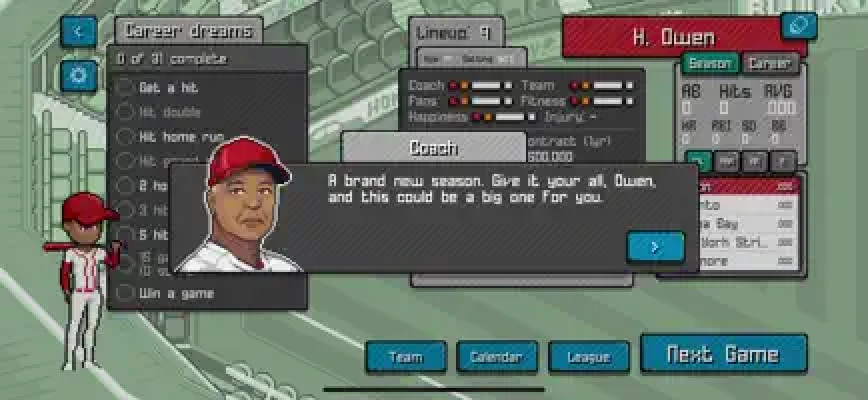
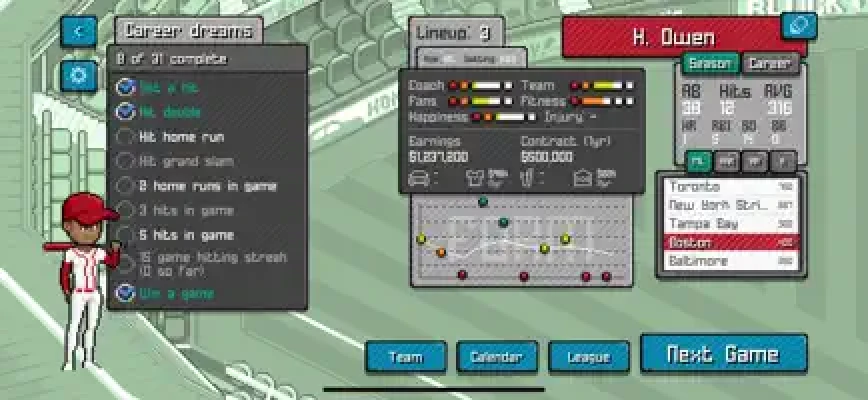
Designated Hitter Mode gives Pixel Pro Baseball a stronger career-game element.
Instead of controlling an entire organization, you follow a single batter across multiple seasons.
Your career can involve:
Practice sessions
Regular games
Side challenges
Career statistics
Season statistics
Form data
Career goals
Relationships
Performance-based story developments
Earnings and endorsements
Multiple seasons before retirement
Your performance can affect how your career develops. Coaches, managers, teammates and other relationships can influence the experience.
This makes Designated Hitter Mode particularly interesting for players who prefer developing one character rather than managing an entire roster.
Designated Hitter Strategy
Don't treat every at-bat as an opportunity to swing for the fences.
A consistent batter can be more valuable than someone who constantly attempts home runs.
Focus on:
Watching the pitch carefully.
Learning the timing window.
Avoiding unnecessary swings.
Building consistency.
Completing practice objectives.
Paying attention to your career statistics.
Taking side challenges when they fit your current abilities.
Maintaining strong performance over multiple games.
A long career is built through consistency rather than one spectacular game.
Dynasty Mode
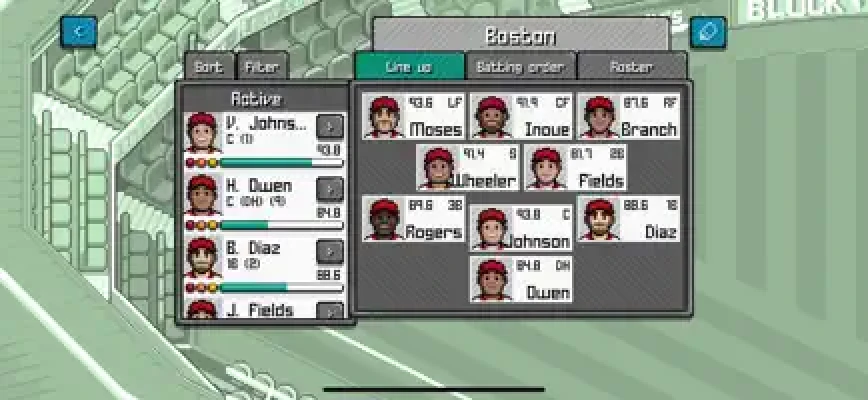
Dynasty Mode is the deepest part of Pixel Pro Baseball.
Instead of following one batter, you take responsibility for an entire team.
You can:
Pitch with your players
Bat with your players
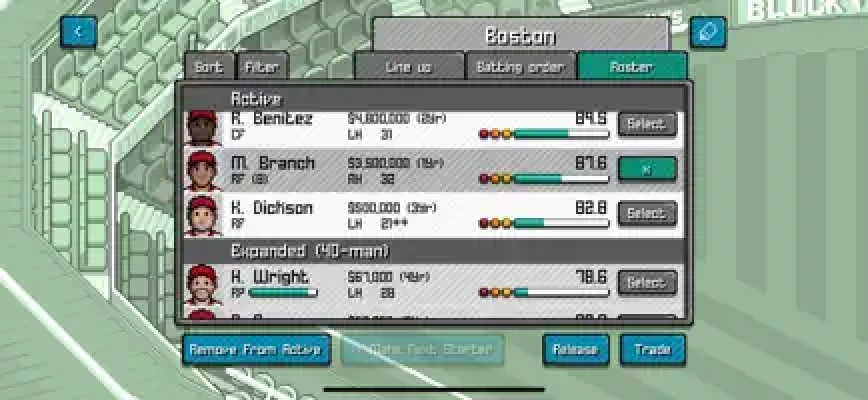
Manage your roster
Recruit free agents
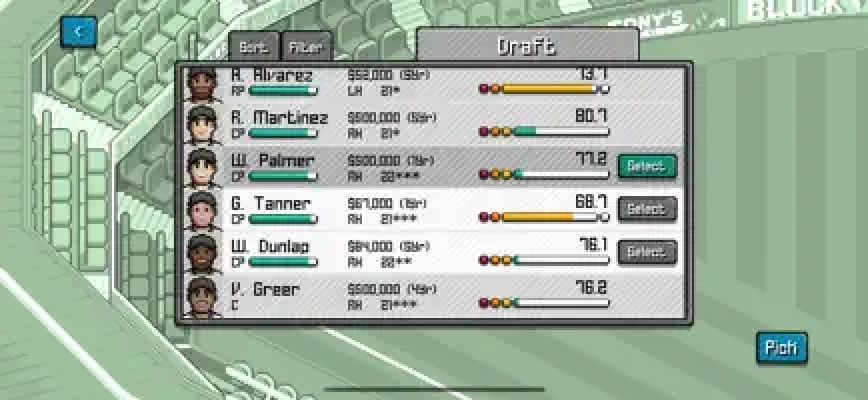
Draft players
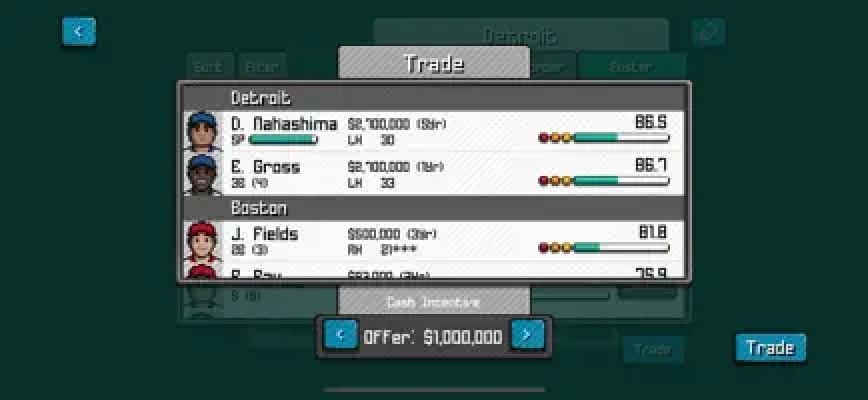
Make trades
Manage payroll
Adjust your lineup
Evaluate player attributes
Play regular seasons
Compete in postseason games
Move between leagues
Work toward franchise targets
The game includes four leagues, 120 teams and thousands of players with different abilities and attributes.
Dynasty Mode Strategy
The biggest mistake new managers can make is concentrating only on individual player ratings.
A strong roster needs balance.
Consider:
Batting ability
Pitching quality
Player consistency
Positional needs
Age and long-term value
Salary requirements
Available free agents
Draft opportunities
Team depth
Don't spend your entire budget trying to improve one position.
A balanced roster gives you more options during a long season.
Pixel Pro Baseball Batting Guide
Batting is one of the most important skills to master.
The controls are simple, but good timing separates successful hitters from players who constantly produce weak contact.
1. Watch the Pitch
Don't swing simply because the ball is coming toward the plate.
Track its movement and learn how different pitches behave.
The more you play, the easier it becomes to recognize the timing needed for different pitches.
2. Prioritize Contact
When you're learning the game, focus on making reliable contact instead of trying to hit home runs.
A well-timed single is better than repeatedly striking out while attempting maximum power.
3. Learn Pitcher Patterns
Intelligent pitchers are part of the game's design, so don't expect every at-bat to feel identical.
Pay attention to:
Pitch speed
Pitch direction
Timing
Location
Repeated patterns
If you notice that a pitcher frequently uses a particular type of pitch, prepare for it rather than reacting at the last possible moment.
4. Don't Chase Every Pitch
Patience is especially important at higher difficulties.
If you're struggling to score runs, stop trying to hit everything.
Wait for pitches that give you a better opportunity to make solid contact.
5. Build Timing Before Power
Power doesn't matter much if your timing is inconsistent.
Spend several games learning the batting rhythm before worrying about maximizing offensive production.
Pixel Pro Baseball Pitching Guide
Pitching requires a different mindset from batting.
Instead of reacting to the opponent, you control the pace and location of the attack.
Vary Your Pitches
Avoid becoming predictable.
Mix different pitches and locations to make your opponent less comfortable.
Change Location
Don't repeatedly aim for the same part of the strike zone.
Move pitches around and force the batter to react.
Use Timing Carefully
The pitching system rewards controlled input rather than simply tapping as quickly as possible.
Practice the game's press, hold, release and tap mechanics until they feel natural.
Don't Overcomplicate Every Pitch
You don't need a perfect pitch every time.
Sometimes the best decision is simply to throw a reliable pitch and let your defense handle the result.
How to Score More Runs
Scoring consistently requires patience.
Early in an inning
Try to establish momentum rather than immediately forcing a big play.
With runners on base
Prioritize contact and avoid unnecessary strikeouts.
With two outs
Take calculated risks because the opportunity to score may disappear after the next out.
Against difficult pitchers
Don't panic after a few failed at-bats.
Study the pitch patterns and adjust your timing.
Best Dynasty Team Management Strategy
Build Around Pitching
A strong offense can produce plenty of runs, but reliable pitching prevents opponents from doing the same.
When evaluating your roster, don't neglect your pitching staff.
Use the Draft Wisely
The draft is an opportunity to improve the team without relying entirely on trades or free agents.
Look beyond immediate ability.
A younger player with room to develop can have significant long-term value.
Monitor Payroll
A good player isn't automatically a good signing if the contract damages the rest of your roster.
Keep enough budget available to address future weaknesses.
Use Free Agents to Fill Gaps
Free agents are particularly useful when you have one position that is clearly weaker than the rest of the roster.
Instead of rebuilding the entire team, identify the biggest weakness and address it.
Don't Trade Just to Trade
A trade should solve a specific problem.
Before making a deal, ask:
What position am I improving?
What am I giving up?
Does the new player fit my lineup?
Will the salary affect future moves?
Does this help immediately or over several seasons?
How to Improve at Pixel Pro Baseball
Improvement comes primarily from understanding timing and recognizing patterns.
Practice batting
Spend time in situations where you can concentrate entirely on hitting.
Practice pitching
Learn the movement and timing of your available pitches.
Experiment with difficulty
If the easiest setting becomes comfortable, increase the difficulty gradually instead of jumping immediately to the hardest option.
Track your results
Pay attention to which situations cause problems.
For example, if you consistently strike out against certain pitches, make those pitches the focus of your practice.
Learn from bad games
A poor game can tell you more than an easy win.
Ask yourself:
Was my timing late?
Did I swing too often?
Was I predictable while pitching?
Did I build the roster around the wrong strengths?
Pixel Pro Baseball Career Tips
Designated Hitter Mode rewards long-term thinking.
Complete Practice Sessions
Practice sessions aren't just filler. They provide opportunities to improve your ability and complete different objectives.
Pay Attention to Side Challenges
Side challenges add another layer to the career system.
Complete them when they align with your strengths rather than forcing yourself into a situation that consistently produces poor results.
Protect Your Consistency
One great performance is useful, but repeated solid performances are more important for a long career.
Watch Your Career Development
Keep track of statistics and other career information as your player progresses.
This helps you understand how your decisions and performances are shaping the career.
Beginner Tips for Pixel Pro Baseball
1. Start with Quick Game
Learn the controls before starting a long career.
2. Master batting timing
Good batting starts with timing rather than power.
3. Learn pitching mechanics
Practice the pitching controls until they become automatic.
4. Don't swing at everything
Patience can dramatically improve your offensive results.
5. Change pitching locations
Predictable pitching becomes easier to attack.
6. Build a balanced Dynasty roster
Don't spend everything on one star.
7. Watch your budget
Keep money available for future roster needs.
8. Use trades to solve specific problems
Every trade should have a purpose.
9. Take advantage of the draft
Think about both current ability and long-term roster development.
10. Adjust gradually
If a difficulty setting feels overwhelming, practice the specific skill causing the problem before changing everything else.
Advanced Pixel Pro Baseball Strategy
Reading the Pitcher
Experienced players should start thinking about the pitcher rather than simply reacting to the ball.
Look for repeated tendencies.
Does the pitcher frequently use a particular pitch?
Does the location change after you make strong contact?
Does the pitcher become predictable in certain situations?
Identifying these patterns can make difficult at-bats more manageable.
Creating Pitching Variety
Your goal isn't simply to throw strikes.
Your goal is to make the batter uncertain about what comes next.
Change pitch type and location while avoiding patterns that can easily be recognized.
Building a Dynasty Around Depth
One outstanding player cannot cover every weakness.
A deep roster gives you greater flexibility and makes the team less vulnerable when certain positions underperform.
Think in Seasons, Not Games
A single loss doesn't define a Dynasty season.
Avoid making major roster decisions because of one poor performance.
Look at the broader trend.
Pixel Pro Baseball Difficulty Tips
Players can choose from multiple difficulty settings, allowing the experience to be adjusted as their skills improve.
If you're new:
Begin with an easier setting.
Concentrate on timing.
Learn the pitching system.
Move upward when games become consistently comfortable.
If you're experienced:
Use tougher difficulty to improve pitch recognition.
Focus on consistent contact.
Avoid relying on one pitching pattern.
Build stronger rosters in Dynasty Mode.
The goal isn't simply to select the hardest setting. The goal is to choose a difficulty where you're learning and improving.
Pixel Pro Baseball Updates
The App Store currently lists version 2.0.9, released September 8, 2026, with minor bug fixes. Version 2.0.8 included improvements related to fielding and baserunning AI, while the 2.0.x updates also introduced and expanded Designated Hitter Mode.
The game has received numerous updates since its original 2021 release, including gameplay fixes, difficulty adjustments, Japanese language support and the addition of Designated Hitter Mode.
Pixel Pro Baseball Controls and Gameplay
Pixel Pro Baseball deliberately keeps its controls accessible.
The important gameplay systems are:
Tap-based batting
Skill-based pitching
Automatic fielding
Intelligent opposing pitchers
Custom game lengths
Multiple difficulty settings
This makes the game relatively easy to understand while leaving room to improve through practice.
The automatic fielding system also means that players spend less time managing every defensive movement and more time focusing on batting, pitching and strategic decisions.
Pixel Pro Baseball Pros and Cons
Pros
Retro pixel-art presentation
Simple controls
Skill-based batting
Hands-on pitching
Quick Game option
Single-player career experience
Dynasty team management
Draft and free-agent systems
Player trading
Multiple leagues
Large number of teams and players
Custom game and season lengths
Game Center achievements and leaderboards
Things to Keep in Mind
Pixel Pro Baseball is intentionally streamlined compared with large-scale baseball simulations.
Some players may want more detailed control over areas such as baserunning, defensive decisions or individual game statistics. These points have also appeared in App Store user feedback, so expectations should be set accordingly.
Pixel Pro Baseball In-App Purchases
The current App Store listing shows several optional purchases, including options to remove advertisements, unlock teams, game lengths, season lengths, Dynasty Mode, editing features, additional owners and multiple save slots. An Unlock Everything option is also listed.
The game itself is listed as free with optional in-app purchases.
Is Pixel Pro Baseball Good for Baseball Fans?
Pixel Pro Baseball is aimed at players who enjoy accessible arcade baseball combined with career and management elements.
It can appeal to different types of players:
Arcade fans: Quick Game provides a straightforward way to play.
Career players: Designated Hitter Mode offers a longer single-player progression.
Management fans: Dynasty Mode introduces roster building, trades, drafting and budget management.
Retro game fans: The pixel-art presentation gives the game a distinctive classic style.
Frequently Asked Questions
What is Pixel Pro Baseball?
Pixel Pro Baseball is a retro-style arcade baseball game developed by Pixamo, featuring batting, pitching, automatic fielding, career progression and team management.
Is Pixel Pro Baseball free?
Yes. The App Store lists Pixel Pro Baseball as free with optional in-app purchases.
Does Pixel Pro Baseball have a career mode?
Yes. Designated Hitter Mode allows you to follow a single batter through multiple seasons and eventually retirement.
Does Pixel Pro Baseball have a franchise mode?
Its Dynasty Mode provides franchise-style team management, including roster management, trades, free agents, drafting, budgets and multiple leagues.
How many teams are in Pixel Pro Baseball?
The game's description lists 120 teams across four leagues.
Can you draft players?
Yes. Drafting players is one of the management features available in Dynasty Mode.
Can you trade players?
Yes. Dynasty Mode includes multi-player trades and roster management.
Can you sign free agents?
Yes. Dynasty Mode allows you to recruit free agents.
Does Pixel Pro Baseball have achievements?
Yes. The game supports Game Center achievements and leaderboards.
What devices support Pixel Pro Baseball?
The App Store lists support for iPhone, iPad, iPod touch and Apple Vision, with iOS/iPadOS 13.0 or later required for the relevant Apple devices.
What is the latest version of Pixel Pro Baseball?
The current App Store listing shows version 2.0.9, dated September 8, 2026.
Final Thoughts
Pixel Pro Baseball blends the simplicity of an arcade baseball game with surprisingly substantial career and management systems.
Its biggest attraction is the combination of easy-to-understand controls and deeper long-term gameplay. You can play a quick baseball match when you have a few minutes, follow a single batter across multiple seasons, or take control of an entire organization in Dynasty Mode.
For the best experience, start by mastering batting and pitching in shorter games. Once the fundamentals become comfortable, move into Designated Hitter or Dynasty Mode and start focusing on long-term strategy.
Whether you're trying to build a successful baseball career or guide a franchise toward the Final Series, patience, timing, roster balance and consistent decision-making are the keys to getting more from Pixel Pro Baseball.
Rate the Game
User Reviews















Popular Games



















 Android
 iOS
iOS Windows
 Xbox
Xbox