






Pixel Commander: Tower Battle – Complete Strategy Guide & Walkthrough
What Is Pixel Commander: Tower Battle?
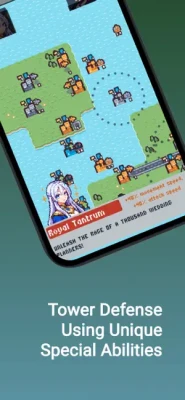
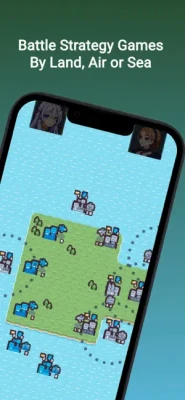
Pixel Commander: Tower Battle is a real-time strategy game that blends classic pixel visuals with tower conquest mechanics. Instead of traditional tower defense gameplay, players actively capture, connect, and expand territories while commanding armies across interconnected maps. The game supports multiple playstyles, including defensive strategies and aggressive expansion.
The game focuses on:
-
Tower connections
-
Strategic territory expansion
-
Resource management
-
Army deployment
-
Tactical decision-making
-
Multiple battle scenarios
-
Replayable maps
-
Sandbox experimentation
Main Features
Strategic Tower Connections
Capture neutral towers and connect them to strengthen your army production.
Pixel Art Visuals
Simple yet attractive retro-inspired graphics make battles easy to follow.
Multiple Game Modes
Players can enjoy:
-
Campaign battles
-
Sandbox mode
-
Skirmish mode
Recent updates added Sandbox and Skirmish experiences for additional gameplay variety.
Diverse Battlefield Strategies
Every map requires a unique approach.
Easy To Learn, Difficult To Master
Basic controls are simple, but mastering timing and battlefield awareness takes practice.
How Gameplay Works
Each battle follows a strategic cycle.
Step 1: Capture Neutral Towers
Expand your territory quickly.
Step 2: Build Your Network
Connect controlled towers.
Step 3: Produce Armies
Generate units continuously.
Step 4: Attack Enemy Positions
Target weak enemy structures.
Step 5: Defend Your Territory
Prevent enemy counterattacks.
Repeat this cycle to dominate the entire map.
Complete Beginner Walkthrough
Stage 1: Secure Nearby Towers Immediately
At the beginning of every battle:
-
Capture the closest neutral towers.
-
Avoid direct attacks too early.
-
Build your economy first.
Never rush enemies during the opening seconds.
Stage 2: Expand Gradually
Do not spread too far.
Focus on:
-
One side of the battlefield
-
Controlled expansion
-
Stable army production
Avoid overextending.
Stage 3: Create Defensive Layers
Protect your strongest towers.
Build defensive lines:
Front:
Middle:
Back:
Stage 4: Attack Weak Points
Identify enemy vulnerabilities.
Good targets include:
-
Isolated towers
-
Low-unit structures
-
Recently captured locations
Avoid heavily defended positions.
Stage 5: Control The Battlefield
Territory control often matters more than brute force.
Think strategically rather than attacking constantly.
Best Early Game Strategy
Follow this simple sequence.
First Minute
-
Capture 2 nearby towers.
-
Strengthen production.
-
Establish connections.
Second Minute
-
Build defensive lines.
-
Scout enemy movement.
Third Minute
-
Launch controlled attacks.
-
Expand toward enemy territory.
This balanced approach creates sustainable momentum.
Best Offensive Strategy
Aggressive players should:
Prioritize Speed
Capture towers rapidly.
Attack Multiple Directions
Force enemies to split their defenses.
Chain Attacks
Keep pressure constant.
Target Production Towers
Disrupt enemy reinforcement systems.
Best Defensive Strategy
Defensive players should:
Fortify Core Positions
Protect high-value towers.
Build Buffer Zones
Use outer towers as shields.
Counterattack Carefully
Punish enemy overextensions.
Maintain Reserve Forces
Always keep backup units available.
Advanced Tactical Tips
Never Empty Your Entire Army
Overcommitting leaves your base exposed.
Expand Before Fighting
More towers generate more units.
Adapt To Every Map
No universal strategy works everywhere.
Watch Enemy Movements
Prediction is a major advantage.
Control Chokepoints
Narrow areas can decide battles.
Common Mistakes Beginners Make
Avoid these errors.
Expanding Too Quickly
Overextension creates weak defenses.
Ignoring Neutral Towers
Neutral towers are free resources.
Attacking Constantly
Patience often wins battles.
Leaving Towers Unprotected
Every tower matters.
Fighting Without A Plan
Random attacks waste resources.
Daily Improvement Routine
Spend 10 minutes focusing on these tasks.
✅ Practice opening strategies
✅ Experiment with Sandbox mode
✅ Play Skirmish battles
✅ Test defensive formations
✅ Improve attack timing
✅ Learn map layouts
Sandbox mode allows players to experiment with generals and abilities without pressure, making it useful for improving strategies.
Users Feedback Insights
Players commonly appreciate:
Positive Feedback
-
Simple controls
-
Relaxing gameplay
-
Pixel-art visuals
-
Strategic depth
-
Short game sessions
-
Multiple playstyles
Many early reviews praise its accessibility and enjoyable gameplay loop. User ratings on the App Store are generally very positive, although the player base is still relatively small.
Areas Players May Find Challenging
-
Learning advanced tactics
-
Managing multiple fronts
-
Choosing between offense and defense
These challenges add long-term replay value.
Frequently Asked Questions
Is Pixel Commander beginner friendly?
Yes. New players can quickly understand the mechanics.
Is there a Sandbox mode?
Yes. Players can experiment freely with different strategies and abilities.
Does tower positioning matter?
Absolutely. Strategic placement determines victory.
Is every battle different?
Yes. Enemy behavior and tactical decisions create variety.
Is the game suitable for short play sessions?
Yes. Most battles are easy to fit into short gaming sessions.
Final Thoughts
Pixel Commander: Tower Battle successfully combines pixel-art charm with strategic depth. Players who master expansion, defense, and battlefield control will steadily improve their skills over time. Instead of relying on speed alone, the game rewards smart decisions, careful planning, and adaptive strategies that create satisfying victories on every battlefield.