




Latest Version
August 05, 2024
Dream Tiles Piano Game Studio
Music
Android
0
Report a Problem
More About :game
Piano Game: Classic Music Song combines the familiar piano-tile format with a broad music library.
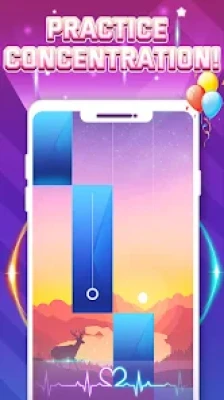
Rather than requiring players to know how to play an actual piano, the game transforms musical performance into a reaction and rhythm challenge. Notes appear on the screen and players must tap them accurately as they reach the appropriate position.
The official Google Play description highlights songs ranging from classical pieces such as Canon in D to modern tracks such as Shape of You, alongside more than 100 songs overall.
The result is a casual music game that can be played for a few minutes or revisited for longer sessions as players try to improve their accuracy and scores.
Game Theme and Atmosphere
The game combines the atmosphere of a traditional piano performance with the energy of an arcade rhythm game.
Its presentation focuses on:
- Piano music
- Falling tiles
- Musical timing
- High-score challenges
- Progressive difficulty
- Classical and modern songs
- Fast finger reactions
The visual design supports the rhythm rather than trying to simulate a complete physical piano.
Gameplay Overview
The main gameplay loop is straightforward:
Choose a song → Watch the falling tiles → Tap accurately → Build your score → Collect stars → Unlock more content → Try harder songs
The official listing states that players tap the keys as they fall to match the melody, with accuracy contributing to higher scores. Stars can be collected to unlock new songs and progress toward tougher levels.
This simple structure makes the game approachable for beginners while providing a greater challenge as the speed increases.
How to Play
1. Choose a Song
Select a track from the available music collection.
2. Watch the Piano Tiles
Tiles begin moving toward the target area.
3. Tap in Rhythm
Tap each tile at the correct moment to stay synchronized with the music.
4. Maintain Accuracy
Accurate taps help you maintain your performance and achieve higher scores.
5. Collect Stars
Stars contribute toward unlocking additional songs and progression.
6. Increase the Challenge
Move into more difficult songs and faster sections as your skills improve.
100+ Songs to Explore
One of the major attractions of the current version is its advertised collection of 100+ songs.
The music selection combines different styles, including:
- Classical piano
- Modern songs
- Familiar melodies
- Contemporary pop-inspired tracks
- Piano arrangements
This variety gives players more reasons to return after completing individual songs.
Classical Piano Music
Classical music is an important part of the game's identity.
The Google Play description specifically mentions Canon in D as an example of the classical repertoire available.
For players who enjoy traditional piano melodies, these songs provide a calmer contrast to the faster rhythm challenges.
Modern Music
The game also incorporates contemporary music.
The official listing references Shape of You as an example of a modern song available within the experience.
This combination of classical and modern music helps broaden the game's appeal beyond traditional piano enthusiasts.
Realistic Piano Sounds
The game advertises realistic piano sounds designed to make each successful tap feel connected to the music.
Sound is particularly important in a rhythm game because players can use the audio as an additional timing cue.
Multiple Difficulty Levels
Piano Game: Classic Music Song offers multiple difficulty levels.
This allows beginners to start with manageable songs before progressing toward faster and more demanding challenges.
Beginner
Slower sequences provide an opportunity to learn the basic rhythm.
Intermediate
Faster tile patterns require greater concentration and timing.
Advanced
Rapid sequences test reaction speed, accuracy and consistency.
Rhythm and Reflex Challenge
At its heart, this is a reaction-based rhythm game.
Success depends on combining:
- Hand-eye coordination
- Timing
- Concentration
- Rhythm recognition
- Finger speed
- Accuracy
The game can therefore feel relaxing during slower songs but intense when the pace increases.
Progression System
Progression revolves around completing songs, improving performance and collecting stars.
The official listing states that players can collect stars to unlock new songs and reach tougher levels.
This creates a straightforward progression loop:
Play → Improve → Earn stars → Unlock songs → Increase difficulty → Improve your score
Star Collection
Stars provide an additional reason to replay songs.
Instead of simply completing a track once, players can return to improve their performance and work toward progression requirements.
This gives the game more longevity than a simple collection of standalone piano tracks.
Offline Gameplay
The Google Play listing identifies the game as offline, meaning players can enjoy the core experience without Wi-Fi.
This is particularly useful for:
- Travel
- Commuting
- Flights
- Waiting rooms
- Breaks
- Places without reliable internet
Beginner's Guide
If you're new to piano tile games, start slowly.
Focus on Accuracy
Don't immediately try to tap as quickly as possible.
Listen to the Music
The melody provides useful timing information.
Watch the Tile Pattern
Try to anticipate upcoming notes instead of reacting only at the last possible moment.
Start With Easier Songs
Use slower tracks to build familiarity.
Increase Difficulty Gradually
Move to faster songs once the basic timing feels natural.
Replay Difficult Sections
Repeated practice helps develop muscle memory and reaction speed.
Advanced Strategy and Tips
Use the Rhythm as Your Guide
Don't rely exclusively on visual information. Listen to the melody and use the beat to anticipate the next tap.
Keep Your Eyes Ahead
Experienced players can watch upcoming tiles rather than staring only at the tile they are currently tapping.
Avoid Panic Tapping
Rapidly tapping without following the pattern can cause mistakes.
Develop Consistent Finger Movement
Smooth movements are generally more reliable than sudden gestures.
Learn Song Patterns
Repeated exposure to a song can make its note sequences easier to anticipate.
Prioritize Accuracy Over Speed
A fast player who makes frequent mistakes will often perform worse than someone who maintains accurate timing.
Game Difficulty
Overall Difficulty: Easy to Learn, Challenging at Higher Levels
| Category | Difficulty |
|---|---|
| Basic Controls | Very Easy |
| First Songs | Easy |
| Intermediate Songs | Moderate |
| Fast Songs | Hard |
| Reaction Challenges | Moderate–Hard |
| Mastery | Hard |
| Accessibility | Very High |
The controls themselves are extremely simple. The difficulty comes from maintaining accuracy as the music and tile patterns become faster.
Graphics and Presentation
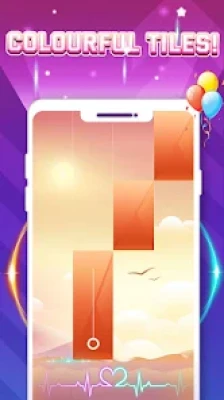
The game uses a colorful rhythm-game presentation built around falling piano tiles.
Rather than overwhelming players with complicated menus, the design keeps attention on the music and incoming notes.
The Google Play listing describes the game as an abstract, intense, arcade-style single-player music experience.
User Experience
The current Google Play listing shows a 3.9-star rating from approximately 298,000 reviews and more than 100 million downloads, demonstrating a substantial Android audience.
Player feedback highlights several different experiences.
Some users praise the game for being enjoyable and challenging, while others request more songs, harder levels or additional gameplay options.
One recurring theme in the reviews is the desire for more song variety and greater challenge for experienced players.
What Players Like
Based on the available Google Play feedback, notable strengths include:
- Easy-to-understand gameplay
- Enjoyable piano music
- Challenging higher levels
- Large music collection
- Offline play
- Quick sessions
- Simple controls
- Rhythm-based progression
Areas Players Would Like Improved
Some reviews mention requests for:
- More song choices
- More difficult songs
- An endless mode
- More relaxed gameplay options
- Improved visual contrast in some situations
These are useful observations when comparing the game with other piano-tile titles.
Updates and What's New
The Google Play listing shows that the game was updated on August 26, 2026. The current update notes mention optimization of the user experience and a new limited-time themed event.
The store description also advertises new songs every week, providing an ongoing reason to revisit the game.
Technical Details
| Detail | Information |
|---|---|
| Game | Piano Game: Classic Music Song |
| Developer | Dream Tiles Piano Game Studio |
| Current developer entity | LINN PTE. LTD. |
| Package ID | game.piano.music.tiles.challenge |
| Platform | Android |
| Genre | Music / Arcade |
| Players | Single player |
| Offline | Yes |
| Songs | 100+ advertised |
| Difficulty | Multiple levels |
| Content Rating | Everyone |
| Downloads | 100M+ |
| Google Play Rating | 3.9/5 |
| Reviews | Approximately 298K |
| Ads | Yes |
| In-App Purchases | Yes |
| Latest listed update | August 26, 2026 |
The game is currently listed on Google Play with the above information.
Accessibility and Ease of Use
The game is particularly accessible because its core mechanic requires only simple tapping.
There is no complicated control scheme to learn.
This makes it suitable for:
- Casual gamers
- Music fans
- Rhythm-game beginners
- Children and families
- Players who enjoy reaction games
- Experienced piano-tile players
The official content specifically describes it as suitable for beginners and more experienced players through its multiple difficulty levels.
Pros and Cons
Pros
- 100+ advertised songs
- Classical and modern music
- Simple tap-based controls
- Multiple difficulty levels
- Offline gameplay
- Realistic piano sounds
- Star-based progression
- Easy to learn
- Suitable for quick gaming sessions
- Regularly updated content
- Large Android player base
Cons
- Some experienced players may find easier songs insufficiently challenging
- Players have requested more song variety
- Visual contrast can occasionally make tiles harder to distinguish
- The core piano-tile mechanic may feel familiar to fans of the genre
- Ads and in-app purchases are included
Who Should Play Piano Game: Classic Music Song?
This game is a good fit for players searching for:
- piano games
- piano tiles games
- music games for Android
- rhythm games
- piano games offline
- classic piano games
- music tile games
- piano tapping games
- relaxing music games
- piano games for beginners
- rhythm games for Android
- falling tiles games
- music games with songs
- offline piano games
- piano challenge games
Piano Game: Classic Music Song vs Other Piano Games
The biggest differentiator is its combination of classical music, modern songs, offline play and a large advertised song library.
For players who prefer a simple piano-tile format without complicated character systems or multiplayer mechanics, it provides a focused experience.
Compared with deeper music games, however, its main emphasis remains quick reflex-based tapping rather than music creation or actual piano instruction.
Piano Game vs Real Piano Apps
A piano simulator attempts to reproduce the experience of playing individual piano keys.
This game takes a completely different approach.
You aren't expected to freely compose music. Instead, you're following predetermined musical sequences and attempting to tap the correct tiles with accurate timing.
That makes it a rhythm game rather than a piano-learning simulator.
Replay Value
Replay value comes from several elements:
- Large song selection
- Multiple difficulty levels
- Star collection
- High-score improvement
- Faster note patterns
- New songs
- Limited-time events
Players who enjoy chasing better scores can return to songs they've already completed and try to improve their performance.
Expert Rating
Overall Rating: 4.2/5
| Category | Rating |
|---|---|
| Music Selection | 4.3/5 |
| Gameplay | 4.3/5 |
| Controls | 4.8/5 |
| Accessibility | 4.8/5 |
| Difficulty | 4.1/5 |
| Replay Value | 4.2/5 |
| Offline Play | 4.7/5 |
| Overall Experience | 4.2/5 |
Verdict
Piano Game: Classic Music Song delivers a straightforward piano-tile experience centered on rhythm, timing and quick reactions.
Its current Google Play listing advertises 100+ songs, multiple difficulty levels, realistic piano sounds, offline gameplay and weekly song additions, giving the game a solid foundation for casual music-game fans.
The combination of classical and modern music makes it more approachable for a broad audience, while the star-based progression encourages players to continue improving.
It is particularly appealing if you're searching for an offline piano game, music tiles game, rhythm game or simple piano tapping challenge for Android.
Frequently Asked Questions
What is Piano Game: Classic Music Song?
It is a single-player Android rhythm game where players tap falling piano tiles in time with music.
How do you play Piano Game: Classic Music Song?
Tap the falling piano keys at the correct time to match the melody and build your score.
How many songs are available?
The current Google Play description advertises more than 100 songs.
Does the game include classical music?
Yes. The official description specifically mentions classical pieces such as Canon in D.
Does it have modern music?
Yes. The current listing also references modern songs such as Shape of You.
Can I play without Wi-Fi?
Yes. The Google Play listing identifies the game as playable offline.
Is Piano Game: Classic Music Song free?
The game is available on Google Play with ads and in-app purchases.
Is the game suitable for beginners?
Yes. It provides multiple difficulty levels designed for both beginners and more experienced players.
Does the game get faster?
Higher difficulty and increasingly demanding songs require faster reactions and more accurate tapping.
Can the game help improve reaction skills?
The gameplay naturally exercises timing, hand-eye coordination and reaction speed, although it should be viewed as entertainment rather than a formal training program.
Does the game have progression?
Yes. Players collect stars to unlock new songs and progress toward tougher levels.
Does it receive updates?
Yes. The Google Play listing shows an update dated August 26, 2026, including user-experience optimization and a limited-time themed event.
Who developed the game?
The Google Play listing identifies Dream Tiles Piano Game Studio, with the developer information identifying LINN PTE. LTD.
Piano Game: Classic Music Song is a simple but engaging rhythm experience built around one familiar mechanic: tap the falling piano tiles at exactly the right moment.
With 100+ advertised songs, classical and modern music, multiple difficulty levels, realistic piano sounds, star-based progression, offline play and regular updates, it offers plenty for both casual players and rhythm-game fans.
Its biggest strengths are accessibility and quick gameplay, making it a natural choice for searches such as “piano tiles game,” “piano game Android,” “offline piano game,” “music tiles game,” and “rhythm games for Android.”
Rate the Game
User Reviews












Popular Games



















 Android
 iOS
iOS Windows
 Xbox
Xbox