


Latest Version
September 13, 2026
Amanotes Pte. Ltd.
Music
iOS
0
Report a Problem
More About :game
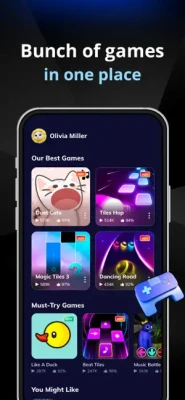
Developed by Amanotes, the game features well-known rhythm experiences such as Magic Tiles 3, Tiles Hop and Dancing Road, along with other music games and regularly refreshed content. Players can explore songs across genres including pop, EDM, rock, country, jazz, classical, R&B, blues and more.
The game also adds competitive elements through battle modes and leaderboards, giving skilled players a reason to improve their scores rather than simply completing songs.
What Is Game of Song?
Game of Song is essentially a music game collection and rhythm hub. Its biggest attraction is variety: one app can offer several different styles of musical gameplay.
Depending on the selected game, you may need to tap notes at the correct moment, follow a moving path, react to visual patterns or maintain accurate timing while a song progresses.
This makes Game of Song suitable for both casual players who want a quick musical challenge and rhythm-game fans who enjoy chasing higher scores.
Key Features
Multiple Music Games in One App
One of the main reasons to try Game of Song is its collection of different rhythm experiences. The App Store specifically highlights Magic Tiles 3, Tiles Hop and Dancing Road, alongside additional music games.
This gives the game more variety than a single-mode rhythm title.
Huge Music Selection
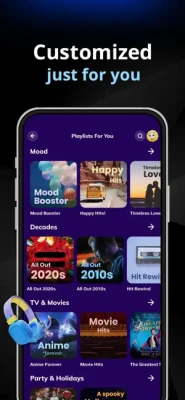
The game promotes access to a very large collection of songs and highlights more than one million songs through its premium offering. Music covers genres such as:
- Pop
- EDM
- Alternative
- Rock
- Dance
- Country
- Jazz
- Ballad
- Classical
- Chill
- Blues
- R&B
The selection makes it easier to switch between different moods and musical styles.
Battle Mode
Battle mode adds a competitive layer to the experience. Instead of concentrating only on your personal high score, you can compete against other players and attempt to establish yourself as the better rhythm player.
Leaderboards
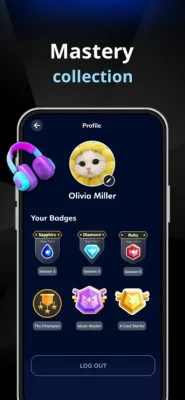
Score chasing is an important part of the long-term experience. Climbing leaderboards gives skilled players an additional goal after they become comfortable with the basic controls.
Regular Content
The App Store version history shows a long series of updates containing new games, improvements, personalization changes, bug fixes and performance improvements. The listed version 5.27.3 was released in February 2024.
Gameplay Explained
The basic idea behind Game of Song is simple: listen, watch and react to the rhythm.
Different games use different mechanics, but successful play generally depends on three things:
- Timing
- Concentration
- Consistency
A beginner may focus on simply surviving a song. Experienced players should gradually shift their attention toward accuracy, combos and score optimization.
The important thing is not to react randomly to every visual movement. Learn how the selected game communicates its rhythm and develop a consistent response.
Full Strategy Guide
1. Start With Easier Songs
Do not immediately choose the hardest available challenge.
Begin with songs that allow you to recognize the rhythm comfortably. This gives you time to understand how notes, tiles, movements or obstacles correspond to the music.
Once your timing becomes reliable, increase the difficulty.
2. Learn the Rhythm Instead of Watching Everything
One of the biggest improvements you can make in a rhythm game is learning to anticipate what is coming.
Rather than waiting until a note reaches the exact point where you need to react, listen to the beat and predict the next action.
Your eyes should confirm what your ears already expect.
3. Keep Your Fingers Relaxed
Tension makes fast rhythm gameplay harder.
Avoid pressing the screen with unnecessary force. Use light, controlled taps and keep your hand in a comfortable position.
A relaxed hand can make repeated inputs much more consistent.
4. Focus on Accuracy Before Speed
Fast songs can be tempting, but speed without accuracy usually produces poor results.
First learn to hit notes consistently.
Once your accuracy improves, faster songs become much easier because your reactions are already trained.
5. Build Consistent Combos
A long combo can make a major difference to your score.
Instead of taking unnecessary risks for a single difficult input, prioritize maintaining a reliable sequence.
A slightly slower but accurate run is often better than an aggressive run that repeatedly breaks your combo.
6. Practice Difficult Sections
If you repeatedly fail at the same point in a song, don't simply restart and repeat the entire song without changing your approach.
Identify what makes that section difficult.
Is the rhythm faster?
Are the inputs closer together?
Does the visual movement become harder to follow?
Once you identify the problem, concentrate specifically on that type of sequence.
7. Use Familiar Songs for Training
Songs you already know can be excellent practice material.
When you recognize the melody and beat, you can often anticipate rhythm changes more naturally.
After improving your timing on familiar tracks, move to unfamiliar songs to test your actual reaction skills.
8. Adjust Your Playing Environment
Rhythm games depend heavily on timing.
Play with a stable device and avoid unnecessary distractions. If the game or your device has audio or performance problems, timing-based gameplay can become considerably harder.
The App Store notes that the game works best on iPhone 6s and newer, while the current listing requires iOS 13 or later.
9. Treat Battle Mode Differently
In competitive matches, don't panic if your opponent starts strongly.
Your objective is to produce your best performance rather than constantly thinking about the other player's score.
Focus on:
- Maintaining accuracy
- Protecting your combo
- Avoiding unnecessary mistakes
- Staying calm during difficult sections
- Finishing the song strongly
Consistency is especially valuable when two players have similar skill levels.
10. Chase Personal Records
Leaderboards are useful, but your own previous score is an excellent benchmark.
After completing a song, ask yourself what caused your mistakes.
Maybe your timing slipped during fast sections, or you lost concentration near the end.
Target that weakness on the next attempt.
Advanced Rhythm Tips
Listen Before You React
The strongest rhythm players do not rely exclusively on their eyes.
Listen to the beat and use the visual cues as confirmation.
Recognize Repeating Patterns
Many rhythm challenges become easier when you stop seeing individual inputs and start recognizing patterns.
A sequence that initially looks complicated may actually be a repeated rhythm pattern.
Don't Panic After One Mistake
A missed note does not mean the entire run is ruined.
One of the worst reactions is allowing one mistake to cause several more.
Recover immediately and continue following the rhythm.
Save Your Concentration
Long sessions can reduce reaction accuracy.
If your performance suddenly starts getting worse, taking a short break may be more useful than repeatedly restarting the same song.
Best Way to Improve Your Scores
A simple training routine works well:
Step 1: Choose a comfortable song.
Step 2: Complete it without worrying about your score.
Step 3: Identify where you made mistakes.
Step 4: Replay while concentrating on those sections.
Step 5: Try to maintain a longer combo.
Step 6: Increase difficulty after your accuracy improves.
Step 7: Return to competitive modes once your timing is consistent.
This approach is more effective than simply playing the hardest songs repeatedly.
Free Play vs Premium Features
Game of Song is listed as a free app with in-app purchases. The App Store listing says premium access can remove ads, provide access to a larger song selection, offer free revives and support uninterrupted play.
The exact subscription options and pricing can vary by storefront and region, so players should check the current in-app purchase information before subscribing.
Is Game of Song Good for Beginners?
Yes.
The basic concept is easy to understand, while the different music games give beginners several ways to practice rhythm and timing.
You don't need advanced rhythm-game experience to start. The challenge comes from gradually improving accuracy and reaction speed.
Is Game of Song Good for Experienced Players?
It can be, particularly for players who enjoy score chasing and variety.
The combination of multiple rhythm games, different music styles, battles and leaderboards gives experienced players several reasons to keep practicing.
Common Problems Players May Encounter
Some App Store reviews praise the variety and entertainment value while also mentioning issues such as advertisements, loading problems and occasional glitches.
If a song fails to load correctly, try the basic troubleshooting steps:
- Check your internet connection.
- Restart the game.
- Close other demanding apps.
- Make sure the game is updated.
- Restart the device if the problem continues.
- Try another song to determine whether the issue affects one track or the entire game.
Game of Song Tips at a Glance
| Goal | Best Approach |
|---|---|
| Improve timing | Practice slower songs |
| Get higher scores | Protect long combos |
| Beat difficult songs | Learn repeating patterns |
| Improve reaction speed | Gradually increase difficulty |
| Win battles | Prioritize consistency |
| Learn new songs | Listen carefully before reacting |
| Avoid mistakes | Keep your hands relaxed |
| Improve rankings | Replay songs and target weak sections |
Pros and Cons
Pros
- Several music games in one app
- Wide range of music genres
- Familiar Amanotes rhythm experiences
- Battle mode
- Leaderboards
- Large song selection
- Suitable for short play sessions
- Easy to understand for new players
Cons
- Advertisements can interrupt the experience
- Some features require premium access
- Rhythm gameplay can become demanding at higher difficulties
- Some players have reported loading or glitch problems
- Performance depends on the device and connection
Game Information
Game: Game of Song – All Music Games
Developer: Amanotes Pte. Ltd.
Genre: Music / Rhythm / Casual
Platform: iPhone and iPad
Age Rating: 4+
Price: Free with in-app purchases
Language: English
Game Style: Rhythm and music collection
Multiplayer: Competitive battle features
Developer: Amanotes
App Store Rating: 4.7/5 in the U.S. listing
Current listed version: 5.27.3
Latest listed update: February 29, 2024
The current U.S. App Store listing reports approximately 38,000 ratings and a 4.7/5 rating. The listing also identifies Amanotes as the developer and places the game in the Music category.
Frequently Asked Questions
What is Game of Song?
Game of Song is a music game hub containing multiple rhythm-based experiences, including Magic Tiles 3, Tiles Hop and Dancing Road.
Is Game of Song free?
Yes. The game is free to download, with optional in-app purchases and premium subscription features.
What games are included in Game of Song?
The App Store specifically mentions Magic Tiles 3, Tiles Hop and Dancing Road, along with other music games available through the hub.
Does Game of Song have battle mode?
Yes. The game includes a battle mode where players can compete and attempt to become champions.
What music genres are available?
The listing mentions pop, EDM, alternative, rock, dance, country, jazz, ballad, classical, chill, blues and R&B among its supported music styles.
Does Game of Song have leaderboards?
Yes. Players can work toward higher scores and climb the leaderboard.
Can beginners play Game of Song?
Yes. The basic controls are straightforward, although higher difficulty levels require considerably better timing and concentration.
What is the best strategy for Game of Song?
Focus on rhythm and accuracy first. Learn the timing of each song, protect your combo, practice difficult sections and increase the difficulty gradually.
Final Verdict
Game of Song – All Music Games is a convenient choice for players who enjoy rhythm games but don't want to jump between several separate apps. Its biggest strength is variety: different gameplay styles, music genres, competitive challenges and familiar Amanotes titles are brought together in one place.
For beginners, the best approach is to start slowly, develop accurate timing and gradually move toward harder songs. For experienced rhythm players, the real challenge comes from improving scores, maintaining combos and competing in battles.
If music, quick reflexes and score chasing are your kind of gameplay, Game of Song is worth trying.
Rate the Game
User Reviews










Popular Games



















 Android
 iOS
iOS Windows
 Xbox
Xbox