

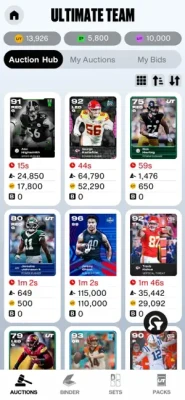
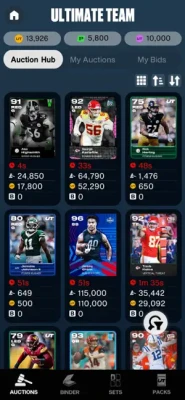
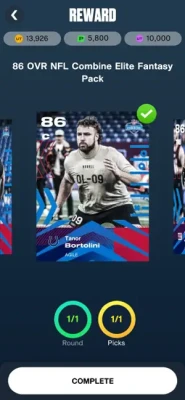
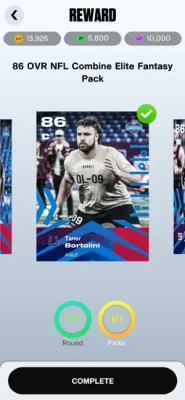
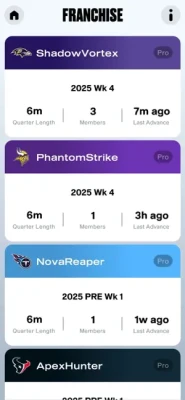
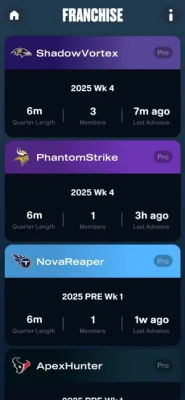
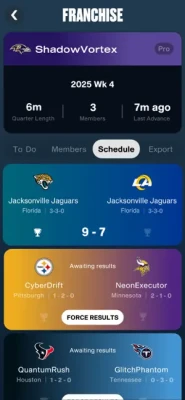
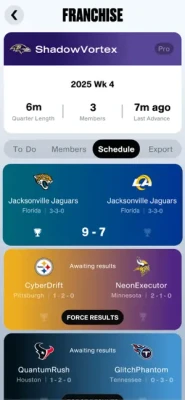
Madden NFL 26 Companion App lets players manage Ultimate Team rosters, auctions, packs, sets, and Franchise leagues directly from their iPhone or iPad.
Madden NFL 26 Companion App is the official mobile companion for EA SPORTS Madden NFL 26, designed to help players manage their teams and stay connected to their football experience while away from console or PC. Developed by Electronic Arts, the app focuses heavily on Madden Ultimate Team (MUT) management, auction house activity, lineup adjustments, pack openings, and Franchise league tools.
The Companion App gives players convenient access to many core Madden systems without needing to boot up their PlayStation, Xbox, or PC. Users can buy and sell cards, monitor auctions, complete sets, customize lineups, and manage Franchise leagues directly from mobile devices. Franchise commissioners also receive tools for managing league settings, scheduling, member activity, and weekly advancement.
For competitive MUT players, the app is especially useful because auction house management is often faster on mobile than on console, allowing users to monitor market prices and make roster moves throughout the day.
Gameplay Overview
Unlike the full Madden NFL 26 game, the Companion App focuses entirely on team management systems rather than actual football gameplay.
Main Activities
Ultimate Team lineup management
Auction house trading
Card buying and selling
Pack opening
Set completion
Franchise league management
Commissioner controls
League scheduling and progress tracking
Core Gameplay Loop
Log into your EA account
Access your MUT or Franchise
Manage rosters and auctions
Earn coins and rewards
Upgrade your lineup
Monitor league progress
Optimize your team remotely
The app is designed to keep players engaged with Madden NFL 26 even when away from their gaming platform.
Features
Full Ultimate Team management
Auction House access
Pack opening support
Lineup editing tools
Franchise mode integration
Commissioner management tools
Weekly league progression
Cross-platform synchronization
Mobile-friendly interface
Fast roster management
Controls & Interface Guide
Touchscreen Controls
The app is fully optimized for iPhone and iPad touch navigation.
Main Controls
Tap menus to navigate
Drag players into lineups
Swipe through auctions
Tap cards for details
Hold items for quick actions
Interface Sections
Ultimate Team Hub
Auctions
Sets
Packs
Franchise Leagues
Team Management
Notifications
The interface is streamlined to simplify quick roster decisions and market management.
Game Progression System
Early Game
Build a starter Ultimate Team
Learn the auction system
Complete beginner sets
Mid Game
Trade cards strategically
Improve team chemistry
Join Franchise leagues
Late Game
Build elite MUT squads
Manage advanced Franchise systems
Optimize competitive lineups
Flip cards for coin profit
Progression depends heavily on market knowledge and roster optimization.
Characters
Main Player Types
The app revolves around NFL player cards rather than traditional characters.
Popular MUT Card Types
NFL Superstars
Legends
TOTW Cards
LTD Players
Promo Event Cards
Rookie Cards
Franchise Roles
Coaches
Commissioners
League Owners
Team Managers
Weapons / Items
Important Ultimate Team Items
Player cards
Coins
Packs
Auction listings
Upgrade items
Training points
Strategy cards
Valuable Resources
Rare elite cards
Limited-time promo players
High-overall upgrades
Market investments
The auction house is one of the most important systems in the Companion App.
How to Play
Beginner Walkthrough
Download the Companion App
Log in with your EA account
Connect your Madden NFL 26 profile
Access Ultimate Team or Franchise
Build your lineup
Buy and sell players
Complete sets and improve your roster
Players must own Madden NFL 26 on supported platforms to fully use the app.
Accessibility
The Companion App is accessible because:
No live gameplay is required
Menus are touch-friendly
Sessions can be short
Navigation is straightforward
Team management is simplified
However, the auction house and advanced market systems may feel overwhelming for casual users.
How to Win: Strategy Guide
Best Strategy
Buy low and sell high on auctions
Monitor market fluctuations daily
Upgrade important positions first
Complete profitable sets
Stay active during promo events
Manage Franchise schedules consistently
Successful players combine roster optimization with smart market decisions.
Tips & Tricks
Check auctions frequently for cheap cards
Sell players during promo hype periods
Complete sets with untradeable items first
Save coins for major events
Monitor player values carefully
Use the app daily for market opportunities
Beginner’s Guide
Essential Advice
Start with budget players
Avoid overspending early
Learn market prices gradually
Focus on lineup balance
Use Franchise tools consistently
New users should focus on understanding the market before making risky investments.
Advanced Pro Strategy
Expert-Level Techniques
Flip cards for coin profit
Predict market inflation during promos
Invest in limited-time players early
Optimize lineup chemistry
Use commissioner tools efficiently
Track weekly Franchise trends
Experienced players can generate huge advantages through consistent market activity.
Trophy & Achievement Guide
Common Goals
Build a high-rated MUT squad
Earn millions of coins
Complete rare sets
Dominate Franchise leagues
Unlock elite players
Win competitive seasons
The app supports long-term progression alongside the main Madden game.
Players Experience
Players commonly praise the Companion App for:
Faster auction house access
Convenient lineup management
Easy pack openings
Portable Franchise tools
However, community feedback also highlights:
Login issues
App instability
Server communication problems
Auction glitches
Occasional crashes.
Some users also criticize the app’s delayed seasonal launches and inconsistent functionality.
Pros & Cons
Pros
Convenient mobile management
Faster auction browsing
Great for MUT trading
Useful Franchise tools
Easy lineup editing
Cross-platform support
Cons
Frequent bugs and crashes
Login/server problems
Market instability
Some missing console features
Requires constant internet connection
Tech Details
Feature
Details
App Type
Sports Companion App
Developer
Electronic Arts
Publisher
EA Sports
Platforms
iPhone, iPad
Main Modes
MUT & Franchise
Multiplayer Integration
Yes
Internet Required
Yes
App Size
~108 MB
System Requirements
iOS Requirements
iOS 13.0 or later
EA account required
Madden NFL 26 ownership required
Stable internet connection
Compatible iPhone or iPad device
Game Modes Overview
Ultimate Team Management
Manage rosters, auctions, sets, and packs remotely.
Franchise Mode
Track schedules, league activity, and weekly progress.
The app maintains mixed App Store ratings, with users praising convenience but criticizing bugs and server reliability.
Many MUT players still rely heavily on the app for auction house activity and roster management because of its convenience and faster mobile navigation.
Why This Game Stands Out
The Madden NFL 26 Companion App stands out because it:
Extends Madden beyond console play
Enables portable Ultimate Team management
Simplifies auction house trading
Supports Franchise commissioners
Keeps players connected constantly
For dedicated MUT players, the app can become an essential daily tool.
Is It Worth Playing? Honest Verdict
Yes — especially for active Madden Ultimate Team and Franchise players.
While the app suffers from bugs and occasional server problems, its convenience and market access make it highly valuable for players deeply invested in Madden NFL 26 progression systems.
Casual players may only use it occasionally, but competitive MUT users often depend on it daily.
Competitor Games
EA SPORTS FC Companion App
MLB The Show Companion App
NBA 2K MyTEAM Mobile
FUTBIN
MUT.GG Tools
Similar Games
Players who enjoy the Madden Companion App may also like:
Madden NFL Mobile
Football Manager Mobile
Top Eleven
Retro Bowl
NFL Rivals
Final Summary / Conclusion
Madden NFL 26 Companion App delivers a convenient and feature-rich way for players to manage Ultimate Team and Franchise content from anywhere. With mobile auction access, lineup editing, set completion, and Franchise commissioner tools, the app keeps players connected to Madden around the clock.
Although technical issues and occasional instability remain common complaints, the Companion App still provides significant value for serious Madden NFL players looking to maximize roster efficiency and market opportunities.
FAQ
Is Madden NFL 26 Companion App free?
Yes, the app is free to download.
Do I need Madden NFL 26 to use it?
Yes, the app requires Madden NFL 26 on supported platforms and an EA account.
Can I play football games inside the app?
No, the app focuses on team management rather than live gameplay.
Does the app support Franchise Mode?
Yes, Franchise management and commissioner tools are included.
Can I use the auction house?
Yes, the app fully supports MUT auction management.
Is the app stable?
Some users report bugs, crashes, and server issues.
Does the app sync with console progress?
Yes, progress syncs automatically through your EA account.
Is the Companion App useful for competitive players?
Yes, many competitive MUT users rely on it for auction house trading and lineup management.
Comments will not be approved to be posted if they are SPAM, abusive, off-topic, use profanity, contain a personal attack, or promote hate of any kind.