
Latest Version
August 19, 2025
SSN Publishing
Music
Android
0
Report a Problem
More About :game
Kalimba Connect brings the experience of playing a traditional thumb piano to a mobile screen. Instead of carrying a physical instrument everywhere, players can open the app and experiment with melodies, riffs, chords and song tabs using a touchscreen.
The game is designed for both casual music fans and people who want a convenient way to practice kalimba. Its Google Play listing describes a 17-key virtual kalimba, more than 650,000 song tabs from music songbooks, lessons, daily challenges, a global leaderboard and several additional instrument sounds.
The app is currently listed on Google Play as a Music simulation / Casual / Single-player / Realistic / Offline title, with an Everyone content rating. Google Play currently shows 500K+ downloads and a 4.1-star rating.
Game Theme & Atmosphere
Kalimba Connect has a relaxed, musical atmosphere rather than a traditional competitive-game presentation. The focus is on experimentation, rhythm, melody and learning.
The virtual instrument interface gives players a simple way to tap notes and build familiar tunes. This makes the experience suitable for short practice sessions as well as longer music sessions.
Gameplay Overview
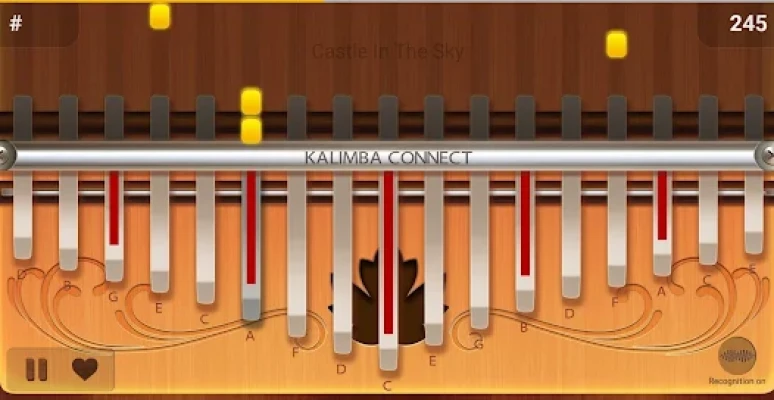
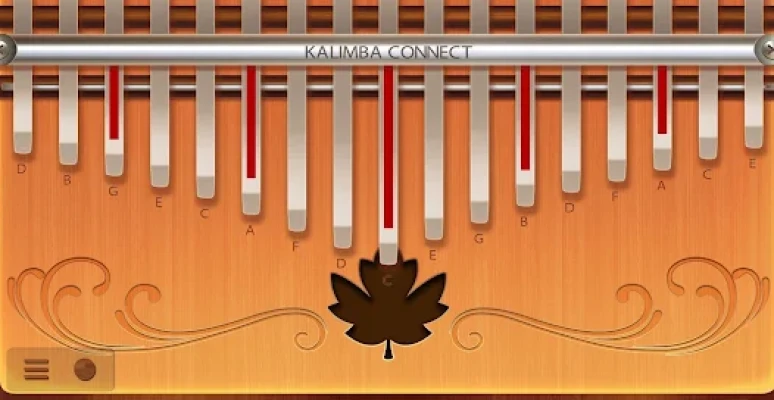
The core experience revolves around playing a virtual 17-key kalimba.
Players can:
- Tap individual keys to produce notes.
- Use multi-touch for faster sequences.
- Swipe across the interface while playing.
- Follow kalimba tabs for songs.
- Practice through lessons.
- Try music-based practice games.
- Complete Daily Challenges.
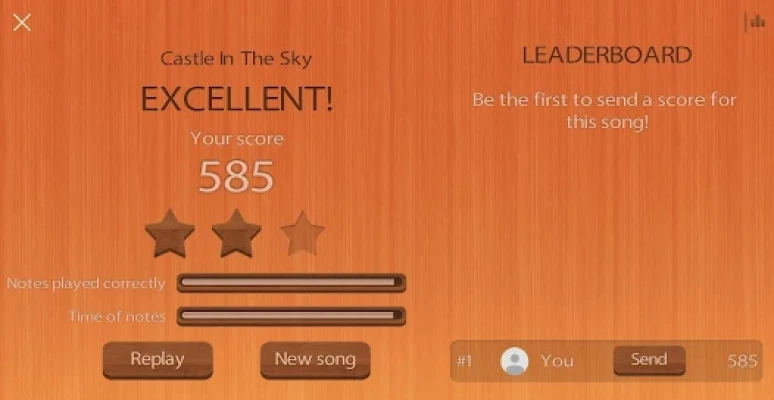
- Compete through the Global Leaderboard.
- Record audio while playing.
- Experiment with different instrument sounds.
- Try Magic Kalimba mode.
The result is closer to a virtual musical instrument and practice game than a conventional level-based mobile game.
Main Features
1. 17-Key Virtual Kalimba
The app provides a full virtual 17-key kalimba interface, allowing players to reproduce melodies directly on a smartphone or tablet.
2. Huge Song and Tab Library
Kalimba Connect promotes access to more than 650,000 songs from music songbooks, giving players a very large selection of material to explore and practice.
3. Kalimba Lessons
The Lessons mode is designed to make learning easier, particularly for people who are new to the instrument.
4. Daily Challenges
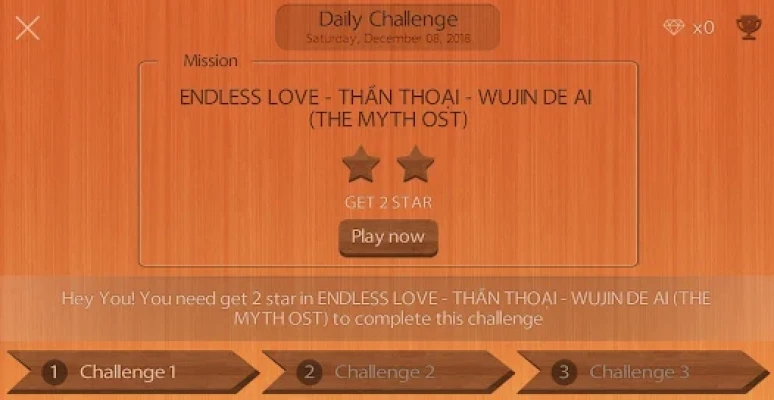
Daily Challenge mode adds a recurring activity for players who want something more structured than simply playing random songs.
5. Global Leaderboard
Players can participate in a global ranking system, adding a competitive element to an otherwise relaxing music experience.
6. Multi-Touch and Swipe Controls
Touchscreen controls support both multi-touch and swiping, allowing players to perform faster note sequences more naturally.
7. Audio Recording
The app includes the ability to record audio while playing, which can be useful for listening back to practice sessions or saving musical ideas.
8. Multiple Virtual Instruments
Beyond kalimba, the app lists numerous instrument sounds, including piano, grand piano, harp, cello pizzicato, guzheng, xylophone, ukulele, violin, flute, banjo, trumpet, dulcimer and others.
9. Magic Kalimba Mode
Magic Kalimba provides an additional way to experiment with the virtual instrument and gives the app a more playful side.
Controls & Interface Guide
The controls are designed around touchscreen interaction.
Basic controls:
- Tap: Play a kalimba note.
- Multi-touch: Trigger multiple notes during suitable sequences.
- Swipe: Move across notes during faster musical passages.
- Song selection: Choose a song or tab to practice.
- Lessons: Follow available learning material.
- Recording: Capture your playing as audio.
Because the app is built around a touchscreen instrument, players should spend a few minutes becoming comfortable with the position of the virtual keys before attempting difficult melodies.
How to Play Kalimba Connect
- Open Kalimba Connect on your Android device.
- Select the virtual kalimba.
- Explore the 17 available keys.
- Choose a song or kalimba tab.
- Follow the displayed notes.
- Start slowly and concentrate on accuracy.
- Increase your speed as the sequence becomes familiar.
- Try Lessons mode for structured practice.
- Use Daily Challenges when you want a specific goal.
- Record a performance when you want to review your playing.
Progression and Practice System
Kalimba Connect does not rely on a traditional RPG-style progression system. Instead, progression comes primarily through musical practice.
Players can improve by:
- Learning new melodies.
- Repeating difficult passages.
- Increasing playing speed.
- Becoming familiar with note positions.
- Completing challenges.
- Exploring different instruments.
- Practicing songs repeatedly.
- Comparing performance through leaderboard activities.
This makes the experience particularly suitable for players who prefer skill development over traditional combat or puzzle progression.
Beginner's Guide
If you have never played a virtual kalimba before, don't immediately start with complicated songs.
Begin with simple melodies and learn where the notes are located. Practice short sequences repeatedly until your fingers naturally move toward the correct keys.
A useful routine is:
Learn → Repeat → Slow Down → Improve Accuracy → Increase Speed → Record
The most important beginner skill is consistency. Playing a simple melody accurately is more useful than repeatedly attempting a difficult song without learning its note pattern.
Advanced Playing Tips
Practice in Short Sessions
Rather than playing one difficult song repeatedly for a long time, divide it into smaller sections.
Learn the Pattern
Try to recognize groups of notes instead of thinking about every individual tap.
Use Multi-Touch Carefully
Multi-touch can make certain sequences faster, but accuracy should come before speed.
Record Your Playing
Audio recording can help you notice timing mistakes that may not be obvious while you're concentrating on the screen.
Use Lessons
The Lessons mode can provide a more structured learning path than randomly selecting songs.
Try Daily Challenges
Daily Challenges can give experienced players an additional reason to return and practice consistently.
Music & Instrument Options
One of the more unusual aspects of Kalimba Connect is the range of instrument sounds available.
The Google Play description lists options including:
- Kalimba
- Piano
- Grand Piano
- Pipe Organ
- Harpsichord
- Accordion
- Electric Guitar
- Harp
- Cello Pizzicato
- Guzheng
- Nylon Guitar
- Music Box
- Sitar
- Xylophone
- Clarinet
- Ukulele
- Violin
- Banjo
- Flute
- Trumpet
- Panpipe
- Maracas
- Tuba
- Dulcimer
The exact available selection may change as the application is updated.
Does Kalimba Connect Work With a Real Kalimba?
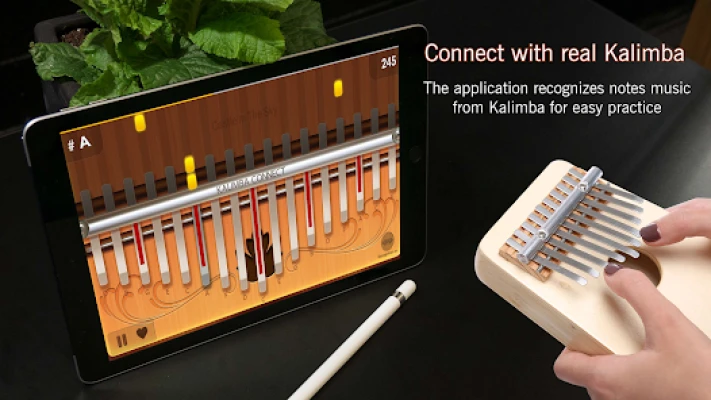
The Google Play listing advertises a notes recognition mode intended for connecting the experience with a real kalimba.
However, player feedback is mixed. Some Google Play reviewers have reported difficulties with note recognition and questioned how effectively the real-instrument connection works.
For that reason, it is best to view the virtual kalimba as the app's most straightforward feature rather than assuming that every real-instrument recognition function will work perfectly on every device.
Is Kalimba Connect Good for Beginners?
Yes, it can be useful for beginners who want to experiment with kalimba playing without immediately committing to a physical instrument.
The combination of a 17-key virtual kalimba, lessons, song tabs and music games gives newcomers several ways to start learning.
That said, users looking for highly precise professional training should treat it as a convenient practice tool rather than a replacement for a physical kalimba and formal instruction.
Game Difficulty
Overall difficulty: Easy to Moderate
The basic controls are simple, but song difficulty depends heavily on the melody being practiced.
Beginner: Easy
Casual player: Easy
Intermediate: Moderate
Advanced: Moderate to challenging depending on the song
The difficulty is therefore determined more by the music than by conventional game mechanics.
Player Experience
Kalimba Connect has received a substantial number of ratings on Google Play, with the current listing showing a 4.1-star rating and thousands of reviews.
Players appreciate the convenience of having a virtual kalimba available on a mobile device. However, some reviews criticize advertisements, premium song availability and the accuracy or responsiveness of note recognition.
This makes the app particularly appealing to casual users who want a portable musical experience, while serious learners may want to test the features carefully before relying on it as their primary learning tool.
Pros and Cons
Pros
- 17-key virtual kalimba
- Large song and tab library
- Lessons mode
- Daily Challenges
- Global leaderboard
- Multi-touch support
- Swipe controls
- Audio recording
- Multiple instrument sounds
- Magic Kalimba mode
- Suitable for casual practice
- Available for Android phones and tablets
Cons
- Advertising can interrupt the experience
- Some content may require premium access
- Real-kalimba note recognition has received mixed user feedback
- Some players have reported inaccurate or delayed note recognition
- Song quality and usefulness can vary by selection
The positives and negatives above reflect both the advertised feature set and user feedback visible on Google Play.
Game Modes
Virtual Kalimba
The primary mode lets you play the 17-key digital kalimba directly on your touchscreen.
Lessons Mode
Designed to help users learn and practice musical material in a more structured way.
Daily Challenge
Provides recurring musical challenges for players who want an additional objective.
Global Leaderboard
Adds competitive ranking to the music-practice experience.
Music Games
Practice is combined with game-like activities to make repetition more engaging.
Magic Kalimba
A more playful mode that offers another approach to interacting with the virtual instrument.
Offline Play
Google Play currently lists Kalimba Connect as an Offline title.
This is useful for players who want to practice away from a constant internet connection, although some features that depend on online content or services may naturally require connectivity.
Technical Details
Game/App: Kalimba Connect
Developer: SSN Publishing
Platform: Android
Package ID: mbira.sansula.pianist.kalimba
Category: Music
Content Rating: Everyone
Players: Single player
Google Play Downloads: 500K+
Current Google Play Rating: 4.1 stars
Contains Ads: Yes
In-App Purchases: Yes
Latest Google Play update: July 27, 2026
Android Compatibility
The application is designed for Android phones and tablets. Historical third-party listings indicate Android 5.0+ for recent versions, although device requirements can change between releases, so users should check the current Google Play listing before installing.
Recent Updates
Google Play currently lists July 27, 2026 as the latest update date, with the current update information shown as “Fix bug.”
The app has also received previous maintenance updates focused on bug fixes and performance improvements.
Similar Games and Apps
Players interested in Kalimba Connect may also enjoy other music-focused mobile experiences such as:
- Rhythm Tiles: Piano Game
- DoReMi Music Academy
- Piano Fever
- Cytoid
- Other virtual piano and rhythm-training games
Google Play itself currently lists several music and rhythm titles as similar games.
Kalimba Connect vs Traditional Kalimba
A physical kalimba provides the tactile feeling, natural resonance and acoustic character of real metal tines.
Kalimba Connect offers something different: portability and immediate access. You can practice without carrying a physical instrument and experiment with melodies directly on a phone or tablet.
For beginners, the app can therefore work as an introduction to kalimba-style playing. For experienced musicians, it can serve as a convenient secondary practice option.
Who Should Play Kalimba Connect?
Kalimba Connect is a good choice for:
- People interested in kalimba music
- Beginners learning basic melodies
- Casual music-game players
- Players looking for a virtual musical instrument
- People who want to practice on Android
- Music fans who enjoy experimenting with different instruments
- Players who like daily challenges and leaderboards
It may be less suitable for players seeking a completely advertisement-free professional music-learning environment.
Expert Rating
Overall: 7.8/10
| Category | Rating |
|---|---|
| Music Experience | 8.5/10 |
| Controls | 8/10 |
| Beginner Friendly | 8.5/10 |
| Song Variety | 9/10 |
| Practice Features | 8/10 |
| Challenge Features | 7.5/10 |
| Real-Instrument Recognition | 6/10 |
| Overall | 7.8/10 |
Final Verdict
Kalimba Connect is an interesting mobile music experience that successfully turns the basic idea of a kalimba into an accessible touchscreen instrument.
Its biggest strengths are the 17-key virtual kalimba, extensive song-tab library, lessons, daily challenges, audio recording and variety of instrument sounds.
It is particularly attractive for beginners and casual musicians who want to experiment with kalimba melodies anywhere. At the same time, mixed feedback about note recognition and advertisements means that serious musicians should consider it a supplementary practice tool rather than a complete replacement for a physical instrument.
If you enjoy virtual instruments, music games or learning simple melodies on your phone, Kalimba Connect is worth trying.
Frequently Asked Questions
Is Kalimba Connect free?
Kalimba Connect is listed on Google Play as a free app, but it contains advertisements and offers in-app purchases.
Is Kalimba Connect available on Android?
Yes. Kalimba Connect is available through Google Play for Android devices.
How many keys does Kalimba Connect have?
The virtual instrument features 17 keys.
Does Kalimba Connect have kalimba tabs?
Yes. The app advertises access to more than 650,000 songs from music songbooks and kalimba tabs.
Can I learn kalimba with Kalimba Connect?
The app includes a Lessons mode designed to make learning easier, so beginners can use it as a practice and introductory learning tool.
Does Kalimba Connect have challenges?
Yes. It includes a Daily Challenge mode and a Global Leaderboard.
Can I record my kalimba playing?
Yes. The app supports audio recording while playing.
Does Kalimba Connect support other instruments?
Yes. The app lists numerous virtual instrument sounds in addition to kalimba, including piano, harp, guitar, violin, flute, xylophone and others.
Can I play Kalimba Connect offline?
Google Play currently categorizes the app as Offline.
Is Kalimba Connect suitable for children?
Google Play currently gives the application an Everyone content rating. Parents should still consider advertisements and in-app purchases when deciding whether it is appropriate for a particular child.
Rate the Game
User Reviews













Popular Games



















 Android
 iOS
iOS Windows
 Xbox
Xbox