


Latest Version
April 25, 2026
Zplay (Beijing) Info. Tech. Co., Ltd.
Simulation
iOS
0
Report a Problem
More About :game
Dive into a world of color and geometry with Idle Painter 3D, published by Zplay. This game offers a unique twist on the idle genre by combining creative expression with incremental progression. You start with simple 3D wireframes and, through the power of tapping and automation, watch as they transform into vibrant, multi-dimensional art pieces.
As you complete various low poly models—ranging from animals and vehicles to famous landmarks—you earn currency to upgrade your painting speed, unlock new color palettes, and hire automated "helper" brushes. Whether you are a fan of digital art or simply looking for a stress-free way to pass the time, Idle Painter 3D provides a satisfying sense of accomplishment with every finished sculpture.
Core Features & Mechanics
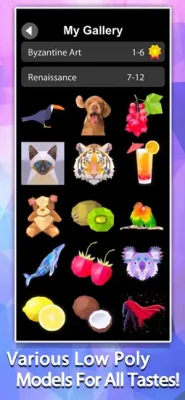
Beautiful Low Poly Art: Collect and complete dozens of unique 3D models with a clean, modern aesthetic.
Satisfying Tap Mechanics: Every tap applies a burst of color, providing instant visual feedback.
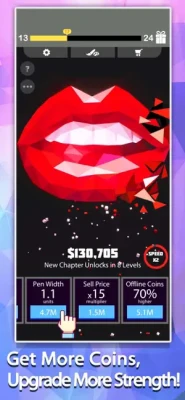
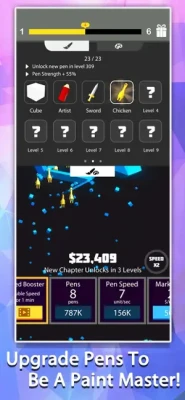
Progressive Upgrades: Invest in paint flow, drying speed, and "Auto-Paint" bots to maximize efficiency.
Creative Gallery: Showcase your finished works in a professional virtual museum layout.
Relaxing Soundtrack: Experience a calm, ambient audio environment designed to reduce stress.
Offline Earnings: Your studio continues to work on masterpieces even when the app is closed.
Gameplay Guide
How to Play
Choose a Model: Select an unpainted 3D wireframe from your collection.
Tap to Fill: Tap the screen to send paint droplets onto the model.
Upgrade Skills: Use the coins generated from painted sections to buy faster brushes and larger paint tanks.
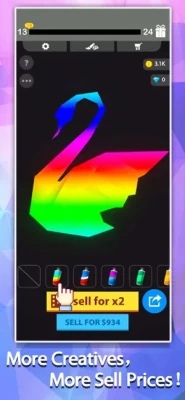
Complete & Sell: Once the model is 100% colored, finalize it to earn a large bonus and move to the next level.
How to Win: Strategy
The best strategy is to focus on Automation Early. While manual tapping is fast, investing your first few thousand coins into "Auto-Painter" levels allows you to generate steady income while you focus on navigating the 3D camera to find unpainted spots.
Tips & Tricks
The 360-Degree View: Don't forget to rotate the model! Some hidden crevices require specific angles to be reached by the paint droplets.
Prestige for Palettes: Use the prestige system to unlock rare neon or metallic color schemes that increase the final value of your art.
Ad-Boosted Speed: If you're stuck on a complex model, use the "2x Speed" boost to triple your paint output for a short duration.
The Player Experience
"It’s like a digital stress ball. Watching the low poly models fill in with color is incredibly soothing. The UI is very clean, and I love that it doesn't require constant attention to make progress." — CreativeMind_Z
Pros & Cons
| Pros | Cons |
| Visually therapeutic and calming | Progress slows down on complex 3D shapes |
| Huge variety of models to unlock | Some premium brushes require unlocking |
| Great for all ages and skill levels | Occasional ads for free multipliers |
Technical Details
Publisher: Zplay (Beijing) Info. Tech. Co., Ltd.
Category: Simulation / Creativity / Idle
Compatibility: Requires iOS 9.0 or later; Android 5.0 and up.
Size: ~120 MB
Language Support: English, Chinese, Japanese, Korean, and more.
Comparison & Competition
Comparison Section
Unlike 2D "Color by Number" apps, Idle Painter 3D uses a dynamic 3D engine. This adds a layer of spatial awareness and exploration as you have to manipulate the object to ensure every polygon is covered, making it more engaging than flat coloring games.
Competitor Games
I Can Paint
Paint and Learn
Color Bump 3D
Similar Games
Poly Island (For the low poly fans)
Idle Museum Tycoon (For the gallery management fans)
Terrarium: Garden Idle (For the relaxing vibes)
FAQ
Q: Can I share my finished art?
A: Yes! There is a "Snapshot" mode that allows you to take high-quality photos of your completed 3D models to save to your device or share.
Q: Do I lose my progress if I switch phones?
A: If you are logged into Game Center or Google Play Games, your progress is synced to the cloud.
Q: How do I get more "Auto-Painters"?
A: Auto-Painters are unlocked through the "Hiring" tab using the coins you earn from completing paintings.
Rate the Game
User Reviews













Popular Games



















 Android
 iOS
iOS Windows
 Xbox
Xbox