
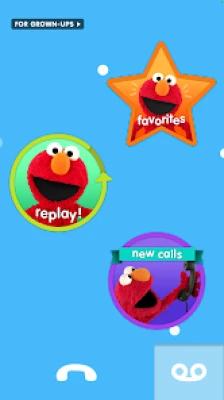

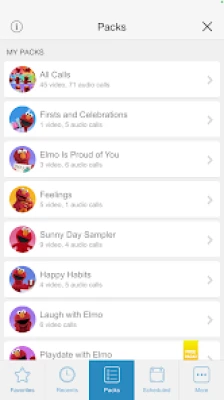
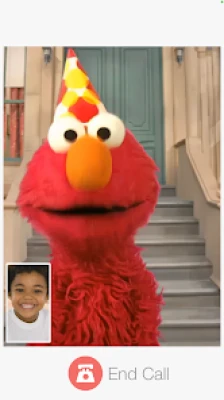
Elmo Calls transforms screen time into playful educational engagement by allowing preschoolers to interact with one of Sesame Street’s most beloved characters. Through simulated calls and personalized interactions, children can practice listening, counting, identifying letters, and social-emotional skills while feeling directly connected to Elmo.
The app is particularly popular with parents of toddlers and preschoolers because it encourages familiarity with daily routines like bedtime, potty training, birthdays, and emotional expression. Unlike fast-paced arcade apps, Elmo Calls focuses on safe, age-appropriate, low-pressure digital experiences.
Its biggest strengths are simplicity, trusted Sesame Street branding, child-safe design, and educational value, though older children may outgrow it quickly due to limited complexity.
Key Features
Interactive Learning
-
Pretend video calls with Elmo
-
Voice calls and voicemail
-
Personalized birthday messages
-
Early literacy activities
Educational Benefits
-
Letter recognition
-
Number learning
-
Emotional development
-
Routine reinforcement
Child-Friendly Design
-
Simple controls
-
Preschool-safe content
-
Familiar Sesame Street character
-
Bright visuals and audio
Characters
Main Characters:
-
Elmo
-
Sesame Street-themed supporting educational prompts
Character Appeal:
Elmo’s familiar voice and friendly tone help children build trust, engagement, and confidence during learning sessions.
Weapons / Items
Since Elmo Calls is educational rather than action-based, “items” are interactive tools:
Core Interactive Tools:
-
Video call mode
-
Audio call mode
-
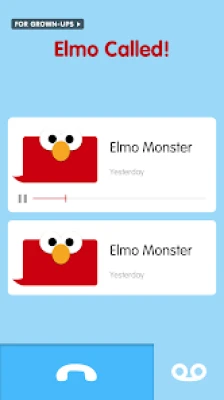
Voicemail mode
-
Learning prompts
-
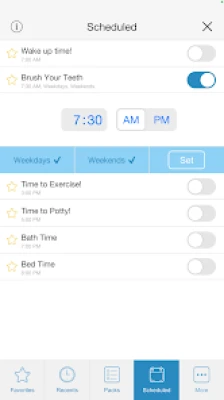
Personalized scheduler
How to Play
-
Open the app
-
Choose call type (video, audio, voicemail)
-
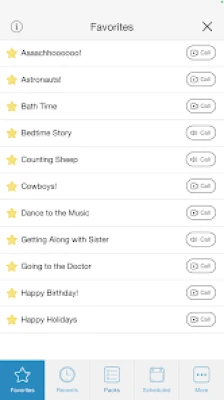
Select learning topic or routine
-
Let your child interact with Elmo
-
Practice repetition through educational prompts
-
Reinforce lessons through repeated engagement
How to Win: Strategy Guide
Best Parent Strategy
Consistency + Supervised Learning + Routine Reinforcement
Winning Approach:
-
Use bedtime or morning routines
-
Encourage repetition
-
Integrate real-world counting
-
Practice emotional vocabulary
-
Personalize milestones like birthdays
Tips & Tricks
-
Schedule Elmo calls for motivation
-
Use potty or bedtime themes for routine support
-
Repeat favorite lessons for memory retention
-
Pair app lessons with offline activities
-
Limit sessions to age-appropriate durations
Beginner’s Guide
First Steps for Parents:
-
Explore all call types
-
Start with favorite Elmo interactions
-
Introduce numbers and letters gradually
-
Use routines children already know
-
Monitor engagement levels
Common Mistakes:
-
Overusing novelty
-
Expecting advanced academic outcomes
-
Using without parental reinforcement
Advanced Pro Strategy
For Maximum Educational Value:
-
Use Elmo Calls as a behavior cue
-
Pair with reading time
-
Reinforce lessons with physical toys
-
Use calendar events for personalized learning
-
Rotate content to maintain engagement
Trophy & Achievement Guide
Elmo Calls does not use traditional trophies, but practical milestones include:
-
Learning first numbers
-
Recognizing letters
-
Improved bedtime transitions
-
Better emotional vocabulary
-
Positive screen habits
Player Experience
Parent Pros:
-
Trusted educational brand
-
Preschool-friendly
-
Safe digital environment
-
Encourages routines
Parent Cons:
-
Limited complexity
-
Younger age focus
-
Repetitive for older kids
Pros & Cons
Pros:
-
Sesame Street trust factor
-
Educational design
-
Emotional development support
-
Easy navigation
Cons:
-
Narrow age range
-
Limited long-term challenge
-
Less engaging for children above preschool age
Tech Details
-
Developer: Sesame Workshop
-
Category: Educational / Kids
-
Target Age: Preschool / Early Childhood
-
Platform: Android
-
Focus: Learning + Entertainment
System Requirements
Android:
-
Android-compatible mobile device
-
Stable app permissions for calls/media
-
Family-friendly supervision
Recommended:
-
Parent-guided first-time use
Game Modes Overview
Video Calls
Face-to-face pretend interactions
Voice Calls
Quick conversational learning
Voicemail
Replayable educational messages
Updates & What’s New
Updates typically improve stability, usability, and educational content refinement to keep the app functional for families.
Comparison Section
| Feature | Elmo Calls | ABC Kids | Khan Academy Kids |
|---|
| Character Familiarity | Excellent | Moderate | Moderate |
| Preschool Focus | Strong | Strong | Broad |
| Routine Reinforcement | Excellent | Weak | Moderate |
| Emotional Learning | Strong | Weak | Moderate |
| Complexity | Low | Moderate | High |
User Ratings & Social Proof
Parents often choose Elmo Calls because Sesame Workshop is a highly trusted educational organization with strong preschool brand recognition.
Is It Worth Playing? Honest Verdict
Yes — especially for toddlers and preschoolers.
Elmo Calls excels as a gentle educational introduction to mobile apps, particularly for routine-building and early childhood development. It is best for younger children, while older kids may prefer broader educational platforms.
Competitor Games
-
ABC Kids
-
Khan Academy Kids
-
PBS Kids Games
-
Daniel Tiger apps
Similar Games
-
Sesame Street Alphabet Kitchen
-
Elmo Loves ABCs
-
Elmo Loves 123s
-
PBS Play & Learn
FAQ
Is Elmo Calls free?
It is typically offered as a child-friendly educational app; availability may vary by platform.
Is it safe for kids?
Yes, it is designed for preschool audiences with Sesame Workshop educational standards.
What age is best?
Toddlers and preschoolers benefit most.
Does it teach real skills?
Yes, especially letters, numbers, routines, and emotional development.
Is parental supervision needed?
Recommended for best learning outcomes.