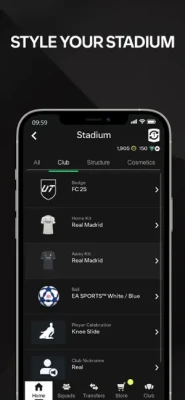
EA SPORTS FC 26 Companion App is the official mobile companion for Ultimate Team in EA SPORTS FC 26. Designed for iPhone and iPad, the app allows players to stay connected to their FUT club without needing to access their console or PC. Players can manage squads, complete Squad Building Challenges (SBCs), trade on the transfer market, open packs, customize stadiums, and claim competitive rewards directly from their mobile devices.
The app syncs seamlessly with EA SPORTS FC 26 Ultimate Team progress, meaning every squad change, transfer market purchase, or reward claim instantly updates across platforms. Whether you are grinding Division Rivals, building SBC solutions, or tracking Evolutions, the Companion App provides nearly all major FUT management features outside live gameplay.
The app is especially popular among competitive FUT players because it allows constant market monitoring and squad optimization while away from the game console.
Gameplay Overview
Unlike the main EA SPORTS FC 26 game, the Companion App focuses entirely on Ultimate Team management rather than actual football matches.
Main Activities
-
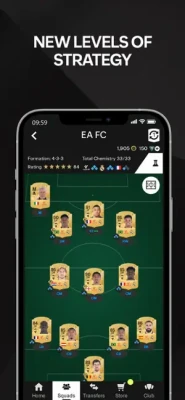
Squad management
-
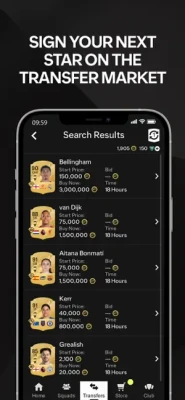
Transfer market trading
-
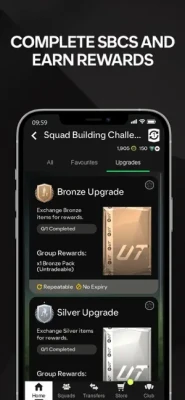
SBC completion
-
Pack opening
-
Evolution upgrades
-
Reward claiming
-
Stadium customization
-
Objective tracking
Core Gameplay Loop
-
Log into Ultimate Team
-
Manage your squad
-
Trade players on the market
-
Complete SBCs
-
Earn rewards
-
Upgrade your team
-
Track competitive progress
The app acts as a full FUT management hub for competitive players.
Features
-
Full Ultimate Team club management
-
Live transfer market access
-
Squad Building Challenges support
-
Evolutions system integration
-
Reward claiming without console login
-
Squad customization tools
-
Stadium management
-
Cross-platform synchronization
-
Mobile-friendly interface
-
Fast trading and squad editing
Controls & Interface Guide
Mobile Navigation
The interface is designed specifically for touchscreen devices.
Main Controls
-
Tap menus to navigate
-
Swipe between sections
-
Drag players into squads
-
Tap cards for player details
-
Hold for quick actions
Main Interface Tabs
-
Squads
-
SBCs
-
Transfer Market
-
Store
-
Evolutions
-
Objectives
-
Club Management
The streamlined mobile layout makes team management extremely efficient for FUT players.
Game Progression System
Early Progression
-
Create your Ultimate Team club
-
Build starter squads
-
Complete beginner SBCs
Mid Game
-
Trade players actively
-
Improve chemistry
-
Upgrade cards through Evolutions
Late Game
-
Build elite meta squads
-
Compete in Champions
-
Maximize market profits
-
Complete advanced SBCs
Progression depends heavily on market knowledge and efficient squad building.
Characters
Player Cards
The Companion App revolves around football player cards rather than story characters.
Popular Card Types
-
Gold Players
-
Icons
-
Heroes
-
TOTW
-
Special Promo Cards
-
Evolution Players
Managers
Managers boost chemistry and league links for squads.
Weapons / Items
Important FUT Items
-
Player cards
-
Packs
-
Coins
-
FC Points
-
Consumables
-
Stadium cosmetics
-
Position modifiers
-
Chemistry styles
Valuable Assets
-
Rare gold cards
-
Promo players
-
High-rated fodder
-
Evolution upgrades
Trading and investing are major parts of the Companion App experience.
How to Play
Beginner Walkthrough
-
Download the Companion App
-
Log in with your EA account
-
Connect your Ultimate Team club
-
Open starter packs
-
Build your first squad
-
Complete beginner SBCs
-
Start trading on the market
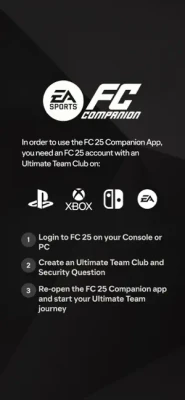
Players must first create an Ultimate Team club on console or PC before using the app.
Accessibility
The Companion App is highly accessible because:
-
Matches are not required
-
Controls are simple
-
Menus are easy to navigate
-
Sessions can be very short
-
Squad management is streamlined
However, advanced market trading may become overwhelming for casual players.
How to Win: Strategy Guide
Best Strategy
-
Invest in fodder before SBC releases
-
Monitor market fluctuations
-
Complete daily objectives
-
Sell cards during hype periods
-
Use Evolutions efficiently
-
Build hybrid chemistry squads
The best FUT players combine smart trading with competitive squad building.
Tips & Tricks
-
Buy players during low market periods
-
Complete SBCs with untradeable cards first
-
Claim rewards regularly
-
Track promo events carefully
-
Use the app daily for market opportunities
-
Save packs for major promos
Beginner’s Guide
Essential Advice
-
Start with cheap meta players
-
Learn chemistry basics
-
Avoid wasting coins early
-
Focus on objectives first
-
Complete foundation SBCs
New players should focus on efficient squad progression rather than expensive star players.
Advanced Pro Strategy
Elite FUT Techniques
-
Snipe undervalued cards quickly
-
Flip cards during promo cycles
-
Predict SBC demand spikes
-
Invest in chemistry styles
-
Use Evolutions strategically
-
Track live market trends daily
Top FUT traders can generate millions of coins through market expertise.
Trophy & Achievement Guide
Common Goals
-
Reach FUT Champions qualification
-
Complete advanced SBCs
-
Unlock premium Evolutions
-
Build elite squads
-
Earn Division Rivals rewards
-
Complete seasonal objectives
Long-term progression is heavily tied to Ultimate Team performance.
Players Experience
Most players praise the Companion App for:
-
Fast squad management
-
Convenient SBC completion
-
Mobile transfer market access
-
Efficient reward claiming
However, community discussions frequently mention:
-
Transfer market lock issues
-
Login errors
-
Occasional server instability during launches and promos.
Some players also report frustration with transfer market access restrictions for newer accounts.
Pros & Cons
Pros
-
Full FUT management on mobile
-
Easy transfer market trading
-
Excellent SBC support
-
Fast reward claiming
-
Cross-platform synchronization
-
Convenient for daily FUT grinding
Cons
-
No actual match gameplay
-
Occasional login/server problems
-
Market access restrictions
-
Heavy FUT grind focus
-
Companion app bugs during launches
Tech Details
| Feature | Details |
|---|
| App Type | Sports Companion App |
| Developer | Electronic Arts |
| Publisher | EA Sports |
| Platform | iPhone, iPad |
| Main Mode | Ultimate Team Management |
| Multiplayer Integration | Yes |
| Internet Required | Yes |
| Size | ~70 MB |
System Requirements
iOS Requirements
-
iOS 15.0 or later
-
EA account required
-
Active Ultimate Team club
-
Stable internet connection
-
Compatible iPhone or iPad device
Game Modes Overview
Squad Management
Build and customize Ultimate Team squads.
Transfer Market
Buy and sell players globally.
SBC Mode
Complete Squad Building Challenges for rewards.
Evolutions
Upgrade player cards with progression systems.
Objectives & Rewards
Track seasonal progress and claim rewards.
Updates & What's New
Recent FC 26 Companion App updates introduced:
-
Improved Evolutions support
-
Better squad management tools
-
Faster transfer market access
-
UI optimizations
-
Enhanced mobile performance
Comparison Section
| Feature | FC 26 Companion App | FIFA 23 Companion | eFootball Hub |
|---|
| Transfer Market | Yes | Yes | No |
| SBC Support | Yes | Yes | No |
| Squad Management | Excellent | Strong | Moderate |
| Cross-Platform Sync | Yes | Yes | Limited |
| Mobile Optimization | Excellent | Good | Moderate |
User Ratings & Social Proof
The app consistently ranks highly in sports categories on the App Store and remains one of the most-used football companion apps globally.
The FUT community heavily relies on the app during promo events, SBC releases, and market trading periods.
Why This Game Stands Out
The FC 26 Companion App stands out because it:
-
Gives full FUT access anywhere
-
Simplifies squad management
-
Enables live market trading
-
Keeps players connected outside gameplay
-
Supports deep Ultimate Team progression
For competitive FUT players, the app is nearly essential.
Is It Worth Playing? Honest Verdict
Yes — especially for dedicated Ultimate Team players.
While it cannot replace the full football gameplay experience, the Companion App dramatically improves FUT convenience and efficiency. Players who enjoy trading, SBCs, squad building, and market investing will find it incredibly useful.
Casual players may only use it occasionally, but hardcore FUT users often rely on it daily.
Competitor Games
-
eFootball Companion Tools
-
FUTBIN
-
FUTWIZ
-
MADFUT
-
PacyBits-inspired apps
Similar Games
Players who enjoy the FC Companion App may also like:
-
FUTBIN
-
FUTWIZ
-
MADFUT
-
Top Eleven
-
Football Manager Mobile
Final Summary / Conclusion
EA SPORTS FC 26 Companion App remains one of the most important tools for Ultimate Team players. With full squad management, transfer market access, SBC support, Evolutions, and reward claiming, the app allows players to stay connected to FUT 24/7 from their mobile devices.
Despite occasional server issues and transfer market restrictions, the Companion App continues to be an essential companion for competitive EA SPORTS FC players looking to maximize efficiency and squad progression.
FAQ
Is the EA SPORTS FC 26 Companion App free?
Yes, the app is free to download with optional FC Points purchases.
Can you play matches in the Companion App?
No, the app only supports Ultimate Team management features.
Do I need the full game?
Yes, you must create an Ultimate Team club on console or PC first.
Can I use the transfer market?
Yes, but some accounts may need to unlock access first.
Does the app sync with console progress?
Yes, progress syncs automatically with your EA account.
Is the Companion App worth using?
Yes, especially for active FUT players who trade or complete SBCs regularly.
Does the app support Evolutions?
Yes, Evolutions are fully supported in FC 26.
Why is my transfer market locked?
EA may restrict access for security reasons until gameplay objectives are completed.





































 Android
 iOS
iOS Windows
 Xbox
Xbox