




Latest Version
August 19, 2025
SSN Publishing
Music
Android
0
Report a Problem
More About :game
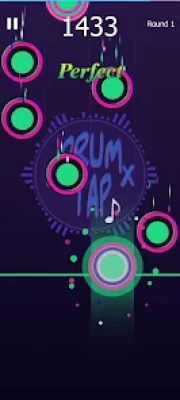
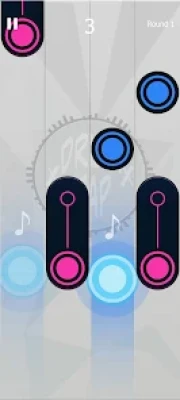
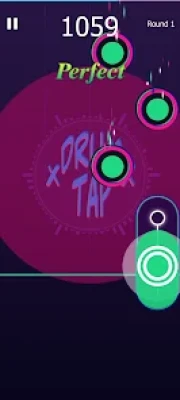
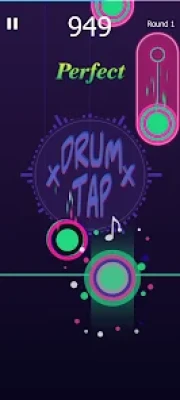
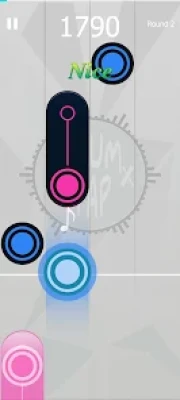
Drum Tap: Tiles Drum Beat is a mobile virtual drum kit developed by SSN Publishing. Instead of requiring a physical drum set, the game places different drum sounds into a touchscreen tile interface.
The basic concept is extremely accessible: tap a colored tile and hear the corresponding drum sound. Players can use the interface to practice rhythms, experiment with beats or simply enjoy making percussion music.
The app is positioned as a convenient alternative to a physical drum kit because it can be used on a phone or tablet without taking up space or producing the volume associated with a traditional drum set.
Game Theme & Atmosphere
Drum Tap focuses on rhythm, percussion and musical experimentation rather than a conventional story.
Its atmosphere comes from:
- Colorful drum tiles
- Immediate percussion sounds
- Different drum-kit styles
- Fast tapping
- Rhythm creation
- Musical experimentation
The result is a casual virtual instrument that can be played for a few minutes or used for longer rhythm sessions.
Gameplay Overview
The main gameplay mechanic is tapping the colored drum tiles at the right moment to create a beat.
Unlike a traditional action game, there are no enemies, weapons or complicated character systems. The player's skill comes from timing, rhythm and coordination.
A typical session can involve:
- Selecting a drum style.
- Exploring the available drum sounds.
- Tapping individual tiles.
- Combining different percussion sounds.
- Creating repeating rhythms.
- Experimenting with different tempos.
- Practicing coordination.
- Performing along with other musical parts where supported.
The app's description specifically highlights kick drums, cymbals and snare drums as sounds that can be triggered by tapping.
Main Features
Virtual Drum Kit
Drum Tap converts the phone or tablet into a compact virtual drum kit. This allows users to experiment with percussion without needing physical equipment.
Colorful Drum Tiles
The drum interface uses colorful tiles to represent different percussion sounds. Tapping the tiles immediately produces the associated sound.
Multiple Drum Styles
The game includes several distinct drum-kit styles:
- Jazz Kit
- Rock Kit
- Dance Kit
- Electric Pad
- Ethnic Drums
- Chinese Drum
Kick, Snare & Cymbal Sounds
The virtual kit provides core percussion sounds such as kick drums, snare drums and cymbals, giving players the basic building blocks needed for simple beats.
Music Practice
The game can be used as a simple practice environment for people interested in learning rhythm and experimenting with percussion.
Portable Drumming
Because everything happens on a mobile device, players can practice without carrying a real drum kit.
How to Play Drum Tap: Tiles Drum Beat
Step 1: Open the Drum Kit
Launch the game and enter the virtual drum interface.
Step 2: Explore the Tiles
Tap different colored tiles to discover which drum sound each one produces.
Step 3: Find the Basic Beat
Start with a simple combination of kick, snare and cymbal sounds.
Step 4: Establish a Rhythm
Repeat a basic pattern until you can maintain consistent timing.
Step 5: Add More Sounds
Experiment with additional percussion elements to make your beat more interesting.
Step 6: Change Drum Styles
Try jazz, rock, dance, electric, ethnic and Chinese drum sounds to discover different musical textures.
Controls & Interface Guide
The controls are based almost entirely on touchscreen tapping.
| Action | Control |
|---|---|
| Play a drum | Tap its tile |
| Play kick | Tap the kick-drum tile |
| Play snare | Tap the snare tile |
| Play cymbal | Tap the cymbal tile |
| Create a rhythm | Combine multiple tile taps |
| Change style | Select another drum kit |
The simple interface makes Drum Tap accessible even to players who have never used a virtual drum application before.
Rhythm & Timing
Timing is the most important skill in Drum Tap.
A good rhythm is not simply a collection of random drum sounds. The player needs to understand how different percussion elements work together.
A basic rhythm can be built around:
Kick → Snare → Kick → Snare
Cymbals and additional percussion can then be added to create variation.
For beginners, keeping a steady tempo is more important than attempting complicated patterns.
Beginner's Guide
Start With Three Sounds
Begin with kick, snare and cymbal. These sounds provide an easy foundation for understanding rhythm.
Keep a Steady Tempo
Tap at a consistent pace rather than changing speed randomly.
Practice Repeating Patterns
Repeat the same beat several times. This helps develop timing and finger coordination.
Experiment With Styles
A rock kit can feel very different from an ethnic or Chinese drum kit. Exploring different kits helps players understand how percussion sounds can change the character of a rhythm.
Don't Overcomplicate Your Beats
A simple, consistent rhythm can sound better than a complicated pattern played without accurate timing.
Advanced Drumming Tips
1. Build a Foundation
Start with the kick drum and establish a steady pulse.
2. Add the Snare
Use the snare to create contrast and give the beat a stronger structure.
3. Add Cymbals Strategically
Cymbals can emphasize transitions and add energy without needing to be played continuously.
4. Experiment With Syncopation
Once basic timing feels natural, try placing some hits between the main beats.
5. Try Different Drum Kits
Changing from rock to jazz or electric percussion can inspire completely different rhythms.
6. Practice Finger Independence
Try alternating between different tiles with separate fingers when the interface allows it.
Drum Kit Styles
Jazz Kit
The jazz kit provides a style suited to softer and more traditional drum patterns.
Rock Kit
Rock-style drums are useful for heavier, more energetic rhythms.
Dance Kit
Dance-oriented percussion is suitable for electronic and upbeat rhythms.
Electric Pad
The electric pad introduces a more electronic character to the drumming experience.
Ethnic Drums
Ethnic percussion provides sounds that differ from conventional Western drum kits.
Chinese Drum
The Chinese drum option adds another distinctive percussion style to the collection.
Music Styles
One of Drum Tap's strengths is its variety of percussion styles.
The available kits allow players to experiment with:
- Jazz
- Rock
- Dance
- Electronic
- Ethnic
- Traditional Chinese percussion
This variety gives the app more flexibility than a virtual drum interface limited to a single conventional kit.
Progression System
Drum Tap does not follow a conventional RPG progression system.
There are no traditional:
- Character levels
- Weapons
- Armor
- Skill trees
- Story chapters
Instead, progression is based on musical ability and experimentation.
Players improve by developing:
- Timing
- Rhythm
- Finger coordination
- Tempo control
- Beat construction
- Musical creativity
This makes the game more comparable to a virtual instrument and rhythm app than a traditional level-based game.
Game Difficulty
Overall Difficulty: Easy to Moderate
| Skill | Difficulty |
| Learning the controls | Very Easy |
| Playing individual sounds | Very Easy |
| Creating simple beats | Easy |
| Maintaining tempo | Moderate |
| Complex rhythms | Moderate |
| Advanced finger coordination | Moderate–Hard |
The interface is easy to understand, but producing a genuinely consistent rhythm requires practice.
Who Is Drum Tap For?
Drum Tap is particularly suitable for:
- Beginner drummers
- Music students
- Rhythm-game fans
- Casual music players
- Percussion enthusiasts
- People without access to a physical drum kit
- Players who enjoy virtual instruments
- Users who want to experiment with drum sounds
- Anyone looking for a portable drum pad
Drum Tap as a Practice Tool
The application can be useful for basic rhythm experimentation, but it should not be considered a complete replacement for a physical drum kit or professional drum instruction.
A real drum set provides physical feedback, acoustic dynamics and a much broader range of playing techniques.
Drum Tap's advantage is convenience: users can experiment with beats immediately on a mobile screen without needing a dedicated instrument.
Player Experience
Available third-party Google Play tracking data identifies SSN Publishing as the developer and records a generally positive user rating of approximately 4.67/5 from 58 ratings in its indexed data.
One user review praised the game but reported difficulty achieving perfect scores because of timing issues in some songs. Another review simply described the game as brilliant.
This suggests that the core concept is well received, although timing precision may be an area where some players notice limitations.
Pros & Cons
Pros
- Simple touchscreen controls
- Virtual drum kit
- Colorful drum-pad interface
- Kick, snare and cymbal sounds
- Jazz kit
- Rock kit
- Dance kit
- Electric pad
- Ethnic drums
- Chinese drum
- Suitable for beginners
- Portable music experience
- Useful for rhythm experimentation
- No physical drum kit required
Cons
- Touchscreen feedback is different from real drums
- Advanced drummers may find the system limited
- Timing accuracy may not always feel perfect
- The experience is more casual than professional
- Some features may depend on the current app version
A user review specifically mentions timing problems affecting perfect performances.
Characters & Story
Drum Tap is not a story-driven game, so it does not feature traditional characters, narrative missions or a campaign.
The player effectively becomes the drummer, with the virtual drum kit serving as the main gameplay environment.
This minimalist structure keeps attention on:
Sound + Timing + Rhythm + Creativity
Weapons & Items
There are no weapons because Drum Tap is a music game.
The main interactive elements are the virtual percussion tiles and the different drum-kit configurations.
Game Modes
The available information presents Drum Tap primarily as a virtual drum and music game rather than a conventional level-based arcade title.
Its experience can be divided into several practical play styles:
Free Drumming
Tap the virtual kit and create your own rhythms.
Rhythm Practice
Use repeated patterns to improve timing and coordination.
Style Exploration
Switch between jazz, rock, dance, electric, ethnic and Chinese drum kits.
Musical Performance
Play along with other musical parts where supported by the app's experience. The description specifically mentions playing alongside a pianist, guitarist and singer.
Technical Details
Game: Drum Tap: Tiles Drum Beat
Developer: SSN Publishing
Package ID: drum.pads.realdrum.drumtap
Platform: Android
Category: Music
Content Rating: Everyone
Latest identified version: 1.8
Latest identified update: October 31, 2024
Android requirement: Android 5.0+ for version 1.8
In-app purchases: Yes
Approximate app size: 40–55 MB depending on distribution/version data
Latest Update
Version 1.8 is identified as the latest version in the available app records.
The update notes mention:
- Bug fixes
- Performance optimization
The indexed Google Play-derived data records October 31, 2024 as the update date.
Android Compatibility
Available records list Android 5.0 or newer for version 1.8.
Because Android compatibility can change with future releases, users should always check the current Google Play installation requirements before installing.
Similar Games
Players who enjoy Drum Tap may also be interested in:
- Drum Tiles: Drumming Game
- Drum Pad: Beat Maker
- Real Drum
- Virtual Drum
- Drum Kit Music Games
- Learn Drum
- Beat Maker and Drum Pad games
Available app-category data identifies titles such as Drum Tiles, Drum Pad, Drum Kit Music Games Simulator, Play Drum and Learn Drum among comparable Android applications.
Drum Tap vs a Real Drum Kit
| Feature | Drum Tap | Physical Drum Kit |
| Portability | Excellent | Limited |
| Setup | Instant | Requires setup |
| Noise | Low | High |
| Cost | Low | Usually much higher |
| Physical feedback | Limited | Excellent |
| Beginner accessibility | High | Moderate |
| Sound variety | Digital | Acoustic |
| Professional practice | Limited | Excellent |
Drum Tap's biggest advantage is convenience. You can experiment with drum patterns almost anywhere, while a physical drum kit provides a much deeper and more realistic playing experience.
Why Drum Tap Is Fun
The appeal comes from its simplicity.
You don't need to understand complicated music theory to start making sounds. You can simply tap a tile, hear a drum, and begin experimenting.
That immediate feedback makes Drum Tap particularly approachable for beginners.
For experienced musicians, the app can provide a convenient way to sketch out rhythm ideas when a physical kit isn't available.
Expert Rating
Overall Rating: 7.9/10
| Category | Rating |
| Controls | 8.5/10 |
| Sound Variety | 8/10 |
| Beginner Friendly | 9/10 |
| Drum Styles | 8.5/10 |
| Rhythm Practice | 8/10 |
| Realism | 7/10 |
| Replay Value | 7/10 |
| Overall | 7.9/10 |
This is an editorial rating based on the available feature set and user feedback, not an official store rating.
Final Verdict
Drum Tap: Tiles Drum Beat is a straightforward virtual drum game that makes percussion accessible through a colorful touchscreen interface.
Its biggest strengths are its simple controls, multiple drum styles and instant sound feedback. Jazz, rock, dance, electric, ethnic and Chinese drum options give players plenty of room to experiment with different musical styles.
It won't replace the physical experience of sitting behind a real drum kit, but that isn't necessarily its purpose. Its strength is convenience.
For beginners, casual musicians and rhythm-game fans who want a portable drum experience, Drum Tap is an enjoyable and accessible option.
Frequently Asked Questions
What is Drum Tap: Tiles Drum Beat?
Drum Tap: Tiles Drum Beat is an Android virtual drum and music game that lets players create rhythms by tapping colorful drum tiles.
Is Drum Tap a real drum simulator?
It is a virtual drum experience rather than a physical drum simulator. It reproduces percussion sounds through touchscreen controls.
Can I play drums on my phone?
Yes. Drum Tap turns your Android phone or tablet into a virtual drum interface.
What drum kits are available?
The available drum styles include jazz, rock, dance, electric pad, ethnic drums and Chinese drums.
Does Drum Tap have kick and snare sounds?
Yes. The app description specifically mentions kick drums, cymbals and snare drums.
Is Drum Tap good for beginners?
Yes. The simple tap-based interface makes it easy for beginners to start experimenting with rhythm.
Can Drum Tap replace a real drum kit?
No. It is better viewed as a portable practice and entertainment tool. A physical drum kit provides much more realistic tactile and acoustic feedback.
What Android version does Drum Tap require?
Available records for version 1.8 list Android 5.0 or newer.
Who developed Drum Tap?
Drum Tap: Tiles Drum Beat was developed by SSN Publishing.
What is the latest version of Drum Tap?
Available records identify version 1.8 as the latest version, with bug fixes and performance optimization listed in its update notes.
Rate the Game
User Reviews














Popular Games



















 Android
 iOS
iOS Windows
 Xbox
Xbox