


Latest Version
January 18, 2026
ABI GLOBAL LTD.
Puzzle
iOS
0
Report a Problem
More About :game
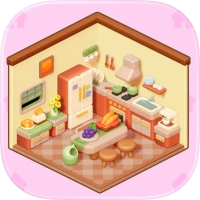
The result is a game that mixes home design, furniture organization, room decoration, sorting puzzles, and relaxing 3D gameplay.
Players can design bedrooms, kitchens, workspaces, bathrooms, and other areas while unlocking different furniture styles. The App Store describes the game as a combination of cozy sorting puzzles and dreamy room design, with hundreds of levels and a large selection of furniture.
What Is Dreamy Architect?
Dreamy Architect puts you in the role of a virtual interior designer.
Each puzzle presents a room or floor plan that needs to be organized. Your job is to determine where different furniture and decorative objects belong and then arrange them into the appropriate spaces.
The basic gameplay cycle is:
Study the room → sort the furniture → place each item → complete the layout → decorate the space → unlock more content.
This makes Dreamy Architect different from a traditional home-design game because the decorating process is connected to puzzle-solving.
Dreamy Architect Gameplay
The gameplay revolves around two connected activities: sorting and decorating.
First, you need to understand the layout of the room. Then you identify which pieces belong in that area and place them correctly.
Once the puzzle is solved, the room gradually becomes a finished interior.
The game's official description highlights floor-plan puzzles, furniture placement, cozy room design, and a calming 3D presentation.
Main Features
Cozy Sorting Puzzles
Dreamy Architect turns furniture organization into a puzzle. You need to determine where objects belong rather than simply placing decorations anywhere you want.
3D Interior Design
The game uses a soft 3D visual style that lets you see rooms and furniture from a more immersive perspective.
Dream Home Decoration
Completed puzzles help transform empty spaces into furnished rooms.
Furniture Collection
As you progress, you can unlock additional furniture and discover different visual styles.
Multiple Room Types
The game features areas such as:
- Bedrooms
- Kitchens
- Workspaces
- Bathrooms
- Other home spaces
The App Store listing specifically mentions bedrooms, kitchens, workspaces, and more.
Different Design Styles
The game includes several aesthetic directions, ranging from soft minimal interiors to vintage-inspired designs.
Hundreds of Levels
Dreamy Architect advertises hundreds of levels, giving players a substantial collection of sorting and decorating challenges.
Full Dreamy Architect Strategy Guide
1. Study the Floor Plan First
Before moving any furniture, examine the entire room.
Look at:
- Door positions
- Windows
- Empty floor areas
- Existing furniture
- Wall locations
- Available space
- The shape of each room
Understanding the floor plan makes furniture placement much easier.
Don't start dragging objects immediately. Spend a few seconds figuring out the structure.
2. Identify the Purpose of Each Room
The purpose of a room can provide a major clue about where furniture belongs.
For example:
Bedroom: bed, bedside furniture, wardrobes, lamps, and bedroom decorations.
Kitchen: cabinets, counters, appliances, tables, and cooking-related objects.
Workspace: desks, chairs, computers, shelves, and office decorations.
Bathroom: bathroom fixtures, storage, mirrors, and decorative items.
Thinking about the function of the room helps narrow down your choices.
3. Look at the Furniture Shape
Don't rely only on the appearance of an object.
Its dimensions can also tell you where it belongs.
A large piece of furniture needs enough floor space, while small decorative objects can usually fit into tighter areas.
Before placing an item, consider:
Will this object physically fit here without interfering with another piece?
4. Place Large Furniture First
Large objects should generally be considered before small decorations.
Beds, desks, sofas, cabinets, and other large pieces determine how much usable space remains.
Once the major furniture is positioned, smaller objects become easier to organize.
A useful order is:
Large furniture → functional furniture → storage → decorations → finishing touches
5. Pay Attention to Available Space
One of the biggest challenges in a room-design puzzle is fitting everything together.
Avoid filling a small area with decorative objects before placing the major furniture.
You don't want to discover later that the main item has nowhere to go.
6. Think About Movement Around the Room
A room shouldn't only look attractive; it should also make sense as a living space.
When positioning furniture, consider where a person would logically walk.
For example, don't block the main path through a bedroom with unnecessary furniture.
Similarly, leave sensible space around desks, beds, kitchen areas, and other functional objects.
7. Use Visual Relationships
Furniture often works as a group.
A desk looks more natural with a chair.
A bed may work with bedside furniture.
A dining table usually needs enough surrounding space for seating.
Instead of considering every object independently, think about how pieces work together.
8. Don't Rush Furniture Placement
Some players may be tempted to drag objects quickly into the nearest available space.
That can cause problems when the game expects more specific placement.
A current App Store review specifically mentions that furniture placement can feel sensitive and that some pieces may snap into positions unexpectedly.
For this reason, move objects carefully and check their final position before continuing.
9. Use the Room's Visual Logic
When you're unsure where an object belongs, look for clues around it.
Ask:
- What type of room is this?
- What objects are already nearby?
- Does the furniture match a particular area?
- Is there an empty space that appears designed for it?
- Would the item make sense functionally in this location?
This is usually more reliable than simply trying random positions.
10. Leave Small Decorations Until Later
Small objects can be tempting because they are easy to move.
However, they are usually less important than the major layout.
First solve the room's structure.
Then use smaller decorations to finish the space.
How to Solve Difficult Dreamy Architect Levels
When a level becomes confusing, use this method.
Step 1: Stop and Observe
Don't immediately move everything.
Study the entire floor plan.
Step 2: Categorize the Furniture
Mentally divide objects into groups:
- Sleeping furniture
- Kitchen furniture
- Office furniture
- Bathroom items
- Storage
- Decorations
Step 3: Identify the Largest Items
Determine which pieces will consume the most space.
Step 4: Match Furniture to Rooms
Use the room's function and layout to narrow down possible placements.
Step 5: Place the Major Pieces
Start building the basic structure of the room.
Step 6: Check Space
Make sure smaller objects still have logical locations.
Step 7: Add Decorative Pieces
Once the layout is stable, complete the room with smaller items.
Step 8: Recheck the Whole Room
Look at the finished space rather than focusing on one object.
Furniture Placement Tips
Use Corners Carefully
Corners are often useful for furniture that doesn't need to sit in the middle of the room.
Cabinets, shelves, desks, and certain decorative objects can work well around the edges.
Don't Overcrowd the Center
The middle of a room often needs open space.
Leaving some breathing room can make the layout easier to complete and visually cleaner.
Match Furniture Scale
A large piece can dominate a small room.
When several pieces are possible, consider their relative size and the amount of available floor space.
Keep Related Items Together
Grouping related objects creates a more logical arrangement.
For example, office furniture should generally form a functional workspace rather than being scattered around the room.
Dreamy Architect Puzzle Tips
Tip 1: Think Like an Interior Designer
Don't treat every object as an isolated puzzle piece.
Think about how the complete room should function.
Tip 2: Solve the Layout Before the Style
The attractive part of the game comes after you understand the room.
Get the practical arrangement right first.
Tip 3: Use Empty Space as a Clue
An unusual empty area may indicate where a particular object is intended to go.
Tip 4: Avoid Random Placement
If an item doesn't seem to fit, don't repeatedly force it into nearby spaces.
Look for another area that better matches its purpose.
Tip 5: Check Your Positioning
When furniture snaps into place, make sure it landed where you intended.
Tip 6: Learn From Failed Placements
If an object doesn't fit in a location, treat that as information.
Use it to eliminate possibilities rather than repeatedly trying the same position.
Common Dreamy Architect Mistakes
Placing Small Items Too Early
Decorations can make a room look finished, but they shouldn't distract you from solving the main layout.
Ignoring the Floor Plan
The floor plan provides important information about where furniture can logically go.
Focusing Only on Appearance
An item may look attractive in a location but still be wrong for the room's function.
Moving Everything at Once
Changing several objects simultaneously can make it difficult to understand what is working.
Move furniture methodically.
Ignoring Furniture Size
Always consider how much physical space an item requires.
How to Handle Tricky Furniture Placement
Some players have reported difficulty with precise placement and furniture snapping. One App Store reviewer specifically described challenges with positioning accuracy and sensitivity.
If you're having trouble:
- Move the furniture slowly.
- Aim for the center of the intended area.
- Watch where the object snaps.
- Check the surrounding furniture.
- Avoid moving several pieces at once.
- Reposition large objects before attempting small decorations.
This approach can make the placement process more predictable.
Dreamy Architect Room Design Guide
Bedroom Design
Start with the bed because it is normally the dominant object.
Then consider:
- Bedside furniture
- Lamps
- Wardrobe or storage
- Seating
- Decorative objects
Leave enough open space around the bed and entrances.
Kitchen Design
Begin with the major kitchen units.
Then arrange:
- Counters
- Appliances
- Dining furniture
- Storage
- Decorations
Try to create a logical working area rather than simply filling empty spaces.
Workspace Design
Start with the desk.
Then consider:
- Chair
- Computer or work equipment
- Shelves
- Storage
- Decorative accessories
Keep the workspace visually organized.
Bathroom Design
Identify the main fixtures first.
Then fill the remaining areas with storage and decorative objects while keeping the room open enough to feel functional.
Dreamy Architect Progression
The game combines puzzle progression with home decoration.
As you solve levels, you can unlock more furniture and develop additional rooms. The App Store describes the game as having hundreds of levels and a large collection of stylish furniture.
This gives you two reasons to keep progressing:
Puzzle progression: solve increasingly challenging layouts.
Design progression: unlock more furniture and create new interiors.
Dreamy Architect Graphics and Atmosphere
The visual identity is one of the game's defining features.
Dreamy Architect uses soft, calming 3D visuals with an aesthetic-focused presentation. The goal is not to create a highly competitive atmosphere but to provide a relaxed environment where solving puzzles and decorating rooms work together.
The result is a cozy combination of:
- 3D rooms
- Cute furniture
- Soft visual presentation
- Interior decoration
- Sorting puzzles
- Home customization
Dreamy Architect Game Information
Game Name: Dreamy Architect
Category: Puzzle
Developer: ABI GLOBAL LTD.
Platforms: iPhone and iPad
Age Rating: 4+
Price: Free with in-app purchases
Core Gameplay: Sorting puzzles and interior design
Visual Style: Soft 3D aesthetic
Main Activities: Furniture sorting, floor-plan puzzles, room decoration
Rooms: Bedrooms, kitchens, workspaces and more
Progression: Levels and furniture unlocks
Levels: Hundreds advertised
iOS Requirement: iOS 13.0 or later
Size: 404.4 MB
Languages: English plus seven additional languages listed by Apple
The App Store currently lists in-app purchases including starter, booster, revive, architect, and other bundles, as well as a remove-ads option.
Dreamy Architect Updates
The App Store version history shows several level updates following the game's May 2025 launch, including versions 1.1 through 1.5. The latest version shown on Apple's listing is version 1.5, dated July 18, 2025.
Because the available levels and game systems can change with future updates, players should treat the current in-game layout as the definitive version when following a walkthrough.
Is Dreamy Architect a Relaxing Game?
Dreamy Architect is designed around a calm combination of sorting and home decoration rather than fast-paced action.
The official description emphasizes relaxing puzzle sessions, soft 3D visuals, interior design, and creativity.
However, the experience can become more demanding when furniture placement requires greater precision. Some App Store reviewers have specifically mentioned difficulties with placement and timers, so the game may feel more challenging than its cozy presentation initially suggests.
Final Thoughts
Dreamy Architect brings together two popular casual-game ideas: puzzle solving and home decoration.
The sorting mechanics give you a reason to carefully study each floor plan, while the interior-design side provides a satisfying visual payoff when a room comes together.
The best approach is to avoid rushing. Study the room, identify its purpose, place the largest furniture first, and gradually complete the smaller details.
If you enjoy home design games, interior decoration games, cozy puzzle games, furniture sorting, room makeover games, and relaxing 3D games, Dreamy Architect offers a distinctive combination of those elements.
The key strategy is simple:
Plan the room first, place furniture carefully, and decorate only after the layout makes sense.
Rate the Game
User Reviews














Popular Games



















 Android
 iOS
 Windows
 Xbox